1. Uvod
The virtavo VistaFlask 2K Security Camera is a wireless, battery-powered outdoor camera designed to enhance your home security. Featuring 2K QHD imaging, AI motion detection, starlight lens for colorful night vision, and weatherproof construction, it provides reliable surveillance in various conditions. This manual provides detailed instructions for setting up, operating, maintaining, and troubleshooting your camera.

Image: Two virtavo VistaFlask 2K security cameras, designed for outdoor use.
2. Sigurnosne informacije
- Osigurajte da je kamera sigurno postavljena kako biste spriječili pad.
- Use only the specified charging cable and power adapter to charge the battery.
- Ne izlažite kameru ekstremnim temperaturama izvan njenog radnog raspona.
- Avoid disassembling or modifying the camera, as this will void the warranty and may cause damage.
- Držite kameru i njenu dodatnu opremu van dohvata djece.
3. Sadržaj paketa
- virtavo VistaFlask 2K Security Camera(s)
- Montažni nosač(i)
- USB kabl za punjenje
- Uputstvo za upotrebu
- Montažni vijci i ankeri
4. Proizvod je gotovview
The virtavo VistaFlask camera features a compact design with essential components for optimal performance. Key elements include the lens, IR LEDs for night vision, a microphone for audio input, a speaker for two-way communication, and a motion sensor. The power switch, sync button, and charging port are located at the bottom of the camera, alongside the microSD card slot for local storage.

Slika: Interna view highlighting the battery and electronic components.

Slika: Donja strana view of the camera with power switch, charging port, sync button, and microSD card slot.
5. Vodič za postavljanje
5.1 Početno podešavanje
- Napunite kameru: Before first use, fully charge the camera using the provided USB cable. The battery lasts 1-3 months per charge depending on usage.
- Preuzmite aplikaciju: Traži 'HOME V' in your smartphone's app store (iOS or Android) and download the application.
- Kreirajte račun: Open the 'HOME V' app and follow the on-screen instructions to register a new account or log in if you already have one.
5.2 Camera Pairing and Connection
Follow these steps to pair your virtavo VistaFlask camera with the 'HOME V' app. For a visual guide, please refer to the official installation video below.
Video: Official virtavo VistaFlask Installation Guide Setup. This video demonstrates the step-by-step process of binding the camera to the 'HOME V' app using QR codes, including powering on the camera, confirming the red light flashing, connecting to the camera's hotspot, and connecting to your home Wi-Fi network.
- Dodaj uređaj: In the 'HOME V' app, tap the '+' icon to add a new device.
- Skenirajte QR kod: Grant camera access to the app. Scan the QR code located on the back of your virtavo VistaFlask camera.
- Uključeno: Ensure the camera is powered on. The power switch is located at the bottom.
- Confirm Flashing Light: Confirm that the camera's red indicator light is flashing rapidly. If not, press and hold the 'Sync' button for 5-10 seconds until you hear a 'Du' sound or see rapid flashing.
- Connect to Camera Hotspot: The app will prompt you to connect to the camera's Wi-Fi hotspot (e.g., 'IPC365_AP-XXXX'). Confirm and join this network.
- Select Home Wi-Fi: Choose your home 2.4GHz Wi-Fi network from the list and enter the correct password. Note: This device only supports 2.4GHz Wi-Fi.
- Nazovite svoju kameru: Once connected, name your camera for easy identification (e.g., 'Front Door', 'Living Room').
5.3 Fizička instalacija
The virtavo VistaFlask camera is designed for easy installation, both indoors and outdoors. Its weatherproof design ensures durability.

Image: Easy installation on smooth surfaces like glass or tiles, no drilling required.

Image: Wireless connection for remote access.
- Odaberite lokaciju: Select a location with good Wi-Fi signal strength and a clear view područja koje želite nadgledati.
- Montaža: Use the provided mounting bracket, screws, and anchors to securely attach the camera to a wall or other suitable surface. Ensure the camera is positioned to capture the desired field of view.
- Otporan na vremenske uslove: The camera is designed to withstand various weather conditions, making it suitable for outdoor use.
6. Uputstvo za upotrebu
6.1 Uživo View i dvosmjerni audio
Access real-time video feed and communicate through the camera using the 'HOME V' app.
- Uživo View: Otvorite aplikaciju i odaberite kameru za view live feed.
- Dvosmjerni zvuk: Dodirnite ikonu mikrofona u toku prijenosa uživo view to speak through the camera's speaker, and listen through its microphone.
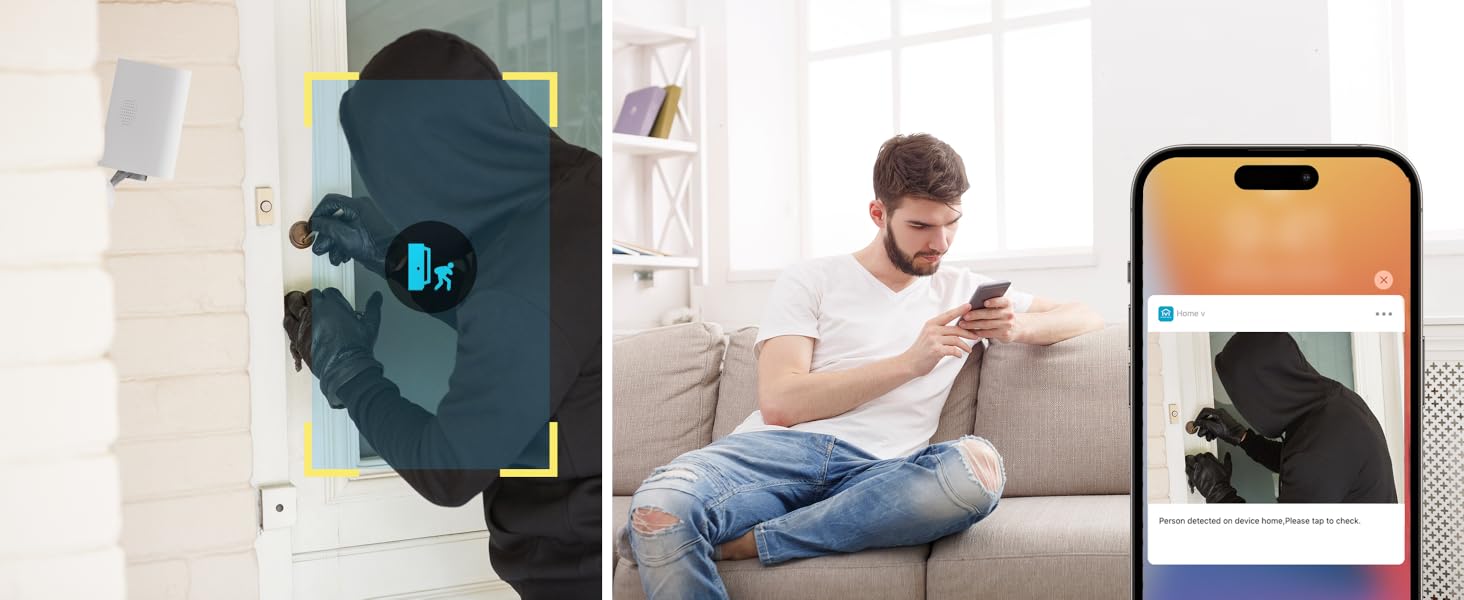
Image: Two-way audio feature for communication.
6.2 Detekcija pokreta i upozorenja
The camera features advanced PIR motion detection and AI capabilities to minimize false alarms.
- PIR detekcija pokreta: Detects motion up to 30 feet.
- Pametna upozorenja: Primajte trenutna obavještenja na svoj pametni telefon kada se detektuje kretanje.
- AI Detection (Cloud Subscription): With an optional cloud subscription, the camera can differentiate between humans, vehicles, and animals, reducing irrelevant alerts.
- Prilagodljive zone detekcije: Set specific areas for motion detection to focus on critical zones and ignore others.
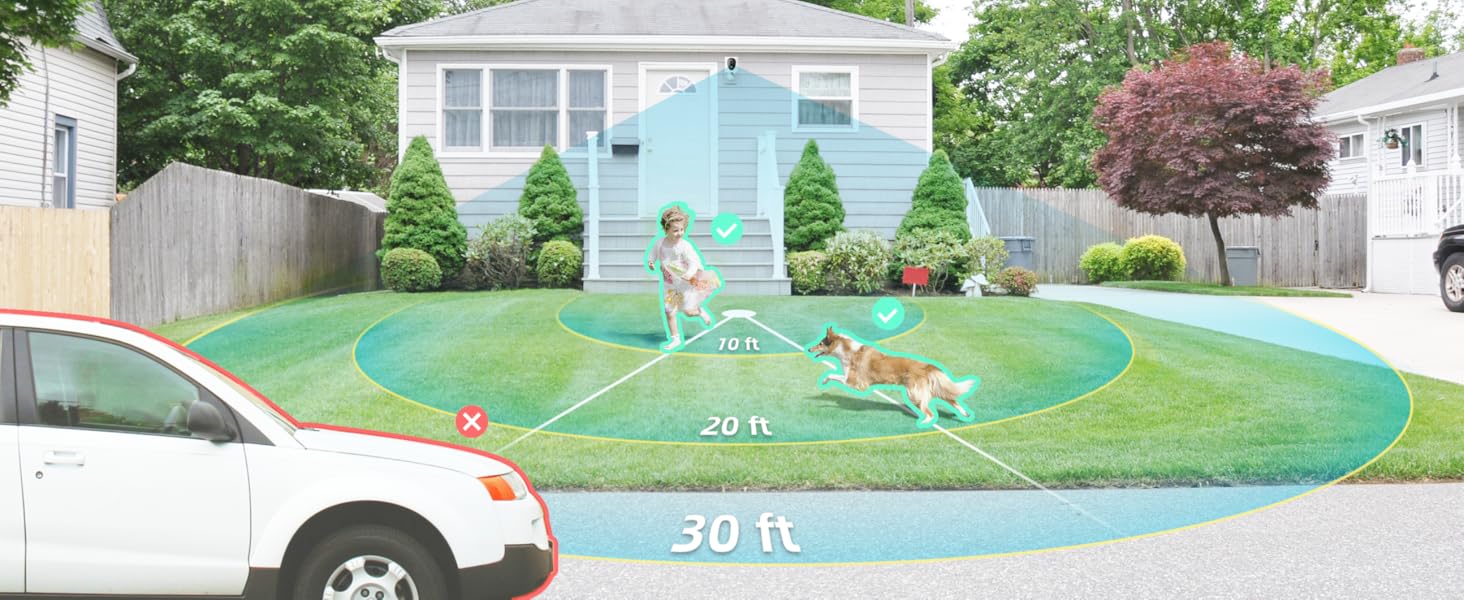
Image: Smart detection distinguishing between people, vehicles, and animals.
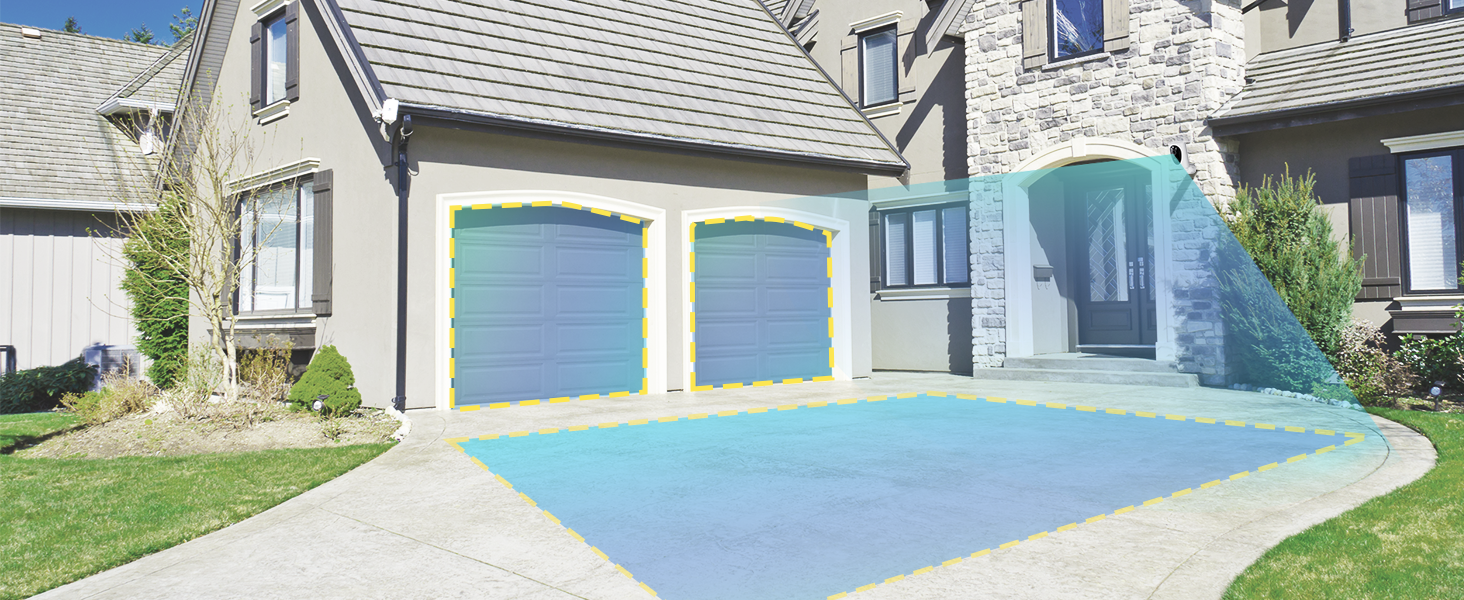
Image: Customizable motion detection zones.

Image: Instant alerts with image previews.
6.3 Noćni vid
Kamera pruža jasan vid čak i u uslovima slabog osvjetljenja.
- Noćni vid u boji: Utilizes Starlight technology and a wide F1.6 aperture for vivid, color-rich images in low light.
- IR noćni vid: Equipped with 2 high-intensity IR LEDs for clear black-and-white viewing in complete darkness.

Image: Superior 2K QHD imaging and color-rich night vision.
6.4 Snimanje i pohranjivanje
Your data is secured with flexible storage options.
- Lokalna pohrana: Supports microSD cards from 32GB to 256GB for continuous recording, even without network access. (MicroSD card not included).
- Cloud Storage: Optional cloud storage plans offer additional features like snapshot alerts and advanced AI capabilities. Video encryption ensures privacy.

Image: Comparison of no-fee basic storage (SD card) and cloud storage options.
6.5 App Features and Remote Access
Manage and control your security remotely via the 'HOME V' app.
- Daljinsko praćenje: Monitor your home from anywhere with an internet connection.
- Višekorisnički pristup: Share camera access with family members.
- Zakazivanje: Set schedules for recording or alerts.

Image: Remote access and multi-user monitoring via the 'HOME V' app.
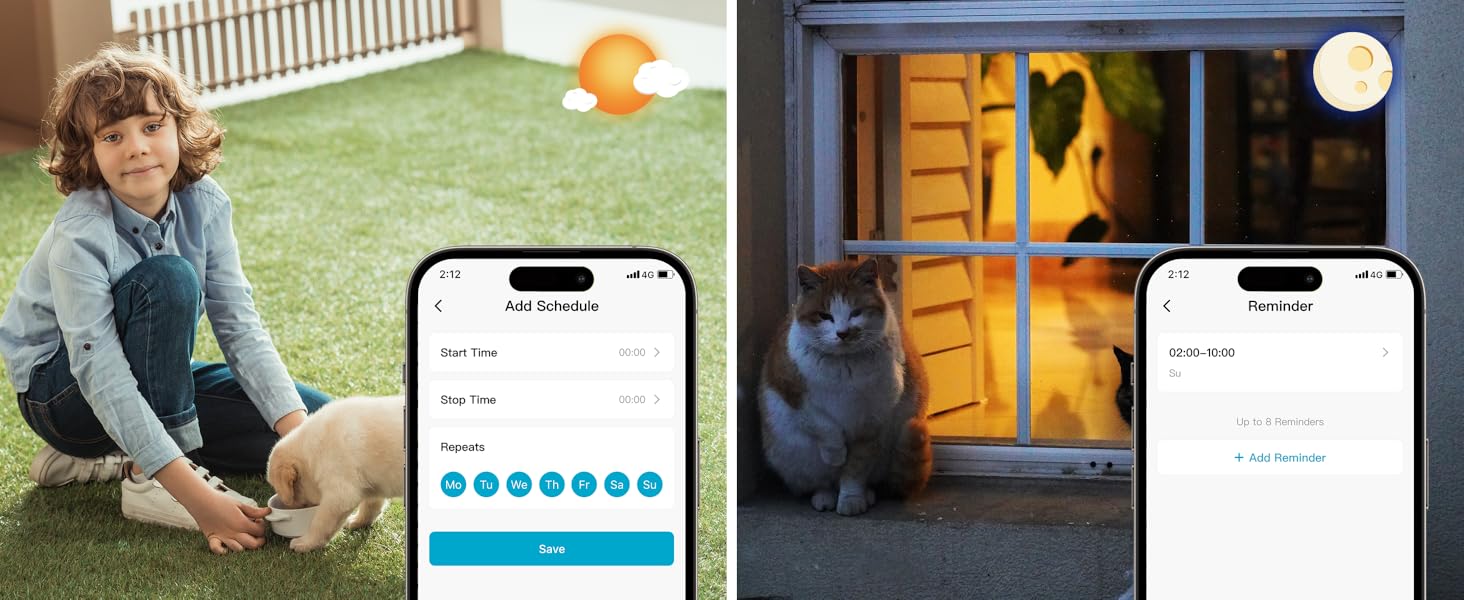
Image: App features including scheduling and reminders.
7. Održavanje
- Punjenje baterije: Recharge the camera battery when prompted by the app. A full charge can last 1-3 months depending on activity.
- čišćenje: Nježno obrišite objektiv i tijelo kamere mekom,amp tkanina. Izbjegavajte abrazivna sredstva za čišćenje.
- Ažuriranja firmvera: Regularly check the 'HOME V' app for firmware updates to ensure optimal performance and security.
8. Otkrivanje problema
| Issue | Mogući uzrok | Rješenje |
|---|---|---|
| Camera won't power on | Battery depleted; Power switch off | Charge the camera fully; Ensure power switch is in the 'ON' position. |
| Nije moguće povezati se na Wi-Fi | Incorrect Wi-Fi password; 5GHz Wi-Fi network; Weak Wi-Fi signal | Verify password; Ensure you are connecting to a 2.4GHz network; Move camera closer to router or use a Wi-Fi extender. |
| Česti lažni alarmi | High motion sensitivity; Unfiltered motion sources (e.g., trees, animals) | Adjust motion sensitivity in app; Set up detection zones to exclude irrelevant areas; Consider cloud subscription for AI detection. |
| Poor night vision clarity | Dirty lens; Obstruction in front of camera; Insufficient ambient light for color night vision | Clean the lens; Remove obstructions; Ensure adequate ambient light for color mode or switch to IR night vision. |
| Baterija se brzo prazni | High activity/recordings; Frequent live view access; Weak Wi-Fi signal | Reduce motion detection sensitivity; Limit live view sessions; Improve Wi-Fi signal strength. |
9. Specifikacije
| Feature | Detalj |
|---|---|
| Naziv modela | LJH10 |
| Unutrašnja/vanjska upotreba | Unutarnji, vanjski |
| Izvor napajanja | Battery Powered (4400mAh rechargeable Lithium battery) |
| Connectivity Protocol | Wi-Fi (samo 2.4 GHz) |
| Tip kontrolera | HOME V App |
| Vrsta montaže | Zidni nosač |
| Rezolucija video snimanja | 2K QHD |
| Viewing Angle | 120 Degrees (Field of View: 130 stepeni) |
| Noćni vid | 30 stopa |
| Low Light Technology | Starlight (F1.6 aperture, 3.0mm focal length) |
| Broj IR LED dioda | 2 |
| Nivo vodootpornosti | Vodootporan |
| Dimenzije (D x Š x V) | 2.7 x 1.3 x 3.2 inča |
| Težina artikla | 1.41 funti |
| Opcije skladištenja | MicroSD (32GB-256GB), Cloud Storage |
| Posebne karakteristike | 2-Way Audio, Battery Powered, Local Recording, Motion Sensor, Night Vision, AI Motion Detection |
10. Garancija i podrška
virtavo products are designed for reliability and performance. For information regarding product warranty, please refer to the warranty card included in your product packaging or visit the official virtavo website. If you encounter any issues or have questions not covered in this manual, please contact virtavo customer support through the 'HOME V' app or their official support channels for assistance.


