Uvod
This manual provides instructions for the GOWENIC BT Cordless Bike Handlebar Remote Phone Controller. This device allows for convenient control of music and calls from your smartphone while cycling, offering a cordless connection up to 15 meters. Its IPX6 water-resistant design ensures durability for outdoor use. The controller features a simple one-step pairing process and a long-lasting rechargeable battery.

Image: The GOWENIC BT Cordless Bike Handlebar Remote shown mounted on a bicycle handlebar, demonstrating its outdoor application and water-resistant design.
Sadržaj paketa
Provjerite da li se u vašem paketu nalaze sve dolje navedene stavke:
- 1 x daljinski upravljač
- 1 x kabel za punjenje (USB tip-C)
- 1 Set x Fixing Clip
- 1 x Accessory Pack (likely contains screws/pads for mounting)
- 1 x Korisnički priručnik (ovaj dokument)

Image: All components included in the product package: the remote controller, USB-C charging cable, fixing clip, and accessory pack.
Setup
1. Punjenje kontrolera
Before first use, fully charge the remote controller. Connect the provided USB Type-C charging cable to the controller's charging port and to a 5V USB power source. The indicator light will display a breathing light pattern during charging. A full charge typically takes approximately 1 hour.

Image: The remote controller on a handlebar, illustrating its compact design and highlighting its long battery life and quick charging feature.
2. Montiranje kontrolera
Use the provided fixing clip and accessory pack to securely attach the remote controller to your bike's handlebar. Ensure the controller is positioned within easy reach for safe operation while riding.
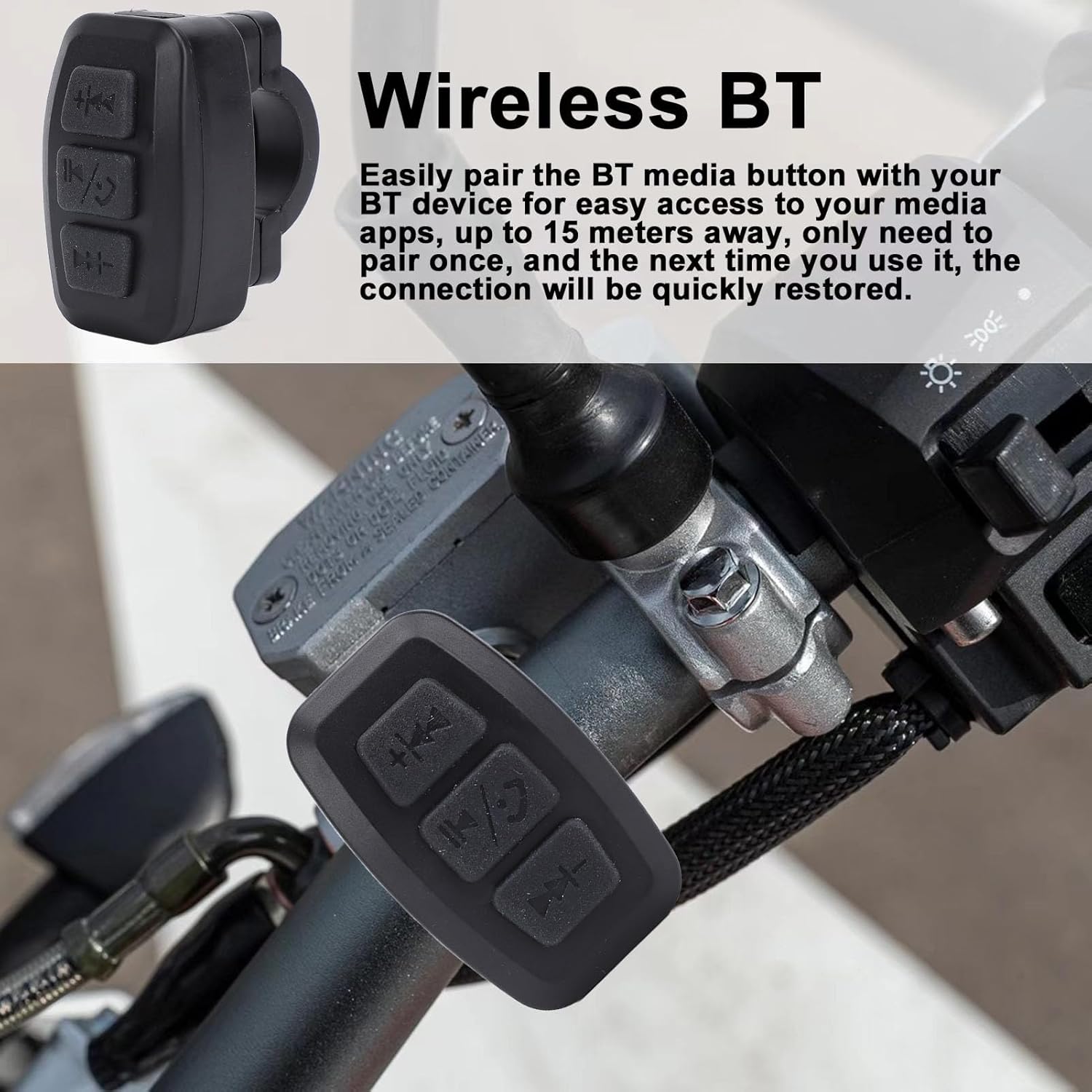
Slika: Krupni plan view of the GOWENIC remote controller securely mounted on a bicycle handlebar, ready for use.
3. Bluetooth uparivanje
- Provjerite je li Bluetooth na vašem pametnom telefonu omogućen.
- Power on the GOWENIC remote controller. The blue BT connection indicator light will flash, indicating it is in pairing mode.
- On your smartphone, search for available Bluetooth devices and select the GOWENIC controller from the list.
- Once paired, the blue BT connection indicator light will become solid.
- The controller features one-step pairing, meaning it will automatically connect to the last paired device every time it is powered on.
Uputstvo za upotrebu
The GOWENIC remote controller provides convenient access to your phone's media and call functions from your handlebar, with a maximum control distance of approximately 15 meters.

Slika: Detaljna view of the remote controller's buttons, showing the previous track/volume down, play/pause/call, and next track/volume up controls.
Funkcije dugmadi:
- Top Button (Previous Track / Volume Down):
- Short press: Skip to previous track.
- Dugi pritisak: Smanjivanje jačine zvuka.
- Middle Button (Play/Pause / Answer/End Call):
- Short press: Play or pause media.
- Short press during incoming call: Answer call.
- Short press during active call: End call.
- Long press: Reject incoming call.
- Bottom Button (Next Track / Volume Up):
- Kratak pritisak: prelazak na sledeću numeru.
- Dugi pritisak: Povećavanje jačine zvuka.
Održavanje
The GOWENIC remote controller features an IPX6 water-resistant design, making it suitable for outdoor use and resistant to strong jets of water. To ensure longevity and optimal performance:
- Obrišite uređaj mekom krpom, damp cloth to clean. Avoid harsh chemicals or abrasive cleaners.
- Ensure the USB Type-C charging port cover (if present) is securely closed when not charging to maintain water resistance.
- Kontroler čuvajte na hladnom i suhom mjestu kada ga ne koristite duži period.
- Izbjegavajte izlaganje uređaja ekstremnim temperaturama.
Rješavanje problema
| Problem | Mogući uzrok | Rješenje |
|---|---|---|
| Kontroler se ne uključuje. | Slaba ili prazna baterija. | Charge the controller using the provided USB Type-C cable. |
| Nije moguće upariti uređaj sa pametnim telefonom. | Bluetooth not enabled on phone; controller not in pairing mode; interference. |
|
| Povremena veza ili kratak domet. | Obstructions; distance too great; low battery. |
|
| Dugmad ne reaguju. | Not connected to phone; app not active; low battery. |
|
Specifikacije
| Model | GOWENIC1auvcm9odb-11 |
| Materijal | ABS |
| Maksimalna kontrolna udaljenost | Pribl. 15m / 49.21ft |
| Radno vrijeme | Pribl. 100 sati |
| Vrijeme punjenja | Pribl. 1 sat |
| Vrijeme pripravnosti | Pribl. 18 mjeseca |
| Vrsta baterije | Li Battery (built-in) |
| Kapacitet baterije | 300mAh |
| Način punjenja | USB tip-c 5V |
| Indikatorska lampica | Breathing light (charging), Blue (BT connection, key indicator) |
| Kompatibilnost | iOS, Android Phones |
| Otpornost na vodu | IPX6 |
| Dimenzije (paket) | 10.8 x 9.9 x 3.4 cm |
| Težina (paket) | 60 g |

Image: Illustration showing the remote controller's universal compatibility with bikes, motorcycles, and electric vehicles.
Garancija i podrška
Specific warranty details for the GOWENIC BT Cordless Bike Handlebar Remote Phone Controller are typically provided with your purchase documentation or can be found on the official GOWENIC website. For technical support or inquiries, please refer to the contact information provided by your retailer or the manufacturer's official support channels.


