1. Uvod
The WAVLINK DL7400 USB-C Docking Station is designed to expand the connectivity of your laptop or computer, providing multiple display outputs, high-speed data transfer ports, and power delivery. This manual provides detailed instructions for setting up, operating, and maintaining your docking station to ensure optimal performance.
2. Sadržaj paketa
Molimo Vas da provjerite da li se u Vašem paketu nalaze svi artikli:
- WAVLINK DL7400 USB-C Docking Station
- Napajanje 160W
- USB-C na USB-C kabl
- Uputstvo za upotrebu
3. Proizvod je gotovview i luke
Upoznajte se s različitim portovima i funkcijama vaše priključne stanice:
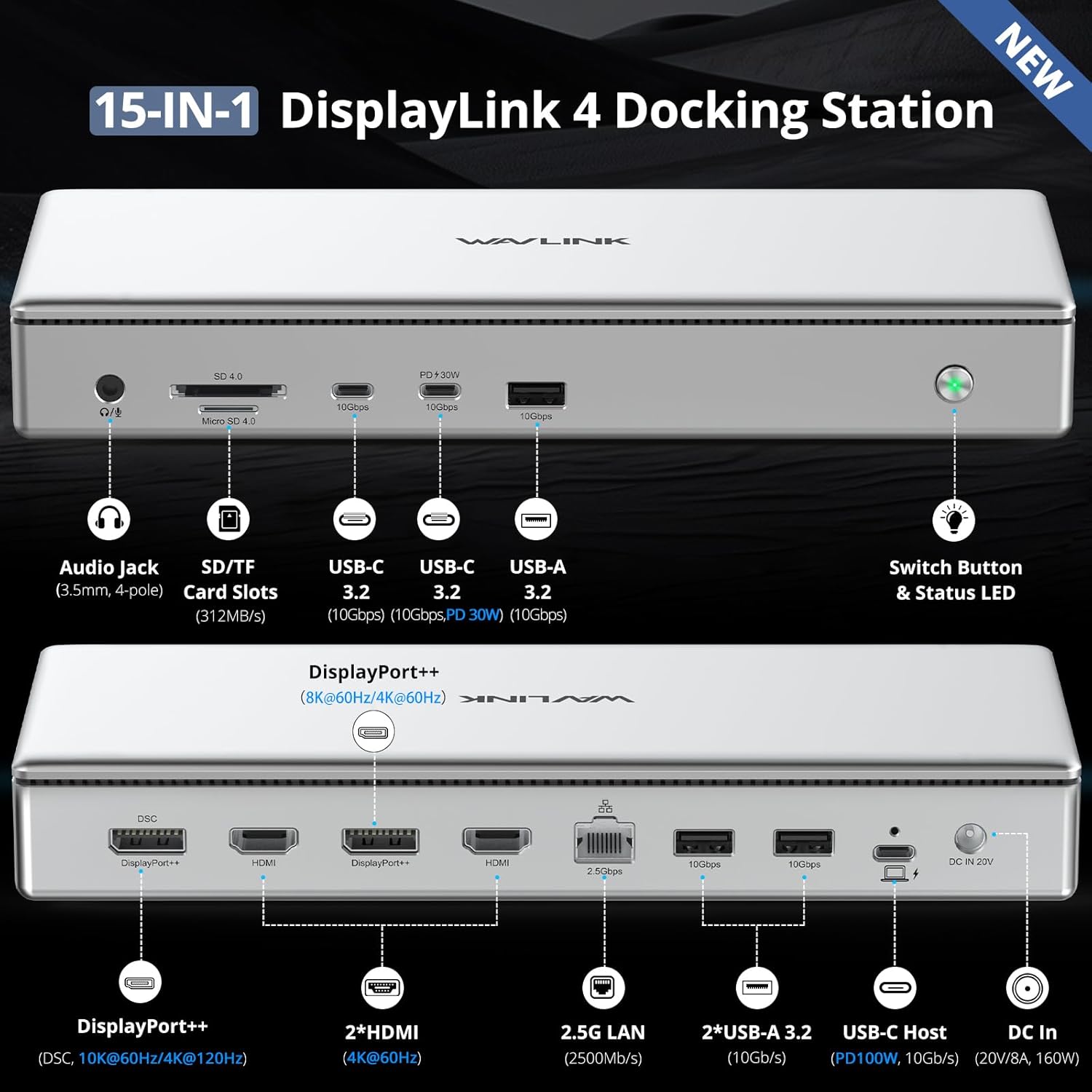
Slika: Prednja i zadnja strana view of the WAVLINK DL7400 Docking Station with all 15 ports clearly labeled, including Audio Jack, SD/TF Card Slots, USB-C 3.2 (10Gbps, PD 30W), USB-A 3.2 (10Gbps), Switch Button & Status LED on the front, and DisplayPort++, HDMI, 2.5G LAN, USB-A 3.2, USB-C Host (PD 100W, 10Gbps), and DC In on the rear.
Portovi na prednjoj ploči:
- Audio Jack (3.5mm, 4-pole): Connect headphones or speakers with microphone support.
- SD/TF Card Slots (312MB/s): For high-speed data transfer from SD and Micro SD cards.
- USB-C 3.2 (10Gbps, PD 30W): High-speed data transfer and 30W power delivery for charging mobile devices.
- USB-A 3.2 (10 Gbps): High-speed data transfer for USB-A devices.
- Switch Button & Status LED: Power on/off the docking station and indicate operational status.
Portovi na zadnjoj ploči:
- DisplayPort++ (8K@60Hz / 4K@120Hz): Connect to DisplayPort monitors for high-resolution video output.
- 2x HDMI (4K@60Hz): Connect to HDMI monitors for video output.
- 2.5G LAN (2500Mbps): Provides a high-speed wired Ethernet connection.
- 2x USB-A 3.2 (10 Gbps): Additional high-speed USB-A ports for peripherals.
- USB-C Host (PD 100W, 10Gbps): Connects to your host laptop for data, video, and 100W power delivery.
- DC In (20V/8A, 160W): Connect the included power adapter to power the docking station.
4. Upute za postavljanje
- Priključite napajanje: Plug the 160W power adapter into the DC In port on the rear of the docking station, then connect it to a power outlet.
- Poveži se s host uređajem: Use the provided USB-C to USB-C cable to connect the "USB-C Host" port on the rear of the docking station to a compatible USB-C, USB4, Thunderbolt 3, or Thunderbolt 4 port on your laptop or computer.
- Instalirajte DisplayLink drajver: Before connecting external displays, it is crucial to install the DisplayLink driver. Refer to Section 5 for detailed instructions.
- Povežite ekrane: Once the driver is installed, connect your monitors to the DisplayPort++ and/or HDMI ports on the rear of the docking station using appropriate cables.
- Povežite periferne uređaje: Connect your USB devices (keyboard, mouse, external drives), Ethernet cable, and audio devices to the respective ports on the docking station.
- Uključeno: Press the power button on the front of the docking station. The status LED will illuminate.
5. Instalacija drajvera
The WAVLINK DL7400 docking station utilizes DisplayLink technology, which requires a specific driver for proper functionality, especially for video output. Follow these steps to install the DisplayLink driver:
- Visit DisplayLink Webstranica: Otvori svoj web pretraživač i idite na www.displaylink.com.
- Locate Drivers: Navigate to the 'Downloads' or 'Drivers' section. Traži 'DisplayLink Graphics' or 'DL7400' drivers.
- Odaberite operativni sistem: Choose the correct driver for your operating system (Windows, macOS, or Chrome OS).
- Preuzmite i instalirajte: Download the latest driver package and follow the on-screen instructions to complete the installation.
- macOS Specific Step: After installation on macOS, you may need to go to 'Privacy & Security' settings and grant 'Screen Recording Permission' to 'DisplayLink Manager' for full functionality.

Image: Visual guide showing the four steps to install the DisplayLink driver: Go to displaylink.com, select OS, download and install, and adjust privacy settings for macOS.
6. Uputstvo za upotrebu
6.1. Konfiguracija ekrana
The docking station supports various display configurations, including extended and mirrored modes, across Windows and macOS systems.

Image: Diagram illustrating quad 4K display configurations for Windows and Mac, showing both Extend Mode (multiple independent displays) and Mirror Mode (all displays showing the same content).
- Quad 4K@60Hz: Connect up to four 4K monitors simultaneously at 60Hz.
- Dual 8K@60Hz: Achieve dual 8K resolution at 60Hz using the DisplayPort++ ports.
- Single 10K@60Hz / 4K@120Hz: A single DisplayPort++ can support 10K@60Hz or 4K@120Hz with DSC (Display Stream Compression) on compatible Windows PCs.
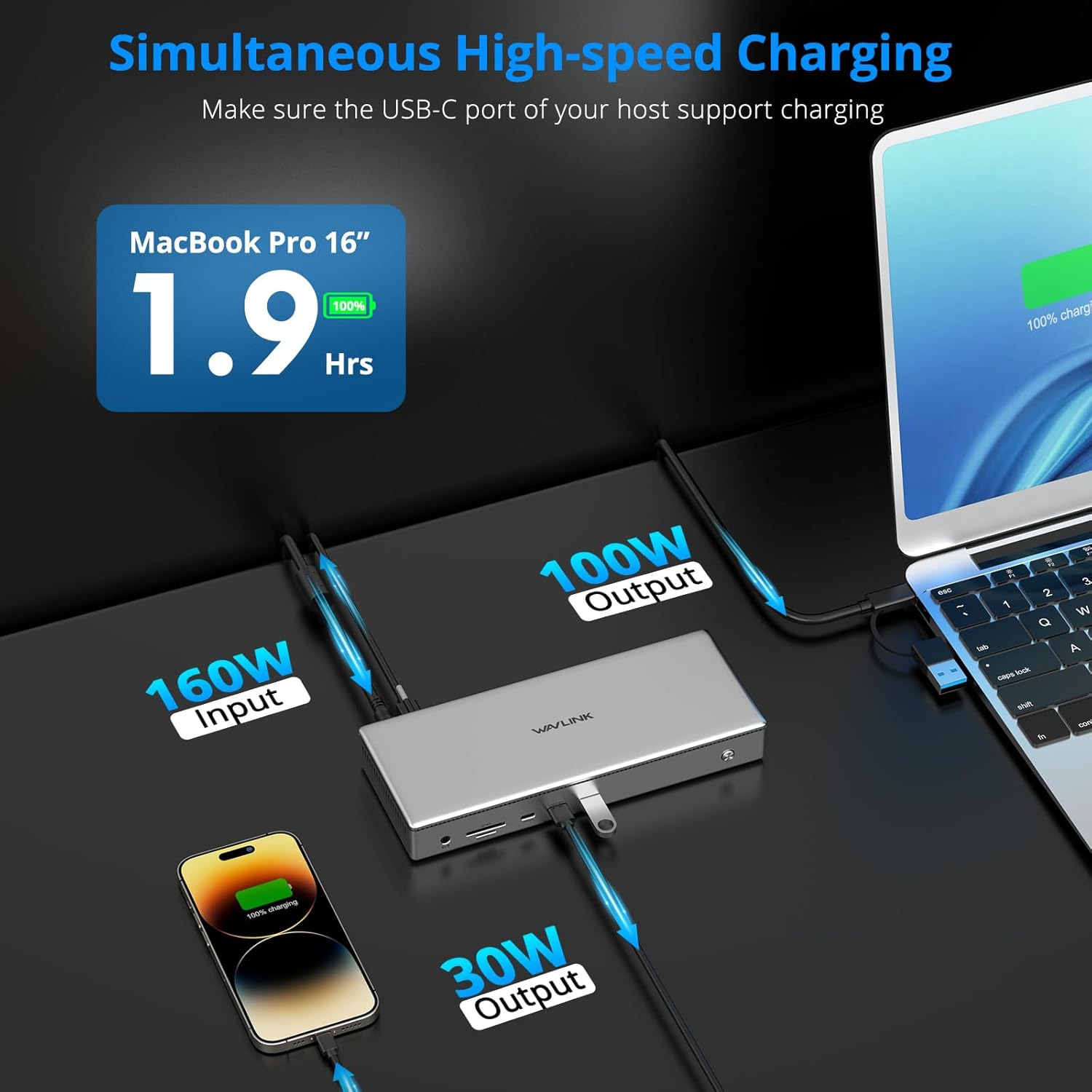
Image: Visual representation of a single 10K@60Hz display setup and a dual 8K@60Hz display setup, highlighting the high-resolution capabilities.
6.2. Isporuka energije
The docking station provides efficient power delivery to your host laptop and other devices.

Image: Diagram showing the power flow: 160W input from the adapter, 100W output to the host MacBook Pro, and 30W output from the front USB-C port to a smartphone.
- 100W PD to Host: The USB-C Host port delivers up to 100W of power to charge your connected laptop. Ensure your laptop's USB-C port supports Power Delivery.
- 30W PD to Front USB-C: The front USB-C 3.2 port provides up to 30W for fast charging of mobile phones, tablets, or other USB-C devices.
6.3. Prijenos podataka
Benefit from high-speed data transfer across various ports.
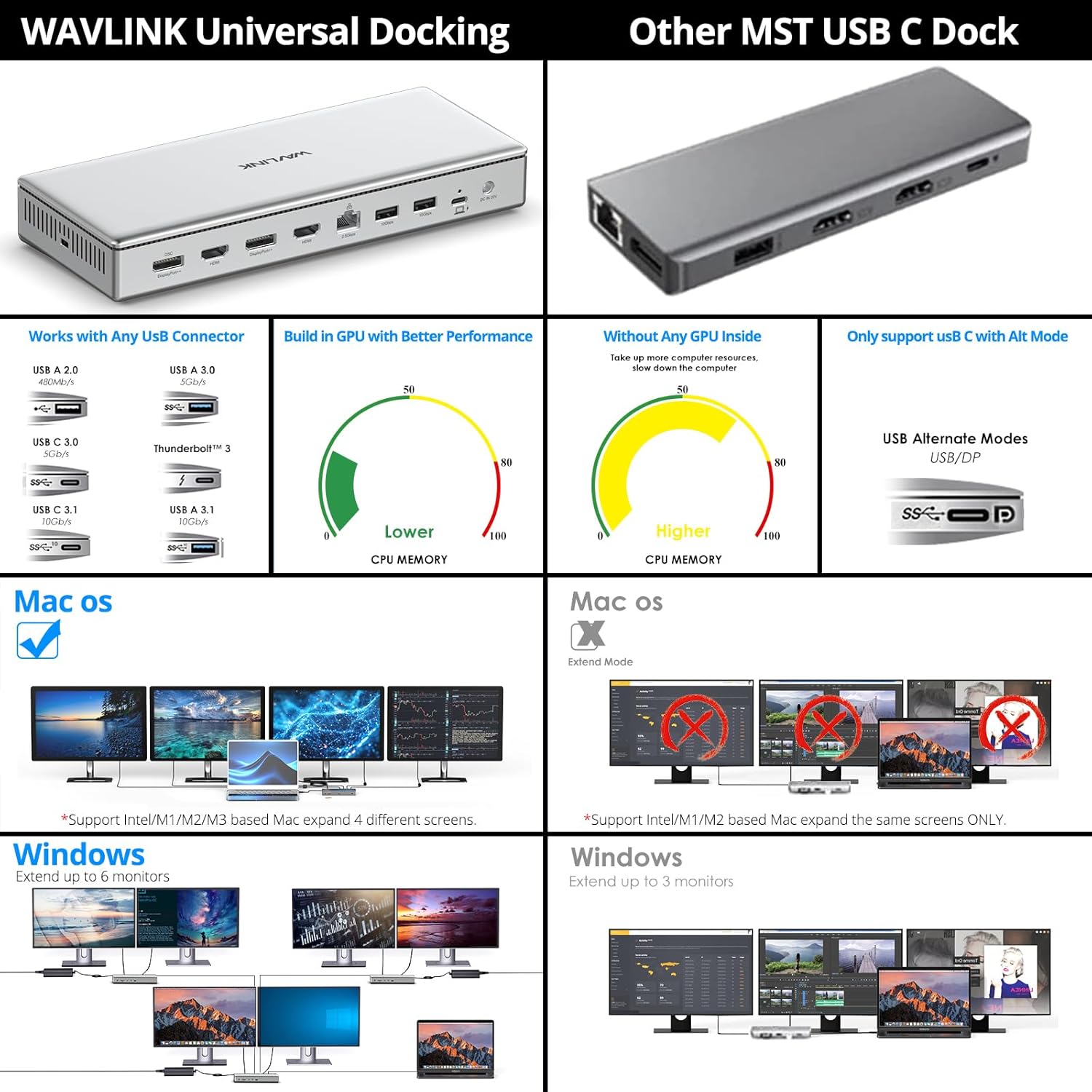
Image: Graphic highlighting the data transfer speeds: 10Gbps for USB-C 3.2, 10Gbps for USB-A 3.2, 312MBps for SD/TF Card Slot, and 2.5Gbps for Ethernet.
- USB 3.2 Ports (10Gbps): All USB-C and USB-A 3.2 ports support data transfer speeds up to 10 Gigabits per second, ideal for large file transferi.
- SD 4.0 Card Slot (312MB/s): Quickly access photos and videos from SD cards with speeds up to 312 Megabytes per second.
- 2.5G Ethernet: Enjoy faster and more stable network connections with the 2.5 Gigabit Ethernet port.
7. Kompatibilnost
The WAVLINK DL7400 docking station offers broad compatibility with various operating systems and devices.

Image: Chart showing universal compatibility with various USB host laptops (Mac, Dell, Lenovo, HP, Microsoft Surface, Asus) and external USB devices (camera, U Disk, keyboard). Supported systems include Windows 10/11, macOS 11.x and later, and Chrome OS.
- Operativni sistemi: Compatible with Windows 10/11 or later, macOS 11+ (requires DisplayLink drivers), and ChromeOS 100.x and later.
- Host uređaji: Supports laptops with full-featured USB-C, USB4, Thunderbolt 3, and Thunderbolt 4 ports. This includes Mac M1/M2/M3 (Pro/Max), Intel-based Thunderbolt 3 MacBooks, Dell XPS/Latitude, Microsoft Surface, HP ProBook/EliteBook, Lenovo ThinkPad/IdeaPad, LG Gram, and many other compliant laptops.
- Napomena: HDCP (High-bandwidth Digital Content Protection) is not supported. This may affect playback of encrypted or copy-protected content from certain streaming services or media players.
8. Održavanje
Da biste osigurali dugotrajnost i optimalne performanse vaše priključne stanice, slijedite ove smjernice za održavanje:
- čišćenje: Use a soft, dry cloth to clean the exterior of the docking station. Avoid liquid cleaners or solvents.
- ventilacija: Osigurajte da je priključna stanica postavljena u dobro prozračenom prostoru kako biste spriječili pregrijavanje. Ne blokirajte ventilacijske rešetke.
- Skladištenje: Kada se ne koristi duži period, priključnu stanicu čuvajte na hladnom i suhom mjestu, dalje od direktne sunčeve svjetlosti i ekstremnih temperatura.
- Upravljanje kablovima: Avoid bending or crimping cables excessively, as this can damage them over time.
9. Otkrivanje problema
If you encounter issues with your WAVLINK DL7400 docking station, refer to the following common problems and solutions:
| Problem | Moguće rješenje |
|---|---|
| Nema izlaza na ekranu |
|
| Laptop se ne puni |
|
| USB uređaji nisu prepoznati |
|
| Problemi s Ethernet vezom |
|
| Audio ne radi |
|
10. Specifikacije
| Feature | Detalj |
|---|---|
| Broj modela | WL-UG75PD1-DH2-US |
| Čipset | DisplayLink DL7400 |
| Luke | 15 (2x DisplayPort++, 2x HDMI, 1x 2.5G Ethernet, 1x USB-C Host, 2x USB-C 3.2, 3x USB-A 3.2, 1x SD 4.0, 1x TF 4.0, 1x 3.5mm Audio, 1x DC In) |
| Video izlaz | Dual 8K@60Hz, Quad 4K@60Hz, Single 10K@60Hz / 4K@120Hz |
| USB prijenos podataka | USB 3.2 Gen 2 (10Gbps) |
| Ethernet brzina | 2.5 Gigabit (2500Mbps) |
| SD Card Speed | SD 4.0 (up to 312MB/s) |
| Isporuka napajanja (host) | Up to 100W via USB-C Host port |
| Power Delivery (Front USB-C) | Up to 30W via front USB-C 3.2 port |
| Ulaz adaptera za napajanje | 160W (20V/8A) |
| Dimenzije | 10.2 x 5.94 x 3.5 inča (pakovanje) |
| Težina artikla | 3.52 funti (1.6 kilograma) |
| Kompatibilan OS | Windows 10/11+, macOS 11+, ChromeOS 100+ |
11. Sigurnosne informacije
Please read and follow these safety precautions to prevent damage to the device or injury to yourself:
- Ne izlažite uređaj vodi, vlazi ili ekstremnim temperaturama.
- Izbjegavajte ispuštanje ili izlaganje uređaja jakim udarima.
- Ne pokušavajte rastavljati ili modificirati uređaj. To će poništiti garanciju.
- Koristite samo priloženi adapter za napajanje. Korištenje nekompatibilnog adaptera može uzrokovati oštećenje ili požar.
- Držite uređaj dalje od izvora topline i direktne sunčeve svjetlosti.
12. Garancija i podrška
WAVLINK products come with a standard manufacturer's warranty. For specific warranty terms and conditions, please refer to the warranty card included in your package or visit the official WAVLINK website. For technical support, driver updates, or further assistance, please visit the WAVLINK support page or contact their customer service.
Zvanični WAVLINK Webstranica: www.wavlink.com


