1. Uvod
This manual provides comprehensive instructions for the operation and maintenance of your FOXWELL NT604 Elite OBD2 Scanner and BT301 Car Battery Tester. This combined diagnostic tool is designed to assist in vehicle maintenance by providing engine system diagnostics, ABS, SRS, transmission system analysis, and detailed battery health assessments. Please read this manual thoroughly before using the devices to ensure proper and safe operation.
2. Sigurnosne informacije
Always observe the following safety precautions to prevent personal injury or damage to the vehicle or device:
- Always wear eye protection when working on or around vehicles.
- Ensure the vehicle is in a well-ventilated area to avoid inhaling exhaust fumes.
- Keep the device away from moisture, oil, grease, and extreme temperatures.
- Do not attempt to disassemble the device; internal repairs should only be performed by authorized service personnel.
- Refer to your vehicle's service manual for specific diagnostic procedures and safety warnings.
- Avoid contact with hot engine parts and moving components.
3. Sadržaj paketa
Provjerite da li se sve stavke nalaze u vašem paketu:
- FOXWELL NT604 Elite Main Unit
- FOXWELL BT301 Battery Tester Unit with clamps
- OBDII Diagnostic Cable
- USB kabel (za ažuriranja softvera)
- Korisnički priručnik (ovaj dokument)
- Zaštitna torbica za nošenje

Image: The FOXWELL NT604 Elite OBD2 Scanner (left) and the BT301 Car Battery Tester (right) are shown side-by-side. The NT604 Elite features a color display and function buttons, while the BT301 has a smaller display and battery clamps.
4. Proizvod je gotovview
4.1 FOXWELL NT604 Elite OBD2 Scanner
The NT604 Elite is a multi-system diagnostic tool designed to read and clear fault codes, view live data, and perform various tests on engine, ABS, SRS, and transmission systems. It features a user-friendly interface and robust functionality for comprehensive vehicle diagnostics.

Image: The FOXWELL NT604 Elite display showing icons for Transmission System Diagnostic, SRS System Diagnostic, ABS Diagnostic, and Engine System Diagnostic, illustrating its multi-system diagnostic capabilities.
4.2 FOXWELL BT301 Car Battery Tester
The BT301 is a dedicated battery analyzer that provides quick and accurate assessments of battery health, cranking performance, and charging system efficiency. It is compatible with 6V and 12V batteries and various battery types.
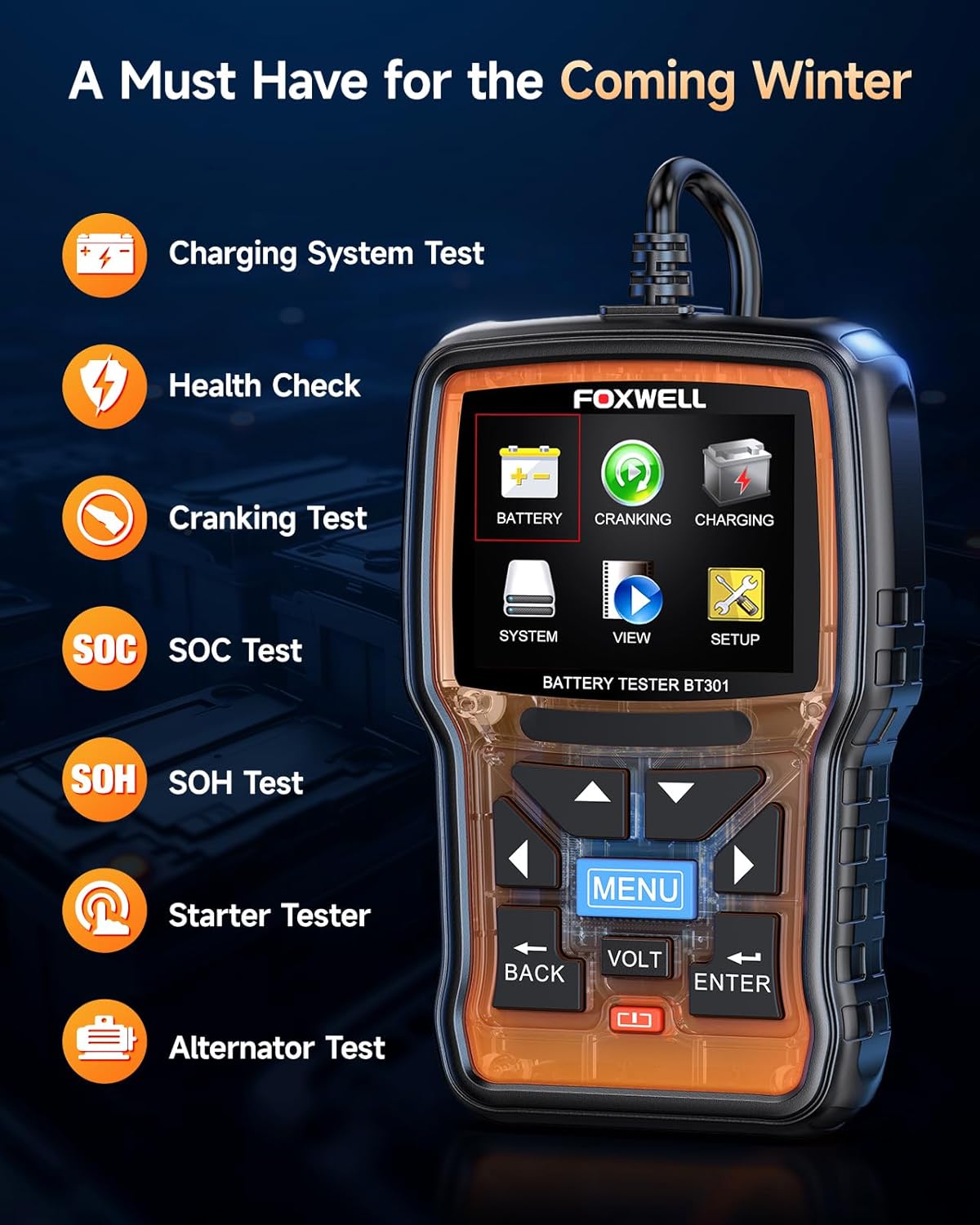
Image: The FOXWELL BT301 Car Battery Tester display with icons for Battery, Cranking, Charging, System, View, and Setup. Text highlights features like Charging System Test, Health Check, Cranking Test, SOC Test, SOH Test, Starter Tester, and Alternator Test.
5. Podešavanje
5.1 Connecting the NT604 Elite
- Locate the vehicle's 16-pin Data Link Connector (DLC), typically found under the dashboard on the driver's side.
- Plug the OBDII diagnostic cable firmly into the vehicle's DLC.
- Connect the other end of the cable to the NT604 Elite. The device will power on automatically from the vehicle's battery.
5.2 Connecting the BT301
- Ensure the vehicle's ignition is off and the engine is cool.
- Spojite crveni clamp na pozitivni (+) terminal baterije.
- Spojite crni clamp na negativni (-) terminal baterije.
- The BT301 will power on automatically once a secure connection is established.

Image: A hand connecting the red clamp of the BT301 battery tester to a car battery's positive terminal, illustrating a stable connection for accurate testing.
6. Uputstvo za upotrebu
6.1 Using the NT604 Elite (OBD2 Scanner)
Once connected, the NT604 Elite will display the main menu. Use the navigation buttons (up, down, left, right) and the OK button to select desired functions.

Image: The FOXWELL NT604 Elite main menu showing various OBDII functions including Read Codes, Clear Codes, Live Data, Freeze Frame, DTC Lookup, I/M Readiness, Component Test, Modules Present, Retrieve Vehicle Info, and On-BOARD Monitor Test.
6.1.1 Reading and Clearing Codes
- From the main menu, select "Diagnostic" or "OBDII".
- Choose "Read Codes" to display current, pending, and historic Diagnostic Trouble Codes (DTCs).
- To clear codes, select "Clear Codes". Confirm the action when prompted. Clearing codes will turn off the Check Engine Light (MIL).

Image: The FOXWELL NT604 Elite display showing the "Read Codes" and "Clear Codes" options, along with icons representing Engine, ABS, SRS, and Transmission systems, indicating the scope of diagnostics.
6.1.2 Prijenos podataka uživo
Select "Live Data" to view real-time sensor data from the vehicle's Engine Control Unit (ECU). This data can be displayed in text or graph format, allowing for detailed analysis of vehicle performance.

Image: The FOXWELL NT604 Elite display showing a live data stream in a graph format, illustrating multiple data points over time for detailed analysis. This image also highlights features like Lifetime Free Update and AutoVIN Scan.
6.1.3 Spremnost za I / M
Use "I/M Readiness" to check if the various emissions-related systems on the vehicle are operating correctly and are ready for inspection and maintenance testing. This is crucial for passing annual vehicle inspections.
6.2 Using the BT301 (Car Battery Tester)
After connecting the BT301 to the battery, navigate through the menu using the "MENU" and arrow buttons. The device will guide you through the testing process.
6.2.1 Test baterije
Select "Battery Test" to assess the battery's State of Health (SOH) and State of Charge (SOC). The tester will prompt you to input the battery type (e.g., Regular Flooded, AGM Flat Plate, AGM Spiral, GEL, EFB) and the Cold Cranking Amps (CCA) rating for accurate results.

Image: The FOXWELL BT301 display showing various battery test results such as "GOOD BATTERY", "CHARGE BATTERY", "REPLACE BATTERY", "CRANKING NORMAL", and "LOW OUTPUT", indicating the tester's ability to provide clear recommendations.
6.2.2 Test pokretanja
This test evaluates the battery's ability to start the engine. Follow the on-screen prompts to start the engine. The tester will analyze the cranking voltage and time to determine the battery's cranking performance.
6.2.3 Test sistema za punjenje
This test checks the vehicle's charging system, including the alternator, rectifier, and diodes. Follow the on-screen prompts to run the engine at specified RPMs. The tester will provide an assessment of the charging system's efficiency.
7. Održavanje
Proper maintenance ensures the longevity and optimal performance of your diagnostic tools:
- Keep the devices clean and free from dust, dirt, and grease. Use a soft, damp krpu za čišćenje; izbjegavajte abrazivna sredstva za čišćenje.
- Store the devices in their protective carrying case when not in use to prevent damage.
- Avoid dropping the devices or exposing them to severe impacts.
- Regularly check for software updates for the NT604 Elite via the official FOXWELL website to ensure optimal performance, access to new features, and compatibility with new vehicle models.
8. Otkrivanje problema
8.1 NT604 Elite Troubleshooting
Uređaj se ne uključuje:
- Ensure the OBDII cable is securely connected to both the vehicle's DLC and the scanner.
- Provjerite napunjenost akumulatora vozilatage; the scanner draws power directly from the vehicle.
Greška u komunikaciji s vozilom:
- Verify the ignition is in the "ON" position (engine off or running, depending on the test).
- Check for loose connections at both the DLC and the scanner.
- Ensure the vehicle supports the OBDII protocol. Consult your vehicle's manual if unsure.
8.2 BT301 Troubleshooting
Uređaj se ne uključuje:
- Uverite se da je baterija clampsu sigurno spojeni na ispravne terminale baterije (crvena na pozitivan, crna na negativan).
- Check if the battery has sufficient voltage (minimum 6V for the BT301 to operate).
Netačni rezultati testa:
- Ensure battery terminals are clean and free of corrosion. Clean them if necessary.
- Verify the correct battery type and CCA rating are accurately entered into the tester.
- For best results, ensure the battery is fully charged before performing a comprehensive test.
9. Specifikacije
- Brand: FOXWELL
- Model (OBD2 Scanner): NT604 Elite
- Model (Battery Tester): BT301
- Izvor napajanja: Vehicle OBDII port (NT604 Elite), Vehicle Battery (BT301)
- Supported Protocols (NT604 Elite): OBDII/EOBD (ISO9141-2, ISO14230-4, SAEJ1850, ISO15765-4)
- Supported Battery Types (BT301): Regularne poplavljene, AGM ravne ploče, AGM spiralne, GEL, EFB
- Battery Voltage Range (BT301): 6V-12V
- Radna temperatura: 0°C do 60°C (32°F do 140°F)
- Temperatura skladištenja: -20°C do 70°C (-4°F do 158°F)
- Dimenzije: Za tačne dimenzije pogledajte pakovanje proizvoda.
- Težina: Refer to product packaging for exact weight.
10. Garancija i podrška
FOXWELL products typically come with a limited warranty. Please refer to the warranty card included in your package or visit the official FOXWELL website for detailed warranty terms and conditions specific to your region and product.
For technical support, software updates, or service inquiries, please contact FOXWELL customer service through their official webweb-mjesto ili kontakt informacije navedene u dokumentaciji vašeg proizvoda.
Official FOXWELL Webstranica: www.foxwelltech.com


