1. Uvod
Thank you for choosing Blackview Smart Glasses. These innovative sunglasses combine stylish design with advanced audio technology, allowing you to enjoy music, make calls, and interact with your voice assistant while staying aware of your surroundings. This manual provides detailed instructions for setup, operation, and maintenance to ensure optimal performance and longevity of your device.

Slika 1: Prednja strana view Crnogview Smart Glasses.
2. Značajke proizvoda
- Bluetooth 5.3 tehnologija: Ensures faster and more stable signal transmission with low latency, offering a connection range of up to 12 meters.
- IP65 vodootporna ocjena: Protects against sweat and small raindrops, suitable for outdoor activities and gym use.
- Uparivanje u jednom koraku: After initial pairing, the glasses automatically reconnect to the last paired device upon opening.
- Široka kompatibilnost: Compatible with various devices including smartphones and computers.
- Immersive Open Ear Sound: Features an open headphone speaker design, dynamic drivers, and ultra-sensitive polymer diaphragms for rich, balanced audio without isolating you from your environment.
- Unparalleled Call Clarity: Advanced microphone design with noise reduction technology suppresses up to 90% of background noise for clear communication.
- Intuitivne kontrole na dodir: Manage playback, volume, calls, and voice assistant activation directly from the glasses.
- Produženo radno vrijeme: Equipped with 80mAh+80mAh rechargeable batteries, providing approximately 7 hours of communication, 6 hours of music playback, and 160 hours of standby time.
3. Proizvod je gotovview
Familiarize yourself with the components of your Blackview Pametne naočale:

Figure 2: Key components of the Smart Glasses.
- Objektiv: TAC+UV400 (UV resistant)
- Nose Bridge: Provides comfortable fit.
- Dodirno dugme: For various control functions.
- Stereo-speaker: Delivers open-ear audio.
- Ugrađeni mikrofon: Za jasan kvalitet poziva.
- Charging Indicator Port: For magnetic charging.
- Okvir ogledala: PC+light steel construction.
4. Specifikacije
Refer to the following specifications for your Blackview Pametne naočale:
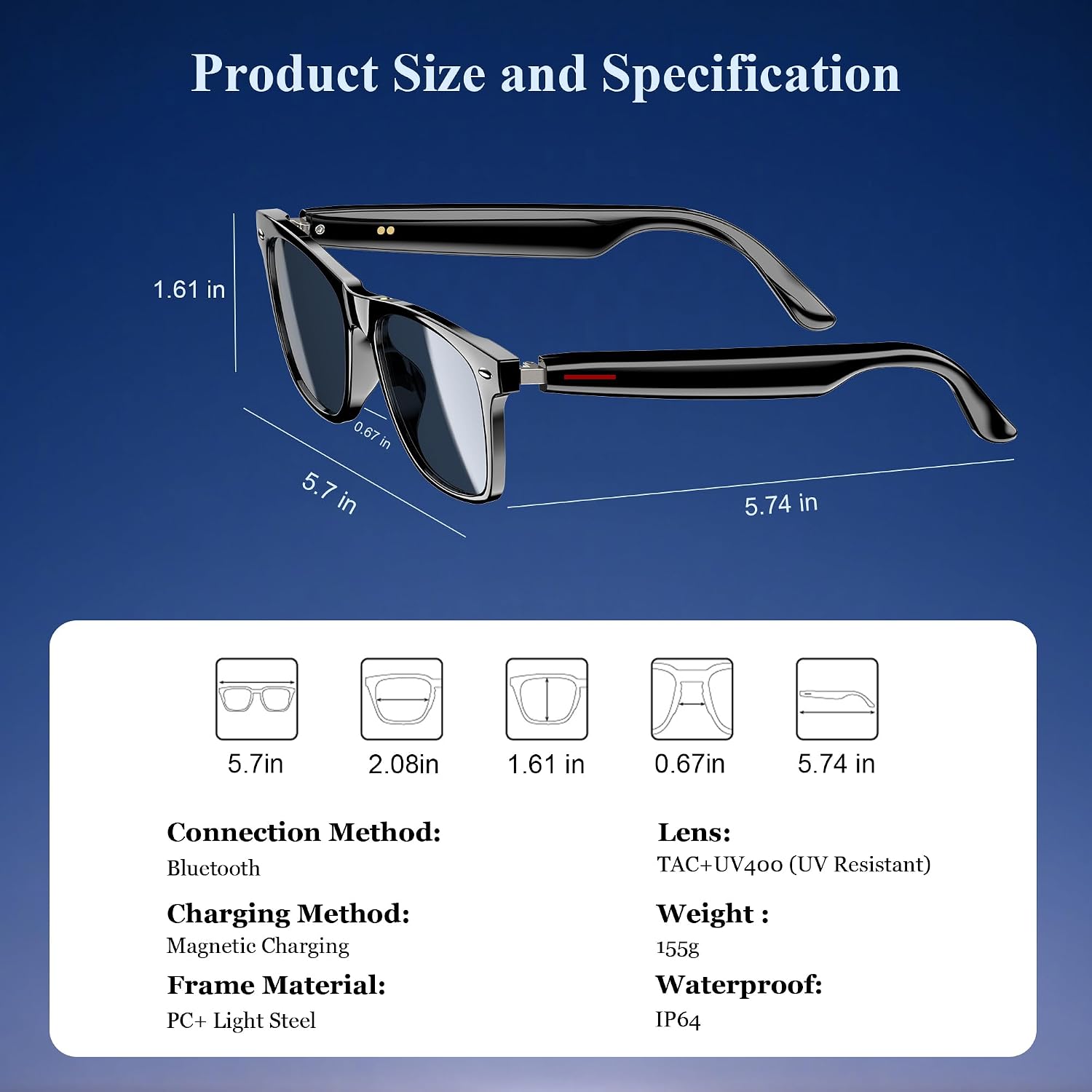
Slika 3: Dimenzije proizvoda i ključne specifikacije.
| Specifikacija | Vrijednost |
|---|---|
| Bluetooth verzija | 5.3 |
| Waterproof Rating | IP65 |
| Kapacitet baterije | 80mAh+80mAh |
| Vreme komunikacije | Pribl. 7 sati |
| Vrijeme reprodukcije muzike | Pribl. 6 sati |
| Vrijeme pripravnosti | Pribl. 160 sati |
| Vrijeme punjenja | Approx. 1.2 hours (magnetic charge) |
| Lens Type | TAC+UV400 (UV Resistant) |
| Materijal okvira | PC + Light Steel |
| Težina artikla | 4.6 unce |
| Dimenzije paketa | 6.65 x 2.36 x 1.93 inča |
5. Šta se nalazi u kutiji
Tvoja Crnaview Smart Glasses package includes:
- Pametne sunčane naočare
- Magnetski kabel za punjenje
- Cloth Cloth
- Uputstvo za upotrebu
6. Podešavanje
6.1. Punjenje naočala
Prije prve upotrebe, potpuno napunite svoj Blackview Smart Glasses. Use the provided magnetic charging cable.
- Connect the magnetic charging cable to the charging port on the temple of the glasses.
- Povežite drugi kraj kabla na USB izvor napajanja (npr. računar, zidni adapter).
- The charging indicator light will illuminate (usually red) during charging and turn off or change color (usually blue/green) when fully charged.
- Potpuno punjenje traje otprilike 1.2 sati.

Figure 4: Magnetic charging connection.
6.2. Uključivanje/isključivanje
- Uključeno: Long touch the touch button on the temple for 5 seconds until you hear a power-on prompt.
- Iskljuciti: Long touch the touch button for 5 seconds until you hear a power-off prompt.
6.3. Bluetooth uparivanje
- Provjerite da li su naočale napunjene i uključene.
- Na pametnom telefonu ili uređaju omogućite Bluetooth i potražite dostupne uređaje.
- Odaberite "Crna"view Smart Glasses" (or similar name) from the list to pair.
- Once paired, the glasses will automatically reconnect to your device when powered on and within range.
7. Uputstvo za upotrebu
Tvoja Crnaview Smart Glasses feature intuitive touch controls located on the temples:

Figure 5: Touch control functions.
- Pusti/pauziraj muziku: One-tap the touch button on either temple.
- Sljedeća pjesma: Twice-tap the touch button on the right temple.
- Prethodni zapis: Twice-tap the touch button on the left temple.
- Pojačavanje/stišavanje glasnoće: (Specific gesture not detailed in image, typically long press or swipe, refer to quick start guide if included).
- Odgovori/prekini poziv: One-tap the touch button on either temple.
- Aktivirajte glasovnog asistenta: Long touch the touch button for 2 seconds.
- Daljinsko fotografisanje: Double click the touch button to trigger your phone's camera shutter.

Figure 6: Voice assistant activation example.
8. Njega i održavanje
Da biste osigurali dugotrajnost i optimalne performanse svojih pametnih naočala, slijedite ove smjernice za njegu:
- čišćenje: Use the provided cleaning cloth to gently wipe the lenses and frame. Avoid using abrasive materials or harsh chemicals.
- Otpornost na vodu: The glasses have an IP65 rating, meaning they are resistant to sweat and light splashes of water. Do not submerge them in water or expose them to heavy rain.
- Skladištenje: Store the glasses in a protective case when not in use to prevent scratches and damage. Avoid exposing them to extreme temperatures.
- Izbjegnite udar: While the lenses are strong, avoid dropping the glasses or subjecting them to strong impacts.

Figure 7: Smart Glasses demonstrating water resistance.
9. Otkrivanje problema
Ako naiđete na bilo kakve probleme sa svojim Black uređajemview Smart Glasses, refer to the following common solutions:
- Nema napajanja: Ensure the glasses are fully charged. Connect them to the magnetic charger and check the indicator light.
- Ne može se upariti:
- Ensure Bluetooth is enabled on your device and the glasses are in pairing mode (usually indicated by a flashing light).
- Make sure the glasses are not already connected to another device. Turn off Bluetooth on other nearby devices.
- Restart both the glasses and your device, then attempt pairing again.
- Nema zvuka/niska jačina zvuka:
- Check the volume levels on both the glasses and your connected device.
- Ensure the glasses are properly positioned on your ears for optimal open-ear audio.
- Verify that the glasses are correctly paired and selected as the audio output device on your phone.
- Problemi s kvalitetom poziva:
- Pazite da mikrofon nije blokiran.
- Premjestite se u područje s manje pozadinske buke.
- Check your phone's signal strength.
- Nereagirajuće kontrole na dodir:
- Pazite da su vam prsti čisti i suhi.
- Ponovo pokrenite naočare.
If these steps do not resolve the issue, please contact Blackview korisničku podršku za dalju pomoć.
10. Zvanični video proizvoda
Pogledajte službeni video o proizvodu za više informacijaview Crnogview Smart Glasses features and usage:
Video 1: Crnaview Polarized Sport Smart Sunglasses for Men and Women. This video highlights the design and features of the smart sunglasses, including their polarized lenses and smart capabilities.


