1. Uvod i krajview
The AZZA CSAZ-570B Cove is an ATX mid-tower computer case designed for gaming and high-performance PC builds. It features a back-connect supported design, optimizing cable management and internal aesthetics. This manual provides essential information for setting up, operating, and maintaining your computer case.
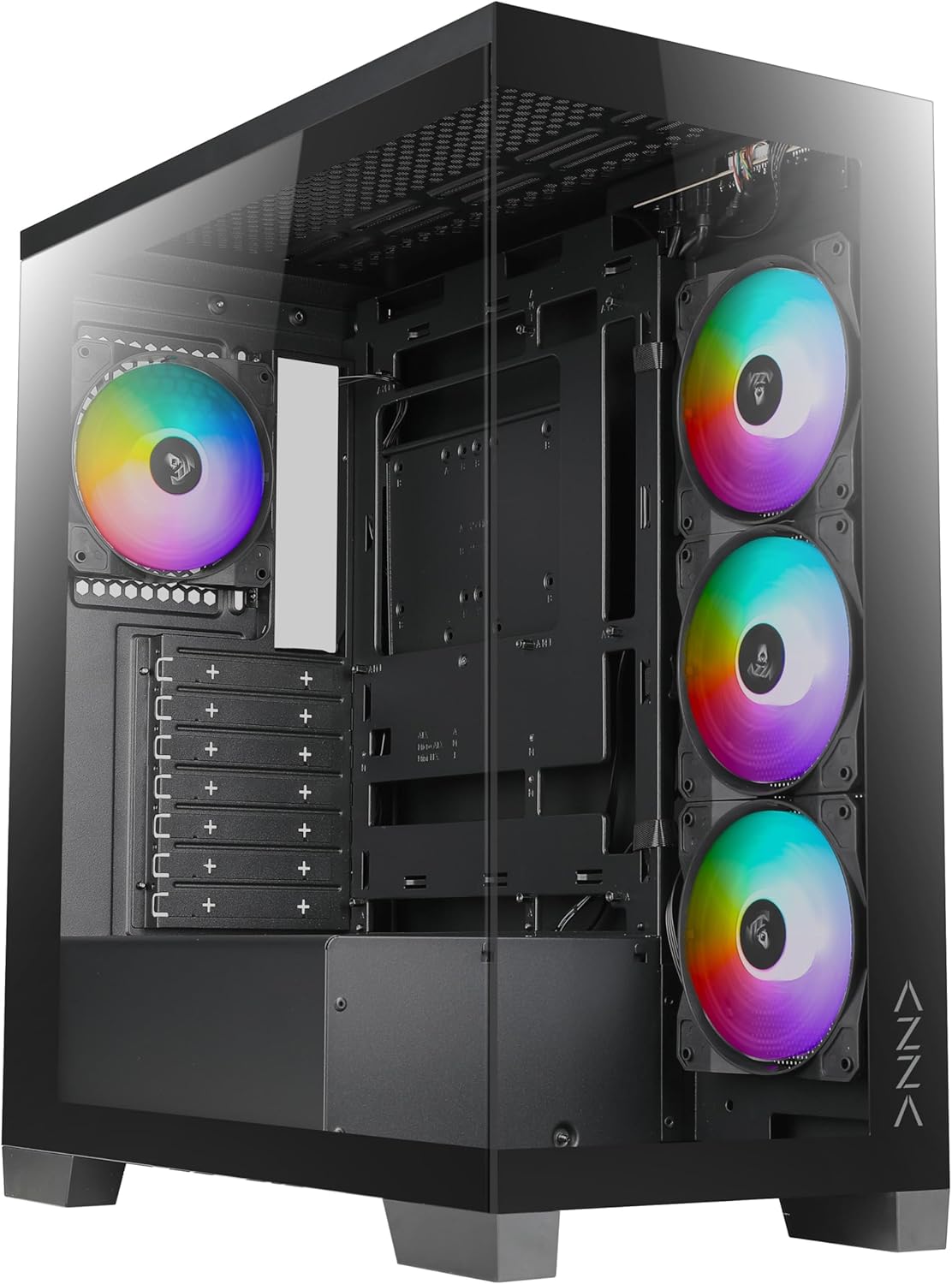
Slika 1: Prednja strana view of the AZZA CSAZ-570B Cove computer case with RGB fans visible.
Ključne karakteristike:
- Performance Optimized: Full mesh front panel with 4 x 120 mm pre-installed addressable RGB fans for excellent airflow.
- Multifaceted Airflow Support: Supports up to 10 x 120 mm fans, including direct GPU airflow with 2 x 120 mm fans above the PSU shroud.
- Prilagodljiva rasvjeta: Controllable fan lighting via the top panel LED button, with motherboard RGB software synchronization support.
- Intuitive I/O: Top panel includes Power button, LED button, Combo HD Audio, 1 x USB 2.0, 1 x USB 3.0, and 1 x Type-C port.
- Back-Connect Supported: Designed to accommodate motherboards with back-mounted connectors for cleaner internal routing.
2. Postavljanje i instalacija
This section outlines the steps for installing components into your AZZA CSAZ-570B Cove computer case.
2.1 Instalacija matične ploče
The case supports ATX (including back-connect supported), Micro ATX, and ITX motherboards. Ensure standoffs are correctly aligned for your motherboard form factor before installation.

Figure 2: Internal layout indicating motherboard support area (A), maximum CPU cooler height (B), and maximum GPU length (C).
- Poravnajte matičnu ploču s unaprijed instaliranim stavovima.
- Secure the motherboard using appropriate screws.
- Connect all necessary power cables (24-pin ATX, CPU 8-pin) and data cables.
- For back-connect motherboards, route cables through the designated rear channels.
2.2 Cooling System Configuration
The CSAZ-570B offers extensive cooling options for optimal thermal performance.

Figure 3: Diagram illustrating fan mounting locations and sizes within the case.
Podrška obožavatelja:
- Prednji dio: 4 x 120mm (pre-installed ARGB fans)
- Vrh: 3 x 120 mm ili 2 x 140 mm
- pozadi: 1 x 120 mm
- Strana (Ladica matične ploče): 3 x 120 mm
- Above PSU Shroud: 2 x 120mm (for direct GPU airflow)

Figure 4: Diagram showing radiator compatibility for the AZZA CSAZ-570B case.
Podrška radijatora:
- Motherboard Side: Do 360 mm
- Vrh: Up to 280mm or 360mm
2.3 Instalacija uređaja za skladištenje
The case provides flexible options for installing 2.5" SSDs and 3.5" HDDs.

Slika 5: Interni view highlighting locations for SSD and HDD installation.
- Desna bočna ploča: Supports 2 x 2.5" SSDs or 1 x 3.5" HDD.
- metalni poslužavnik: Supports 1 x 2.5" SSD.
2.4 Instalacija napajanja
Napajanje se montira na dno kućišta.
- Slide the power supply into the designated compartment at the bottom rear of the case.
- Pričvrstite napajanje vijcima sa stražnje strane kućišta.
3. Uputstvo za upotrebu
This section details the functionality of the front I/O panel and lighting controls.
3.1 Prednja I/O ploča
The top panel provides convenient access to essential ports and controls.

Slika 6: Krupni plan view of the top I/O panel with labeled ports and buttons.
- Dugme za napajanje: Press to power on or off the system.
- LED dugme: Cycles through various pre-programmed ARGB lighting modes for the installed fans.
- Combo HD Audio: Za povezivanje slušalica i mikrofona.
- USB 2.0 x 1: Standardni USB priključak za periferne uređaje.
- USB 3.0 x 1: High-speed USB port for data transfer.
- Type-C x 1: Reversible USB-C port for modern devices.
3.2 ARGB kontrola osvjetljenja
Unaprijed instalirani ARGB ventilatori mogu se kontrolirati na dva načina:
- LED dugme: Use the dedicated LED button on the top panel to cycle through different lighting effects and colors.
- RGB softver matične ploče: If your motherboard supports Addressable RGB (ARGB) synchronization, connect the case's ARGB cable to the motherboard's ARGB header. This allows you to control the fan lighting directly through your motherboard's software (e.g., ASUS Aura Sync, MSI Mystic Light Sync, Gigabyte RGB Fusion, ASRock Polychrome Sync). Ensure the LED button is not actively overriding the motherboard control.
4. Održavanje
Redovno održavanje pomaže u osiguravanju optimalnih performansi i dugovječnosti kućišta vašeg računara i njegovih komponenti.
- Čišćenje prašine: Periodically clean dust filters (if present) and internal components using compressed air. Dust accumulation can impede airflow and lead to overheating.
- Čišćenje ventilatora: Gently clean fan blades to remove dust buildup, which can affect fan performance and noise levels.
- Upravljanje kablovima: Ensure cables are neatly routed and secured to prevent interference with airflow and moving parts.
- Eksterijerno čišćenje: Obrišite vanjske površine mekom krpom, damp tkanina. Izbjegavajte abrazivna sredstva za čišćenje.
5. Otkrivanje problema
This section provides general troubleshooting tips for common issues.
- Sistem se ne uključuje:
- Check if the power supply is properly connected to the wall outlet and the motherboard.
- Ensure the power button cable from the case is correctly connected to the motherboard's front panel header.
- Verify the power supply switch is in the 'ON' position.
- Ventilatori se ne okreću/RGB ne radi:
- Confirm fan power cables are securely connected to the motherboard or fan controller.
- Check ARGB cables for proper connection to the motherboard's ARGB header or the case's ARGB controller.
- If using motherboard software, ensure the software is running and configured correctly.
- Try cycling the LED button on the top panel to see if the lights respond.
- USB portovi ne rade:
- Ensure the USB 2.0, USB 3.0, and Type-C headers from the case are correctly plugged into the corresponding headers on your motherboard.
- Check device drivers for your motherboard's USB controllers.
6. Specifikacije
Detailed technical specifications for the AZZA CSAZ-570B Cove computer case.
| Feature | Specifikacija |
|---|---|
| Naziv modela | CSAZ-570B |
| Tip slučaja | Mid Tower |
| Boja | Crna |
| Materijal | Plastika, Kaljeno staklo |
| Dimenzije proizvoda (DxŠxV) | 435 mm x 230 mm x 490 mm |
| Težina artikla | 21.8 funte |
| Kompatibilnost matične ploče | ATX (Back-connect supported), Micro ATX, ITX |
| Maksimalna visina CPU hladnjaka | 170mm |
| Maksimalna dužina GPU-a | 400mm |
| Vrsta montaže napajanja | Bottom Mount |
| Unaprijed instalirani ventilatori | 4 x 120mm ARGB (Front) |
| Prednji I / O portovi | Power Button, LED Button, Combo HD Audio, 1x USB 2.0, 1x USB 3.0, 1x Type-C |
| Drive Bays | 2 x 2.5" SSD or 1 x 3.5" HDD (Right Side Panel), 1 x 2.5" SSD (Metal Tray) |
Figure 7: Product dimensions of the AZZA CSAZ-570B case.
7. Garancija i podrška
For warranty information and technical support, please contact AZZA directly.
- Proizvođač: AZZA
- prodavač: AZZA USA (via Amazon)
- Planovi zaštite proizvoda: Additional protection plans are available for purchase separately. These plans offer extended coverage beyond the standard manufacturer's warranty.
- Dvogodišnji plan zaštite
- Dvogodišnji plan zaštite
- Potpuna zaštita (mjesečna pretplata)
- Politika povrata: This product is eligible for a 30-day return policy (refund/replacement) from the date of purchase.
- Official AZZA Store: For further information and product updates, visit the AZZA Store on Amazon.


