Uvod
This user manual provides comprehensive instructions for the setup, operation, and maintenance of your Kogan 55" QLED 4K 144Hz Smart AI Google TV (Model: KAQL55XQ98GSTA). Please read this manual thoroughly before using your TV to ensure proper functionality and to maximize your viewing iskustvo. Sačuvajte ovaj priručnik za buduću upotrebu.

Figure 1: Kogan 55" QLED 4K 144Hz Smart AI Google TV
This image shows the Kogan 55-inch QLED 4K 144Hz Smart AI Google TV from the front, highlighting its slim bezels and the vibrant display. The Kogan logo is visible on the bottom left, and the screen displays a colorful abstract pattern, emphasizing its QLED technology.
Setup
Raspakivanje i prvi pregled
Carefully remove the TV from its packaging. Inspect the TV and all accessories for any signs of damage. If any damage is found, do not proceed with setup and contact Kogan customer support immediately.
Pričvršćivanje postolja ili montaže na zid
Your TV comes with a stand for tabletop placement. For wall mounting, a VESA-compatible wall mount (not included) is required. Refer to the wall mount's instructions for proper installation.
- Instalacija postolja:
- Postavite televizor ekranom prema dolje na meku, čistu površinu kako biste spriječili oštećenje ekrana.
- Poravnajte nosače postolja s otvorima za vijke na donjoj strani televizora.
- Pričvrstite postolje pomoću priloženih vijaka. Provjerite da li je postolje čvrsto pričvršćeno.
- Montaža na zid:
This TV supports wall mounting. Ensure you use a compatible wall mount and follow the manufacturer's instructions for safe and secure installation. Professional installation is recommended for wall mounting.
Povezivanje perifernih uređaja
Connect your external devices such as set-top boxes, gaming consoles, or sound systems to the TV's input ports (HDMI, USB, etc.).
- HDMI priključci: Use HDMI cables for high-definition video and audio. This TV features multiple HDMI inputs.
- USB veze: Povežite USB uređaje za reprodukciju medija.
- Priključak za napajanje: Uključite kabel za napajanje u ulaz za napajanje televizora, a zatim u zidnu utičnicu.
Uputstvo za upotrebu
Prvo podešavanje i Google TV
Upon first power-on, the TV will guide you through the initial setup process, including network connection, Google account login, and channel scanning. Google TV integrates your favorite streaming services and content into one personalized hub.

Figure 2: Google TV Interface in Use
This image depicts two individuals comfortably seated in a living room, viewing the Kogan Google TV. The TV screen displays the Google TV interface with various streaming app icons and content recommendations, illustrating the user-friendly nature of the smart TV system.

Figure 3: Detailed Google TV Home Screen
This image provides a closer look at the Google TV home screen, showcasing content recommendations like "Nine Perfect Strangers" and various app icons such as Netflix, YouTube, and Prime Video. The interface is clean and organized, making content discovery intuitive.

Figure 4: All Your Favorite Apps
This image highlights the extensive selection of streaming applications available on the Kogan Google TV. It displays numerous popular app logos, including Netflix, Prime Video, Disney+, YouTube, and Stan, emphasizing the TV's capability to serve as a comprehensive entertainment hub.
Ključne karakteristike i funkcije
- QLED tehnologija: Experience mesmerizing color reproduction and vibrant visuals thanks to Quantum Dot Technology.
- 4K UHD rezolucija: Enjoy stunning clarity and detail with 3840 x 2160 pixel resolution.

Figure 5: Ultra HD (4K) Visual Comparison
This image visually compares Full HD and Ultra HD (4K) resolutions using a scenic view of boats on clear water. The 4K side demonstrates significantly clearer picture quality and sharper colors, illustrating the enhanced immersive viewing experience provided by 4K resolution.
- Promjenjiva brzina osvježavanja (VRR) od 144 Hz: Achieve smoother and tear-free visuals, especially beneficial for fast-paced scenes and gaming.

Figure 6: 144Hz Variable Refresh Rate in Action
This image illustrates the benefit of a 144Hz Variable Refresh Rate (VRR) for gaming. It shows a split screen with a racing game, comparing the visual quality "Without 144Hz VRR" (blurry) and "With 144Hz VRR" (sharp and smooth), highlighting the enhanced gaming experience.
- Dolby Vision™: Enjoy cinematic immersion with lifelike and vibrant visuals.
- Visoki dinamički raspon (HDR): Delivers brighter highlights, better contrast, and more realistic colors.
- Ugrađeni Google Chromecast: Stream content directly from your smartphone, laptop, or tablet to your TV.
- Google Play trgovina: Access over 400,000 movies, TV episodes, live TV, and a wide range of applications.
- Procjena pokreta i kompenzacija pokreta (MEMC): Improves clarity and reduces blur in fast-moving scenes for smoother visuals.
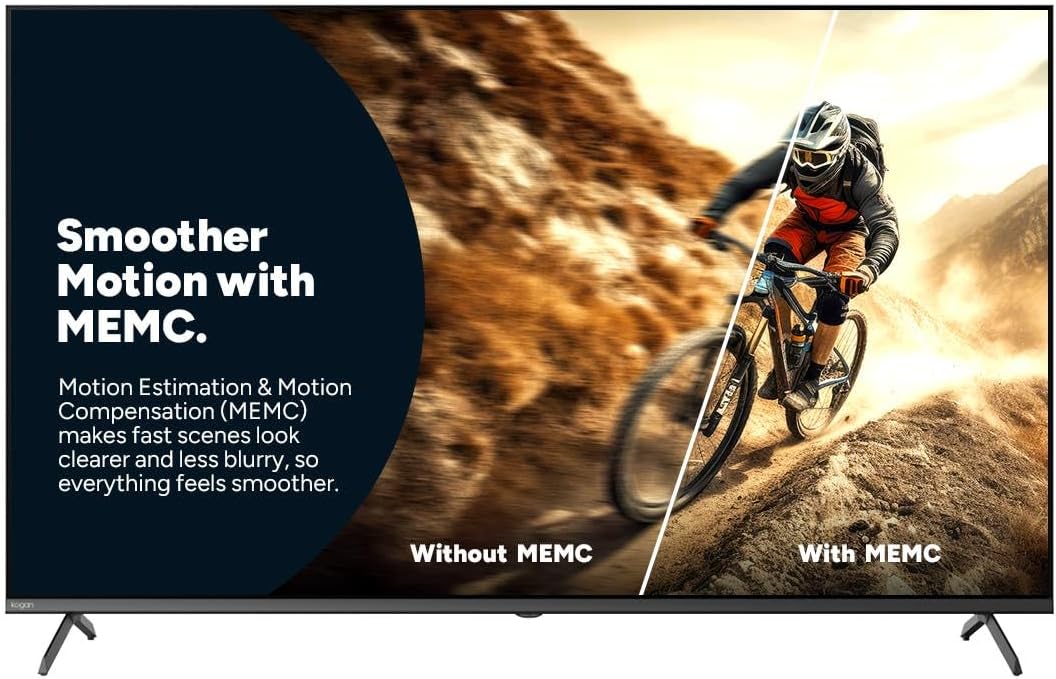
Figure 7: Smoother Motion with MEMC
This image demonstrates the effect of Motion Estimation & Motion Compensation (MEMC). It shows a split view of a cyclist in motion, comparing the visual "Without MEMC" (blurry) and "With MEMC" (clearer and smoother), illustrating how MEMC enhances the clarity of fast-paced scenes.
- Automatski način rada niske latencije (ALLM): Automatically reduces response time for an ultra-smooth and lag-free gaming experience.
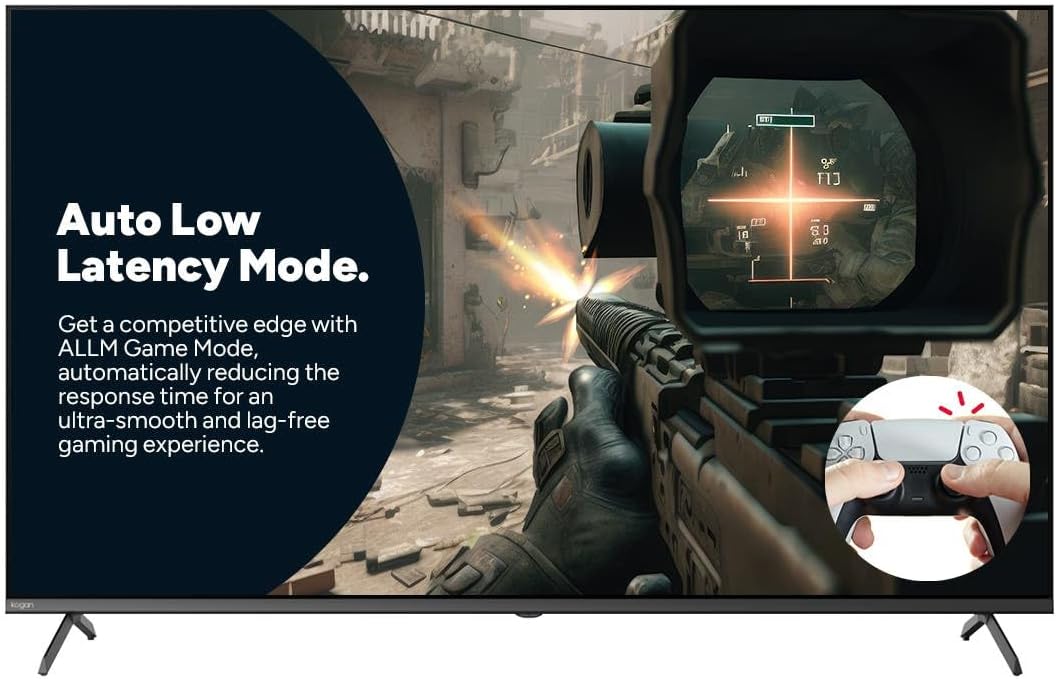
Figure 8: Auto Low Latency Mode for Gaming
This image highlights the benefits of Auto Low Latency Mode (ALLM) for gaming. It features a first-person shooter game scene, emphasizing how ALLM automatically reduces response time, providing a competitive edge with ultra-smooth and lag-free gameplay.
Upotreba daljinskog upravljača
The included remote control allows you to navigate the Google TV interface, adjust settings, change channels, and control connected devices. Familiarize yourself with the button layout for optimal use.
Održavanje
Čišćenje TV-a
- ekran: Nježno obrišite ekran mekom krpom koja ne ostavlja dlačice. Za tvrdokorne mrlje koristite sredstvo za čišćenje ekrana posebno dizajnirano za televizore, naneseno na krpu, a ne direktno na ekran.
- okvir: Obrišite okvir i postolje televizora mekom, suhom krpom.
- Ne koristite: Izbjegavajte upotrebu abrazivnih sredstava za čišćenje, voskova ili rastvarača jer mogu oštetiti završnu obradu televizora.
Opća njega
- Osigurajte odgovarajuću ventilaciju oko televizora kako biste spriječili pregrijavanje.
- Držite televizor dalje od direktne sunčeve svjetlosti, izvora toplote i prekomjerne prašine.
- Isključite televizor iz električne utičnice tokom oluje sa grmljavinom ili kada ga ostavljate bez nadzora duži period.
Rješavanje problema
If you encounter issues with your Kogan TV, refer to the following common problems and solutions. If the problem persists, contact Kogan customer support.
| Problem | Mogući uzrok / rješenje |
|---|---|
| Nema snage | Provjerite je li kabel za napajanje sigurno priključen u TV i zidnu utičnicu. Uvjerite se da zidna utičnica ima napajanja. Pokušajte s drugom utičnicom. |
| Nema slike/zvuka | Verify the correct input source is selected (e.g., HDMI 1, TV). Check cable connections to external devices. Ensure volume is not muted or too low. |
| Daljinski upravljač ne radi | Provjerite i zamijenite baterije. Pazite da nema prepreka između daljinskog upravljača i IR senzora televizora. |
| Loša kvaliteta slike | Check antenna/cable connection. Adjust picture settings (brightness, contrast, sharpness). Ensure the source content is high quality. |
| Nema internetske veze | Check Wi-Fi router and modem. Reconnect to the Wi-Fi network in TV settings. Try restarting the TV and router. |
Specifikacije
| Feature | Detalj |
|---|---|
| Brand | Kogan |
| Naziv modela | Kogan 55" QLED 4K 144Hz Smart AI Google TV |
| Broj modela | KAQL55XQ98GSTA |
| Veličina ekrana | 55 inča |
| Display Technology | QLED |
| Rezolucija | 4K (3840 x 2160) |
| Refresh Rate | 144 Hz |
| Operativni sistem | Google TV |
| Veličina RAM-a | 3 GB |
| Posebne karakteristike | Chromecast, Dolby Vision, HDR, MEMC, ALLM |
| Tehnologija povezivanja | USB,HDMI |
| Audio Input Compatible | USB,HDMI |
| Voltage | 240 Volts |
| Težina artikla | 18.2 kg |
| Dimenzije paketa | 134 x 85 x 14 cm |
Garancija i podrška
For warranty information and technical support, please refer to the warranty card included with your product or visit the official Kogan website. You can also contact Kogan customer service directly for assistance with product issues or inquiries.
Kogan Support: https://www.kogan.com/au/help/


