1. Uvod
This manual provides essential instructions for the safe operation, assembly, and maintenance of your Genesis Designs Smart Full Body Massage Chair, model GM1-W. Please read this manual thoroughly before using the product to ensure proper function and to prevent injury or damage.
The Genesis Designs GM1-W massage chair features 2D SL-track rollers, voice activation, a tablet remote control, 12 auto pre-programmed modes, and 6 massage techniques. It includes a zero-gravity function, built-in Bluetooth speakers, and a USB charging port. Airbag massage is provided for the shoulders, arms, waist, legs, and feet, along with a heated lumbar function and foot rollers.
2. Važne informacije o sigurnosti
WARNING: To reduce the risk of electric shock, burns, fire, or injury, always follow these basic precautions:
- Read all instructions before using the massage chair.
- Nemojte koristiti dodatke koje nije preporučio proizvođač.
- Isključite iz utičnice kada ne koristite, prije stavljanja ili skidanja dijelova i prije čišćenja.
- Nužan je strog nadzor kada ovaj proizvod koriste djeca, invalidi ili osobe s invaliditetom ili u njihovoj blizini.
- Nemojte raditi ispod ćebeta ili jastuka. Može doći do prekomjernog zagrijavanja i uzrokovati požar, strujni udar ili ozljede osoba.
- Nikada nemojte rukovati ovim proizvodom ako ima oštećen kabel ili utikač, ako ne radi ispravno, ako je pao ili oštećen ili pao u vodu.
- Držite kabl dalje od zagrejanih površina.
- Ne koristiti na otvorenom.
- Nemojte raditi tamo gdje se koriste proizvodi u obliku aerosola (sprej) ili gdje se daje kisik.
- Da biste prekinuli vezu, okrenite sve komande u položaj ISKLJUČENO, a zatim izvucite utikač iz utičnice.
- Ovaj aparat je namenjen isključivo za upotrebu u domaćinstvu.
- Consult a physician before using if you have any medical conditions, are pregnant, or have a pacemaker.
3. Sadržaj paketa
Provjerite da li su sve komponente prisutne u pakovanju:
- Genesis Designs GM1-W Massage Chair (Main Unit)
- Tablet Remote Control
- Kabl za napajanje
- Korisnički priručnik (ovaj dokument)

Slika 3.1: "In The Box" diagram illustrating the main chair unit, the tablet remote control, and the power cord.
4. Postavljanje i montaža
The Genesis Designs GM1-W massage chair typically arrives partially assembled. Follow these steps for final assembly and placement.
4.1 Raspakivanje i postavljanje
- Carefully remove all packaging materials. It is recommended to retain packaging for future transport or service.
- Position the chair in a suitable location. Ensure there is enough space around the chair for full recline, especially for the zero-gravity function. The chair requires approximately 66.33 inches in length when fully reclined.
- Ensure the chair is placed on a level surface.

Slika 4.1: Prednja strana view of the Genesis Designs GM1-W massage chair.

Slika 4.2: Side view of the Genesis Designs GM1-W massage chair, illustrating its profile.
4.2 Povezivanje napajanja
- Locate the power input port on the back or bottom of the chair.
- Connect the power cord securely to the chair.
- Uključite drugi kraj kabla za napajanje u uzemljenu električnu utičnicu.
5. Uputstvo za upotrebu
Your Genesis Designs GM1-W massage chair offers various functions for a personalized massage experience.
5.1 Kontrole prekoview
The chair can be controlled via the handheld tablet remote or the quick-start buttons on the right armrest.

Slika 5.1: Handheld tablet remote control interface.

Slika 5.2: Quick-start control panel on the right armrest.
5.2 Starting a Massage
- Udobno se smjestite u stolicu.
- Press the Power button on the tablet remote or the quick-start panel.
- Odaberite jedan od 12 auto pre-programmed modes or choose from 6 massage techniques using the tablet remote.
5.3 Ključne karakteristike i funkcije
- 2D SL-Track Rollers: The massage rollers follow the natural curve of your spine, extending from your neck to your thighs, providing a comprehensive massage.
- Zero Gravity Function: Activate zero gravity mode to recline the chair to a position that elevates your legs above your heart, reducing pressure on your spine and enhancing relaxation. The chair offers multiple recline levels.

Slika 5.3: Illustration of the chair's zero gravity recline positions.
- Glasovna aktivacija: Use voice commands to control various functions of the massage chair. Refer to the tablet remote interface for specific voice commands.
- Masaža vazdušnim jastukom: Airbags located in the shoulders, arms, waist, legs, and feet inflate and deflate to provide compression massage. Adjust intensity via the tablet remote.
- Heated Lumbar Function: Activate the heating function for the lower back to soothe muscles and enhance relaxation.
- Foot Massage: The legrest can extend up to 6.25 inches to accommodate different user heights. Foot rollers provide a targeted massage to the soles of your feet.
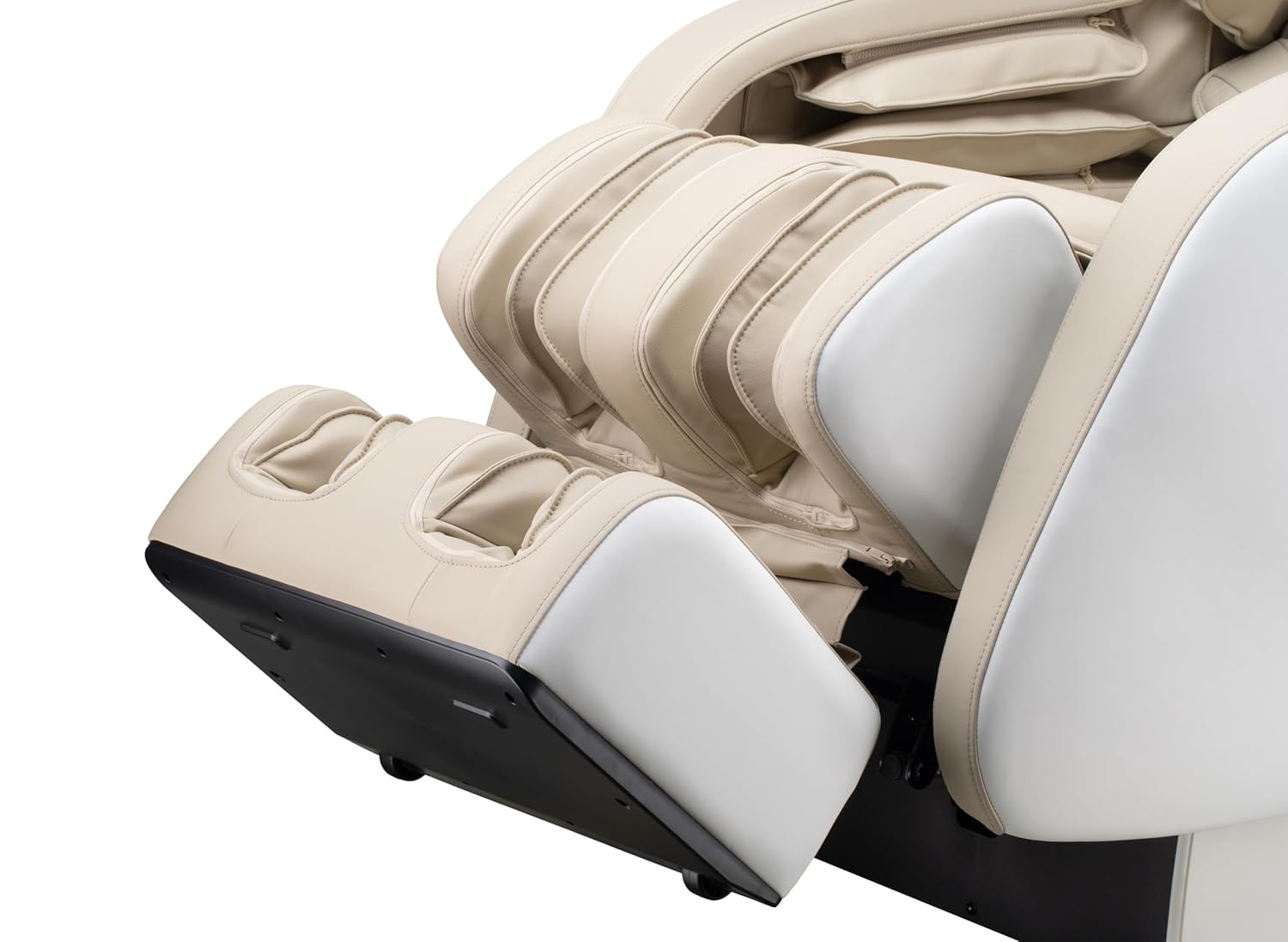
Slika 5.4: Detail of the footrest with integrated foot rollers.
- Bluetooth zvučnici: Connect your personal device via Bluetooth to enjoy audio during your massage.
- Omogućite Bluetooth na svom uređaju.
- Traži "Genesis Massage Chair" or similar on your device's Bluetooth settings.
- Uparite i povežite.
- USB priključak za punjenje: A convenient USB port is available for charging your mobile devices.

Slika 5.5: Gotovoview of main features and their locations on the chair.
6. Održavanje i njega
Pravilno održavanje osigurava dugotrajnost i optimalne performanse vaše masažne stolice.
6.1 Čišćenje
- Eksterijer: Obrišite mekom krpom, damp cloth. Do not use abrasive cleaners, solvents, or harsh chemicals, as these may damage the upholstery.
- unutrašnjost: Periodically vacuum any dust or debris from crevices.
- Ensure the chair is unplugged before cleaning.
6.2 Skladištenje
If storing the chair for an extended period, unplug it and cover it to protect from dust and moisture. Store in a cool, dry place.
7. Otkrivanje problema
If you encounter issues with your massage chair, refer to the following common problems and solutions:
| Problem | Mogući uzrok | Rješenje |
|---|---|---|
| Stolica se ne uključuje. | Kabl za napajanje nije sigurno priključen. Nema napajanja iz utičnice. | Check power cord connection to chair and outlet. Test outlet with another device. |
| Massage rollers are not moving. | Chair is in standby mode. Program not selected. | Ensure chair is powered on. Select an auto program or manual massage technique. |
| Bluetooth se ne povezuje. | Bluetooth on device is off. Chair's Bluetooth is off or not discoverable. | Ensure Bluetooth is enabled on your device. Check tablet remote for Bluetooth activation. Try restarting both devices. |
| Voice activation not responding. | Microphone obstructed. Incorrect commands. | Ensure no obstructions near the microphone. Speak clearly and use the specified voice commands. |
| Neuobičajeni zvukovi tokom rada. | Normal operational sounds. Loose component. | Some motor and airbag sounds are normal. If noise is excessive or new, discontinue use and contact customer support. |
If the problem persists after attempting these solutions, please contact Genesis Designs customer support for assistance.
8. Specifikacije
| Feature | Detalj |
|---|---|
| Broj modela | GM1-W |
| Brand | Genesis Designs |
| Staza za masažu | 2D SL-Track |
| Upright Dimensions (L x W x H) | 57.67 x 29.72 x 44.33 inča |
| Zero Gravity Dimensions (L x W x H) | 66.33 x 29.72 x 38.77 inča |
| Težina proizvoda | 165 funti |
| Seat Width | 21 inča |
| Legrest Extension | Do 6.25 inča |
| Programi za masažu | 12 Auto Modes, 6 Manual Techniques |
| Posebne karakteristike | Voice Activation, Bluetooth Speakers, USB Charging, Heated Lumbar, Foot Rollers |
| Certifikacija | ETL Certified |
| UPC / GTIN | 811691028064 |

Slika 8.1: Dimensional diagram of the massage chair.
9. Garancija i korisnička podrška
For warranty information, please refer to the documentation included with your purchase or contact Genesis Designs customer support directly. Keep your proof of purchase for warranty claims.
If you require technical assistance, have questions about operation, or need to report a problem, please contact Genesis Designs customer support through their official webweb-mjesto ili kontakt informacije koje ste dobili uz proizvod.


