Uvod
The PETKIT Purobot Ultra is an advanced automatic self-cleaning cat litter box designed to provide a hygienic and convenient solution for pet owners. Featuring the world's first cat facial recognition and poop monitoring AI camera, this device offers unparalleled insights into your cat's health and habits. It integrates touch-free auto waste packing, efficient odor control, and smart app connectivity for a seamless user experience.
This manual provides comprehensive instructions for setting up, operating, maintaining, and troubleshooting your Purobot Ultra to ensure optimal performance and longevity.
Vodič za postavljanje
Raspakivanje i postavljanje
Carefully remove all components from the packaging. Ensure the device is placed on a flat, stable floor. Avoid placing it on carpets or mats, as this may interfere with the internal sensors and cause malfunctions. Do not block the entrance to the cat litter tray.

Image: The PETKIT Purobot Ultra main unit, showcasing its sleek design, the integrated AI camera, and a smartphone displaying the companion app interface. Various accessories like odor eliminators and a refill ring are also visible.
Device Binding and App Connection
The Purobot Ultra connects to your smartphone via the PETKIT app, supporting both 2.4GHz and 5G WiFi. Follow these steps to bind your device:
- Ensure your phone's Bluetooth is enabled and grant the PETKIT app Bluetooth permission.
- Open the PETKIT app and tap the "+" icon in the top right corner of the homepage.
- Select "Purobot Ultra" from the device list.
- Add the device and confirm.
- Enter your valid WiFi network name and password, then click "Next".
- Wait for the connection to complete. A "binding successful" message will appear, allowing you to set up cleaning modes and camera functions.
Video: Official PETKIT guide demonstrating the step-by-step process of binding the Purobot Ultra litter box to the PETKIT mobile application and configuring initial settings.
Uputstvo za upotrebu
Automatsko samočišćenje
The Purobot Ultra offers two methods for initiating automatic scooping:
- Kontrolna tabla: Press the menu button on the device to switch to "scoop", then press the "OK" button to execute the cleaning cycle.
- PETKIT App: On the device's homepage within the app, tap "scoop" and then "OK".
It is recommended to set the automatic cleaning to start 2-5 minutes after your cat uses the litter box. This allows the litter to form solid clumps effectively, preventing it from sticking to the bottom of the tray.
AI Camera and Health Monitoring
The integrated AI camera provides advanced monitoring capabilities:
- Prepoznavanje lica: Accurately tracks individual cat visits, preventing mixed data in multi-cat households.
- Poop Monitor: Records toilet times, duration, stool shape/color, and urine clump size. Generates photo/video records for per-cat health tracking.
- Upozorenja u realnom vremenu: The app notifies you of abnormal stool color or clumping size, aiding in early detection of potential health issues.

Image: The PETKIT Purobot Ultra's AI camera system identifying two cats, Milly and Moon, by facial recognition and displaying their age and weight for personalized health tracking.

Image: A visual representation of the PETKIT Purobot Ultra's health monitoring features, showing a cat's health data including toilet times and weight changes, alongside stool image check-ups for health analysis.
Ključne karakteristike
Touch-Free Auto Waste Packing
The Purobot Ultra automates waste management. After each cleaning cycle, the system auto-fills, seals, and refills the waste bag, eliminating the need for manual scooping and handling. The 10L capacity waste container can hold waste for up to 20 days for one cat, and the included waste bag ring lasts up to 200 days. Overflow protection ensures efficient packing.

Image: A comparison showing the manual disposal of a traditional litter bag versus the PETKIT Purobot Ultra's automated waste packing system, highlighting its auto-seal and auto-refill capabilities.
Efficient 4-Stage Odor Control
The device employs a quadruple deodorization system to maintain a fresh environment:
- Sealed Trunk Lid: Keeps odors contained within the waste bin.
- N60 Pet Odor Eliminator: Purifies unpleasant smells with a refreshing scent.
- Auto-Sealed Waste Bin Door: Closes automatically after each cycle, sealing in odors with up to 97.5% efficiency.
- Leak-Proof Trash Bag: Made of durable PE material to prevent leaks and odor escape.
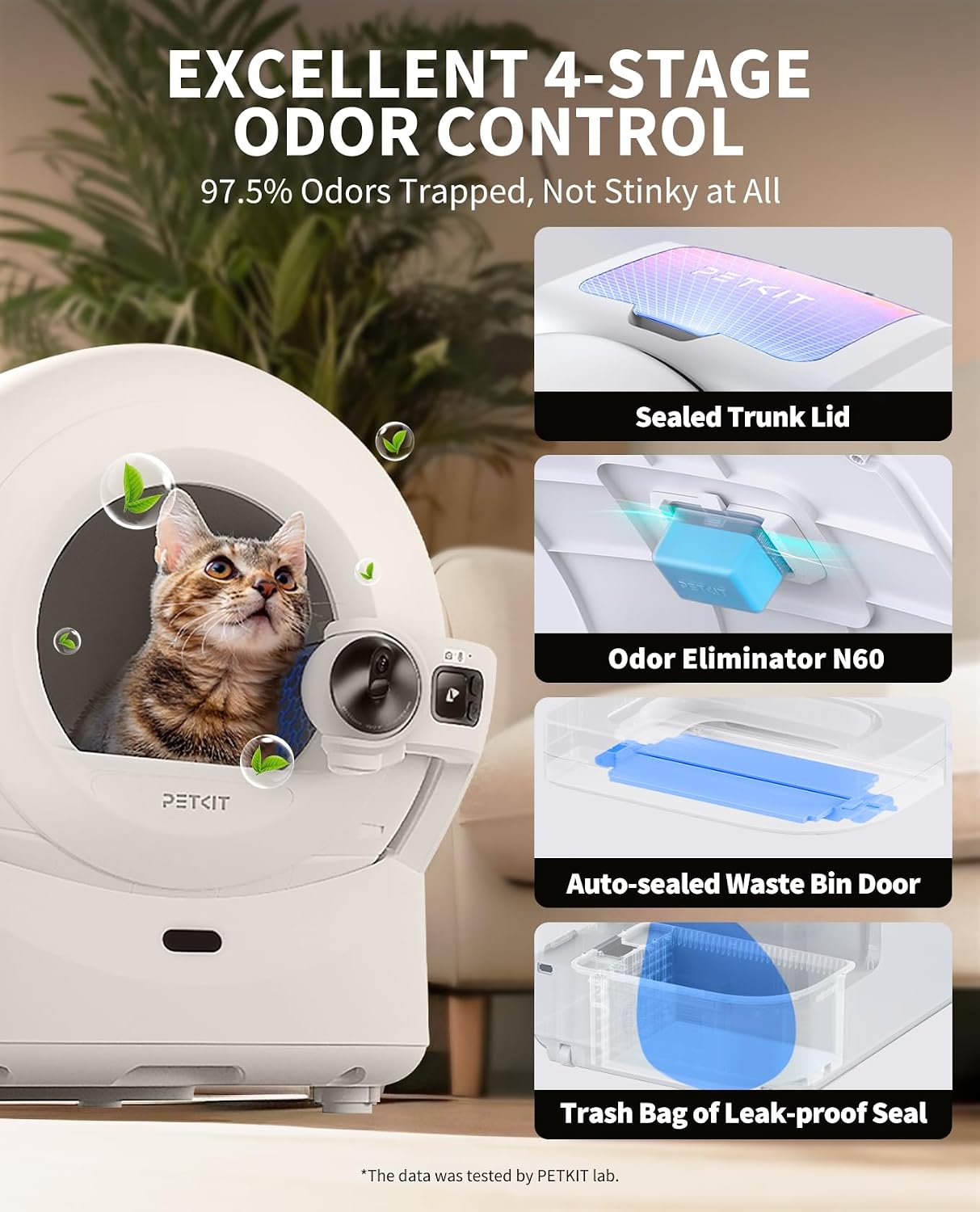
Image: A diagram illustrating the four stages of odor control in the PETKIT Purobot Ultra: the sealed trunk lid, the N60 odor eliminator, the auto-sealed waste bin door, and the leak-proof trash bag.
XSECURE Safety System
Equipped with 20 high-precision sensors, the Purobot Ultra ensures maximum safety. The cylinder immediately stops operation upon pet proximity, and its anti-pinch structure prevents cats from getting stuck. The cylinder's side-to-side rotation keeps the entrance open at all times. It is suitable for cats weighing 1.5 kg (3.3 lbs) to 10 kg (22 lbs) and over 6 months old.
Upgraded Leak-Proof Design
The cylinder features a 360-degree sealed ShieldBase for anti-leakage and easier maintenance. A patented brim structure guides urine to the waterproof litter pad, preventing leakage. The elastic edge of the litter pad ensures easy installation and a secure fit.
Large Space and Quiet Operation
The 70L interior space provides a comfortable environment for your cat. The Purobot Ultra is compatible with all clumping cat litter types and operates at a noise level of less than 35 dB, equivalent to a quiet library, ensuring a peaceful home environment.
Održavanje
Waste Bag Replacement
When the waste bin is full, the device will automatically seal the bag. Simply remove the sealed bag and dispose of it. The system will then automatically refill a new bag from the refill ring. Ensure you use original PETKIT refill rings to prevent malfunctions.
Čišćenje jedinice
The Purobot Ultra features a detachable design for easy cleaning. The 360-degree sealed ShieldBase and waterproof litter pad simplify maintenance. Regularly clean the interior and exterior surfaces with a damp tkanina. Izbjegavajte korištenje jakih kemikalija ili abrazivnih sredstava za čišćenje.

Slika: Eksplodirala view of the PETKIT Purobot Ultra's components, including the main device, litter sifter, pet odor eliminator, AI camera, refill ring, power adapter, screws, and hex key.
Rješavanje problema
| Problem | Mogući uzrok | Rješenje |
|---|---|---|
| Device not operating correctly / Sensor issues | Placed on carpet or uneven surface. | Ensure the device is placed on a flat, hard floor. |
| Problemi sa povezivanjem aplikacija | Incorrect WiFi credentials, Bluetooth off, or network interference. | Verify WiFi password, ensure Bluetooth is on, and re-attempt device binding. Check router settings for 2.4GHz/5G compatibility. |
| Litter sticking to bottom | Cleaning cycle initiated too soon after use. | Adjust automatic cleaning delay to 2-5 minutes after cat uses the box to allow litter to clump properly. |
| Odor issues | Odor eliminator needs replacement, waste bin full, or lid not properly sealed. | Replace N60 odor eliminator. Empty waste bin. Ensure trunk lid is closed. |
Specifikacije
| Feature | Detalj |
|---|---|
| Naziv modela | PETKIT PUROBOT ULTRA |
| Broj modela stavke | P9903 |
| Dimenzije (DxŠxV) | 32.2 x 24 x 20.94 inča |
| Težina artikla | 46 funti |
| Materijal | ABS plastika |
| Boja | Bijelo |
| Unutrašnji prostor | 70L |
| Kapacitet kontejnera za otpad | 10L (up to 20 days for one cat) |
| Nivo buke | Manje od 35 dB |
| Applicable Cat Weight | 1.5 kg (3.3 funti) do 10 kg (22 funti) |
| Recommended Cat Age | Stariji od 6 mjeseci |
| Povezivanje | 2.4GHz & 5G WiFi, Bluetooth |
| Sigurnosni senzori | 20 senzora visoke preciznosti |

Image: A detailed diagram showing the dimensions of the PETKIT Purobot Ultra, including height, width, and depth measurements for proper space planning.
Garancija i podrška
The PETKIT Purobot Ultra comes with a 1 godina garancije od datuma kupovine. Ova garancija pokriva proizvodne nedostatke i kvarove u normalnim uslovima upotrebe.
For technical support, warranty claims, or any inquiries regarding your PETKIT Purobot Ultra, please contact PETKIT customer service. Refer to the official PETKIT webnajnovije informacije o podršci potražite na web-mjestu ili na kontaktnim informacijama navedenim u pakiranju proizvoda.
You can also visit the official PETKIT store on Amazon for more information and product updates: PETKIT Amazon Store


