1. Uvod
This manual provides detailed instructions for the setup, operation, maintenance, and troubleshooting of your Gustard X30 Network Streaming DAC. Please read this manual thoroughly before using the device to ensure optimal performance and longevity.

Slika 1: Prednja strana view of the Gustard X30 Network Streaming DAC in silver finish.
2. Ključne karakteristike
The Gustard X30 is a high-performance balanced DAC and preamplifier designed for audiophiles, featuring advanced digital and analog technologies.
- Quad ES9039SPRO & ES9311Q Chipset: Utilizes four ES9039SPRO DAC chips and ES9311Q for a fully balanced architecture with independent power supply and grounding for each channel.
- Audio podrška visoke rezolucije: Supports PCM up to 32bit 768kHz, native DSD512, and MQA 384K decoding via XMOS XU216 USB interface.
- Advanced DSP Digital Filter: Incorporates ADI SHARC DSP platform with newly developed high-performance digital filters, supporting 3 types of PCM and 4 types of DSD, including NOS mode.
- Passive Analog Preampdizalica: Features R2R relay volume adjustment for lossless signal control, allowing direct connection to active studio monitors or power amplifiers.
- Network Streaming Capabilities: Connects to networks and supports Roon, Airplay, DLNA, UPnP, and NAA protocols with configurable settings and online upgrade functions.
- Vrhunske komponente: Includes K2 synthesizer synchronous clock implantation technology, local OCXO clock, external 10M clock input, and discrete Class A analog LPF circuits for optimized performance.
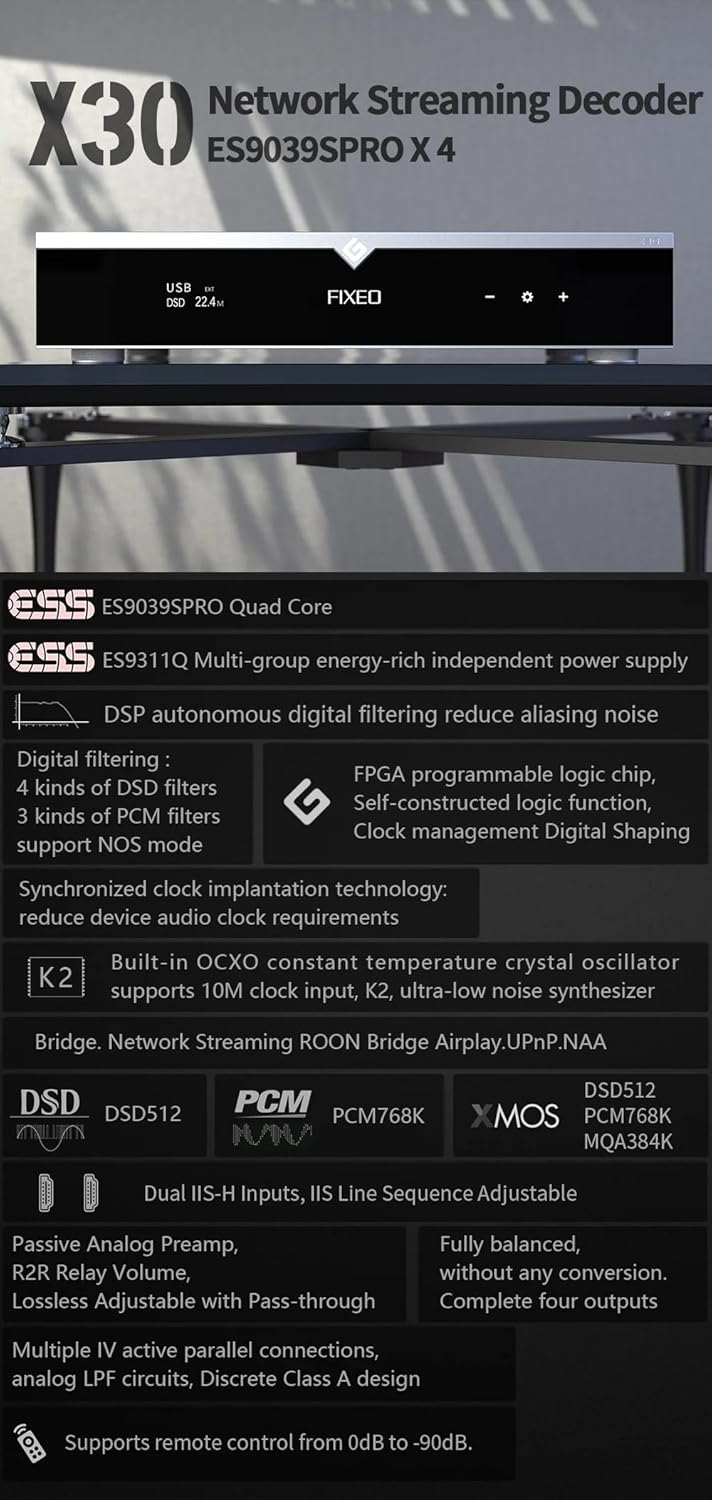
Slika 2: Gotovoview of key features and supported audio formats, including ES9039SPRO Quad Core, DSP digital filtering, network streaming, and clock synchronization.
3. Vodič za postavljanje
3.1 Raspakivanje i postavljanje
Carefully remove the Gustard X30 from its packaging. Place the unit on a stable, level surface away from direct sunlight, heat sources, and excessive moisture. Ensure adequate ventilation around the unit.
3.2 Povezivanje napajanja
Connect the provided power cable to the AC input on the rear panel of the X30. Ensure the voltage switch (if present and accessible) is set to your local mains voltage (AC115V/230V). Plug the other end into a suitable wall outlet.
3.3 Ulazne i izlazne veze
The Gustard X30 offers a variety of digital inputs and analog outputs. Refer to the rear panel diagram for connection points.

Figure 3: Rear panel showing various input and output connections, including Clock, Coaxial, AES, USB, LAN, IIS, XLR, and RCA.
- USB ulaz: Connect your computer or digital audio source via a USB cable.
- Optical/Coaxial/AES Inputs: For connecting digital audio sources like CD players, media streamers, or TVs.
- LAN ulaz: For network streaming capabilities. Connect an Ethernet cable to your router or network switch.
- IIS Inputs (x2): For high-quality digital audio transmission from compatible sources.
- Ulaz sata: For connecting an external 10M clock for enhanced timing precision.
- XLR Outputs (Balanced): Za povezivanje sa balansiranim amplifiers ili aktivni zvučnici.
- RCA Outputs (Unbalanced): For connecting to unbalanced amplifiers ili aktivni zvučnici.
4. Uputstvo za upotrebu
4.1 Kontrole na prednjoj ploči
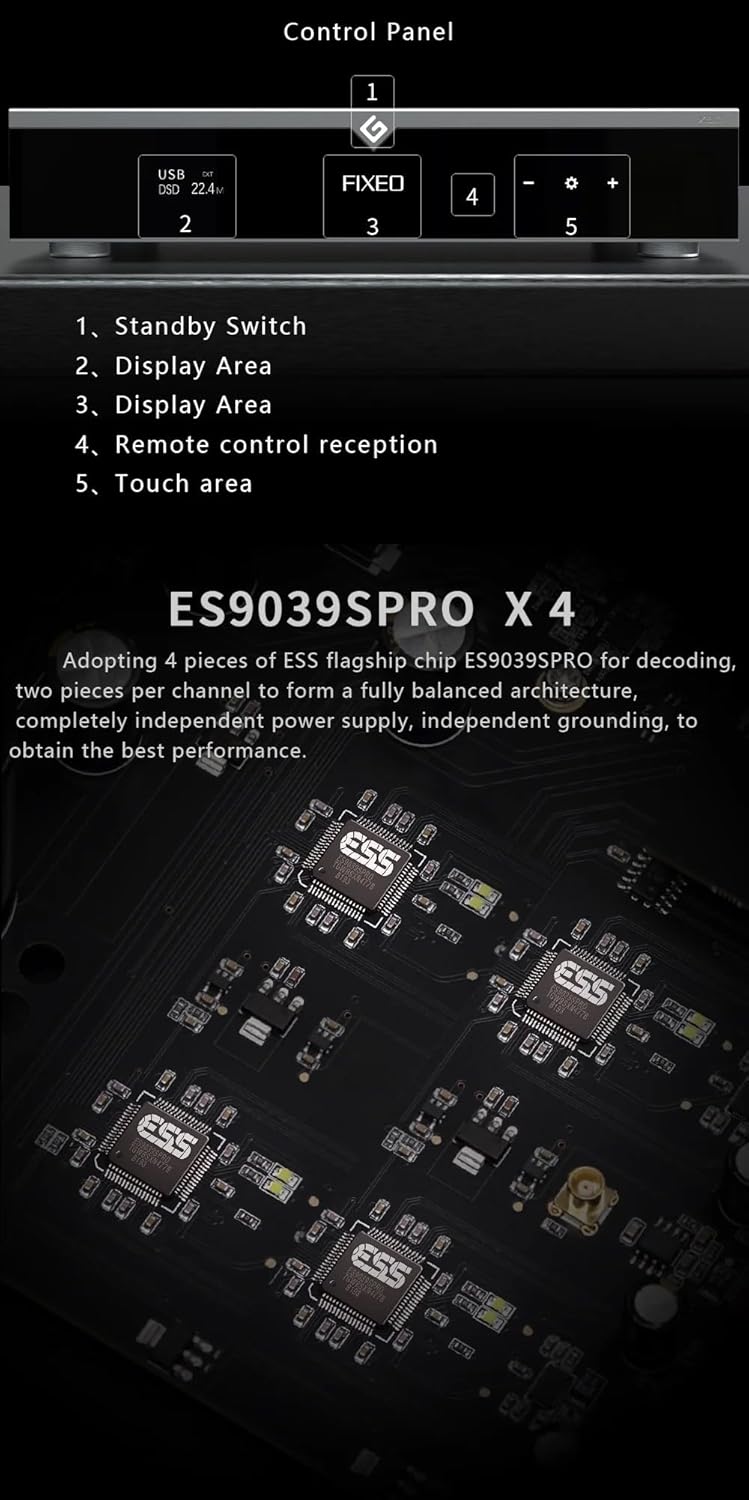
Figure 4: Front panel layout and control areas, indicating standby switch, display, remote reception, and touch area.
- Standby prekidač: Press to power on/off the unit or put it into standby mode.
- Područje prikaza: Prikazuje trenutni ulaz, sample rate, and other operational information.
- Prijem daljinskog upravljača: Infracrveni prijemnik za daljinski upravljač.
- Područje dodira: Used for navigation and selection on the display.
- Volume/Menu Controls: Adjusts volume or navigates menu options.
4.2 Osnovni rad
- Uključivanje/isključivanje: Press the standby switch on the front panel or the power button on the remote control.
- Odabir ulaza: Use the front panel controls or remote to cycle through available digital inputs (USB, Optical, Coaxial, AES, LAN, IIS, Clock).
- Podešavanje jačine zvuka: Rotate the volume knob or use the +/- buttons on the remote. The X30 features a passive analog preamplifier with R2R relay volume adjustment for lossless control.
- Navigacija menijem: Access settings and advanced options via the front panel touch area or remote control.
4.3 Mrežni streaming
The Gustard X30 supports various network streaming protocols. For initial setup and configuration, access the device's web configuration page. The Linux kernel is optimized for I/O to reduce audio data forwarding delay and jitter.
- Roon Ready: Integrate the X30 into your Roon ecosystem for seamless music management and playback.
- Reprodukcija 2: Bežično strimujte zvuk sa Apple uređaja.
- DLNA/UPnP: Connect to compatible media servers and control points.
- NAA (Network Audio Adapter): For advanced network audio setups.
- Ažuriranja firmvera: The device supports online firmware upgrades via the network connection.

Slika 5: Prample of network streaming interface on a tablet and smartphone, demonstrating connectivity and music playback.
5. Održavanje
- čišćenje: Za čišćenje vanjske strane uređaja koristite meku, suhu krpu. Izbjegavajte upotrebu abrazivnih sredstava za čišćenje ili rastvarača.
- ventilacija: Uvjerite se da otvori za ventilaciju nisu blokirani kako biste spriječili pregrijavanje.
- Ažuriranja firmvera: Regularly check for and install firmware updates to ensure optimal performance and access to new features. Instructions for online updates are available via the device's web interfejs.
6. Otkrivanje problema
| Problem | Mogući uzrok | Rješenje |
|---|---|---|
| Nema struje | Power cable not connected; Power outlet faulty; Unit in standby. | Check power cable connection; Try a different outlet; Press standby switch to power on. |
| Nema izlaza zvuka | Odabran pogrešan ulaz; Jačina zvuka je preniska; Kablovi nisu pravilno povezani; Amplifier/speakers off or faulty. | Select correct input; Increase volume; Check all audio cable connections; Verify amplifier/speaker status. |
| Network streaming issues | Network cable disconnected; Router/network issue; Incorrect network settings. | Check LAN cable connection; Restart router; Verify network settings via web interfejs. |
| Izobličen zvuk | Kvalitet zvuka izvora; Netačan zvukample rate setting; Faulty cables. | Ensure source audio is high quality; Check sample rate settings on source and DAC; Replace audio cables. |
Ako problem i dalje postoji nakon isprobavanja ovih rješenja, obratite se korisničkoj podršci.
7. Tehničke specifikacije

Figure 6: Detailed specifications table outlining supported PCM, MQA, and DSD formats for USB/IIS streamer and AES/Coaxial/Optical inputs.
Digitalni ulaz
- LAN Support Protocols: Roon, Airplay, UPnP, NAA, Spotify (configurable via web page, online upgradeable)
- LAN brzina: 100/1000Mbps
- 10M Clock (BNC): Input impedance 50 Ohm, 0dBm-20dBm, CMOS square wave 0.2V-3.3V, Sine wave 0.5V-3.3V
Analogni izlaz
- Frekvencijski odziv: 20-20kHz / +-0.2dB
- dinamički raspon: >130dB
- Odnos signal/šum: >129dB
- Preslušavanje kanala: -139dB @ 10kHz
- THD+N: <=0.0001% @ 1kHz
- IMD: ~0.001% @ -1dbfs
- RCA izlazni nivo: 2.5Vrms (VOLUME FIXED)
- Izlazna impedancija RCA: 100Ω
- XLR Output Level: 5.1Vrms (VOLUME FIXED)
- XLR izlazna impedancija: 100Ω
- XLR Interface Definition: American standard (1 ground, 2 hot, 3 cold)
Ostali parametri
- Napajanje naizmeničnom strujom: AC115V / 230V 50 / 60Hz
- Potrošnja energije: <30W
- Veličina (Š*D*V): 430mm * 300mm * 80mm (including feet 92mm)
- Package Size (L*W*H): 530mm * 400mm * 180mm
- Weight with Package: 10KG
8. Garancija i podrška
The Gustard X30 is covered by a manufacturer's warranty. Please refer to the warranty card included with your product for specific terms and conditions. For technical support, troubleshooting assistance beyond this manual, or warranty claims, please contact your retailer or the manufacturer, Gustard, directly. The seller, Auinshifiman, also provides 24-hour online service and a 1-year or more pledge from the date of purchase.
For further assistance, you may contact Auinshifiman through their Amazon seller page: Auinshifiman Seller Page.


