1. Uvod
Thank you for choosing the Vixic LM1600 Label Maker Machine. This portable and versatile label maker is designed for efficient organization in various environments, from home to office. It features both a QWERTY keyboard for direct input and Bluetooth connectivity for smartphone integration, offering flexibility in label creation. This manual provides detailed instructions for setup, operation, maintenance, and troubleshooting to ensure optimal performance of your device.

Image: The Vixic LM1600 Label Maker shown alongside various colored label tapes, highlighting the product and its consumables.
2. Sigurnosne informacije
Please read and understand all safety instructions before using the Vixic LM1600 Label Maker. Failure to follow these instructions may result in injury or damage to the device.
- Ne izlažite uređaj vodi ili prekomjernoj vlazi.
- Izbjegavajte ispuštanje ili izlaganje uređaja jakim udarima.
- Use only Vixic-approved label tapes and accessories.
- Držite uređaj dalje od direktne sunčeve svjetlosti i izvora topline.
- Ne pokušavajte sami rastaviti ili popraviti uređaj. Obratite se korisničkoj podršci za pomoć.
- Čuvati van domašaja djece.
3. Sadržaj paketa
Provjerite da li se sve stavke nalaze u vašem paketu:
- Vixic LM1600 Label Maker (Gray) x 1
- White on Black 1/2 inch (12mm) x 23 feet (7m) Label Tape (3D35) x 4
- Black on White 1/2 inch (12mm) x 23 feet (7m) Label Tape (3D21) x 1
- Type-C kabl za punjenje x 1
- Korisnički priručnik (ovaj dokument) x 1
4. Podešavanje
4.1 Punjenje uređaja
The LM1600 label maker features a built-in 1200 mAh rechargeable lithium battery. Before first use, fully charge the device.
- Connect the provided Type-C charging cable to the charging port on the side of the label maker.
- Drugi kraj kabla priključite na standardni USB adapter za napajanje (nije uključen) ili USB port računara.
- Indikator punjenja će se upaliti. Potpuno punjenje obično traje otprilike 2 sata.
- Once fully charged, the device can continuously print up to 50 meters of tape.

Image: The Vixic LM1600 Label Maker being charged via its Type-C port, illustrating the rechargeable feature.
4.2 Postavljanje etiketne trake
Proper installation of the label tape is crucial for clear printing and to prevent jamming.
- Provjerite je li uređaj za etiketiranje isključen iz napajanja.
- Locate the tape compartment cover on the top of the device.
- Gently push the release latch and lift the cover to open the compartment.
- Insert the Vixic DZ series label tape cassette into the compartment, ensuring the tape feeds through the guide slot. The tape should click into place.
- Čvrsto zatvorite poklopac odjeljka za traku dok se ne zaključa.
- The device features an auto-shrink ribbon function to reduce jamming.
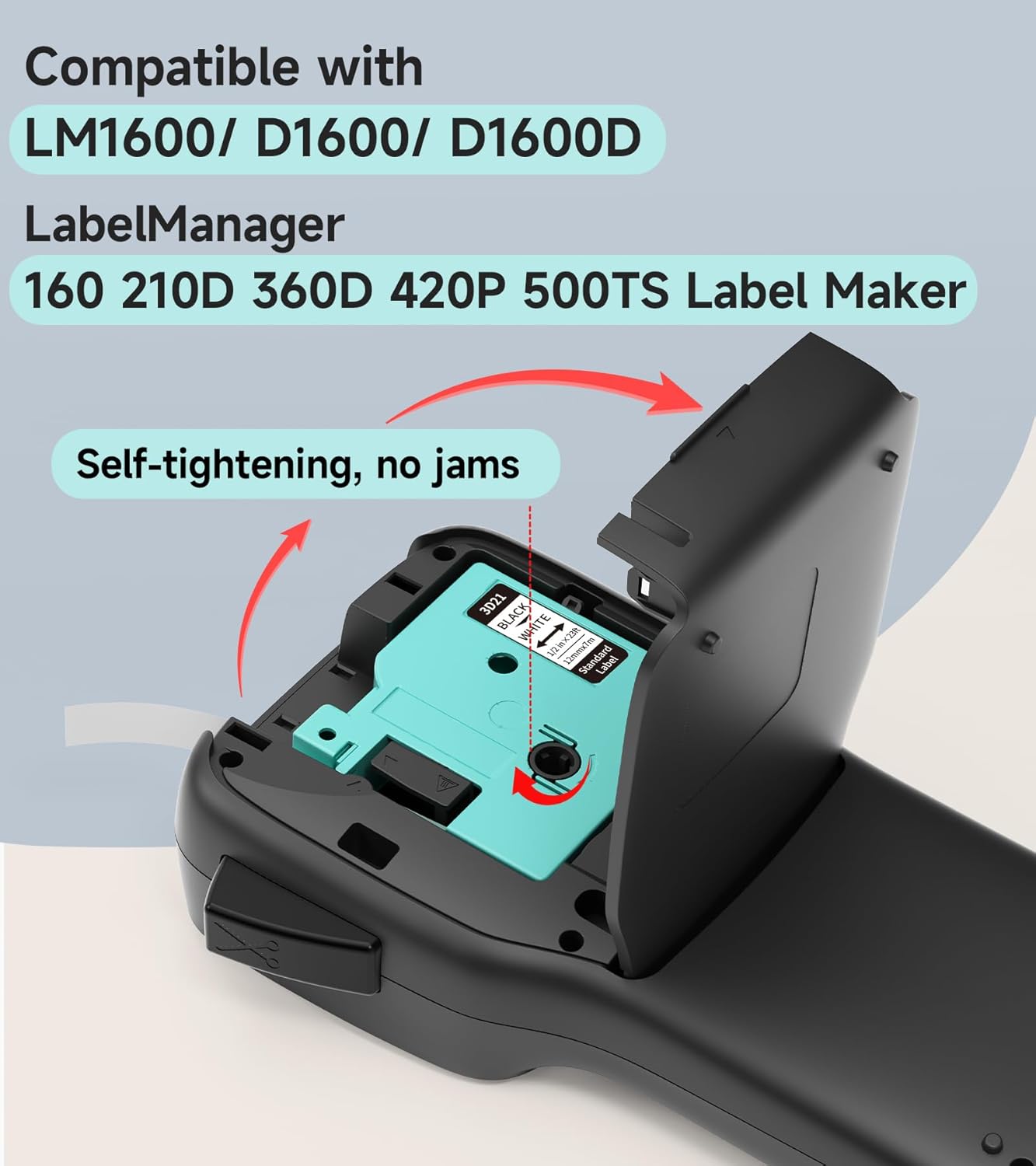
Slika: Eksplodirala view of the Vixic LM1600 Label Maker's tape compartment, demonstrating the correct way to insert a label tape cassette.
4.3 Uključivanje/isključivanje
- To power on: Press and hold the power button (usually marked with a power symbol) until the LCD screen illuminates.
- To power off: Press and hold the power button again until the LCD screen turns off. The device also features an auto-off function after 5 minutes of inactivity to conserve battery.
5. Uputstvo za upotrebu
5.1 Basic Label Creation (QWERTY Keyboard)
The LM1600 features a full QWERTY keyboard for direct text input, ideal for quick labeling without a smartphone.
- Uključite uređaj.
- Use the QWERTY keyboard to type your desired text. The text will appear on the backlighting LCD screen.
- Use the navigation keys (Menu, OK, Esc, directional arrows) to adjust text formatting, such as font size, bold, italic, and alignment.
- Press the "Print" button to print the label. The built-in cutter will automatically cut the label.

Image: A user operating the Vixic LM1600 Label Maker, demonstrating the QWERTY keyboard and the visibility of the backlighting LCD screen in different lighting conditions.
5.2 Using the Mobile App (Bluetooth Connectivity)
For advanced features and design flexibility, connect your LM1600 to your smartphone via Bluetooth.
- Download the official Vixic label printing app from your smartphone's app store (compatible with Android & iOS).
- Ensure Bluetooth is enabled on your smartphone and the LM1600 label maker.
- Open the Vixic app and follow the on-screen instructions to pair with your LM1600 device.
- Once connected, you can access multiple pre-templates, fonts, icons, borders, and languages within the app to design your labels.
- Send your design to the label maker for printing via Bluetooth.

Image: The Vixic LM1600 Label Maker shown with a smartphone displaying its companion app, illustrating the Bluetooth connectivity and mobile editing capabilities.

Image: The Vixic LM1600 Label Maker displaying its high-resolution printing capability (203 DPI) with examples of diverse label designs, including QR codes and multi-language text.
6. Label Tape Features
The Vixic DZ series label tapes are designed for durability and versatility, compatible with LM1600, D1600, D1600D, and Dymo LabelManager 160, 280, 210D label makers.
6.1 Waterproof and Durable Labels
Vixic label tapes are engineered to withstand various conditions, making them suitable for a wide range of applications.
- vodootporan: Labels maintain integrity even when exposed to water.
- Smudge and Scratch-Resistant: Printed content remains clear and legible.
- Strongly Self-Adhesive: Ensures labels stick firmly to surfaces.
- Otporan na blijeđenje: Utilizes thermal transfer technology for long-lasting print, even in high/low temperatures or sunlight.

Image: A label applied to a mug being held under running water, illustrating the waterproof characteristic of the Vixic label tapes.
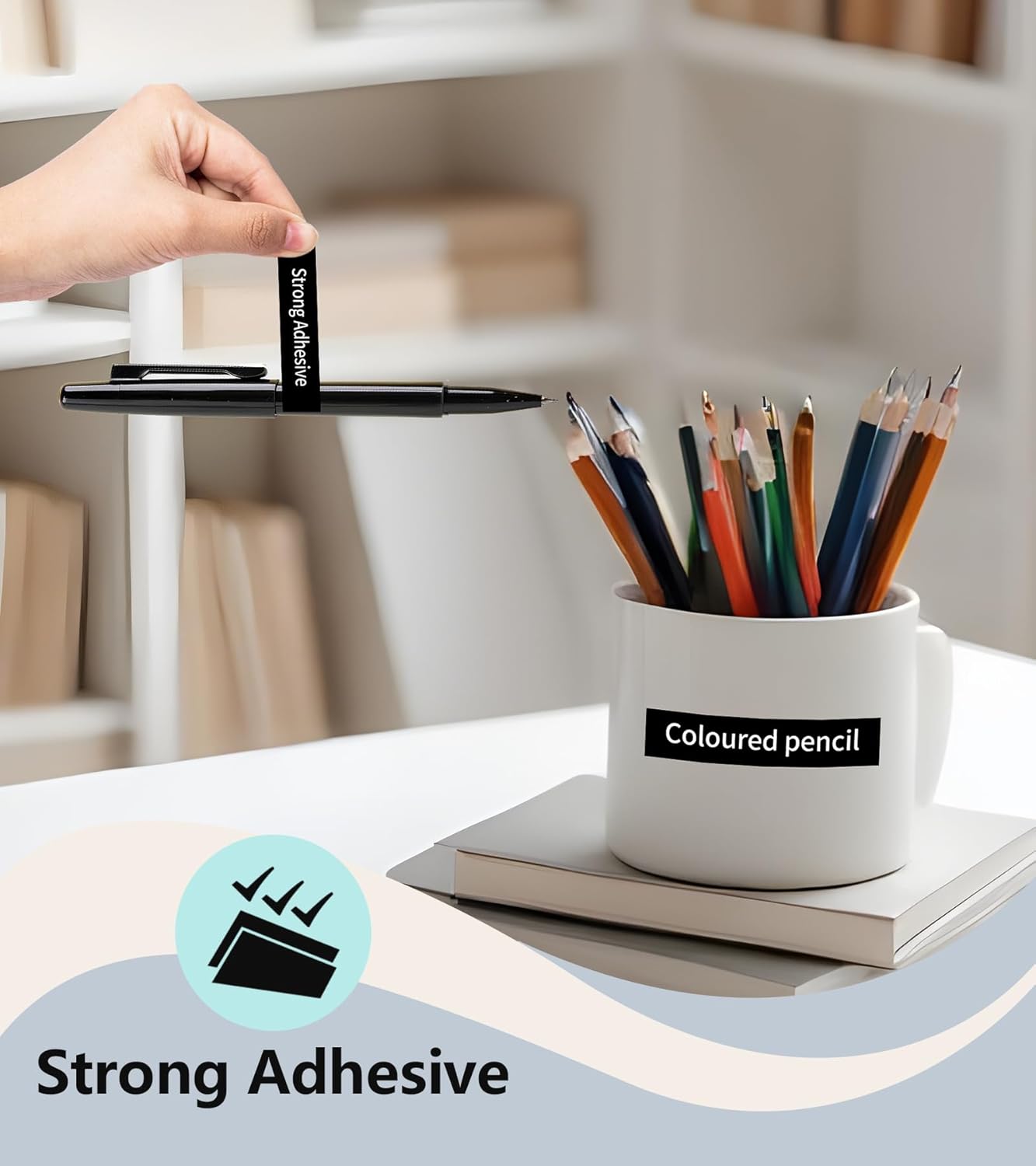
Image: A label adhered to a mug, showcasing the strong adhesive property of the Vixic label tapes.
6.2 Easy Peeling
Vixic label tapes feature a split-back design for effortless peeling, making application quick and convenient.
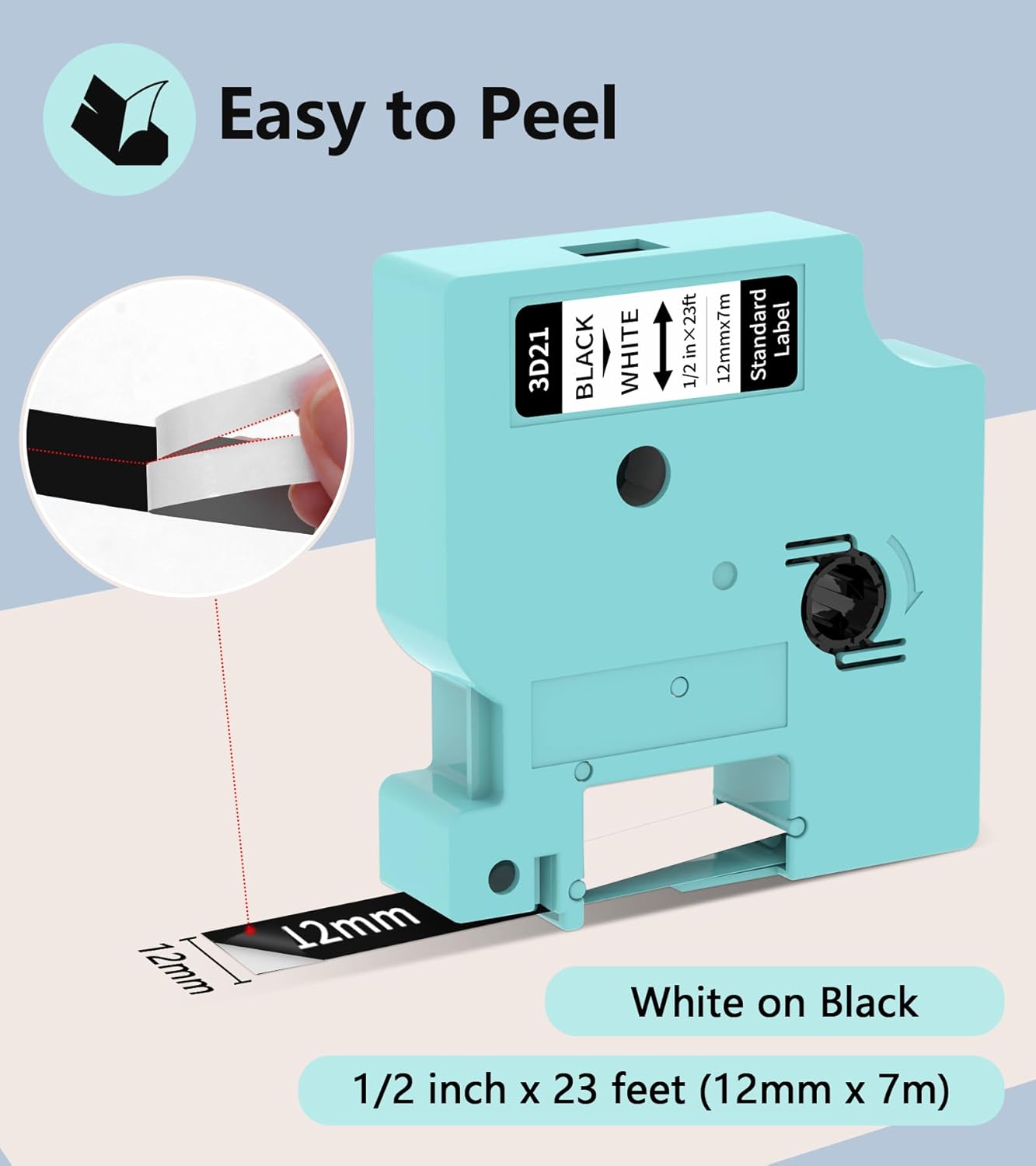
Slika: Krupni plan view of a Vixic label tape demonstrating its split-back design, which facilitates easy peeling and application.
7. Održavanje
7.1 Čišćenje uređaja
Regular cleaning helps maintain the performance and longevity of your label maker.
- Prije čišćenja provjerite je li uređaj isključen i isključen iz utičnice.
- Use a soft, dry, lint-free cloth to wipe the exterior of the label maker.
- To clean the print head, gently wipe it with a cotton swab lightly dampOčišćeno izopropilnim alkoholom. Ostavite da se potpuno osuši prije upotrebe.
- Nemojte koristiti abrazivna sredstva za čišćenje ili rastvarače.
7.2 Storing Label Tapes
Store unused label tape cassettes in a cool, dry place away from direct sunlight and extreme temperatures to preserve their adhesive and print quality.
8. Otkrivanje problema
If you encounter issues with your Vixic LM1600, refer to the following common problems and solutions:
| Problem | Mogući uzrok | Rješenje |
|---|---|---|
| Uređaj se ne uključuje. | Slaba baterija ili nema punjenja. | Napunite uređaj u potpunosti koristeći priloženi Type-C kabel. |
| Poor print quality (faded, incomplete). | Dirty print head; incorrect tape installation; low battery. | Clean the print head. Reinstall the label tape correctly. Charge the device. |
| Label tape jams. | Improper tape installation; foreign object in compartment. | Ensure tape is installed correctly and fully seated. Check for any obstructions in the tape path. The auto-shrink ribbon function helps prevent jams. |
| Bluetooth veza nije uspjela. | Bluetooth off on device/phone; device too far; app issue. | Ensure Bluetooth is enabled on both devices. Move devices closer. Restart the app and label maker. |
| Labels not peeling easily. | Incorrect peeling method. | Utilize the split-back design by bending the label slightly to separate the backing. |
9. Specifikacije
| Feature | Detalj |
|---|---|
| Naziv modela | LM1600 |
| Brand | Vixic |
| Tehnologija povezivanja | Bluetooth |
| Tehnologija štampe | Termički prenos |
| Izlaz štampača | Monochrome |
| Maksimalna rezolucija štampe | 203 dpi |
| Display Type | LCD (Backlighting) |
| Kompatibilni uređaji | Pametni telefoni (Android i iOS) |
| Maksimalna veličina medija | 1/2 inča (12mm) |
| Kapacitet baterije | 1200 mAh litijumska baterija |
| Port za punjenje | Tip-C |
| Posebne karakteristike | Portable, QWERTY Keyboard, Built-in Cutter, Auto Shrink Ribbon Function |
10. Informacije o garanciji
The Vixic LM1600 Label Maker comes with a ograničena garancija. Please refer to the warranty card included in your package or contact Vixic customer support for specific terms and conditions regarding warranty coverage and claims.
11. Korisnička podrška
For any questions, technical assistance, or warranty inquiries, please contact Vixic customer support. You can typically find contact information on the Vixic official webweb-mjestu ili putem prodavača gdje ste kupili proizvod.
We are committed to providing excellent service and support for your Vixic LM1600 Label Maker.


