Uvod
This manual provides detailed instructions for the setup, operation, and maintenance of your Nulea KM75 Advanced Ergonomic Wireless Keyboard and Mouse Combo. Please read this manual thoroughly before using the product to ensure optimal performance and longevity.
Sadržaj paketa
- Nulea KM75 Ergonomic Wireless Keyboard
- Nulea Ergonomic Wireless Mouse
- 2.4G USB Receiver (shared for keyboard and mouse)
- USB-C kabl za punjenje
- Korisnički priručnik (ovaj dokument)
Product Overview
Karakteristike tastature
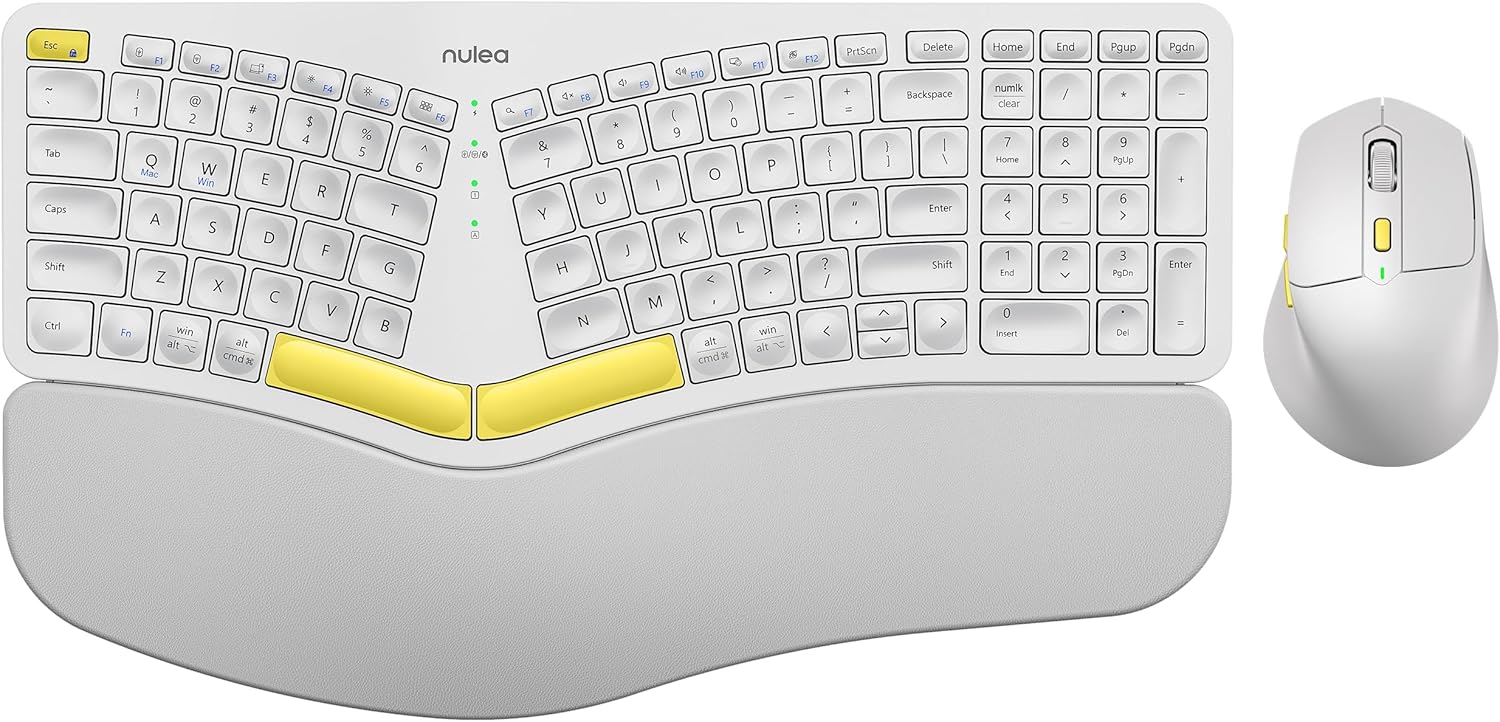
Image: The Nulea KM75 ergonomic keyboard and mouse combo. The keyboard features a curved and split layout with an integrated palm rest, and the mouse is sculpted for comfort. Both are white with yellow accents.
- Ergonomic Curved and Split Key-frame: Designed to position wrists and forearms naturally.
- Integrisani oslonac za dlanove: Features a soft memory foam layer for wrist support.
- Adjustable Tilt Design: Allows for optimal keyboard positioning.
- Povezivanje na više uređaja: Supports USB cable, 2.4G USB receiver, and Bluetooth.
- Punjiva baterija: 500mAh capacity with USB-C charging.
- Auto-Sleep Mode: Conserves power after 30 minutes of inactivity.
Karakteristike miša

Image: A close-up of the Nulea ergonomic mouse, showing its sculpted design for a natural hand posture with integrated palm and thumb rests. The mouse is white with yellow accents.
- Ergonomic Sculpted Design: Integrated palm and thumb rests for natural hand position.
- Podesive postavke DPI: For precise cursor control.
- Dugmad za naprijed/nazad: Za zgodno web navigacija.
- Povezivanje na više uređaja: Supports 2.4G USB receiver and Bluetooth.
- Punjiva baterija: 300mAh capacity with USB-C charging.
- Auto-Sleep Mode: Conserves power after 30 minutes of inactivity.
Setup
1. Punjenje uređaja
Before initial use, fully charge both the keyboard and mouse using the provided USB-C cable. Connect the USB-C end to the device and the USB-A end to a power source (e.g., computer USB port, USB wall adapter).

Image: Illustration showing the keyboard and mouse connected via USB-C cables for charging. The keyboard has a 500mAh battery and the mouse has a 300mAh battery.
The indicator lights will show charging status and turn off when fully charged. A full charge provides approximately two months of operation.
2. Connecting via 2.4G USB Receiver
- Locate the 2.4G USB receiver. It is typically stored in a compartment on the underside of the mouse.
- Umetnite USB prijemnik u slobodan USB-A priključak na računaru.
- Uključite tastaturu i miš koristeći odgovarajuće prekidače za napajanje.
- For the keyboard, press Fn + F2 to select 2.4G mode.
- For the mouse, switch the mode selector on the bottom to 2.4G.
- The devices should connect automatically.

Image: A close-up of the underside of the mouse, showing the storage compartment for the 2.4G USB receiver.
3. Povezivanje putem Bluetooth-a
- Uključite tastaturu i miš.
- For the keyboard, press Fn + F3 to select Bluetooth mode. The indicator light will blink, indicating pairing mode.
- For the mouse, switch the mode selector on the bottom to Bluetooth. The indicator light will blink.
- Na svom uređaju (računaru, tabletu, pametnom telefonu) omogućite Bluetooth i potražite nove uređaje.
- Select "Nulea Keyboard" and "Nulea Mouse" from the list of available devices to pair.
- Pratite sve upite na ekranu da dovršite proces uparivanja.
4. Connecting via Wired Mode
- Connect the USB-C charging cable to the keyboard or mouse and the USB-A end to your computer.
- For the keyboard, press Fn + F1 to select wired mode.
- For the mouse, switch the mode selector on the bottom to wired mode.
- The devices will function as wired peripherals.

Image: Diagram illustrating the simple connectivity options for the Nulea KM75. Pressing Fn+F1 connects via wired, Fn+F2 via 2.4G, and Fn+F3 via Bluetooth, allowing connection to multiple devices like PCs, laptops, and mobile devices.
5. Prebacivanje između uređaja
The Nulea KM75 combo supports multi-device connectivity. You can switch between up to three connected devices (one wired, one 2.4G, one Bluetooth) by pressing the corresponding function keys on the keyboard (Fn + F1/F2/F3) and adjusting the mode selector on the mouse.
Uputstvo za upotrebu
Upotreba tastature
- Ergonomski dizajn: The curved and split key-frame is designed for natural hand and wrist positioning. Allow some time to adapt to this layout for optimal comfort.
- Podesive noge za nagib: Located on the underside of the keyboard, these legs allow you to adjust the typing angle for personalized comfort.

Image: A user demonstrating the adjustable tilt legs of the Nulea KM75 keyboard, showing how to customize the typing angle for ergonomic comfort.
- Funkcijske tipke (Fn): Mnogi tasteri imaju sekundarne funkcije dostupne držanjem pritisnutog Fn key and pressing the desired function key (e.g., media controls, volume). Refer to the keycap legends for specific functions.
Upotreba miša
- DPI podešavanje: Use the DPI switch button, usually located near the scroll wheel, to cycle through different sensitivity levels (DPI). This allows for precise control or faster cursor movement.

Image: A close-up of the Nulea ergonomic mouse, highlighting the DPI switch key and indicator light for adjusting cursor sensitivity.
- Bočna dugmad: The side buttons (typically on the left for right-handed users) are often pre-programmed for forward and backward navigation in web pretraživači ili file istraživači.
Održavanje
- čišćenje: Koristite meku, suhu krpu za čišćenje površina tastature i miša. Za tvrdokornu prljavštinu, laganoamp Može se koristiti krpa s blagim sapunom, pazeći da tekućina ne uđe u uređaj. Izbjegavajte jake hemikalije ili abrazivne materijale.
- Održavanje baterije: To prolong battery life, avoid fully discharging the devices frequently. Recharge when the low battery indicator appears. Store in a cool, dry place if not used for extended periods.
- Skladištenje: When not in use, store the USB receiver in its designated compartment on the mouse to prevent loss.
Rješavanje problema
- Uređaj se ne povezuje:
- Provjerite da li su i tastatura i miš uključeni.
- Verify the correct connection mode (2.4G, Bluetooth, Wired) is selected on both devices and your computer.
- For 2.4G, ensure the USB receiver is securely plugged into a working USB port.
- For Bluetooth, ensure Bluetooth is enabled on your device and the devices are in pairing mode. Try re-pairing if necessary.
- Ensure the devices are charged.
- Try restarting your computer and the devices.
- Kašnjenje ili povremena veza:
- Move the devices closer to the USB receiver or your computer to reduce interference.
- Izbjegavajte postavljanje prijemnika u blizinu drugih bežičnih uređaja ili velikih metalnih predmeta.
- Ensure batteries are sufficiently charged.
- Keys not responding or mouse not moving:
- Provjerite nivoe baterije i napunite ako je potrebno.
- Ensure the devices are properly connected (see "Device not connecting" above).
- Clean any debris from around the keys or mouse sensor.
Specifikacije
| Feature | Detalj |
|---|---|
| Brand | Nulea |
| Model | KM75 |
| Povezivanje | Bluetooth, 2.4G USB, Wired (USB-C) |
| Tastatura Baterija | 500mAh litij |
| Baterija za miš | 300mAh litij |
| Kompatibilan OS | Windows, Mac OS, Android |
| Posebne karakteristike | Ergonomic design, Curved/Split key-frame, Integrated palm rest, Adjustable tilt, Adjustable mouse DPI |
| Težina artikla | 4.2 funti (ukupno) |
| Dimenzije paketa | 16.97 x 11.69 x 2.05 inča |
Garancija i podrška
Nulea products are designed for reliability and performance. For warranty information, technical support, or customer service inquiries, please refer to the contact details provided on the Nulea official webweb-mjesto ili dokumentaciju o kupovini. Molimo sačuvajte dokaz o kupovini za potrebe reklamacije.


