Uvod
Thank you for choosing the CHEREEKI Wireless Gamepad for PS-4. This controller is designed to enhance your gaming experience on PS-4, PS4 Slim, and PS4 Pro consoles, offering precise control, immersive feedback, and comfortable design. This manual provides detailed instructions on setting up, operating, maintaining, and troubleshooting your new gamepad.

Image: The CHEREEKI Wireless Gamepad in white, showcasing njegovim ergonomskim dizajnom.
Product Overview
Familiarize yourself with the various components and buttons of your CHEREEKI Wireless Gamepad.
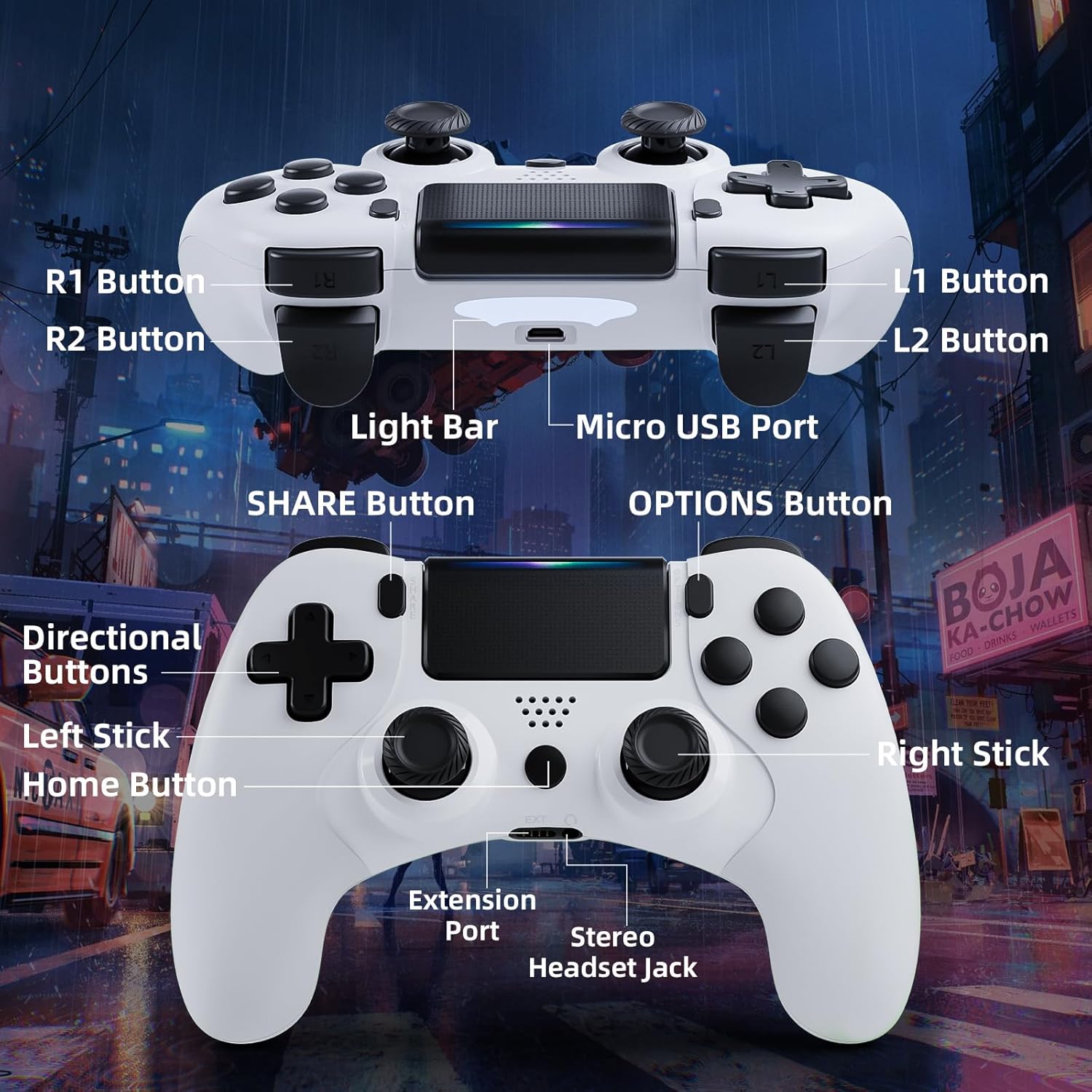
Image: Detailed diagram of the CHEREEKI Wireless Gamepad, highlighting its various buttons and ports for easy identification.
Komponente kontrolera:
- R1 Button: Right shoulder button.
- R2 Button: Right trigger button.
- L1 Button: Left shoulder button.
- L2 Button: Left trigger button.
- Light Bar: Indicates controller status and player number.
- Mikro USB port: For charging and initial wired connection.
- Dugme ZA DIJELJENJE: For sharing gameplay videos and screenshots.
- Dugme OPCIJE: Pristupite menijima i opcijama u igri.
- Smjerni tasteri (D-Pad): Za usmjereni unos.
- Lijevi štap: Analog stick for movement.
- Dugme za početnu stranicu: PS button, for turning on/off the console and accessing the PS menu.
- Desni štap: Analog stick for camera control or aiming.
- Priključak za proširenje: For compatible accessories.
- Stereo Headset Jack: Za povezivanje slušalica.
Setup
1. Initial Connection and Pairing
The controller must be connected via USB cable for the first time to pair with your PS-4 console. This establishes the connection for future wireless use.
- Ensure your PS-4 console is powered on.
- Connect the Micro USB cable to the controller's Micro USB Port and the other end to a USB port on your PS-4 console.
- Pritisnite Home Button (PS button) on the controller. The light bar will flash and then glow steadily, indicating successful pairing.
- Once paired, you can disconnect the USB cable to use the controller wirelessly.
2. Punjenje Gamepad-a
The CHEREEKI Wireless Gamepad features a built-in 600 mAh rechargeable battery.
- Connect the controller to your PS-4 console or a standard USB charger using the Micro USB cable.
- The light bar will slowly pulse orange while charging.
- Punjenje obično traje 2-3 sati za potpuno punjenje.
- Once fully charged, the light bar will turn off.
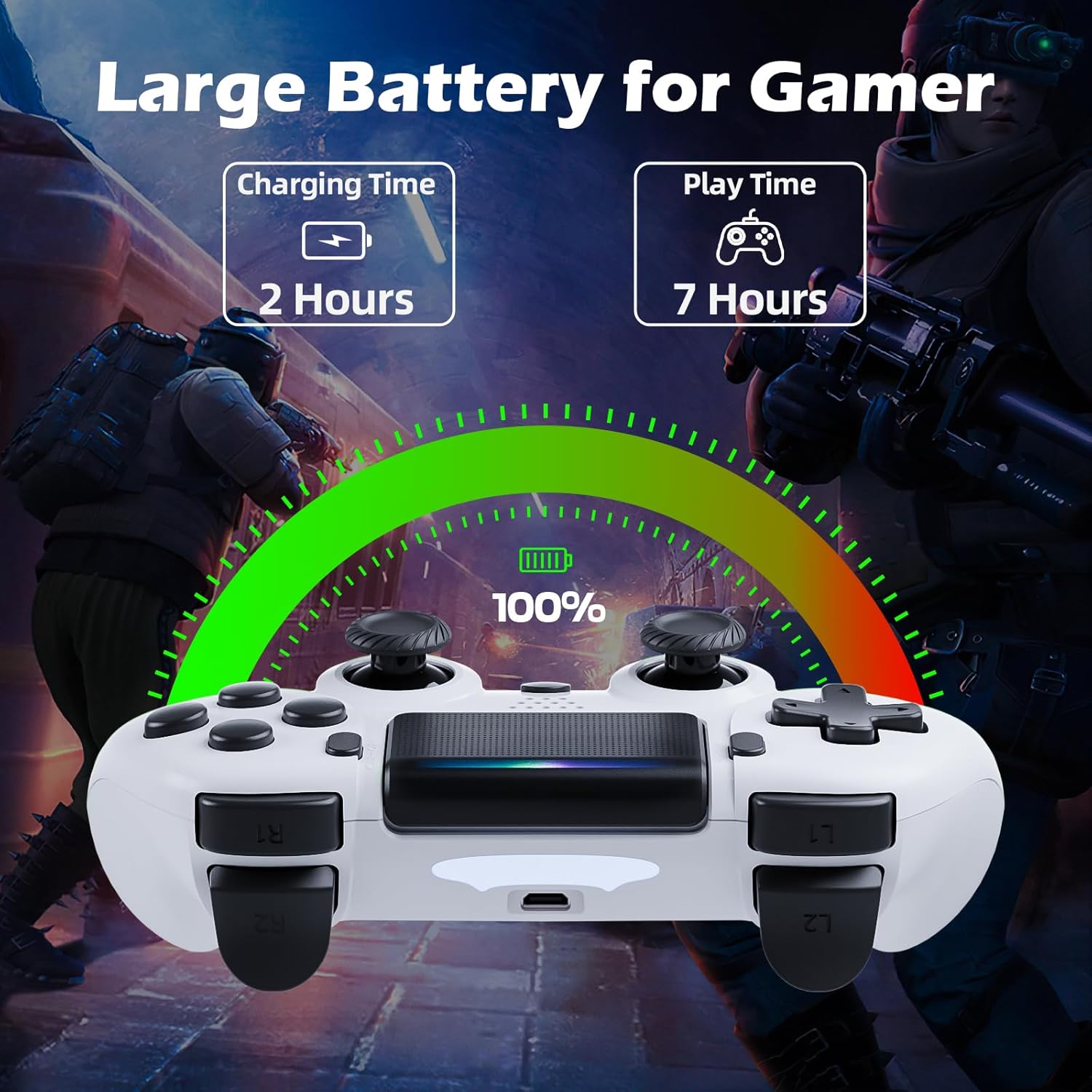
Image: Illustration showing the controller's charging time of 2 hours and play time of 7 hours on a full charge.
3. Kompatibilnost
This controller is compatible with PS-4, PS4 Slim, and PS4 Pro consoles.

Image: Visual representation of the controller's wide compatibility with PS4, PS4 Slim, and PS4 Pro consoles.
Uputstvo za upotrebu
1. Osnovne kontrole
The gamepad features standard PS-4 button layouts for intuitive gameplay.
- Analogne palice: Use the Left Stick for character movement and the Right Stick for camera control or aiming.
- Smjerni tasteri (D-Pad): For precise directional input in menus or specific game actions.
- Dugmad za akcije (trougao, krug, krst, kvadrat): Perform in-game actions as defined by the game.
- Shoulder and Trigger Buttons (L1, L2, R1, R2): Used for various actions like shooting, aiming, or interacting.
2. Motion Sensor (Gyro) Control
The built-in 6-axis motion sensor allows for intuitive control by tilting and rotating the controller.
- In supported games, you can use motion control for actions like steering, aiming, or adjusting viewing angles.
- Experiment with tilting the controller to achieve faster turns, adjust viewing angles, or aim more accurately.

Image: Illustration demonstrating the Gyro Motion Control feature, allowing for faster turning, viewing angle adjustment, and accurate aiming.
3. Double Vibration Feedback
Experience immersive gameplay with the dual motor vibration feature, providing tactile feedback for in-game events.
- The controller will vibrate to simulate impacts, explosions, and other in-game sensations.
- Vibration intensity may vary based on game design.

Image: Illustration of the Double Motor Vibration feature, showing the internal motors that provide immersive haptic feedback during gameplay.
4. Funkcionalnost dodirne table
The integrated touchpad allows for new ways to interact with games and navigate menus.
- Tap, swipe, or click the touchpad as required by specific games or system functions.
5. Dugme SHARE
The SHARE button allows you to easily share your gameplay moments.
- Pritisnite SHARE dugme to access the Share menu, where you can upload screenshots or video clips to social media, or start a broadcast.
6. Stereo Headset Jack
Connect your compatible 3.5mm headset to the Stereo Headset Jack for in-game audio and voice chat.
- Plug your headset into the port located at the bottom of the controller.
- Adjust audio settings via the PS-4 system menu.
7. Ergonomski dizajn
The controller is designed for comfort during extended gaming sessions.

Image: Depiction of the controller's ergonomic design, showing how it comfortably fits the shape of the hand for prolonged use.
Održavanje
Proper care will extend the life of your CHEREEKI Wireless Gamepad.
- čišćenje: Koristite meku, suhu krpu za brisanje kontrolera. Za tvrdokornu prljavštinu, laganoampIsperite krpu vodom. Izbjegavajte jake hemikalije ili abrazivna sredstva za čišćenje.
- Skladištenje: Kontroler čuvajte na hladnom i suhom mjestu, dalje od direktne sunčeve svjetlosti i ekstremnih temperatura.
- Održavanje baterije: To maintain battery health, avoid fully discharging the controller frequently. If storing for a long period, charge the battery to about 50% every few months.
- Rukovanje: Avoid dropping the controller or exposing it to excessive force, which can damage internal components.
Rješavanje problema
If you encounter issues with your gamepad, refer to the following common problems and solutions.
| Problem | Mogući uzrok | Rješenje |
|---|---|---|
| Controller does not connect wirelessly or connection is unstable. | Not properly paired; too far from console; interference. |
|
| Controller does not charge or holds charge for a short time. | Faulty cable; power source issue; battery degradation. |
|
| Dugmad ne reagiraju ili su ljepljiva. | Debris under buttons; physical damage. |
|
| Nema povratne informacije o vibracijama. | Vibration disabled in game/system settings; game does not support vibration. |
|
Specifikacije
| Feature | Detalj |
|---|---|
| Broj modela | STK-4006L |
| Kompatibilnost | PS-4, PS4 Slim, PS4 Pro |
| Povezivanje | Wireless (Bluetooth), Wired (Micro USB) |
| bežični domet | Do 8 metara |
| Vrsta baterije | Ugrađena litijum-jonska baterija |
| Kapacitet baterije | 600 mAh |
| Vrijeme punjenja | Pribl. 2-3 sati |
| Play Time | Do 7 sati |
| Dimenzije (D x Š x V) | 17.4 x 13 x 7.6 cm (približno 6.85 x 5.12 x 2.99 inča) |
| Težina | 210 grama (približno 0.46 lbs) |
| Senzori | 6-osni senzor pokreta (žiroskop, akcelerometar) |
| Vibracije | Vibracija dvostrukog motora |
| Ulaz/Izlaz | Touchpad, Stereo Headset Jack, Extension Port |
Garancija i podrška
For warranty information, please refer to the documentation included with your purchase or visit the official CHEREEKI webstranica. Uslovi i odredbe garancije mogu se razlikovati u zavisnosti od regije i prodavca.
If you require technical support or have questions not covered in this manual, please contact the seller or CHEREEKI customer service through their official channels. Provide your model number (STK-4006L) and a detailed description of your issue for faster assistance.


