1. Uvod i sigurnosne informacije
Thank you for choosing the CHAOKE Exercise Bike Model 520A. To ensure your safety and optimize your workout experience, please read this manual thoroughly before assembly and use. Keep this manual for future reference.
Važna sigurnosna upozorenja:
- Posavjetujte se sa svojim ljekarom prije početka bilo kojeg programa vježbanja.
- Maksimalna težina korisnika za ovaj sobni bicikl je 150 kg (330 lbs).
- The maximum recommended user height is 185 cm.
- Prije svake upotrebe provjerite jesu li svi vijci i matice sigurno zategnuti.
- Držite djecu i kućne ljubimce podalje od opreme tokom rada.
- Postavite sobni bicikl na ravnu, stabilnu površinu.
- Nosite odgovarajuću odjeću i obuću za vježbanje.
- Odmah prestanite s vježbanjem ako osjetite nesvjesticu, vrtoglavicu ili bol.
2. Sadržaj paketa
Carefully unpack all components and verify that you have received all parts listed below. If any parts are missing or damaged, please contact customer support.
- Glavni okvir
- Stabilizatorske šipke (prednje i zadnje)
- Pedale (lijeva i desna)
- Seat Post and Seat
- Handlebar Post and Handlebar
- LCD monitor
- Držač tableta
- Komplet hardvera (vijci, podloške, matice)
- Montažni alati
- Uputstvo za upotrebu
3. Upute za sastavljanje
Assembly typically takes approximately 25 minutes. All necessary tools are included. For a visual guide, scan the QR code in your printed manual for an assembly video tutorial.
Montaža korak po korak:
- Pričvrstite stabilizatorske šipke: Secure the front and rear stabilizer bars to the main frame using the provided bolts and washers. Ensure they are firmly attached for stability.
- Instalirajte pedale: Identify the left (L) and right (R) pedals. The left pedal screws counter-clockwise, and the right pedal screws clockwise. Tighten them securely.
- Montirajte šipku sjedišta i sjedište: Insert the seat post into the main frame and adjust to your desired height. Attach the seat to the seat post.
- Install Handlebar Post and Handlebar: Insert the handlebar post into the main frame. Attach the handlebar to the post and connect any necessary sensor wires to the LCD monitor.
- Attach LCD Monitor and Tablet Holder: Secure the LCD monitor to the handlebar post. Attach the tablet holder above the LCD monitor.

Image: Attaching the front and rear stabilizer bars to the main frame for a stable base.

Image: Correctly installing the left and right pedals onto the crank arms.

Image: Inserting the seat and handlebar posts into their respective slots on the main frame.
4. Komponente proizvoda iznadview
Familiarize yourself with the main parts of your CHAOKE Exercise Bike.
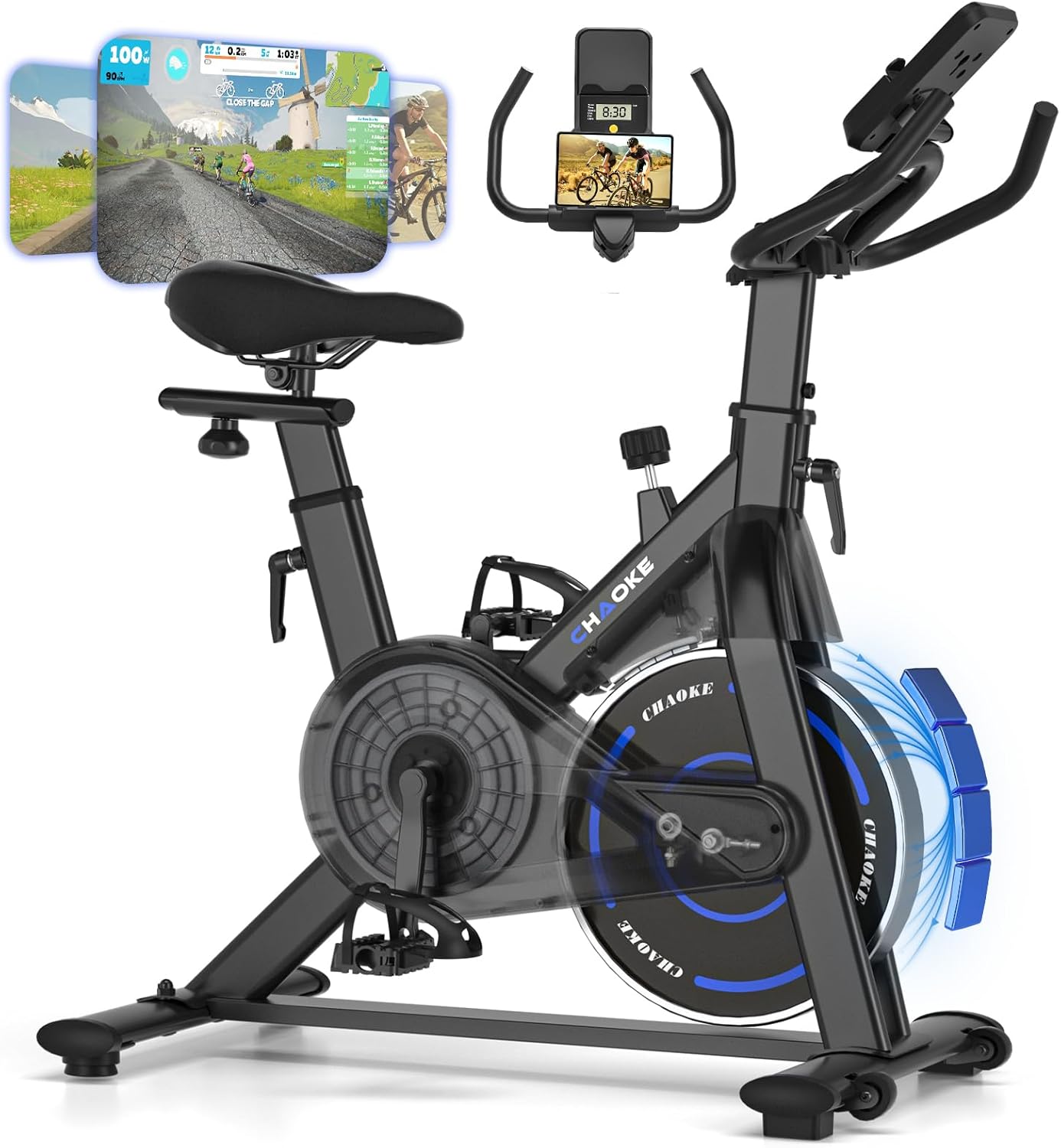
Image: The CHAOKE Exercise Bike Model 520A, showcasing its design and key features like the flywheel, seat, and handlebars.

Image: Detail of the console, featuring the tablet holder for devices and the LCD screen for workout data.
Image: Diagram illustrating the robust, high-density steel pipe construction of the bike frame, ensuring durability and stability.
- Glavni okvir: Constructed from high-density steel for stability and durability.
- Zamašnjak: Provides smooth and consistent resistance.
- Sistem magnetnog otpora: Offers quiet and adjustable resistance levels.
- sjedište: Padded for comfort, adjustable horizontally and vertically.
- Ručice: Multi-grip design, adjustable vertically.
- Pedale: Equipped with adjustable straps for secure foot placement.
- LCD monitor: Displays workout data such as time, speed, distance, and calories.
- Držač tableta: Securely holds your smartphone or tablet for entertainment or app use.
- Dugme za otpor: Used to adjust the intensity of your workout.
5. Initial Setup and Adjustments
Proper adjustment of the seat and handlebars is crucial for comfort and effective exercise.
5.1 Podešavanje sedišta
The seat can be adjusted both vertically (7 positions) and horizontally (forward/backward) to accommodate users between 140 cm and 185 cm in height.
- Vertikalno podešavanje: Loosen the adjustment knob on the seat post, raise or lower the seat to your desired height, and then tighten the knob securely.
- Horizontalno podešavanje: Loosen the knob beneath the seat, slide the seat forward or backward, and then tighten the knob.
5.2 Podešavanje upravljača
The handlebars can be adjusted vertically (5 positions) for optimal comfort.
- Loosen the adjustment knob on the handlebar post.
- Raise or lower the handlebars to a comfortable position that allows for a slight bend in your elbows.
- Čvrsto zategnite dugme.
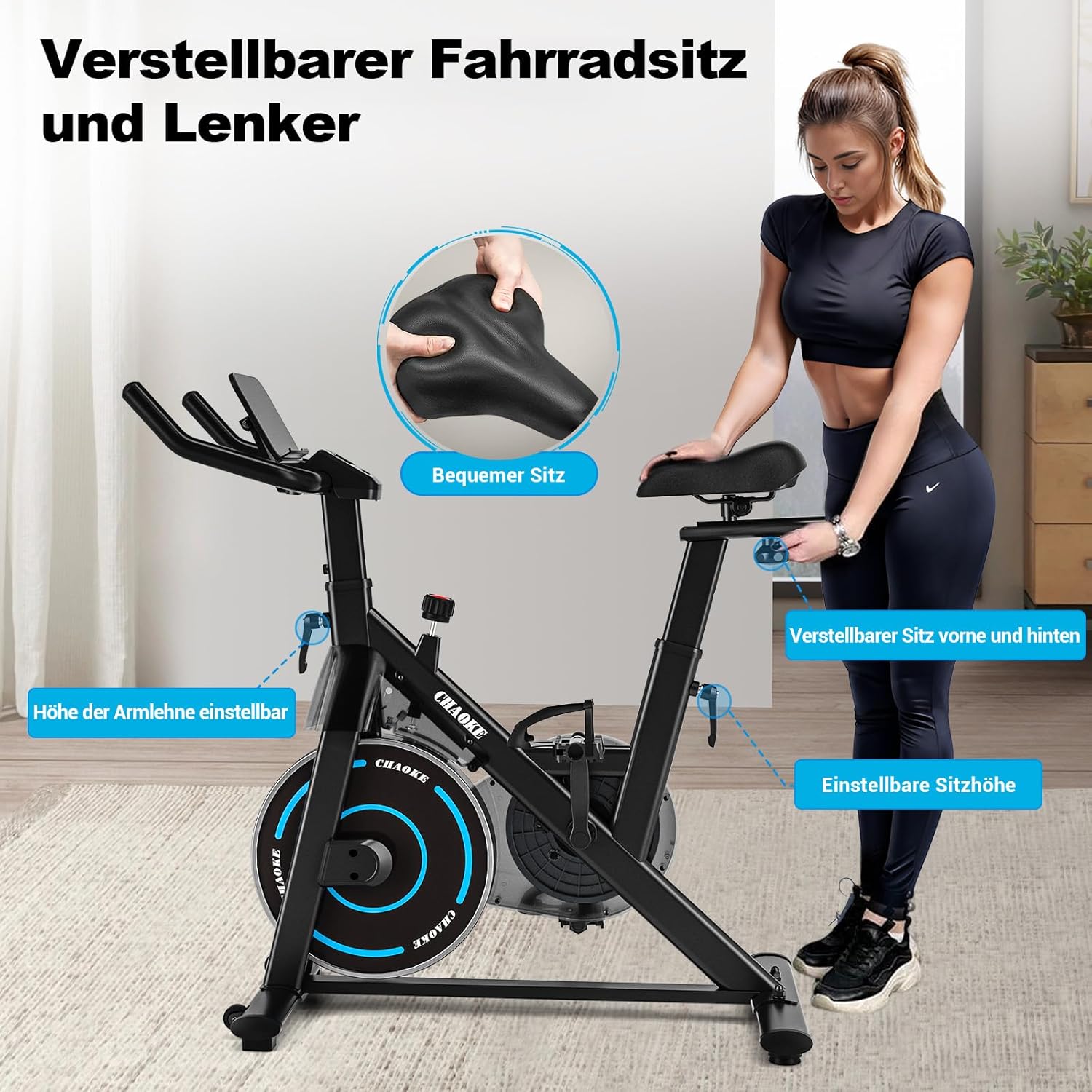
Image: Visual guide demonstrating how to adjust the seat (height and fore/aft) and handlebar height for personalized comfort.
5.3 Pedal Straps
Adjust the pedal straps to ensure your feet are securely in place during your workout. This prevents slipping and ensures efficient power transfer.
5.4 Držač tableta
Place your tablet or smartphone securely in the integrated holder for easy viewing during your exercise session.
6. Upravljanje sobnim biciklom
6.1 Funkcije LCD monitora
The LCD monitor displays key workout metrics:
- VRIJEME: Trajanje vašeg treninga.
- BRZINA: Trenutna brzina bicikliranja.
- RAZDALJINA: Pređena udaljenost tokom vašeg treninga.
- KALORIJE: Procijenjene sagorene kalorije.
The monitor is battery-powered. Ensure batteries are correctly installed if the display is not active.
6.2 Podešavanje otpora
The CHAOKE Exercise Bike features a magnetic resistance system with 0-100% adjustable levels. This system ensures a smooth and quiet operation, typically below 10 decibels.

Image: A user demonstrating the adjustment of the magnetic resistance knob to increase or decrease workout intensity.
- Turn the resistance knob clockwise to increase resistance and make your workout more challenging.
- Turn the resistance knob counter-clockwise to decrease resistance for an easier workout.
- Press the knob down to engage the emergency brake, stopping the flywheel immediately.
6.3 Povezivanje aplikacija (Bluetooth)
This exercise bike supports Bluetooth connectivity, allowing you to sync with fitness applications like Zwift and Kinomap for an enhanced training experience.

Image: The exercise bike integrated with popular fitness applications, displaying virtual cycling routes and workout data.
- Provjerite je li Bluetooth omogućen na vašem pametnom telefonu ili tabletu.
- Download and open your preferred fitness app (e.g., Zwift, Kinomap).
- Follow the app's instructions to connect to your CHAOKE Exercise Bike via Bluetooth.
- Begin your interactive workout.
7. Njega i održavanje
Redovno održavanje osigurava dugotrajnost i optimalne performanse vašeg sobnog bicikla.
- čišćenje: Obrišite bicikl oglasomamp krpom nakon svake upotrebe kako biste uklonili znoj i prašinu. Izbjegavajte abrazivna sredstva za čišćenje.
- Provjerite vijke i matice: Periodically inspect all bolts, nuts, and connections to ensure they are tight. Tighten if necessary.
- Pedale: Check pedals for any signs of wear or looseness.
- Skladištenje: Bicikl čuvajte na suhom i hladnom mjestu, dalje od direktne sunčeve svjetlosti i ekstremnih temperatura.
8. Otkrivanje problema
Ako naiđete na bilo kakve probleme, pogledajte sljedeće uobičajene probleme i rješenja:
| Problem | Mogući uzrok | Rješenje |
|---|---|---|
| LCD ekran ne radi | Dead batteries or loose connection. | Replace batteries. Check sensor wire connections to the monitor. |
| Otpor se ne mijenja | Resistance mechanism issue or knob not properly engaged. | Ensure the resistance knob is fully functional. Contact customer support if the issue persists. |
| Neobična buka tokom rada | Loose bolts, friction, or internal component issue. | Check and tighten all assembly bolts. Ensure the bike is on a level surface. If noise persists, contact customer support. |
| Greška Bluetooth veze | Bluetooth nije omogućen, problemi s aplikacijom ili smetnje. | Ensure Bluetooth is on. Restart the app and your device. Move closer to the bike. |
9. Tehničke specifikacije
| Feature | Specifikacija |
|---|---|
| Broj modela | 520A |
| Brand | CHAOKE |
| Dimenzije (D x Š x V) | 101 x 49.5 x 110 cm |
| Težina proizvoda | 20 kilograma |
| Maksimalna težina korisnika | 150 kilograma (330 lbs) |
| Maximum Recommended User Height | 185 centimetara |
| Mehanizam otpora | Magnetic |
| Drive System | Pojas |
| Nivo buke | Ispod 10 dB |
| Izvor napajanja | Battery Powered (for LCD) |
| Posebne karakteristike | Padded seat, Speedometer, App connectivity, Adjustable resistance level, Tablet holder |
| Materijal | High-density Steel, Plastic |
10. Garancija i korisnička podrška
Informacije o garanciji
CHAOKE offers a 5 godine garancije on this exercise bike, ensuring confidence in your purchase and use. Please retain your proof of purchase for warranty claims.
Korisnička podrška
Our professional customer service team is available to assist you with any questions or concerns. If you require technical support or have inquiries regarding assembly, operation, or maintenance, please do not hesitate to contact us. Our technicians can also provide professional video support if needed.
For support, please refer to the contact information provided on your purchase receipt or the official CHAOKE website.


