1. Proizvod je gotovview
The suptek MD01ABP Single Monitor Mount is an adjustable gas spring desk mount designed to enhance your ergonomic workspace. It supports most screens from 13 to 32 inches, weighing between 4.4 and 19.8 lbs (2-9 kg), and is compatible with VESA mounting patterns of 75x75mm or 100x100mm.
This monitor arm provides extensive adjustability, including 360° rotation, ±80° tilt (up and down), and ±90° swivel (left and right), allowing you to position your screen for optimal viewing comfort and to reduce neck and shoulder fatigue.

Image 1: suptek MD01ABP Monitor Mount showcasing load capacity (2-9kg), screen size compatibility (13"-32"), and VESA patterns (75x75/100x100mm).
2. Sigurnosne informacije
- Pažljivo pročitajte sva uputstva: Before installation and use, read the entire instruction manual to ensure proper assembly and operation.
- Kapacitet težine: Do not exceed the maximum load capacity of 19.8 lbs (9 kg). Overloading can result in serious injury or product damage.
- Veličina monitora: Ensure your monitor is within the recommended size range of 13-32 inches.
- VESA kompatibilnost: Verify your monitor has VESA mounting holes of 75x75mm or 100x100mm. If not, a VESA adapter (not included) may be required.
- Debljina stola: C-clamp and grommet base options fit desks up to 100mm thickness. Ensure your desk is sturdy enough to support the combined weight of the mount and monitor.
- Upozorenje na plinske opruge: The gas spring is under high pressure. Do not attempt to disassemble the gas spring arm. Adjust tension only after the monitor is installed.
- Sigurna instalacija: Ensure all bolts and screws are securely tightened. Do not overtighten.
- djeca: Keep children away from the product during installation. Small parts may be a choking hazard.
3. Sadržaj paketa
Verify that all components are present and undamaged before assembly. If any parts are missing or damaged, contact customer service.
- Sklop kraka za monitor
- C-Clamp Baza
- Grommet Base (optional)
- VESA tanjir
- Hardware Kit (various screws, washers, Allen wrenches)
- Uputstvo za upotrebu

Image 2: All components of the suptek MD01ABP Single Monitor Mount, including the arm, clamp, and VESA plate.
4. Postavljanje i instalacija
The suptek MD01ABP monitor mount offers two installation options: C-clamp and grommet mount. Choose the method best suited for your desk.
4.1 Choose Installation Method

Image 3: Illustration of the C-Clamp and Grommet Mount installation options, showing desk thickness compatibility.
4.2 C-Clamp Instalacija
- Pričvrstite C-clamp to the edge of your desk. Ensure the desk thickness is between 10-70mm.
- Zategnite C-clamp zašrafljajte dok baza ne bude sigurno pričvršćena za stol.
4.3 Grommet Mount Installation (Optional)
- If your desk has a grommet hole, ensure its diameter is between 10-60mm.
- Rastavite C-clamp and use the grommet base components to secure the mount through the desk hole.
- Tighten the grommet screw from underneath the desk until the base is stable.
4.4 Pričvršćivanje monitora
- Attach the VESA plate to the back of your monitor using the appropriate screws and washers from the hardware kit. Ensure the VESA pattern (75x75mm or 100x100mm) matches your monitor.
- Slide the assembled monitor (with VESA plate) onto the monitor arm's head. Ensure it clicks securely into place.
- Tighten the security screw on the VESA plate to prevent accidental detachment.
Video 1: Detailed installation guide for the suptek Single Monitor Arm Desk Mount.
5. Rad i podešavanja
The gas spring arm allows for smooth and effortless adjustments to your monitor's position.
5.1 Full Range of Motion
- Podešavanje visine: Push the gas arm up or down with one hand to stop at any desired height.
- rotacija: Okrenite monitor za 360° za pejzažni ili portretni prikaz viewing.
- Nagib: Tilt the screen ±80° up or down to reduce glare and optimize viewing angles.
- Okretni: Swivel the monitor ±90° left or right to share your screen or adjust your position.
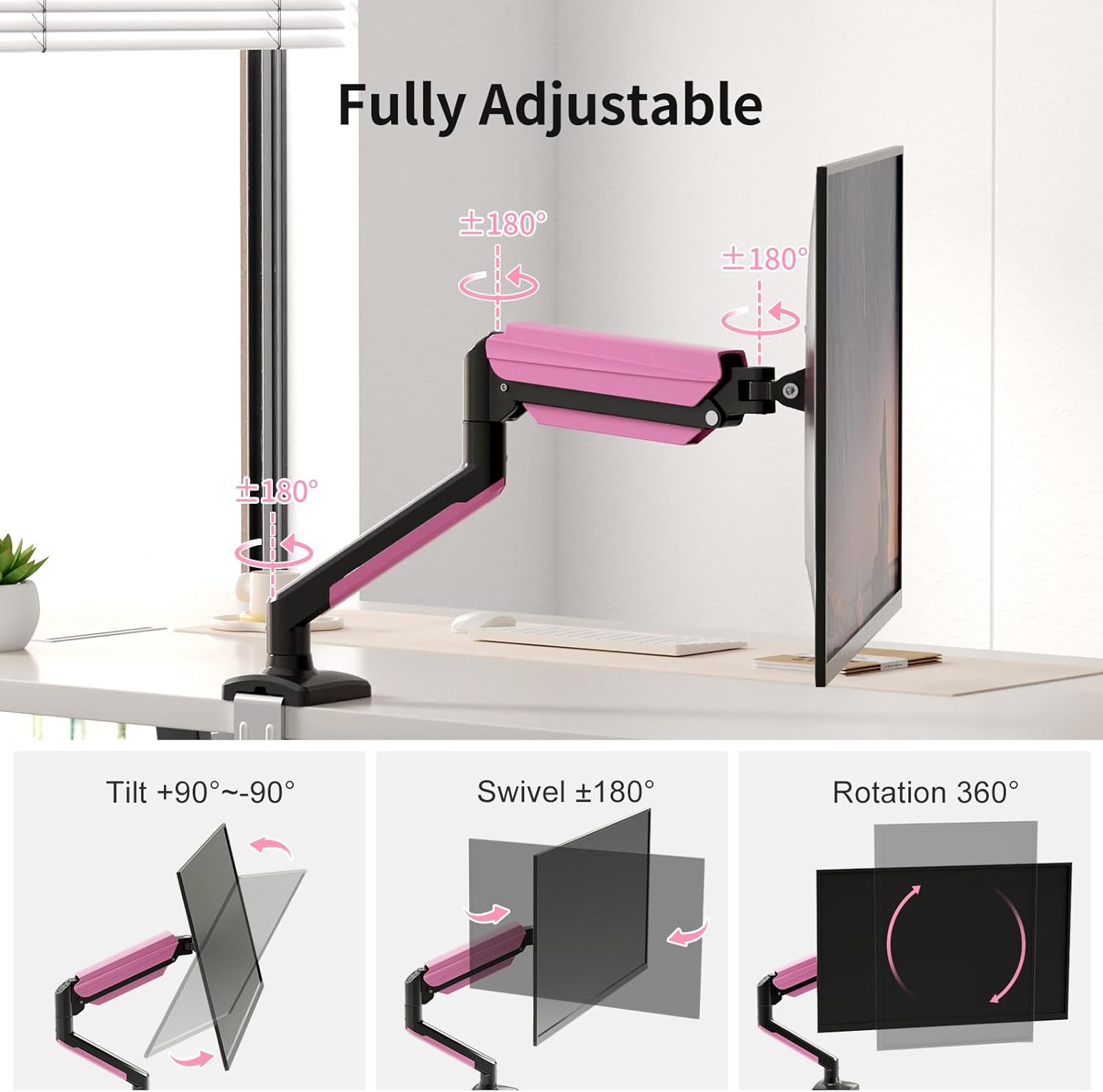
Image 4: The monitor arm demonstrating its full range of motion, including 360° rotation, ±180° swivel, and ±180° tilt.
5.2 Podešavanje napetosti plinske opruge
The gas spring tension needs to be adjusted according to your monitor's weight to ensure it holds its position correctly.
- If the monitor arm falls down, turn the inside screw counter-clockwise (towards the "+" direction) to increase gas spring tension until the arm stays as intended.
- If the monitor arm rises up or cannot be pressed down, turn the inside screw clockwise (towards the "-" direction) to decrease gas spring tension until the arm stays as intended.
- Napomena: Obavezno držite ruku u horizontalnom položaju tokom podešavanja.

Slika 5: Krupni plan view of the gas spring adjustment mechanism on the suptek monitor arm, indicating '+' for increasing tension and '-' for decreasing napetost.
Video 2: Short demonstration of the suptek Single Gas Spring Monitor Arm Desk Mount in action.
6. Upravljanje kablovima
The monitor arm features integrated cable management to keep your workspace tidy and organized. Route your monitor cables through the designated channels on the arm to prevent clutter and tangles.

Image 6: The monitor arm demonstrating its integrated cable management system, keeping wires neat and free from entanglement.
7. Održavanje
- čišćenje: Obrišite krak monitora mekom,amp tkanina. Izbjegavajte korištenje abrazivnih sredstava za čišćenje ili otapala.
- Periodične kontrole: Regularly check all screws and connections to ensure they remain tight and secure. Re-tighten if necessary.
- Plinska opruga: Do not attempt to lubricate or service the internal gas spring mechanism.
8. Otkrivanje problema
- Monitor not holding position: Adjust the gas spring tension as described in Section 5.2. Ensure your monitor's weight is within the specified range (4.4-19.8 lbs).
- Arm too stiff/loose: Adjust the gas spring tension using the provided Allen wrench.
- Monitor se ljulja: Check all mounting screws and connections for tightness. Ensure the desk mount is securely fastened to the desk.
9. Specifikacije
| Feature | Specifikacija |
|---|---|
| Brand | suptek |
| Model | MD01ABP |
| Kompatibilnost veličine ekrana | 13 - 32 inča |
| Kapacitet opterećenja | 4.4 - 19.8 funti (2 - 9 kg) |
| VESA kompatibilnost | 75x75mm, 100x100mm |
| Ugao nagiba | ±80° |
| Ugao okretanja | ±90° |
| Rotacija | 360° |
| Vrsta montaže | Nosač za sto (C-clamp & Grommet) |
| Debljina stola (C-clamp) | 10-70mm |
| Debljina stola (ušica) | 10-70mm |
| Prečnik otvora za ušicu | 10-60mm |
| Materijal | legirani čelik |
10. Garancija i podrška
For warranty information and customer support, please refer to the documentation included with your product or contact suptek customer service directly. Keep your purchase receipt for warranty claims.


