Uvod
The MEFERI MS300R is a versatile finger-worn barcode scanner designed for efficient and hands-free data capture. Equipped with an EM3596 scan engine, it offers swift recognition of various 1D and 2D barcodes, including those that are worn or dirty. Its compact and lightweight design, coupled with NFC and Bluetooth 5.0 connectivity, makes it an ideal solution for diverse environments such as retail, warehousing, and libraries. This manual provides detailed instructions for setting up, operating, maintaining, and troubleshooting your MS300R scanner to ensure optimal performance.
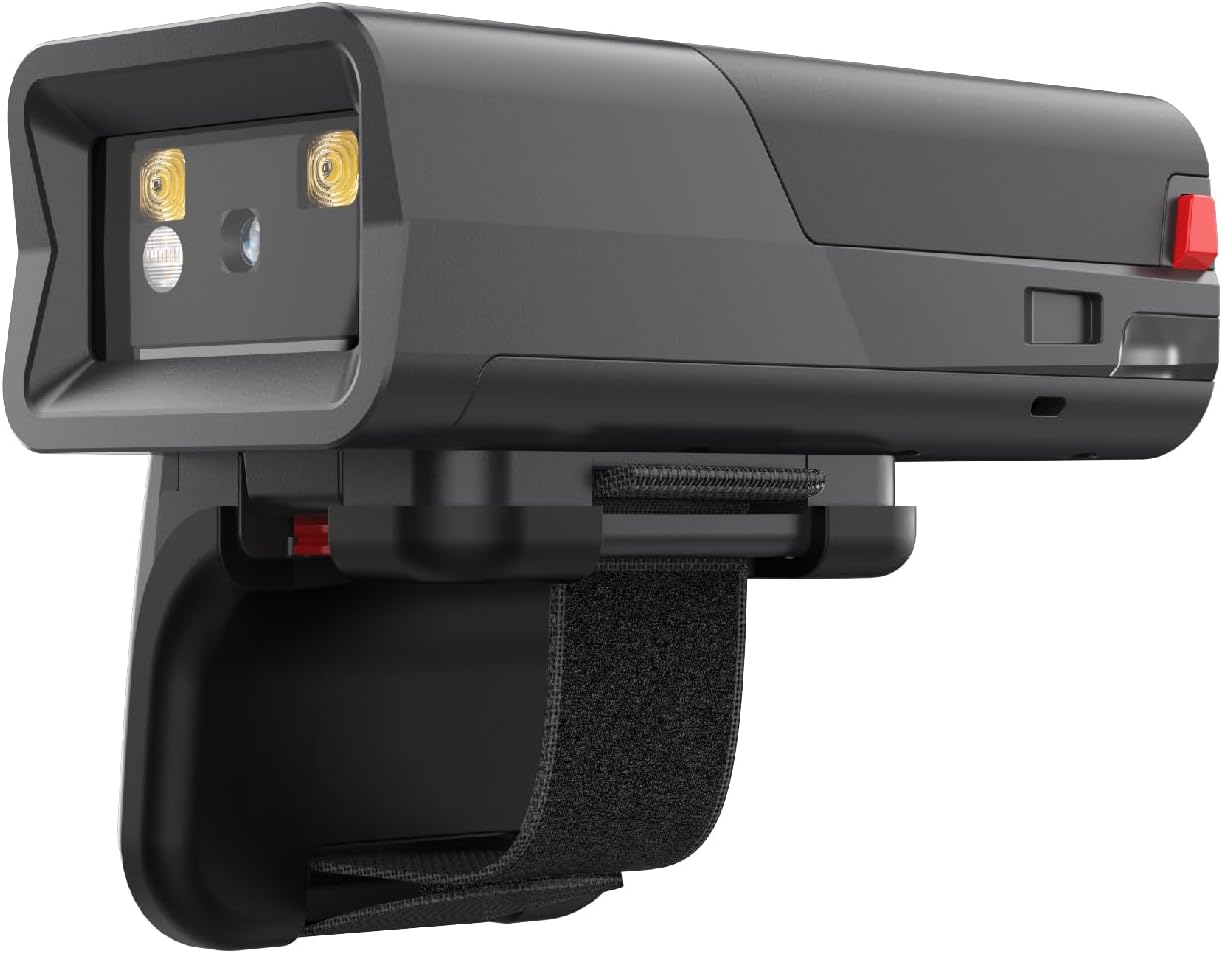
Figure 1: MEFERI MS300R Finger Scanner
The MEFERI MS300R is a compact and ergonomic finger-worn barcode scanner, designed for comfortable and efficient hands-free operation. Its sleek black casing houses advanced scanning technology, making it suitable for various professional environments.
Setup
1. Početno punjenje
Before first use, fully charge the MS300R scanner. Connect the scanner to a power source using the provided USB cable. A full charge takes approximately 1.5 hours. The 1000mAh battery provides over 16 hours of continuous use in HID mode.

Figure 2: Battery and Runtime Information
This image illustrates the long endurance of the MS300R, highlighting its 1000mAh battery and over 16 hours of runtime, ensuring extended operation for inventory or other tasks.
2. Uparivanje skenera
The MS300R supports multiple connection methods and operating systems.
Bluetooth Pairing (HID, SPP, BLE Modes)
- HID način rada: For general use with iOS, Android, and Windows devices. Simply click to connect from your device's Bluetooth list.
- SPP & BLE Modes: Primarily for Android and Windows (SPP only). For Android, these modes require the ScanWizard app for direct connection and full functionality.
NFC One-Touch Easy Pair (Android Only)
For NFC-enabled Android devices, simply touch the MS300R to your device to instantly establish a connection. This feature streamlines the pairing process, eliminating the need for manual Bluetooth searching.

Figure 3: Supported Operating Systems and Pairing Methods
This image demonstrates the MS300R's compatibility with iOS, Android, and Windows via Bluetooth, and its convenient NFC pairing feature specifically for Android devices.
Video 1: MS300R Ring Scanner - NFC Instant Pairing
This video demonstrates the quick and seamless NFC instant pairing feature of the MS300R ring scanner, allowing for immediate connection with compatible devices.
Uputstvo za upotrebu
1. Skeniranje bar kodova
The MS300R is designed for efficient scanning of 1D and 2D barcodes, including UPC/EAN/ISBN/ISSN/Code 39/Code128/Matrix 2 of 5/UCC, etc. Its optimized optical visualization allows it to excel even with worn or dirty barcodes.

Figure 4: Professional Scan Engine Capabilities
This image highlights the MS300R's professional scan engine, capable of quickly decoding various 1D and 2D barcodes, even those that are partially obscured or damaged.
Video 2: MS300R Ring Scanner - Smart Decoding
This video showcases the smart decoding capabilities of the MS300R, demonstrating its ability to accurately read damaged or dirty barcodes for superior data capture.
2. Hands-Free Operation
The MS300R features a unique, removable scan button, allowing for both left and right-hand use. Its tiny and virtually weightless design ensures your hands remain free, significantly increasing job efficiency. For enhanced versatility, the scanner can be integrated with compatible gloves (Right-hand: B0DDKSMLLQ, Left-hand: B0DK88L2C5) that include their own scan function.

Figure 5: Hands-Free Design with Removable Scan Button
This image displays the MS300R's innovative design, featuring a removable scan button for adaptable left or right-handed use, promoting hands-free operation.
Video 3: MS300R Ring Scanner - Comfortable Glove
This video demonstrates the comfortable glove accessory for the MS300R, enhancing hands-free performance and efficiency in various work environments.
3. ScanWizard App (Android Only)
The ScanWizard app is exclusively for Android devices and provides advanced settings and data formatting options for your MS300R scanner. You can obtain the app installation package by contacting MEFERI support.
- Promjena načina rada: Go to ScanWizard app -> Offline Settings -> Click to scan and switch modes (BLE, HID, SPP).
- Data Formatting: Add prefixes and suffixes to barcodes via ScanWizard app -> Data Formatting -> Basic Data Formatting settings.

Figure 6: ScanWizard App Interface
This image shows the ScanWizard app, which is available for Android devices and allows users to set various scan header parameters for the MS300R.

Figure 7: QR Codes for Switching Modes
This image displays QR codes that can be scanned to set up the three different modes (SPP, HID, BLE) for the MS300R scanner, simplifying mode configuration.
Održavanje
1. Upravljanje baterijom
The MS300R is equipped with a 1000mAh Lithium Ion battery. To maximize battery life and ensure consistent performance:
- Charge the device fully before each shift or extended use.
- Typical continuous use times on a full charge are:
- HID Mode: 16 hours (EM3596 engine) / 18.4 hours (Zebra 4107 engine)
- SPP Mode: 15.6 hours
- BLE Mode: 16.4 hours (EM3596 engine) / 20 hours (Zebra 4107 engine)
- Avoid extreme temperatures during charging and operation.
2. Izdržljivost i zaštita
The MS300R is built for robust environments. It features IP54 sealing for protection against dust and splashes, and is designed to withstand drops from up to 1.5 meters. A special frame protects the scanner module's glass from damage.

Figure 8: Rugged and Reliable Design
This image highlights the MS300R's robust construction, featuring IP54 sealing and 1.5m drop resistance, indicating its ability to withstand tough working conditions.
Rješavanje problema
Uobičajeni problemi i rješenja
| Issue | Mogući uzrok / rješenje |
|---|---|
| Cannot scan the first digit of a barcode. | This may be due to the checksum switch for the barcode type being turned off. Scan the QR code to adjust settings or contact MEFERI support for assistance. |
| Skener se ne povezuje putem Bluetootha. | Ensure the scanner is in the correct Bluetooth mode (HID, SPP, or BLE) for your device. Verify Bluetooth is enabled on your host device and the scanner is discoverable. For SPP/BLE on Android, ensure the ScanWizard app is installed and used for connection. |
| Kratko trajanje baterije. | Ensure the device is fully charged (approx. 1.5 hours). Operating in certain modes or continuous scanning may consume more power. Check battery health and contact support if issues persist. |
Specifikacije
| Feature | Detalj |
|---|---|
| Broj modela | MS300R-WN3ANSST |
| Dimenzije (D x Š x V) | 2.7 x 1.4 x 0.9 inča |
| Težina artikla | 2.72 unce |
| Scan Engine | EM3596 (also compatible with Zebra SE4107) |
| Vrste barkodova | 1D & 2D (UPC/EAN/ISBN/ISSN/Code 39/Code128/Matrix 2 of 5/UCC, etc.) |
| Povezivanje | Bluetooth 5.0 (BLE, HID, SPP), NFC |
| Baterija | 1000mAh litijum-jonska (uključena) |
| Vrijeme punjenja | Pribl. 1.5 sati |
| Operativni sistem | Linux |
| Procesor | Qualcomm QCC3034 |
| Memorija | 256KB RAM, 4MB FLASH |
| Trajnost | IP54 Sealing, 1.5m Drop Resistant |
| Kompatibilni sistemi | Android, iOS, Windows |
| Proizvođač | MEFERI |
| Zemlja porijekla | Kina |
Garancija i podrška
Informacije o garanciji
The repair period for MEFERI products is 12 months after shipment. Please retain your proof of purchase for warranty claims.
Tehnička podrška
For technical assistance, including obtaining the ScanWizard app installation package or resolving specific scanning issues, please do not hesitate to contact MEFERI support. An SDK is also available for developers upon request.
MEFERI products adhere to high-quality standards and possess certifications such as AER, GMS, CE, ROHS, FCC, MSDS, UN38.3, ICE, and ISO9001, ensuring reliability and compliance.
Dodatni resursi
Video snimci proizvoda
Video 4: MS300R Ring Scanner - Ultimate Scanning Features
Ovaj video daje krajview of the ultimate scanning features of the MS300R ring scanner, showcasing its capabilities in various scenarios.
Video 5: ME10 and MS300R Wearable Computer Integration
This video demonstrates the integration of the MS300R ring scanner with the ME10 wearable computer, showcasing a comprehensive solution for mobile data capture.


