1. Uvod
This manual provides essential information for the safe and efficient operation of your VISION VP-621 4K Ultra HD Multimedia Projector. Please read this manual thoroughly before using the projector and retain it for future reference.
The VISION VP-621 is a versatile smart projector featuring 4K Ultra HD support, 11000 lumens brightness, 5G WiFi, Bluetooth 5.0, Auto Focus, Wireless Miracast, and an integrated Android 9.0 operating system. It is designed for various applications including home entertainment, business presentations, and educational purposes.
2. Sigurnosne informacije
- Ne blokirajte ventilacijske otvore. Osigurajte dovoljan protok zraka oko projektora kako biste spriječili pregrijavanje.
- Ne gledajte direktno u sočivo projektora kada je lamp je uključeno. Jarko svjetlo može uzrokovati oštećenje oka.
- Postavite projektor na stabilnu, ravnu površinu kako biste spriječili njegov pad.
- Držite projektor dalje od vode, vlage i ekstremnih temperatura.
- Koristite samo adapter za napajanje koji dolazi s projektorom.
- Ne pokušavajte sami otvarati ili popravljati projektor. Za sve servisne radove obratite se kvalifikovanom osoblju.
- Isključite projektor iz struje tokom oluje sa grmljavinom ili kada ga ne koristite duži period.
3. Sadržaj paketa
Provjerite da li se u vašem paketu nalaze sve dolje navedene stavke:
- VISION VP-621 Projector
- Kabl za napajanje
- Adapter
- Daljinski upravljač
- AV kabel
- Poklopac sočiva projektora
4. Proizvod je gotovview
Familiarize yourself with the main components and interfaces of your VISION VP-621 projector.

Slika: Prednja i bočna view of the VISION VP-621 projector, showcasinzbog njegovog kompaktnog dizajna i objektiva.
4.1 Prednja i gornja ploča
- Projekciono sočivo: Emituje sliku.
- Infracrveni prijemnik: Za signale daljinskog upravljanja.
- Kontrolna dugmad: Power, Navigation (OK, Up, Down, Left, Right), Back.
- Ventilacijske rešetke: For cooling the internal components.

Slika: Vrh view of the projector highlighting the integrated control buttons for power and navigation.
4.2 Rear Panel and Connectivity Ports
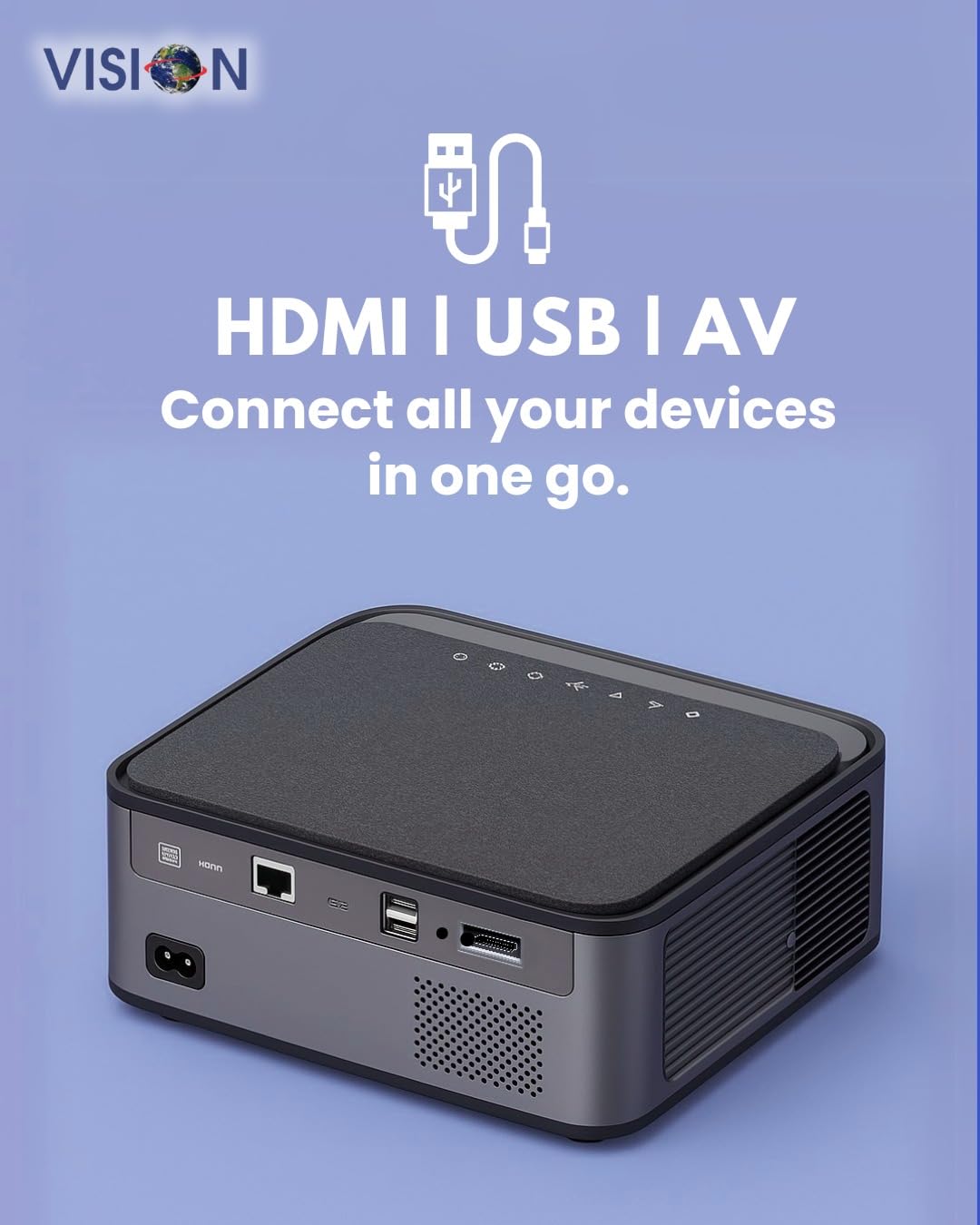
Slika: Stražnja strana view of the projector displaying the various input and output ports, including HDMI, USB, and AV.
- Ulazna snaga: Ovdje povežite strujni adapter.
- HDMI priključak: Connect to HDMI-enabled devices (laptops, gaming consoles, streaming sticks).
- USB portovi (x2): Povežite USB diskove za reprodukciju medija ili eksterne uređaje.
- AV ulaz: Connect to older devices using the provided AV cable.
- Audio izlaz (3.5 mm): Spojite vanjske zvučnike ili slušalice.
- LAN port: For wired internet connection (if available).
5. Podešavanje
5.1 Postavljanje projektora
Choose a flat, stable surface for the projector. Ensure there are no obstructions in front of the lens and that the ventilation grilles are clear.

Image: A projector positioned on a desk, illustrating a typical setup environment.
5.2 Priključak za napajanje
- Spojite adapter za napajanje na ulazni priključak za napajanje projektora.
- Uključite kabl za napajanje u zidnu utičnicu.
- Indikatorska lampica napajanja na projektoru će se upaliti.
5.3 Početno uključivanje
- Pritisnite dugme za napajanje na projektoru ili daljinskom upravljaču da ga uključite.
- Projektor će se pokrenuti i prikazati početni ekran Androida 9.0.
5.4 Fokus i podešavanje trapezoidne korekcije
The VISION VP-621 features automatic focus and 4D keystone correction for a clear and properly aligned image.

Image: Illustrates the projector's automatic focus and keystone correction capabilities, ensuring a sharp and aligned picture.
- Auto Focus: The projector will automatically adjust the focus for a sharp image upon startup or movement.
- 4D Keystone korekcija: The projector automatically corrects image distortion when placed at an angle. Manual adjustments may be available in the settings menu if needed.
6. Uputstvo za upotrebu
6.1 Android 9.0 Smart OS
The integrated Android 9.0 system allows direct access to streaming services and apps.
- Navigacija: Use the remote control's directional buttons and "OK" button to navigate the interface.
- Instalacija aplikacije: Access the Google Play Store to download and install applications like YouTube, Netflix, and Prime Video.
- Mrežna veza: Go to Settings > Network to connect to a 5G WiFi network or a wired LAN connection.
6.2 Povezivanje vanjskih uređaja
HDMI veza
- Connect an HDMI cable from your device (laptop, gaming console, Fire TV Stick) to the HDMI port on the projector.
- On the projector's home screen, select the HDMI input source.
USB veza
- Insert a USB drive into one of the USB ports on the projector.
- The projector will typically prompt you to open the media player or file browser. If not, navigate to the file manager app on the Android home screen.
AV veza
- Connect the provided AV cable to the AV input port on the projector and to your external device.
- Select the AV input source on the projector.
Bluetooth 5.0 Audio Output
- Go to Settings > Bluetooth on the projector.
- Omogućite Bluetooth i potražite dostupne uređaje.
- Select your Bluetooth speaker or headphones from the list to pair and connect.
Wireless Miracast (Screen Mirroring)
Miracast allows you to wirelessly mirror the screen of your compatible smartphone, tablet, or laptop.
- On the projector's home screen, select the "Miracast" or "Screen Mirroring" application.
- On your mobile device, enable screen mirroring (often found in quick settings or display settings, named "Cast," "Smart View," "Wireless Display," etc.).
- Izaberite projektor sa liste dostupnih uređaja da biste uspostavili vezu.
7. Održavanje
7.1 Čišćenje projektora
- Objektiv: Koristite meku krpu bez dlačica, posebno dizajniranu za optička sočiva. Ne koristite abrazivna sredstva za čišćenje.
- Casing: Obrišite projektor casinObrišite mekom, suhom krpom. Za tvrdokornu prljavštinu, laganoampnavlažite krpu vodom, a zatim obrišite suhom krpom.
- ventilacija: Regularly check and clean the ventilation grilles to ensure proper airflow and prevent dust buildup. Use a soft brush or compressed air.
7.2 Lamp Život
The VISION VP-621 utilizes advanced LED technology, providing an estimated lamp vijek trajanja do 50,000 sati. Ovo značajno smanjuje potrebu za lamp replacement compared to traditional projectors.
8. Otkrivanje problema
| Problem | Mogući uzrok | Rješenje |
|---|---|---|
| Nema prikazane slike |
|
|
| Zamućena slika |
|
|
| Nema zvuka |
|
|
| Nije moguće povezati se na Wi-Fi |
|
|
9. Specifikacije
| Brand | VIZIJA |
| Naziv modela | VP-621 AN |
| Display Technology | LCD |
| Display Type | LED |
| Osvetljenost | 11000 lumena |
| Odnos kontrasta slike | 18000:1 Pixels |
| Native Resolution | 1920 x 1280 (Full HD) |
| Podržana rezolucija | Do 4K Ultra HD-a |
| Aspect Ratio | 16:9, 4:3 |
| Operativni sistem | Android 9.0 |
| Tehnologija povezivanja | Bluetooth 5.0, HDMI, USB, Wi-Fi (5G) |
| Hardversko sučelje | Bluetooth 5, HDMI, USB 3.0 |
| Posebne karakteristike | Built-In 3D, Built-In Cooling System, Built-In Speaker, Electric Focus, Wi-Fi Ready, Auto Focus, 4D Keystone Correction, Wireless Miracast |
| Dimenzije proizvoda | 30 x 18 x 7 cm |
| Težina artikla | 8 kg |
| Lamp Život | Do 50,000 sati |

Image: Illustrates the projector's Full HD (1920x1080) resolution capability for crisp visuals.

Image: Highlights the projector's 11000 lumens brightness, ensuring clear visuals in various lighting conditions.
10. Garancija i podrška
For warranty information and technical support, please contact the manufacturer:
- Proizvođač: Scorpio Infosolutions
- Lokacija: Delhi, India
- Telefon: +91-7982647130
- Webstranica: visionsheen.in
Please have your product model (VP-621) and purchase details ready when contacting support.


