1. Uvod
The APC Smart-UPS SMT750C is an Uninterruptible Power Supply (UPS) designed to provide reliable power and surge protection for critical electronic equipment. This unit offers 750VA/500W of line-interactive pure sine wave power, making it suitable for servers, storage systems, network closets, business VoIP setups, desktop computers, and retail POS systems. It features Automatic VoltagRegulacija (AVR) za korekciju volumenatage fluctuations and a SmartConnect Ethernet Port for cloud-based remote monitoring. This manual provides essential information for the safe and efficient installation, operation, and maintenance of your SMT750C UPS.
2. Sigurnosne informacije
WARNING: Risk of electric shock. Refer to bottom of unit for warnings.
- Prije instalacije i rada pažljivo pročitajte sva uputstva.
- Ovaj UPS sadrži interne baterije i može predstavljati opasnost od strujnog udara čak i kada je isključen iz izvora izmjenične struje.
- Ne otvarajte niti rastavljajte UPS. Unutra nema dijelova koje korisnik može sam servisirati osim baterije.
- Spojite UPS samo na uzemljenu utičnicu.
- Ne koristite UPS na direktnoj sunčevoj svjetlosti, u blizini izvora topline ili u područjima s prekomjernom vlagom.
- Osigurajte odgovarajuću ventilaciju oko UPS-a. Ne blokirajte ventilacijske otvore.
3. Sadržaj paketa
Prilikom raspakivanja provjerite da li su svi artikli prisutni:
- APC Smart-UPS SMT750C Unit
- 16GB USB 3.0 Drive
- Korisnički priručnik (ovaj dokument)
- USB komunikacijski kabel
- Kabl za napajanje

Image: Included 16GB USB 3.0 Drive. This USB drive provides additional storage or file transferne mogućnosti.
4. Proizvod je gotovview
Prednja ploča
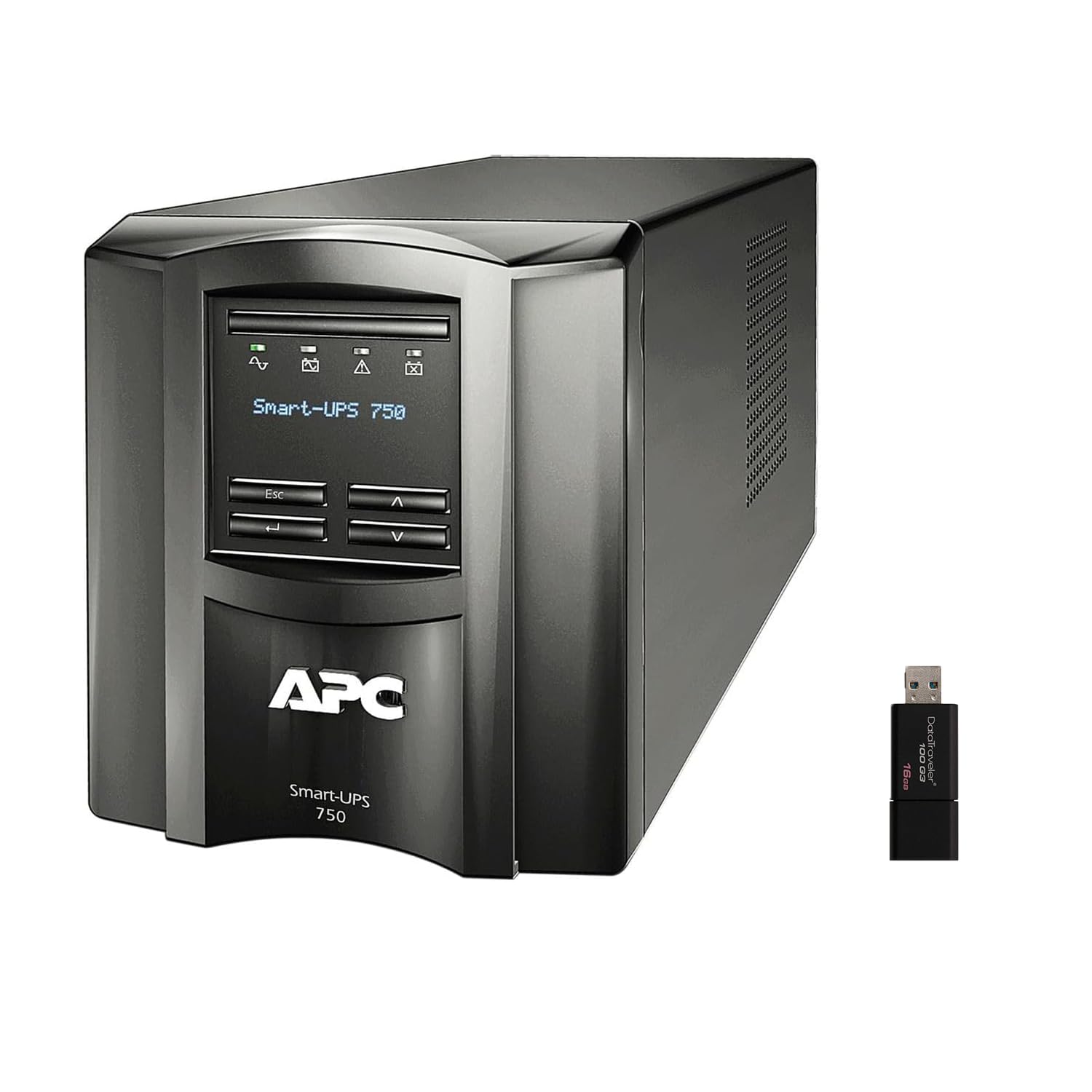
Slika: Prednja i bočna view of the APC Smart-UPS SMT750C. This image displays the compact tower design of the UPS unit.
- Dugme za napajanje: Kontrolira glavno napajanje UPS-a.
- LCD ekran: Provides real-time status information, load levels, battery charge, and estimated runtime.
- Navigacijski gumbi: Used to scroll through display menus and adjust settings.
Zadnja ploča
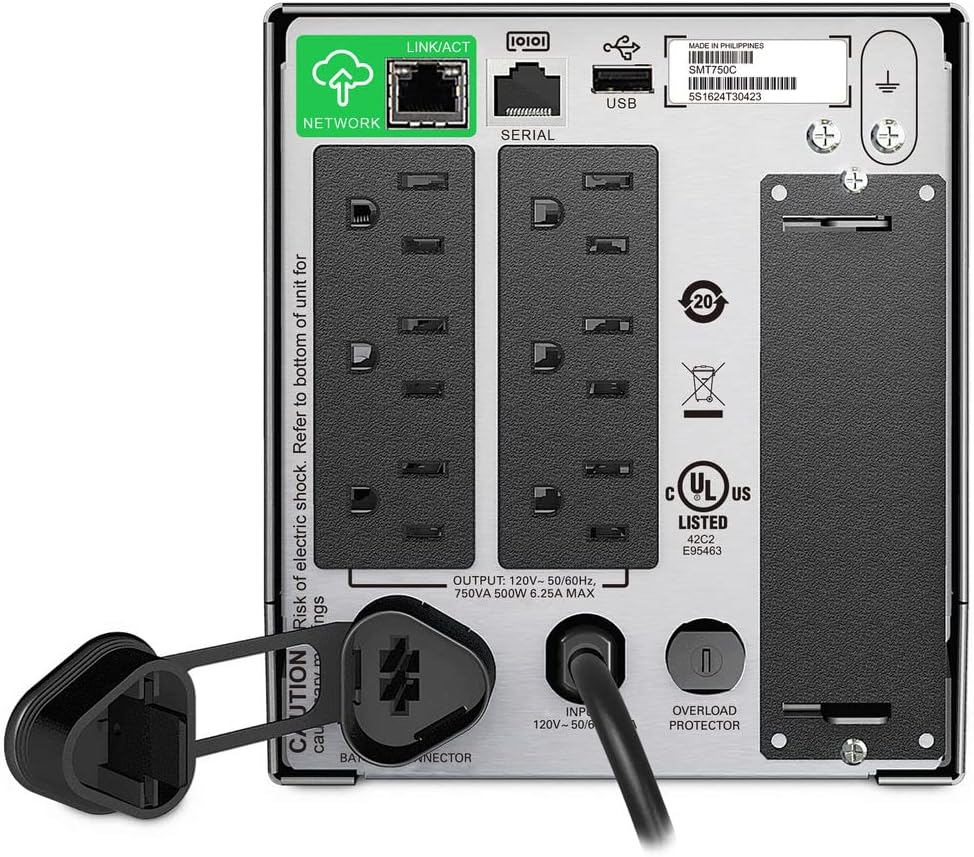
Image: Rear panel of the APC Smart-UPS SMT750C. This view highlights the various input/output ports, including NEMA 5-15R outlets, SmartConnect port, USB, and serial ports.
- NEMA 5-15R Outlets: Six outlets for connecting protected equipment.
- SmartConnect Ethernet Port: For cloud-based remote monitoring and management.
- USB port: For communication with a computer for graceful shutdown via PowerChute Serial Shutdown software.
- Serijski port: Alternative communication port for graceful shutdown.
- Pametni utor: For optional Network Management Card (sold separately).
- Ulazni kabl za napajanje: Povezuje UPS na električnu mrežu.
- Zaštita od preopterećenja: Resettable circuit breaker.
5. Podešavanje
5.1 Početno spajanje baterije
Prije prve upotrebe, unutrašnja baterija mora biti spojena. Uređaj se isporučuje s odvojenom baterijom radi sigurnosti tokom transporta.
- Postavite UPS na stabilnu površinu.
- Locate the battery compartment cover, typically on the bottom or rear of the unit.
- Remove the cover to access the battery.
- Connect the red battery cable to the positive (+) terminal and the black battery cable to the negative (-) terminal. Ensure a secure connection.
- Vratite poklopac odeljka za baterije.
5.2 Connecting to Utility Power
- Plug the UPS power cord into a grounded 3-prong AC outlet.
- Allow the UPS to charge for at least 24 hours before connecting critical equipment to ensure full battery capacity.
5.3 Povezivanje opreme
- Connect your critical equipment (e.g., computer, monitor, network devices) to the NEMA 5-15R outlets on the rear panel.
- For graceful shutdown capabilities, connect the provided USB cable from the UPS to your computer and install the PowerChute Serial Shutdown software (available for download from APC's webweb lokacija).
- For remote monitoring, connect an Ethernet cable to the SmartConnect port and follow the instructions for cloud-based setup.
6. Operacija
6.1 Uključivanje/isključivanje
- To power on the UPS, press and hold the power button on the front panel until the unit beeps and the display illuminates.
- To power off the UPS, press and hold the power button until the unit beeps and the display turns off.
6.2 Automatski Voltage Regulacija (AVR)
The SMT750C features AVR, which automatically corrects minor voltage fluctuations (sags and surges) without switching to battery power. This protects connected equipment from voltage irregularities and extends battery life.
6.3 Rad sa rezervnom baterijom
Tokom napajanjatage, the UPS will automatically switch to battery power, providing continuous power to connected equipment. The LCD display will show the estimated remaining runtime. When utility power returns, the UPS will automatically switch back to utility power and recharge its battery.
6.4 Remote Monitoring (SmartConnect)
The SmartConnect port allows for cloud-based remote monitoring of your UPS. This feature enables IT professionals and network administrators to:
- Monitor UPS status and performance.
- Izvršite nadogradnje firmvera.
- Conduct remote diagnostics.
- Receive proactive email notifications with recommended actions.
7. Održavanje
7.1 Zamjena baterije
The internal battery is a user-replaceable component. When the battery reaches the end of its service life, the UPS will indicate a battery fault. To replace the battery:
- Ensure the UPS is powered off and disconnected from utility power.
- Skinite poklopac odeljka za baterije.
- Disconnect the battery cables (red and black).
- Carefully slide out the old battery.
- Insert a genuine APC replacement battery (model RBC154, sold separately).
- Connect the battery cables, ensuring correct polarity (red to positive, black to negative).
- Vratite poklopac odeljka za baterije.
- Recycle the old battery responsibly.
7.2 Čišćenje
Povremeno čistite vanjski dio UPS-a mekom, suhom krpom. Ne koristite tekuća ili aerosolna sredstva za čišćenje. Osigurajte da su ventilacijski otvori bez prašine i ostataka.
8. Otkrivanje problema
| Problem | Mogući uzrok | Rješenje |
|---|---|---|
| UPS se ne uključuje | Baterija nije povezana ili je slabo napunjena | Ensure battery cables are connected. Plug UPS into AC outlet and allow to charge. |
| UPS neprestano pišti | Overload or on battery power | Reduce connected load. Check utility power. |
| Battery symbol blinking | Battery needs to be flipped (initial setup) or is failing | For new units, ensure battery is correctly oriented and connected. For older units, consider battery replacement. |
| Nema struje u utičnicama | UPS is off, circuit breaker tripped, or utility power lost | Turn on UPS. Reset circuit breaker. Check utility power. |
9. Specifikacije
- Model: SMT750C
- Kapacitet izlazne snage: 500 W / 750 VA
- Izlazne veze: 6 x NEMA 5-15R
- Ulazne veze: NEMA 5-15P
- Nominalni ulaz Voltage: 120V
- Nominalni izlaz Voltage: 120V
- Vrsta baterije: Olovna kiselina
- Form Faktor: Toranj
- Dimenzije (V x Š x D): 6.34 in (16.1 cm) x 5.43 in (13.8 cm) x 14.53 in (36.9 cm)
- Neto težina: 27.56 lb (12.5 kg)
- Boja: Crna
- Materijal: Metal
- Uključeni dodaci: 16GB USB 3.0 Drive
10. Garancija i podrška
APC pruža standardnu garanciju za ovaj proizvod. Za specifične uslove garancije, molimo pogledajte garantni list koji je priložen uz vaš proizvod ili posjetite službenu APC stranicu. website. For technical support, product registration, or to purchase replacement parts, please visit www.apc.com ili kontaktirajte APC korisničku službu.
Protection plans are available for extended coverage. For example, a 3-Year Protection Plan is available.


