Uvod
This manual provides detailed instructions for the operation and maintenance of your Apera KNSTAR PX-680BT Music Set. This versatile device combines a cassette player, FM radio, USB/SD MP3 player, and Bluetooth speaker functionality. Please read this manual thoroughly before using the product to ensure proper operation and to maximize its lifespan.
The Apera KNSTAR PX-680BT is designed for portability and ease of use, offering multiple audio playback options in a compact unit.
Setup
Napajanje uređaja
The PX-680BT can be powered by two methods:
- AC napajanje: Connect the included AC power cord to the AC input jack on the unit and then to a standard wall socket (120V).
- Napajanje istosmjernom baterijom: For portable use, insert 4 x D-size batteries (not included) into the battery compartment located on the back of the unit. Ensure correct polarity (+/-) when inserting batteries.

Image: The Apera KNSTAR PX-680BT demonstrating its two power options: AC power via a wall socket and DC power using 4 D-size batteries in the rear compartment.
Uputstvo za upotrebu
Rad kasetofona
- Ubacivanje kasete: Press the "PUSH" button on the cassette door to open it. Insert a cassette tape with the open edge facing upwards. Close the cassette door firmly.
- Reprodukcija: Pritisnite IGRAJ dugme za početak reprodukcije.
- Premotavanje naprijed/nazad: Koristite FF (Brzo premotavanje unaprijed) i REW (premotavanje unazad) buttons to navigate through the tape.
- zaustaviti: Pritisnite STOP/EJECT button to stop playback. Pressing it again will eject the cassette.
- pauza: Pritisnite PAUSE dugme za privremeno zaustavljanje reprodukcije. Pritisnite ponovo za nastavak.
- Snimanje: To record, ensure a blank or recordable cassette is inserted. Press the REC (Snimanje) button. The unit will automatically start recording from the built-in microphone or selected input. Press STOP/EJECT da prekinete snimanje.

Image: The Apera KNSTAR PX-680BT with its cassette compartment open, illustrating how to insert a cassette tape.
Rad FM radija
- Odaberite način rada: Set the function switch to "RADIO" and select the desired band (FM, AM, SW) using the band selector.
- melodija: Rotate the "TUNING" knob to scan for radio stations. The frequency display will indicate the current station.
- antena: Extend the telescopic antenna for optimal FM and SW reception. For AM reception, rotate the unit for best signal.

Image: The Apera KNSTAR PX-680BT with its telescopic antenna extended, demonstrating its capability for strong AM, FM, and SW radio reception.
USB/SD MP3 Player Operation
- Umetni medij: Insert a USB drive into the USB port or an SD card into the SD card slot.
- Odaberite način rada: Set the function switch to "USB/SD" or similar. The unit should automatically detect and begin playing MP3 files.
- Kontrole: Use the playback controls (Play/Pause, Next, Previous) to manage your music.
Rad Bluetooth zvučnika
- Omogući Bluetooth: Set the function switch to "Bluetooth" mode. The unit will enter pairing mode, indicated by a flashing light or audio prompt.
- Uparivanje: On your mobile device, enable Bluetooth and search for available devices. Select "PX-680BT" (or similar name) from the list to pair.
- Reprodukcija: Once paired, you can play audio from your mobile device, and it will stream wirelessly to the PX-680BT.
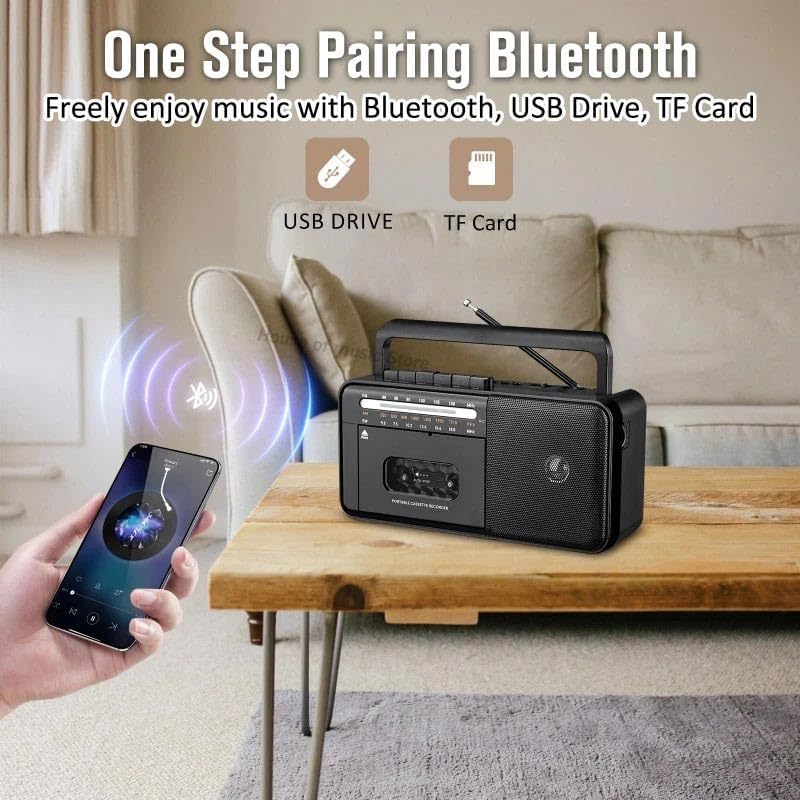
Image: The Apera KNSTAR PX-680BT demonstrating its Bluetooth connectivity, wirelessly streaming music from a smartphone.

Slika: Detaljan prednji dio view of the Apera KNSTAR PX-680BT, highlighting the cassette player, radio tuner, and various control buttons.
Održavanje
General Cleaning
Obrišite vanjski dio uređaja mekom, suhom krpom. Ne koristite abrazivna sredstva za čišćenje, voskove ili rastvarače jer mogu oštetiti završnu obradu. Izbjegavajte prskanje tekućina direktno na uređaj.
Cassette Player Maintenance and Adjustment
Povremeno čistite glavu kasete, potisni valjak i valjčić lagano očišćenim pamučnim štapićem.ampened with isopropyl alcohol. This helps maintain optimal sound quality and prevents tape damage.
The playback speed of the cassette player can be adjusted. On the back of the unit, there is an adjustment screw accessible with a Phillips screwdriver. This allows for fine-tuning of the tape speed if needed. Exercise caution when making adjustments.
Zamjena baterije
If using DC power, replace all D-size batteries when the unit's performance degrades or when the power indicator light dims. Ensure the unit is turned off before opening the battery compartment.
Rješavanje problema
- Nema napajanja:
- Ensure the AC power cord is securely plugged into both the unit and the wall outlet.
- If using batteries, check that they are inserted correctly with the proper polarity and are not depleted. Replace if necessary.
- Nema zvuka:
- Proverite nivo jačine zvuka.
- Ensure the correct function mode (Cassette, Radio, USB/SD, Bluetooth) is selected.
- For radio, extend the antenna and tune properly.
- For Bluetooth, ensure the device is paired and connected.
- Slab radio prijem:
- Potpuno proširite teleskopsku antenu.
- Rotate the unit to find the best signal, especially for AM bands.
- Move away from sources of interference (e.g., computers, TVs, other electronic devices).
- Cassette Playback Issues:
- Ensure the cassette tape is inserted correctly and is not damaged.
- Clean the cassette head, pinch roller, and capstan if sound quality is poor or tape is sticking.
- Neuspješno uparivanje putem Bluetootha:
- Ensure the PX-680BT is in Bluetooth pairing mode.
- Make sure your mobile device's Bluetooth is enabled and within range.
- Pokušajte odvojiti i ponovo upariti uređaj.
- Ensure no other devices are currently connected to the PX-680BT.
Specifikacije
| Model | PX-680BT |
| Brand | Apera |
| Tehnologija povezivanja | Pomoćni, Bluetooth |
| Posebne karakteristike | Built-In Flashlight, Built-in FM Antenna, Portable |
| Izvor napajanja | Corded Electric (AC), 4 x D-size batteries (DC) |
| Podržani radio bendovi | FM, AM, SW (3-Band) |
| Tehnologija tjunera | FM |
| Dimenzije artikla (D x Š x V) | 25 cm x 9.5 cm x 12 cm |
| Težina | Približno 1.2 kg |
| Uključene komponente | Quick Start Guide, AC Power Cord |

Image: The Apera KNSTAR PX-680BT displaying its physical dimensions (250mm L x 98mm W x 133mm H) and weight (1.2 kg).
Garancija i podrška
For warranty information and customer support, please refer to the documentation included with your purchase or contact the retailer. Keep your proof of purchase for any warranty claims.


