Uvod
This manual provides detailed instructions for the setup, operation, and maintenance of your Darmoshark K2PRO Wireless RGB Mechanical Keypad. Please read this manual thoroughly before using the product to ensure optimal performance and longevity.

Image: The Darmoshark K2PRO mechanical keypad in black, featuring a rotary knob, two programmable keys with RGB lighting, and an attached lanyard.
Setup
The Darmoshark K2PRO offers versatile connectivity options to suit various usage scenarios.
1. Načini povezivanja
The keypad supports three connection modes: USB-C wired, 2.4G wireless, and Bluetooth wireless.
- Žičani način rada USB-C: Connect the keypad directly to your computer using the provided USB-C cable. This mode provides a stable connection and charges the device.
- 2.4G bežični način rada: Insert the 2.4G USB receiver into your computer's USB port. Toggle the switch on the keypad to the "ON" position for 2.4G/Bluetooth mode. The keypad will automatically connect.
- Bluetooth bežični način rada: Toggle the switch on the keypad to the "ON" position. On your computer or device, search for Bluetooth devices and select "Darmoshark K2PRO" to pair.

Image: A close-up of the Darmoshark K2PRO keypad showing the Type-C connector and the ON/OFF switch for wireless modes (2.4G/Bluetooth).
2. Prekidači koji se mogu zamjenjivati tokom rada
The K2PRO features hot-swappable mechanical switches, allowing users to customize the feel and sound of their keys without soldering. To replace a switch:
- Pažljivo povucite kapicu tipke s prekidača pomoću alata za izvlačenje kapica tipki.
- Use a switch puller to carefully remove the existing mechanical switch from the PCB.
- Poravnajte pinove novog prekidača s otvorima na PCB-u i čvrsto pritisnite dok ne klikne na mjesto. Pazite da pinovi nisu savijeni.
- Vratite kapicu tipke na novi prekidač.
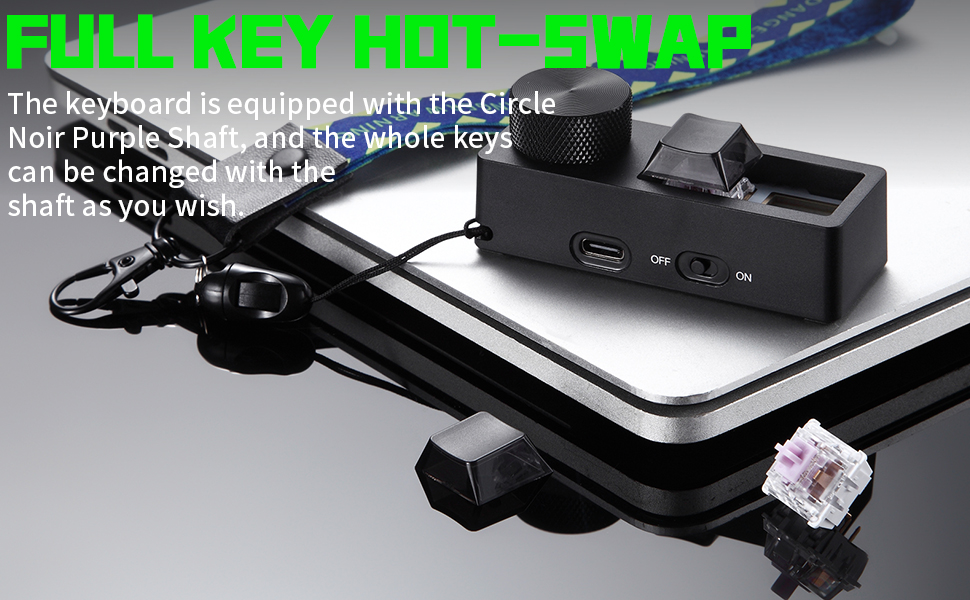
Image: The Darmoshark K2PRO keypad demonstrating its full key hot-swap capability, with a mechanical switch removed from its socket.
Uputstvo za upotrebu
The K2PRO keypad is designed for intuitive control and customization.
1. Programabilni tasteri
The two keys on the keypad are fully programmable. They can be assigned various functions such as shortcut keys, multimedia controls (play, pause, volume, switch song), cut, undo, redo, select all, custom scripts, and even mouse simulation.
To customize key functions, download and install the official Darmoshark K2PRO software from the manufacturer's website. The software allows for detailed configuration of each key.

Image: A screenshot of the Darmoshark K2PRO driver software interface, showing options for customizing key assignments and settings.
2. Funkcionalnost rotacionog dugmeta
The rotary knob provides quick access to essential controls:
- Zadana funkcija: Rotate the knob to adjust system volume.
- Jačina pozadinskog osvjetljenja: Press the knob once to switch its function to adjusting the backlight brightness.
- Return to Volume: Press the knob again to revert its function to volume adjustment.

Image: The Darmoshark K2PRO keypad in white, illustrating the rotary knob's function for volume adjustment and backlight brightness control.
3. RGB svjetlosni efekti
The keypad features dynamic RGB lighting. The lighting color and gradient mode can be controlled and customized through the dedicated software.

Image: Two Darmoshark K2PRO keypads, one black and one white, showcasing their dazzling RGB dynamic light effects.
Održavanje
Proper maintenance ensures the longevity and performance of your K2PRO keypad.
- čišćenje: Use a soft, dry cloth to wipe the surface of the keypad. For deeper cleaning, especially around keycaps, use compressed air to remove dust and debris. Avoid using harsh chemicals or abrasive materials.
- Održavanje tipki i prekidača: If removing keycaps or switches, do so gently to avoid damaging the components. Ensure switches are reinserted correctly to prevent bent pins.
- Održavanje baterije: For wireless use, ensure the internal battery is charged regularly. Avoid fully discharging the battery frequently to prolong its lifespan.
Rješavanje problema
If you encounter issues with your Darmoshark K2PRO keypad, refer to the following common solutions:
- Tastatura ne reaguje:
- Check the connection: Ensure the USB-C cable is securely connected, or the 2.4G receiver is properly inserted, or Bluetooth is paired.
- Verify power: If in wireless mode, ensure the keypad is switched "ON" and has sufficient battery charge.
- Restart: Try restarting your computer and the keypad.
- Specific Key Not Working:
- Check the switch: Due to the hot-swappable design, ensure the switch for the affected key is fully seated and its pins are not bent. Try swapping it with a known working switch if available.
- Software conflict: If using custom profiles, try resetting to default settings in the customization software.
- Problemi s bežičnim povezivanjem:
- Interference: Move the keypad closer to the receiver/device or away from other wireless devices that might cause interference.
- Re-pair: For Bluetooth, unpair and re-pair the device. For 2.4G, try re-inserting the receiver.
- RGB Lighting Not Functioning:
- Software settings: Check the RGB settings within the Darmoshark K2PRO customization software.
- Brightness adjustment: Ensure the brightness hasn't been set to minimum via the rotary knob.
If problems persist, contact Darmoshark customer support for further assistance.
Specifikacije
| Model | K2PRO |
| Brand | Darmošark |
| Tehnologija povezivanja | Bluetooth, 2.4G bežični, USB-C žičani |
| Tip prekidača | Mehanički (mogućnost zamjene tokom rada) |
| Opis tastature | Gaming Keypad with 2 Programmable Keys and Rotary Knob |
| Pozadinsko osvetljenje | RGB |
| Kompatibilni uređaji | PC, Laptop, Linux, Mac, Windows |
| Težina artikla | 4.2 unce |
| Dimenzije paketa | 4.88 x 3.5 x 1.69 inča |
| Baterije | 1 litijum-jonska baterija (uključena) |
Informacije o garanciji
Darmoshark products typically come with a manufacturer's warranty. For specific details regarding the warranty period, coverage, and claims process for your K2PRO keypad, please refer to the warranty card included with your product or visit the official Darmoshark webSačuvajte dokaz o kupovini radi provjere garancije.
Korisnička podrška
For technical assistance, troubleshooting not covered in this manual, or general inquiries, please contact Darmoshark customer support. You can usually find contact information on the official Darmoshark webweb-mjestu ili putem prodavača gdje ste kupili proizvod.
Online resursi:
- Official Darmoshark Webstranica: Visit Darmoshark Store on Amazon (for product information and potential support links)
- Software Downloads: Check the official Darmoshark website for the latest customization software and drivers.


