Uvod
This manual provides instructions for the safe and effective use of your Ashfly Portable Handheld Kids Microscope. Please read this manual thoroughly before operating the device and retain it for future reference.
The Ashfly Portable Handheld Kids Microscope is designed to introduce young scientists to the microscopic world. Featuring a 2-inch LCD screen and 200x magnification, it allows for real-time observation of small objects.
Sadržaj paketa
Provjerite da li se u vašem paketu nalaze sve dolje navedene stavke:
- Ashfly Portable Handheld Kids Microscope
- USB kabl za punjenje
- Traka za zglob/remen za ruku
- Korisnički priručnik (ovaj dokument)

Image: Contents of the Ashfly Portable Handheld Kids Microscope package, including the microscope, USB cable, and wrist strap.
Setup
1. Punjenje uređaja
- Locate the USB charging port on the microscope.
- Connect the provided USB charging cable to the microscope and a compatible USB power source (e.g., computer, wall adapter).
- Indikator punjenja će se upaliti. Sačekajte otprilike 2-3 sata da se baterija potpuno napuni.
- Kada se potpuno napuni, odspojite kabl za punjenje.
2. Attaching the Lanyard/Wrist Strap
Thread the lanyard or wrist strap through the designated loop on the microscope to prevent accidental drops during use.
Uputstvo za upotrebu
1. Uključivanje/isključivanje
- To power on, press and hold the power button (usually marked with a power symbol) for a few seconds until the screen illuminates.
- Da biste isključili uređaj, ponovo pritisnite i držite dugme za napajanje dok se ekran ne isključi.
2. Observing Objects
- Place the object you wish to observe on a flat surface.
- Position the microscope's lens directly over the object.
- Adjust the focus wheel (if present) or move the microscope closer/further from the object until a clear image appears on the 2-inch LCD screen.
- Use the zoom adjustment button (4x zoom) to further magnify the image up to 200x.

Image: A child holding the Ashfly microscope, observing a small object on a surface, demonstrating its handheld operation.
3. Snimanje fotografija i videa
The microscope supports photo and video functions. It comes with built-in memory for storing observations.
- To take a photo: Press the designated photo capture button (refer to device markings).
- To record a video: Press the designated video record button to start recording, and press it again to stop.

Image: The Ashfly microscope's screen displaying a magnified image of an insect, illustrating its digital imaging capability.
4. Dual-Lens Design
This microscope features a dual-lens design. One side is the digital microscope for recording observations, and the other side is a physical magnifier for quick viewing objekata.
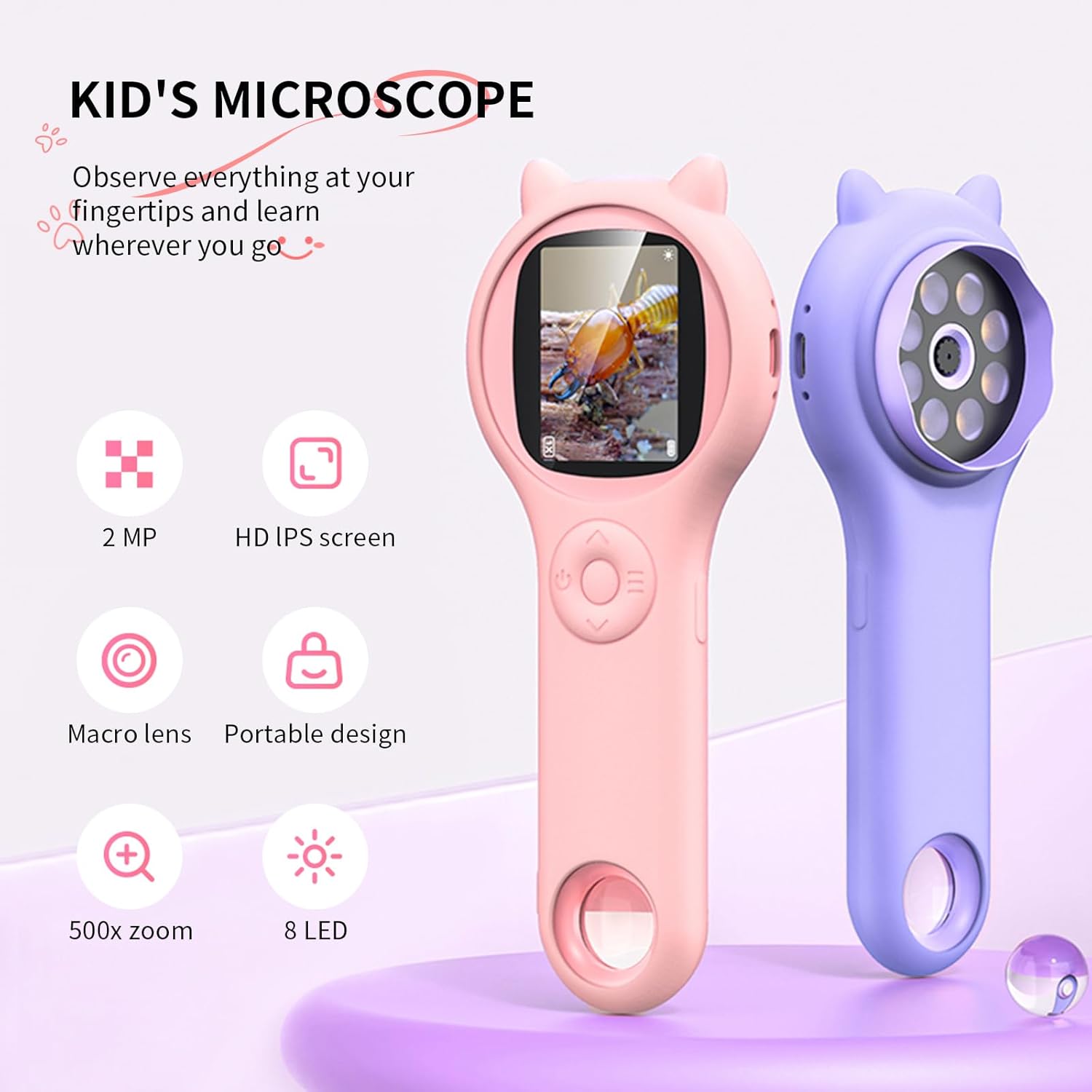
Image: Two Ashfly Kids Microscopes, one pink and one purple, illustrating the compact design and the different lenses/screens on each side.
Održavanje
- čišćenje: Use a soft, dry cloth to clean the exterior of the microscope. For the lens and screen, use a specialized lens cleaning cloth. Do not use abrasive cleaners or solvents.
- Skladištenje: Mikroskop čuvajte na hladnom i suhom mjestu, dalje od direktne sunčeve svjetlosti i ekstremnih temperatura.
- Održavanje baterije: Da biste produžili vijek trajanja baterije, izbjegavajte često potpuno pražnjenje baterije. Redovno punite uređaj, čak i ako ga ne koristite duži period.
Rješavanje problema
| Problem | Mogući uzrok | Rješenje |
|---|---|---|
| Uređaj se ne uključuje. | Baterija je prazna. | Napunite uređaj pomoću priloženog USB kabla. |
| Image on screen is blurry. | Incorrect focus or distance from object. | Adjust the microscope's distance from the object or use the focus wheel (if applicable) until the image is clear. |
| Cannot capture photos/videos. | Internal memory is full. | Transfer existing photos/videos to a computer to free up space. |
Specifikacije
| Feature | Detalj |
|---|---|
| Model | ASIN B0DBVB3RGT |
| Brand | Ashfly |
| Uvećanje | Up to 200x (with 4x zoom adjustment) |
| Ekran | 2-inch LCD, 1080P HD digital imaging |
| Izvor svjetlosti | LED |
| Materijal | Plastika |
| Boja | Ljubičasta |
| Izvor napajanja | Battery Powered |
| Objektivna sočiva | Akromatski |
Informacije o garanciji
Ashfly products are designed for quality and durability. For specific warranty details, please refer to the warranty card included with your product or visit the official Ashfly webSačuvajte račun kao dokaz o kupovini za reklamacije u slučaju reklamacije.
Korisnička podrška
If you encounter any issues or have questions regarding your Ashfly Portable Handheld Kids Microscope, please contact our customer support team:
- Online podrška: Posjetite Ashfly Store on Amazon za često postavljana pitanja i opcije kontakta.
- Email: Pogledajte pakovanje proizvoda ili službene webstranica za direktnu podršku putem e-pošte.


