Uvod
Thank you for choosing the Sorandy 82 Keys RGB Mechanical Keyboard. This manual provides detailed instructions for setting up, operating, and maintaining your new keyboard. Please read this manual thoroughly before use to ensure optimal performance and longevity of your device.
Sigurnosne informacije
- Držite tastaturu dalje od tekućina i prekomjerne vlage kako biste spriječili oštećenja.
- Izbjegavajte izlaganje tastature ekstremnim temperaturama (vrućim ili hladnim).
- Ne pokušavajte rastavljati ili modificirati tastaturu. To može poništiti garanciju i uzrokovati štetu.
- Za punjenje i žičanu vezu koristite samo priloženi USB kabel.
- Čuvati van domašaja male djece.
Sadržaj paketa
Molimo Vas da provjerite sadržaj paketa kako biste bili sigurni da su svi artikli prisutni:
- 1 x Sorandy 82 Keys RGB Mechanical Keyboard
- 1 x izvlakač ključeva
- 1 x USB Type-C podatkovni kabel
- 1 x 2.4G Wireless Adapter
- 1 x Korisnički priručnik (ovaj dokument)
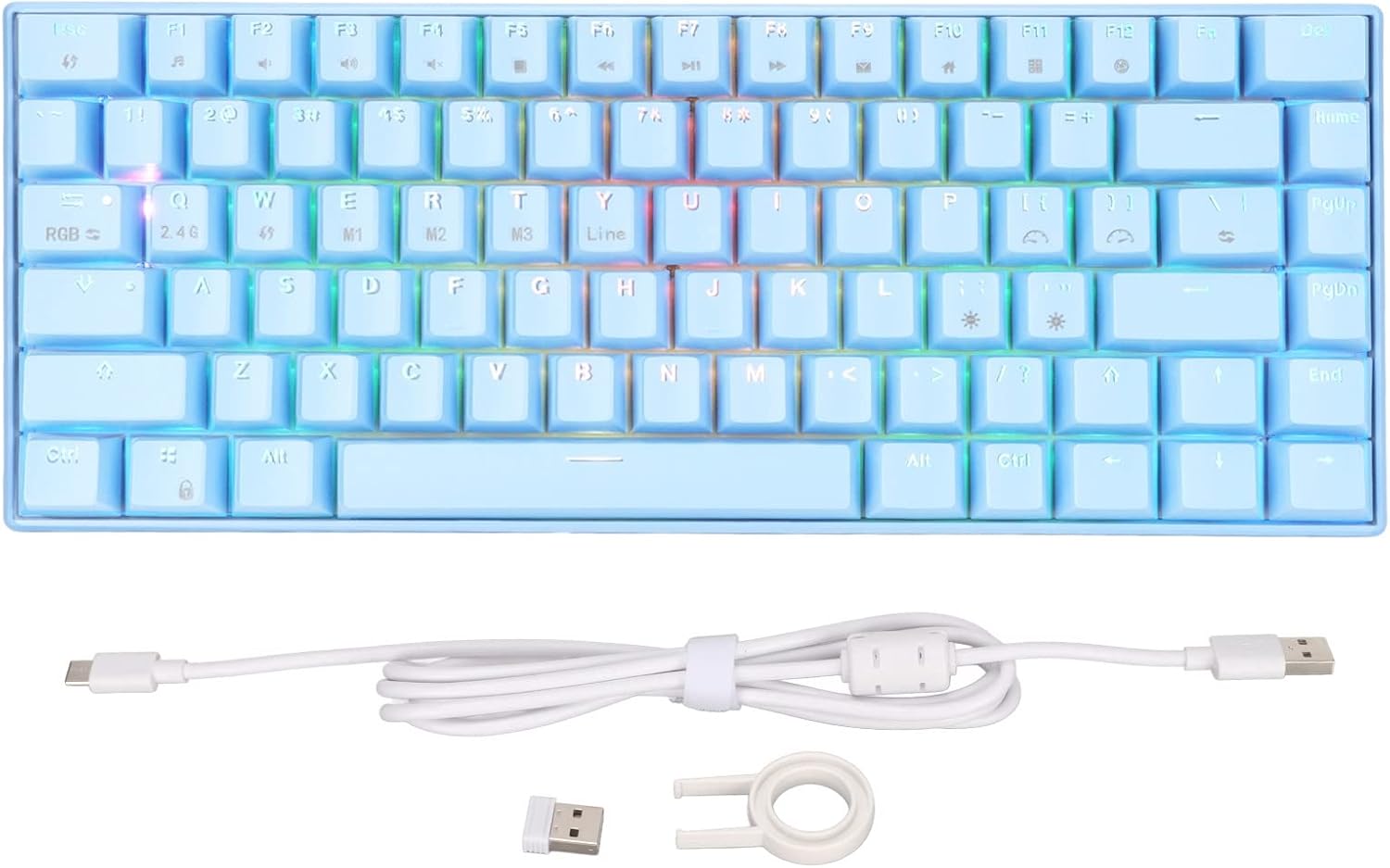
Image: Contents of the keyboard package, including the keyboard, USB cable, 2.4G adapter, and key puller.
Product Overview
Familiarize yourself with the layout and features of your mechanical keyboard.

Slika: Vrh view of the 82-key mechanical keyboard, showing the key layout and RGB lighting.

Slika: Donja strana view of the keyboard, showing the product label with specifications and rubber feet.

Image: Close-up of the brown mechanical switches, illustrating the switch type used in the keyboard.
Setup
1. Žičana veza (tip-C)
- Connect the USB Type-C end of the provided cable to the Type-C port on the keyboard.
- Spojite USB-A kraj kabla na dostupan USB port na računaru.
- Vaš sistem će automatski prepoznati tastaturu.
2. 2.4G bežična veza
- Pronađite 2.4G bežični adapter koji se nalazi u paketu.
- Plug the 2.4G adapter into an available USB port on your computer.
- Ensure the keyboard is in 2.4G mode (refer to the keyboard's function keys for mode switching, usually indicated by an LED).
- The keyboard should automatically connect to the adapter.
3. Bluetooth Connection (BT3.0/5.0)
- Provjerite da li je na vašem računaru ili uređaju omogućen Bluetooth.
- Switch the keyboard to Bluetooth mode (usually by pressing Fn + a specific key, e.g., Fn + 1/2/3 for different Bluetooth channels). The indicator light will flash, indicating pairing mode.
- Na svom uređaju idite u postavke Bluetootha i potražite nove uređaje.
- Select "Sorandy Keyboard" or a similar name from the list of available devices to pair.
- Once paired, the indicator light on the keyboard will stop flashing and remain solid.
4. Punjenje tastature
The keyboard has an inbuilt 1800mAh rechargeable lithium battery. To charge:
- Connect the keyboard to a USB power source (computer USB port, wall adapter) using the provided Type-C cable.
- Indikatorska lampica punjenja će svijetliti tokom punjenja i ugasiti se kada se uređaj potpuno napuni.
Uputstvo za upotrebu
RGB Backlight Adjustment
The keyboard features dynamic RGB backlighting with multiple modes. Use the following key combinations to adjust the lighting:
- Fn + \ |: Cycle through different backlight modes.
- Fn + [{: Smanjite svjetlinu pozadinskog osvjetljenja.
- Fn + ] }: Povećajte svjetlinu pozadinskog osvjetljenja.
- Fn + ; :: Smanjite brzinu pozadinskog osvjetljenja.
- Fn + '": Povećajte brzinu pozadinskog osvjetljenja.
- Fn + strelica lijevo: Change backlight color (in certain modes).
- Fn + strelica udesno: Change backlight color (in certain modes).

Slika: Tastatura prikazuje svoje živopisno RGB pozadinsko osvjetljenje.
Function Key Combinations (Fn)
The keyboard utilizes an 82-key layout, requiring the use of the Fn key for accessing certain functions and multimedia controls. Refer to the keycaps for specific Fn combinations.
| Kombinacija | Funkcija |
|---|---|
| Fn + F1 | Moj kompjuter |
| Fn + F2 | PRETRAGA |
| Fn + F3 | Kalkulator |
| Fn + F4 | Media Player |
| Fn + F5 | Previous Track |
| Fn + F6 | Next Track |
| Fn + F7 | Pusti/Pauza |
| Fn + F8 | Stani |
| Fn + F9 | Mute |
| Fn + F10 | Utišavanje zvuka |
| Fn + F11 | Volume Up |
| Fn + F12 | Zaključaj tastaturu |
| Fn + Q | Prebacite se na 2.4G način rada |
| Fn + W/E/R | Switch to Bluetooth mode (BT1/BT2/BT3) |
Kompatibilnost
This mechanical keyboard is compatible with a wide range of operating systems, including:
- Win 2000, ME, Win XP, Win Vista, Win 7, Win 8, Win 10
- Harmony OS
- Android
- iOS
Održavanje
Čišćenje
- Prije čišćenja isključite tastaturu iz računara.
- Koristite meku krpu koja ne ostavlja dlačiceampvodom ili blagim rastvorom za čišćenje da biste obrisali površinu.
- For dust and debris between keycaps, use compressed air or the provided key puller to remove keycaps and clean underneath.
- Nemojte koristiti jake hemikalije ili abrazivne materijale.
Skladištenje
- Tastaturu čuvajte na hladnom i suhom mjestu, zaštićeno od direktne sunčeve svjetlosti.
- If storing for an extended period, ensure the battery is partially charged (around 50%) to preserve battery health.
Rješavanje problema
| Problem | Rješenje |
|---|---|
| Tastatura ne reaguje (žična) |
|
| Keyboard not connecting (2.4G/Bluetooth) |
|
| Pozadinsko osvjetljenje ne radi ili je prigušeno |
|
| Tipke se ne registruju ili se tipkaju dvaput |
|
Specifikacije
| Feature | Detalj |
|---|---|
| Model | 82 Keys RGB Mechanical Keyboard (Brown Switch) |
| Načini povezivanja | 2.4G Wireless, Bluetooth 3.0/5.0, Type-C Wired |
| Osvetljenje | RGB Multiple Modes |
| Ključni sukob | Full Key Without Conflict (N-Key Rollover) |
| Kapacitet baterije | Inbuilt 1800mAh Lithium Battery |
| Ergonomija | Podržano |
| Radna struja | 300mA (maksimalno) |
| Struja pripravnosti | 0.5mA |
| Kompatibilni sistemi | Win 2000/ME/XP/Vista/7/8/10, Harmony OS, Android, iOS |
| Materijal | ABS (akrilonitril butadien stiren) |
| Broj ključeva | 82 |
Garancija i podrška
Sorandy products are manufactured to high quality standards. For information regarding warranty coverage, technical support, or service inquiries, please refer to the warranty card included with your product or visit the official Sorandy webMolimo sačuvajte dokaz o kupovini za potrebe reklamacije.
Za dodatnu pomoć, možete se direktno obratiti prodavcu putem platforme na kojoj je proizvod kupljen.


