1. Uvod
This manual provides essential instructions for the safe and efficient use of your Meizu Note 21 Pro smartphone. Please read this manual thoroughly before operating the device and retain it for future reference.
2. Šta se nalazi u kutiji
- Meizu Note 21 Pro Smartphone
- Adapter za napajanje
- (Other accessories such as USB cable, SIM ejector tool, and documentation may vary by region.)
3. Izgled uređaja
Familiarize yourself with the physical components of your Meizu Note 21 Pro.
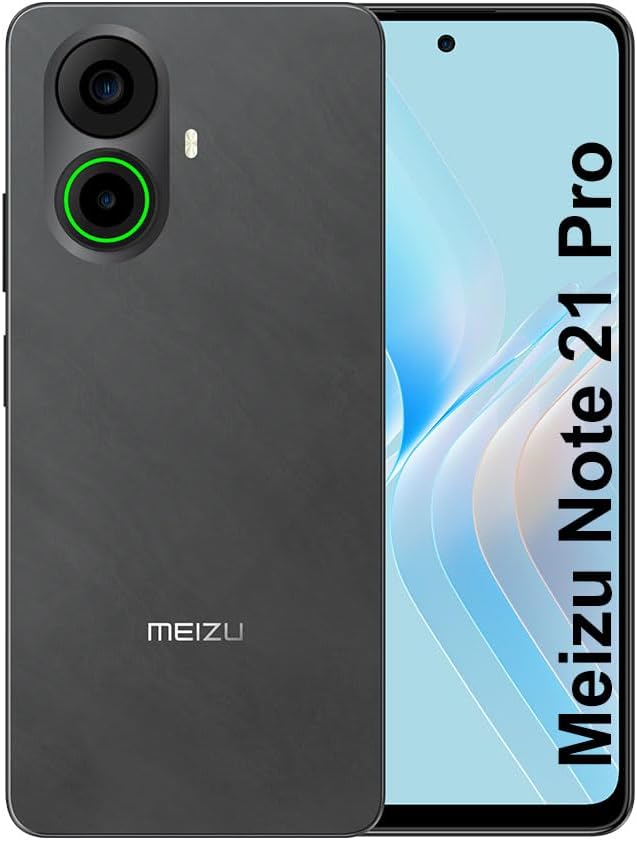
Slika 3.1: Prednji i zadnji view of the Meizu Note 21 Pro. The front displays the screen with a punch-hole camera. The rear shows the dual camera module with a green accent ring on one lens, a flash, and the "MEIZU" logo at the bottom.
- Prednji ekran: 6.78-inch FHD+ screen with a 120Hz refresh rate.
- Prednja kamera: Nalazi se u gornjem središnjem dijelu ekrana.
- zadnje kamere: Dual camera system, including a 64MP main camera.
- Bočni senzor otiska prsta: Integrated for secure access.
- USB port: Za punjenje i prijenos podataka.
- 3.5 mm audio priključak: Za slušalice.
- Ležište za SIM/MicroSD karticu: Supports Dual Nano SIM and MicroSD cards.
4. Podešavanje
4.1. Umetanje SIM i MicroSD kartica
- Pronađite ladicu za SIM karticu sa strane uređaja.
- Umetnite alat za izbacivanje SIM kartice u mali otvor pored ladice i lagano gurnite dok ladica ne iskoči.
- Umetnite svoju Nano SIM karticu(e) i/ili MicroSD karticu u predviđene utore na ladici. Provjerite jesu li zlatni kontakti okrenuti prema dolje.
- Pažljivo vratite ladicu u uređaj dok ne klikne na svoje mjesto.
4.2. Početno uključivanje i podešavanje
- Pritisnite i držite dugme za napajanje dok se ne pojavi Meizu logo.
- Slijedite upute na ekranu da biste odabrali jezik, povezali se na Wi-Fi mrežu i postavili svoj Google račun.
- During setup, you will be guided to configure security features such as a PIN, pattern, or password.
4.3. Fingerprint Recognition Setup
- Navigirajte do Postavke > Sigurnost i privatnost > Otključavanje otiskom prsta.
- Follow the on-screen instructions to register your fingerprint by repeatedly touching the side-mounted sensor.
- Ensure your finger covers the entire sensor area during registration for optimal performance.
5. Upravljanje vašim uređajem
5.1. Prikaz i navigacija
- The 6.78-inch FHD+ display operates at a 120Hz refresh rate for smooth visuals.
- Navigate the Android 14 operating system using touch gestures: tap, swipe, pinch-to-zoom.
- Access quick settings by swiping down from the top of the screen.
5.2. Funkcije kamere
- Otvorite aplikaciju Kamera sa početnog ekrana ili iz menija aplikacija.
- The rear camera system features a 64MP main sensor for high-resolution photos and a 2MP depth-of-field camera for portrait effects.
- The 13MP front-facing camera is suitable for selfies and video calls.
- Tap on the screen to focus, and use the on-screen shutter button to capture images. Explore various modes like Portrait, Night, and Pro within the camera app.
5.3. Performanse i pohrana
- The MediaTek G99 Octa Core processor ensures efficient performance for applications and multitasking.
- The device comes with 256GB of internal storage and 8GB of RAM.
- Storage can be expanded using a MicroSD card (sold separately).
5.4. Baterija i punjenje
- The Meizu Note 21 Pro is equipped with a 5000mAh battery.
- Use the provided Power Adapter for 30W fast charging.
- To charge, connect the USB cable to the phone's USB port and the power adapter, then plug the adapter into a wall outlet.
5.5. Povezivanje
- 4G LTE: Supports various LTE FDD and TDD bands for cellular data. Note: This international version works on T-Mobile in the USA and globally with other carriers.
- Wi-Fi 5: Povežite se na bežične mreže za pristup internetu.
- Bluetooth: Uparite s bežičnim dodacima poput slušalica i zvučnika.
- NFC: Za beskontaktna plaćanja i brzo uparivanje s kompatibilnim uređajima.
- GPS: Za usluge lokacije i navigaciju.
6. Održavanje
- čišćenje: Use a soft, lint-free cloth to clean the screen and body of the device. Avoid harsh chemicals or abrasive materials.
- Održavanje baterije: Avoid extreme temperatures. Do not fully discharge the battery frequently. For optimal battery longevity, keep the charge between 20% and 80%.
- Ažuriranja softvera: Redovno provjeravajte i instalirajte ažuriranja sistema kako biste osigurali optimalne performanse i sigurnost. Idite na Postavke > Sistem > Ažuriranje sistema.
7. Otkrivanje problema
| Issue | Moguće rješenje |
|---|---|
| Uređaj se ne uključuje | Ensure the battery is charged. Connect the device to the power adapter and try again. If unresponsive, press and hold the Power button for 10-15 seconds to force a restart. |
| Loš mrežni signal | Check if the SIM card is correctly inserted. Move to an area with better network coverage. Restart the device. Verify with your carrier that your plan is active. |
| Aplikacije su spore ili se ruše | Zatvorite aplikacije u pozadini. Obrišite keš memoriju aplikacije (Postavke > Apps > odaberite aplikaciju > Pohrana i keš memorija > Obriši keš memoriju). Ponovo pokrenite uređaj. Osigurajte dovoljno prostora za pohranu. |
| Senzor otiska prsta ne radi | Ensure your finger and the sensor are clean and dry. Re-register your fingerprint in settings. |
8. Specifikacije
- Model: Meizu Note 21 Pro
- Operativni sistem: Android 14
- procesor: MediaTek G99 Octa Core (2.2GHz)
- Prikaz: 6.78 inches FHD+ (1080 x 2160 resolution), 120Hz Refresh Rate
- RAM: 8 GB
- Interna pohrana: 256 GB
- stražnja kamera: 64MP glavna + 2MP dubinska
- Prednja kamera: 13MP
- baterija: 5000mAh, brzo punjenje od 30W
- Povezivanje: 4G LTE (FDD:1,2,3,4,5,7,8,12,17,18,19,20,26,28,66; TDD:38,40,41), 3G WCDMA, 2G Quad Band, Wi-Fi 5, Bluetooth, NFC, GPS
- Audio Jack: 3.5 mm
- Dimenzije: 6.64 x 2.96 x 0.33 inča
- Težina: 1.1 funte
9. Garancija i podrška
For warranty information and technical support, please refer to the warranty card included with your product or visit the official Meizu webSačuvajte dokaz o kupovini za slučaj reklamacije.
For further assistance, you may contact Meizu customer service through their official channels.


