Uvod
Welcome to the world of intelligent eyewear with your SOLOS AI Powered Glasses Argon X. These smart glasses integrate advanced AI technology, including ChatGPT, to enhance your daily interactions, travel, and productivity. Featuring ZEISS Sunlens, real-time language translation, stereo speakers, and compatibility with both iOS and Android devices, the Argon X is designed for seamless integration into your lifestyle. This manual provides essential information on setting up, operating, and maintaining your new smart glasses.
Šta je u kutiji
Your SOLOS AI Powered Glasses Argon X package includes the following items:
- SOLOS AI Powered Glasses Argon X (Sunglasses)
- Kabel za punjenje
- Cloth Cloth
- Zaštitna torbica
- Uputstvo za upotrebu
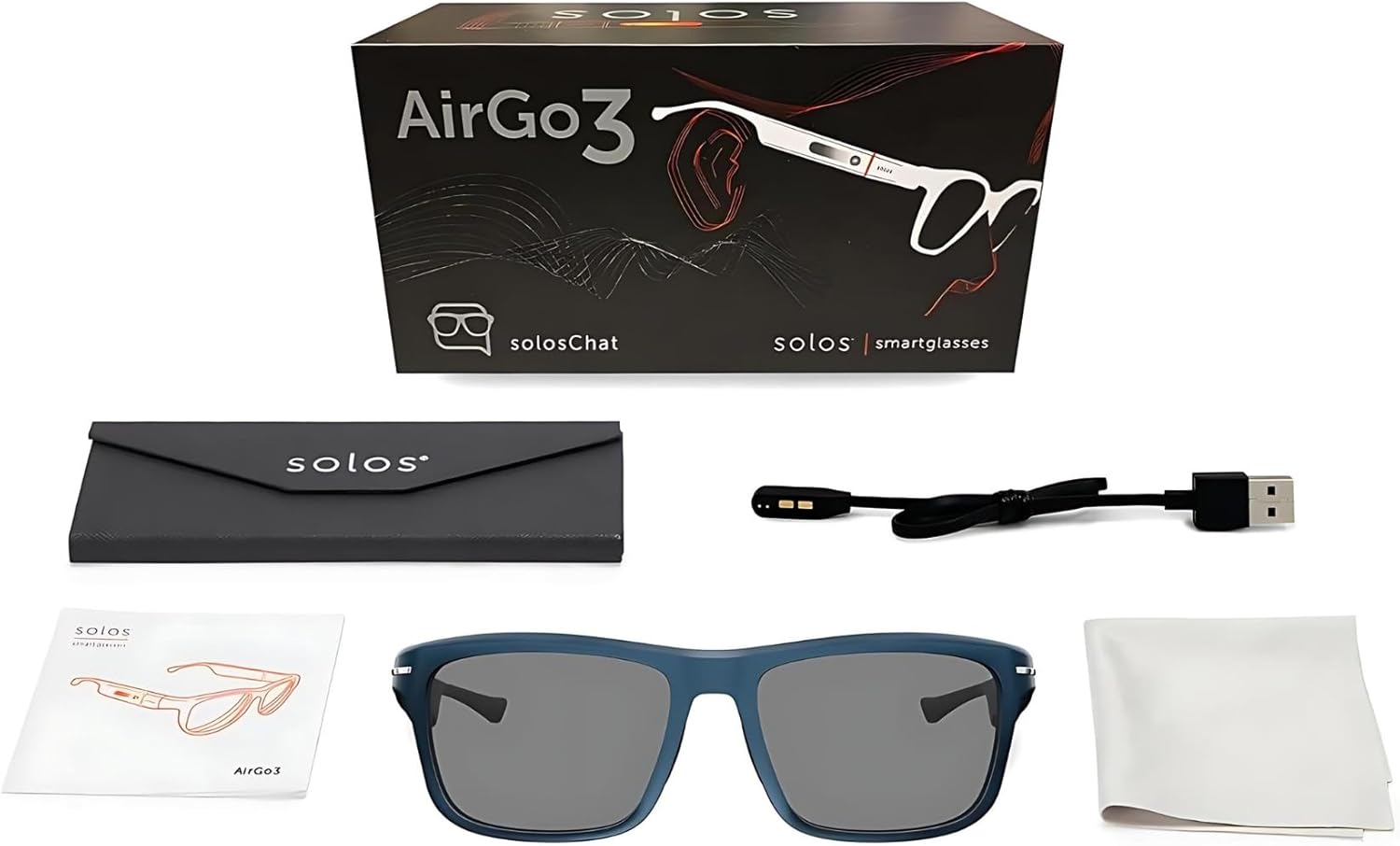
Image: All components included in the SOLOS AI Powered Glasses Argon X package.
Setup
1. Download the SOLOS AirGo App
To unlock the full potential of your SOLOS AI Powered Glasses, download the companion SOLOS AirGo app on your smartphone. Scan the QR code below or visit your device's app store.

Image: Scan the QR code to download the SOLOS AirGo app from the App Store or Google Play. The app is essential for product registration and AI setup.
Alternativno, posjetite: SOLOS AirGo App
2. Početno punjenje
Before first use, fully charge your SOLOS glasses using the provided USB-C charging cable. Connect the cable to the charging port on the glasses and a compatible USB power source. The LED indicator on the glasses will show charging status.
3. Uključivanje i uparivanje
To power on your glasses, locate the power button (Virtual Button) on the temple and press and hold it until you hear an audible prompt or see an LED indicator. Open the SOLOS AirGo app on your smartphone and follow the on-screen instructions to pair your glasses via Bluetooth. Ensure Bluetooth is enabled on your smartphone.
4. In-Depth User Guide Video
For a detailed visual guide on setup and initial use, please watch the official user guide video:
Video: An in-depth user guide for SOLOS Smart Glasses, demonstrating various features and setup procedures.
Operating Your SOLOS AI Glasses
Voice Assistant (SolosChat powered by ChatGPT)
Activate the AI voice assistant by tapping the temple Touch Sensor or pressing the Virtual Button. You can ask questions, get information, set reminders, and more. The AI assistant is always on when the app is open, providing hands-free assistance.
Real-Time Language Translation (SolosTranslate)
Utilize SolosTranslate for real-time language translation. Tap your frame, speak naturally, and your glasses will translate into over 25 supported languages. This feature is ideal for travel and international communication.

Image: Real-time translation in action, showing how the Solos AirGo app facilitates communication across languages.
Audio Functions (Calls & Music)
- telefonski pozivi: Answer or reject calls using the Virtual Button. Enjoy clear stereo audio for conversations.
- Reprodukcija muzike: Play, pause, skip tracks, and adjust volume using the temple Touch Sensor (slide up/down for volume, double-press for next song, triple-press for previous song).
Video Shooting & Recording
Your glasses are equipped with an 8MP camera capable of 1080p 30fps video shooting. Single-click the Virtual Button to take a photo, double-click to start recording, and short-press during recording to end it. Video duration is up to 12 minutes.
Smart Gesture Experience
- Senzor dodira: Slide up/down on the temple for volume control, accept/reject calls.
- Virtual Button: Long press for power on/off, pairing, end call, next song. Double press for previous song.

Image: Key interaction points on the smart glasses, including the touch sensor for volume and call management, and the virtual button for power and media control.
Key Features Overview
- AI Powered: Integrated ChatGPT/Open AI for intelligent assistance.
- IP67 ocjena: Durable and splash-resistant, suitable for various environments.
- Dug vijek trajanja baterije: Up to 10 hours of audio playback and 7 hours of phone calls on a single charge.
- ZEISS Sunlens: High-quality lenses for superior visual clarity and UV protection.
- SmartHinge for Interchangeable Frames: Allows quick switching between different frame styles or lenses (e.g., sunglasses and clear lenses).
- Audio otvorenog uha: Stereo speakers provide immersive sound while keeping you aware of your surroundings.
- Find My Glasses: Use the Solos app for real-time location tracking to easily locate your glasses.
Video: Prekorview of the SOLOS Smart Glasses AirGo3, highlighting key features like interchangeable frames, open-ear audio, and smart controls.
Specifikacije
| Feature | Detalj |
|---|---|
| Naziv modela | Argon X-8, ZGY |
| Brand | SOLOS |
| Dimenzije proizvoda | 6.42 x 5.98 x 1.89 inča |
| Težina artikla | 13.4 unci (380 grama) |
| Veličina ekrana | 63 milimetara |
| Operativni sistem | Android i iOS |
| Posebna karakteristika | Izmjenjivi okviri |
| Tehnologija povezivanja | Bluetooth |
| Standard bežične komunikacije | Bluetooth |
| Sastav baterije baterije | Litijum-jonska (1 uključena) |
| GPS | Nema GPS-a |
| Kamera | 8MP, 1080p 30fps video shooting (up to 12 minutes) |
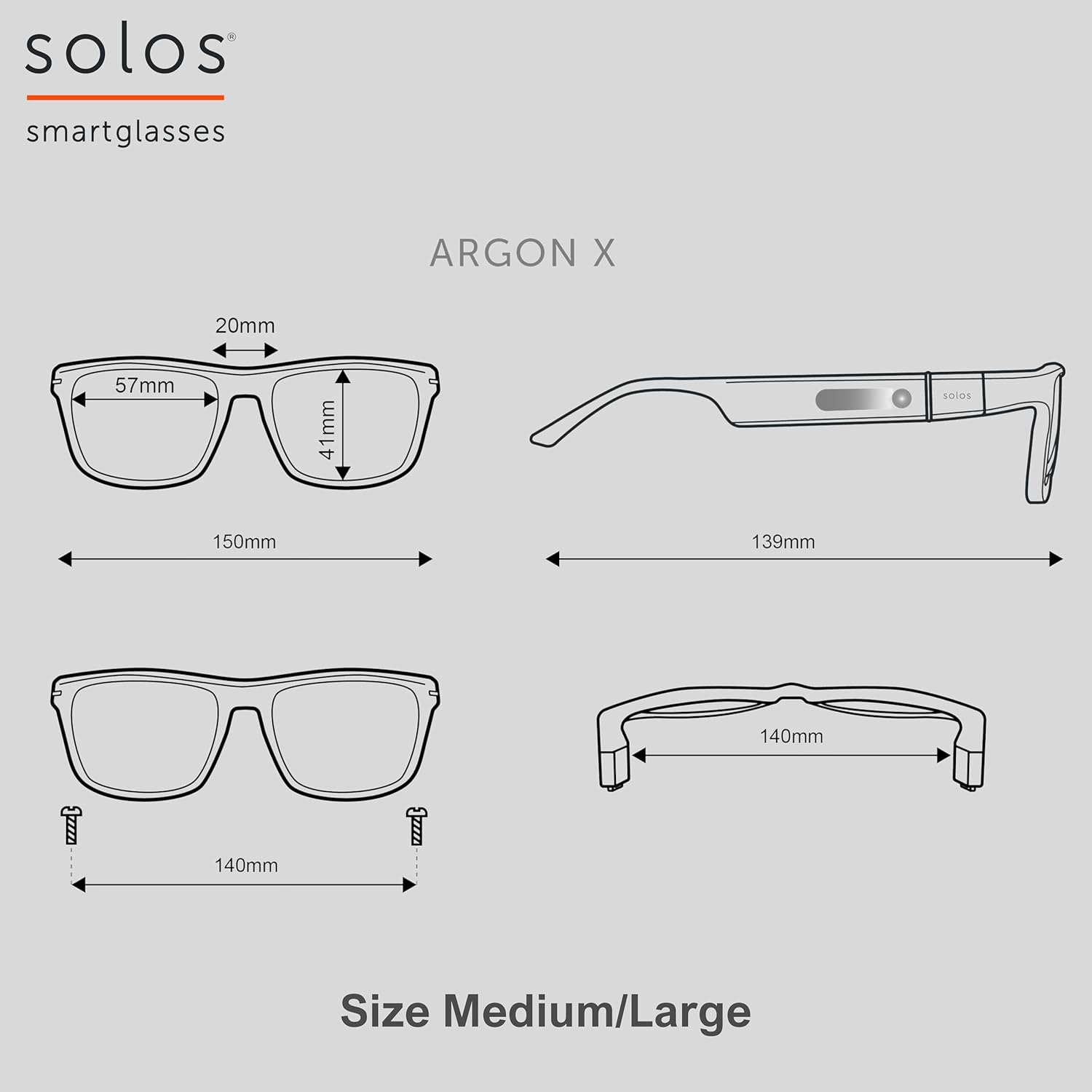
Image: Detailed dimensions of the Argon X frame, illustrating measurements for lens width, bridge, and temple length.
Održavanje
- čišćenje: Use the provided cleaning cloth to gently wipe lenses and frames. Avoid abrasive materials or harsh chemicals.
- Skladištenje: Store your glasses in the protective case when not in use to prevent scratches and damage.
- Otpornost na vodu: The glasses have an IP67 rating, meaning they are splash-resistant. Avoid submerging them in water.
Rješavanje problema
- Problemi sa vezom: Ensure Bluetooth is enabled on your phone and the glasses are charged. Try restarting both devices and re-pairing through the SOLOS AirGo app.
- Funkcionalnost aplikacije: If the app is not responding, ensure it is updated to the latest version. Close and reopen the app, or reinstall if necessary.
- Nema zvuka: Check the volume settings on both your glasses (via slide control) and your connected smartphone. Ensure the glasses are properly paired.
Garancija i podrška
For detailed warranty information and customer support, please refer to the documentation included in your product packaging or visit the official SOLOS webSačuvajte dokaz o kupovini za slučaj reklamacije.


