1. Uvod
This manual provides detailed instructions for the installation, operation, and maintenance of your Kinkeni TYZGTH16A-D1RF Zigbee Smart Temperature Sensor Controller. This device allows for remote monitoring and control of electrical equipment based on ambient temperature, integrating seamlessly with the Tuya Smart Life application.
Ključne karakteristike:
- Remote On/Off Control: Operate electrical equipment from anywhere, with automatic activation/deactivation based on a preset temperature range.
- Mobile APP Control: Monitor real-time temperature and energy consumption via the Tuya Smart Life application.
- upravljanje glasom: Compatible with Amazon Alexa and Google Home Assistant for convenient voice commands.
- Dijeljenje uređaja: Podijelite kontrolu nad uređajem s članovima porodice.
- Record Monitoring: View historical temperature data and export it via email.
2. Sigurnosne informacije
UPOZORENJE: Opasnost od strujnog udara
- Always turn off the circuit breaker before performing any wiring or installation.
- Osigurajte da su svi priključci sigurni i da su u skladu s lokalnim električnim propisima.
- Do not exceed the maximum load current of 16A to prevent overload.
- This device requires a Tuya Zigbee Hub for operation.
- Keep the smart device close to your router for a strong Wi-Fi connection.
3. Sadržaj paketa
- 1 x Kinkeni 16A Zigbee Smart Switch
- 1 x 1m Temperature Sensor Cable (Waterproof Probe)
- 1 x Uputstvo za upotrebu
4. Proizvod je gotovview

Figure 1: Kinkeni TYZGTH16A-D1RF Zigbee Smart Temperature Sensor Controller with waterproof probe and Tuya app interface.

Figure 2: The Kinkeni Smart Temperature Sensor Controller can be used in various applications such as controlling warmers, fish tanks, dehumidifiers, lamps, hatcheries, animal feeding systems, farms, storage facilities, greenhouses, and automatic watering systems.
5. Specifikacije
| Parametar | Vrijednost |
|---|---|
| Broj modela | TYZGTH16A-D1RF |
| Ulazni voltage | AC85V-250V 50 / 60Hz |
| Maksimalna struja | 16A |
| Maksimalno opterećenje | 3000W |
| Bežični standard | Zigbee (Requires Tuya Zigbee Hub) |
| Sigurnosni mehanizam | WPA-PSK/WPA2-PSK |
| Kontrolirajte APP | Tuya Smart/SmartLife (Android, iOS) |
| Radna temperatura | -20°C do 70°C |
| Measuring Range | -40°C do 125°C |
| Materijal | akrilonitril butadien stiren (ABS) |
| Dimenzije proizvoda | 3.8 x 1.8 x 1.2 inča |
| Težina artikla | 1.6 unce |
6. Upute za postavljanje
6.1. Tools Used for Installation
- Kabelski priključak
- Električna traka
- Električna olovka (Vol.tage Tester)
- Žičani odvodnik
6.2. Wiring the Smart Switch Module
- Iskljuciti: Before starting any wiring, locate your circuit breaker and turn off the power to the circuit you will be working on. Verify power is off using an electric pen or voltage tester.
- Spojite žice: Connect the Live wire (L), Neutral wire (N), and Earth wire (optional) to the corresponding input terminals on the smart switch module.
- Povežite uređaje: Connect the Live (L1, L2) and Neutral (N) wires from your electrical equipment (e.g., heater, humidifier) to the output terminals of the smart switch module. The module supports two devices.
- Spojite sondu: Plug the temperature sensor probe into the designated port on the module.
- Vrati snagu: Once all connections are secure, turn the circuit breaker back on.
Video 1: This video provides a step-by-step guide on the installation and wiring of a temperature and humidity smart switch module, including connecting to the mobile application. It shows the tools required, safety precautions, wiring connections, and the app pairing process.
6.3. App Connection and Pairing
- Preuzmi aplikaciju: Download the Tuya Smart or Smart Life app from your smartphone's app store (available for Android and iOS).
- Registracija/Prijava: Kreirajte nalog ili se prijavite na svoj postojeći nalog.
- Dodaj uređaj: Ensure your phone is connected to a 2.4GHz Wi-Fi network. Open the app, tap '+' or 'Add Device'.
- Način uparivanja: Long press the reset button on the smart switch module until the blue indicator light flashes rapidly, indicating it's in network configuration mode.
- Otkrijte uređaj: In the app, select 'Gateway & Zigbee Gateway' and then 'Add Device'. The app will search for nearby devices.
- Potvrdite vezu: Once the device is found and added, you can rename it and assign it to a room.
- Probe Detection: The app will detect temperature and humidity data only if the probe is correctly plugged in and the switch is enabled in the app.
7. Uputstvo za upotrebu
7.1. Remote Monitoring and Control
The Tuya Smart Life app allows you to monitor temperature and humidity in real-time and control connected devices remotely.
- Podaci u realnom vremenu: View current temperature and humidity readings directly from the app.
- Istorijski podaci: Access graphs and records of temperature and humidity changes over time (daily, monthly, yearly). This data can be exported.
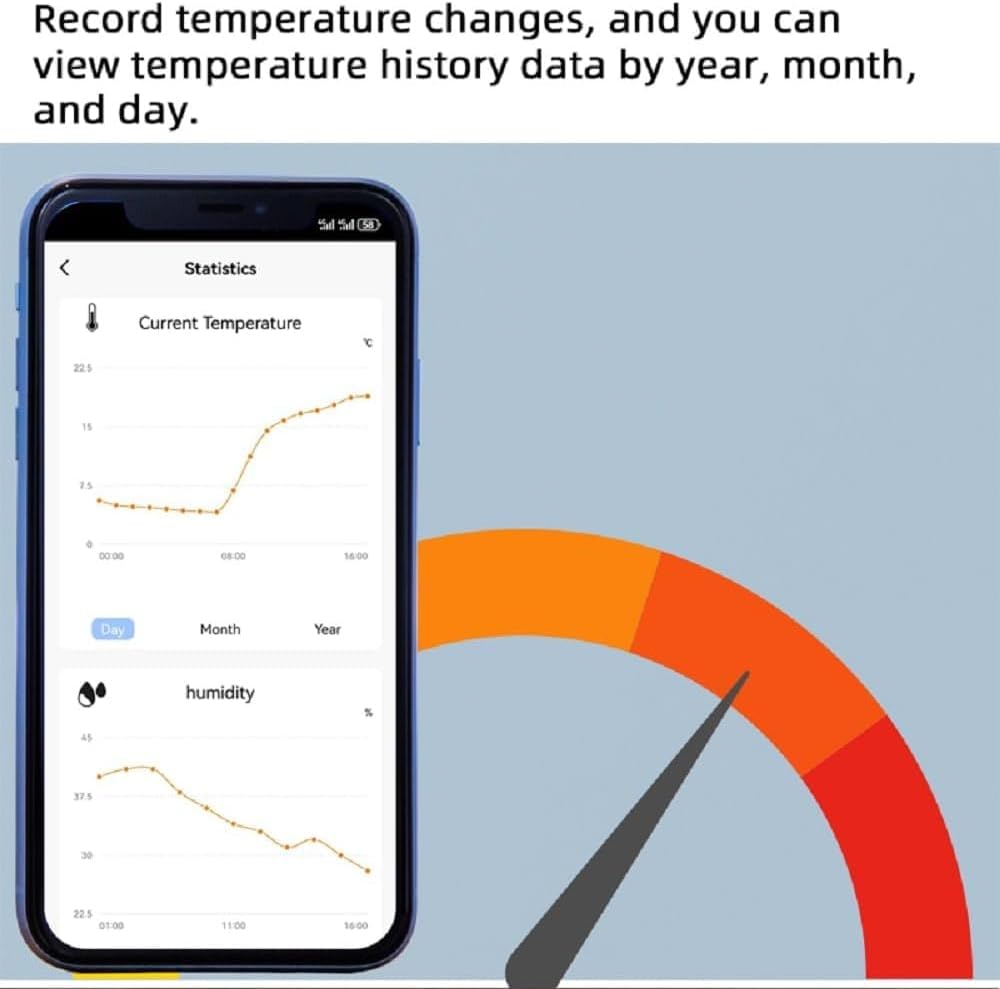
Figure 3: The Tuya Smart Life app displays historical temperature and humidity data, allowing users to track environmental changes over time.

Figure 4: The Tuya Smart Life app enables remote control of devices, allowing users to switch them on or off and monitor conditions from anywhere.
7.2. Temperature and Humidity Control Modes
The controller supports both manual and automatic control modes. You can switch between Centigrade (°C) and Fahrenheit (°F) units.
- Ručni način rada: Manually switch connected devices on or off via the app.
- Automatski način rada: Set temperature or humidity thresholds for automatic operation. For example, you can configure a fan heater to turn on when the temperature drops below a certain point and turn off when it rises above another.

Slika 5: Prample of automatic control in a greenhouse, where the smart switch activates heating or cooling based on predefined temperature thresholds.
7.3. Funkcije tajmera i odbrojavanja
Schedule your devices to turn on or off at specific times or after a set duration.
- Raspored: Set daily or weekly schedules for device operation.
- Odbrojavanje: Use the countdown feature to automatically turn devices off after a specified period.
7.4. Upravljanje glasom
Integrate your smart switch with voice assistants for hands-free control.
- Amazon Alexa: Use voice commands to control your devices.
- Google Home Assistant: Control devices using Google Assistant voice commands.
7.5. Device Sharing and Group Control
Enhance convenience by sharing access and grouping devices.
- Dijeljenje uređaja: Share control of your smart switch with family members through the Tuya Smart Life app, allowing multiple users to manage the device without re-setup.
- Grupna kontrola: Create groups of smart devices to control them simultaneously with a single command or automation.

Figure 6: The Zigbee Smart Switch integrates into a broader smart home ecosystem, enabling control of various appliances and environmental monitoring.
8. Otkrivanje problema
- Uređaj se ne povezuje s aplikacijom:
- Provjerite je li vaš telefon povezan na Wi-Fi mrežu od 2.4 GHz.
- Verify the blue indicator light on the module is flashing rapidly, indicating pairing mode. If not, long press the reset button.
- Keep the smart device close to your Wi-Fi router during the pairing process.
- Check that your Wi-Fi router's name (SSID) uses only English letters and numbers.
- Temperature/Humidity Data Not Displaying:
- Ensure the temperature sensor probe is securely plugged into the module.
- Verify that the switch for the probe is enabled within the Tuya Smart Life app.
- Automatic Control Not Working (e.g., 'Temp Lower Than' action):
- Double-check your automation settings in the Tuya Smart Life app. Ensure that both the condition (e.g., temperature lower than X) and the corresponding action (e.g., turn on device) are correctly configured and enabled.
- Confirm that the temperature probe is accurately reporting data to the app.
- Uređaj ne reagira:
- Check the power supply to the smart switch module.
- Verify your Wi-Fi and Zigbee hub connection.
- Try restarting the module by briefly disconnecting and reconnecting its power.
9. Održavanje
- čišćenje: Za čišćenje uređaja koristite meku, suhu krpu. Ne koristite abrazivna sredstva za čišćenje ili rastvarače.
- Okruženje: Izbjegavajte izlaganje uređaja ekstremnim temperaturama, vlazi ili direktnoj sunčevoj svjetlosti.
- Ažuriranja firmvera: Regularly check the Tuya Smart Life app for any available firmware updates to ensure optimal performance and security.
10. Garancija i podrška
Specific warranty information and customer support details are not available in the provided product data. Please refer to the product packaging or contact the retailer/manufacturer directly for warranty claims and technical assistance.