1. Uvod
Welcome to your new ECHTPower Switch 2 Wireless Controller. This manual provides detailed instructions for setup, operation, maintenance, and troubleshooting to ensure you get the most out of your gaming experience. This controller features vibrant RGB lighting, advanced macro programming, responsive turbo functions, and adjustable vibration feedback, offering broad compatibility with Nintendo Switch/Switch 2, PC, Android, and iOS devices.
2. Sigurnosne informacije
- Ne izlažite kontroler ekstremnim temperaturama, vlazi ili direktnoj sunčevoj svjetlosti.
- Izbjegavajte ispuštanje ili izlaganje kontrolera jakim udarcima.
- Ne pokušavajte rastavljati ili modificirati kontroler. To će poništiti garanciju.
- Držite kontroler dalje od vode i drugih tekućina.
- Koristite samo priloženi kabel za punjenje ili njegov certificirani ekvivalent.
- Čuvati van domašaja male djece.
3. Sadržaj paketa
Molimo Vas da provjerite sadržaj paketa kako biste bili sigurni da su svi artikli prisutni:
- 1 x ECHTPower Wireless Controller (Starry Sky Blue)
- 1 x USB kabl za punjenje
- 1 x Uputstvo za upotrebu
4. Raspored kontrolera
Familiarize yourself with the buttons and features of your ECHTPower controller:
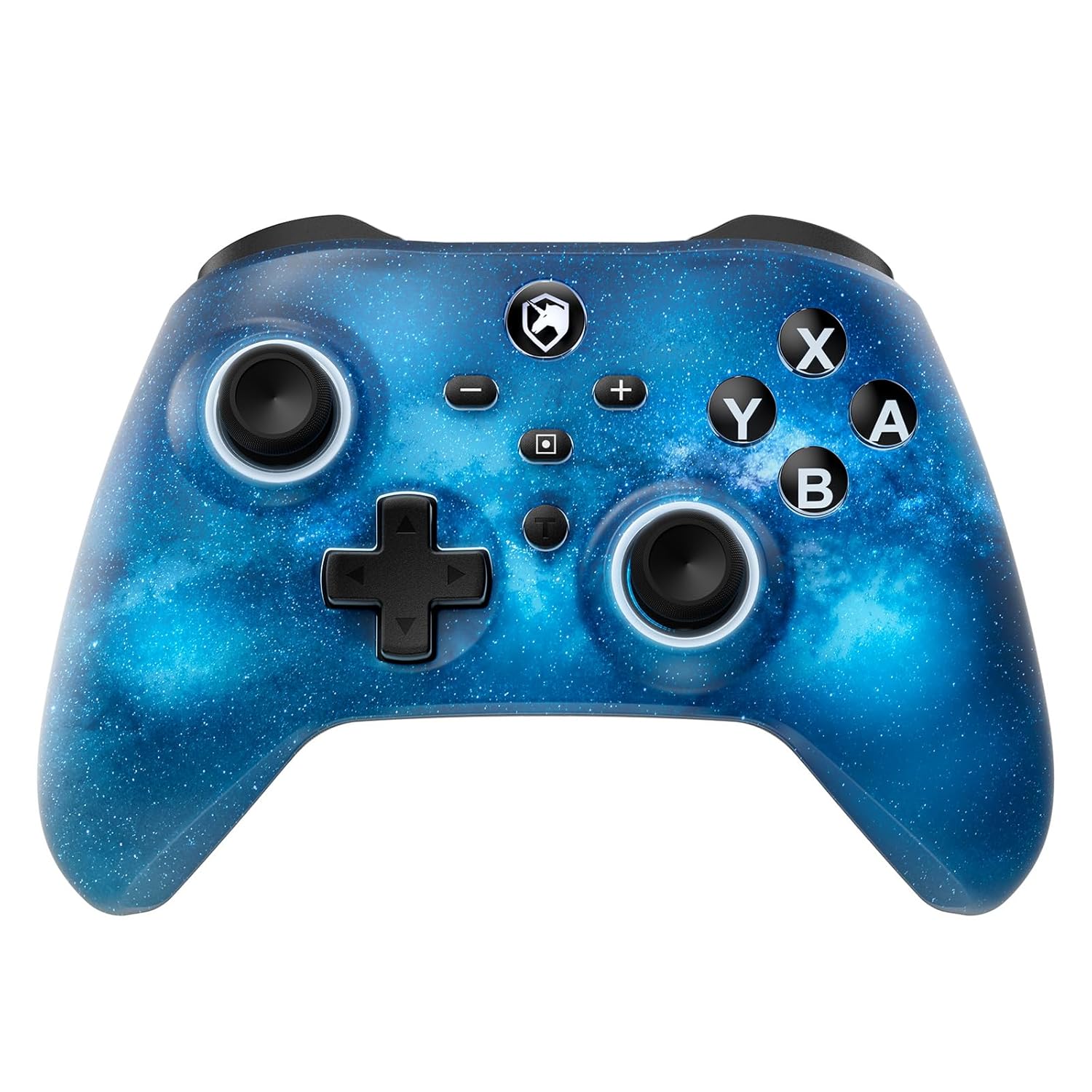
Front view of the ECHTPower Wireless Controller, showcasing its Starry Sky Blue design and button layout.
- Lijeva analogna palica: Za kretanje i kontrolu kamere.
- Desna analogna palica: Za kontrolu kamere i ciljanje.
- D-Pad: Usmjereni ulaz.
- Dugmad A/B/X/Y: Standardni akcijski dugmići.
- L/R dugmad: Dugmad za ramena.
- ZL/ZR Triggers: Analogni okidači za precizan unos.
- Dugme za početnu stranicu: Vraća se na početni ekran sistema.
- Dugme za snimanje ekrana: Pravi snimke ekrana.
- Dugmad Plus (+) / Minus (-): System menu navigation.
- Turbo (T) Button: Activates and adjusts turbo functions.
- Macro (M) Button: Initiates macro programming.
- M1/M2 dugmad: Programmable back paddles.
5. Podešavanje
5.1 Početno punjenje
Before first use, fully charge your controller. Connect the included USB charging cable to the controller's USB-C port and a USB power source (e.g., console, PC, USB wall adapter). The charging indicator will illuminate during charging and turn off when fully charged.

The controller features a 1000mAh battery, providing approximately 6-8 hours of playtime with lights on, and takes 2-3 hours to fully charge.
5.2 Pairing with Nintendo Switch/Switch 2
To pair your controller with a Nintendo Switch or Switch 2 console:
- U izborniku HOME odaberite Kontrolori > Promjena Grip/Red.
- Na kontroleru pritisnite i držite Dugme za početak for 3-5 seconds until the LED indicators begin to flash rapidly.
- Once paired, the corresponding player LED(s) on the controller will light up solid.

The ECHTPower controller is compatible with Nintendo Switch 2, though it does not support the C key, 3.5mm audio jack, or wake-up function on Switch 2.
5.3 Pairing with PC (Windows)
To connect to a Windows PC:
- Provjerite da li je na vašem računaru omogućen Bluetooth.
- Idi na Postavke > Uređaji > Bluetooth i drugi uređaji.
- Odaberite Dodajte Bluetooth ili drugi uređaj > Bluetooth.
- Pritisnite i držite Dugme za početak on the controller until the LEDs flash.
- Izaberite kontroler sa liste dostupnih uređaja za uparivanje.
5.4 Pairing with Android/iOS
To connect to Android or iOS devices:
- Omogućite Bluetooth na svom mobilnom uređaju.
- Pritisnite i držite Dugme za početak on the controller until the LEDs flash.
- Select the controller from the Bluetooth device list on your phone/tablet.

The ECHTPower Wireless Controller offers wide compatibility across Switch, PC, Android, and iOS platforms.
6. Uputstvo za upotrebu
6.1 Uključivanje/isključivanje napajanja
- Uključeno: Pritisnite Dugme za početak jednom.
- Iskljuciti: Pritisnite i držite Dugme za početak for 5 seconds, or the controller will automatically power off after 5 minutes of inactivity (adjustable via KeyLinker app).
6.2 Kontrola RGB osvjetljenja
The controller features 9 different light effects and 3 light models (Breathing Cycle, Laser Mode, Neon Mode) with 4 levels of brightness adjustment (25%-50%-75%-100%).
- Promjena boje: Pritisnite Macro (M) + Minus (-).
- Promjena načina rada svjetla: Pritisnite Macro (M) + Plus (+).
- Podesite svjetlinu: Pritisnite Macro (M) + Left Analog Stick (down).

The controller's RGB lighting offers 9 colors and 4 light modes, creating a dynamic visual experience.
Official ECHTPower video demonstrating the wireless controller's features, including its RGB lighting and responsiveness.
6.3 Makro programiranje
The programmable function allows you to map up to 16 button functions to the M1 or M2 back paddles, enabling complex skill execution with a single press.
- Uđite u način programiranja: Pritisnite i držite Macro (M) button, zatim pritisnite M1 or M2 button you wish to program. The indicator light will flash slowly.
- Redoslijed snimanja: Press the sequence of buttons you want to record (up to 16 inputs).
- Izađite iz režima programiranja: Pritisnite Macro (M) button again. The indicator light will stop flashing.
- Obriši makro: In programming mode, press the M1 or M2 button twice without inputting any sequence.

The controller's ultra-programmable design allows mapping various buttons to the M1 and M2 back paddles for enhanced gameplay.
6.4 Turbo funkcija
The controller supports both auto and manual Turbo functions with three adjustable speeds: 5 rounds/s, 12 rounds/s, and 25 rounds/s.
- Set Turbo: Pritisnite i držite Turbo (T) button, then press the desired action button (A/B/X/Y/L/R/ZL/ZR). The button will now have Turbo functionality.
- Podesite turbo brzinu: Pritisnite i držite Turbo (T) button, zatim pritisnite Right Analog Stick (up/down) to cycle through speeds.
- Clear Turbo: Pritisnite i držite Turbo (T) button, then press the Turbo-enabled action button again.

The controller offers strong manual and auto turbo capabilities, allowing up to 25 shots per second for rapid actions.
6.5 Podešavanje vibracija
The built-in dual vibration motors provide 4 levels of feedback: Strong, Medium, Weak, and None, for a realistic gaming experience.
- Adjust Vibration: Pritisnite i držite Turbo (T) button, zatim pritisnite D-Pad (up/down) to cycle through vibration intensities.

Adjustable dual vibration provides four intensity levels (0%, 30%, 70%, 100%) for a customized gaming experience.
7. Održavanje
- čišćenje: Za čišćenje kontrolera koristite meku, suhu krpu. Nemojte koristiti jake hemikalije ili abrazivne materijale.
- Skladištenje: Kontroler čuvajte na hladnom i suhom mjestu, dalje od direktne sunčeve svjetlosti i ekstremnih temperatura kada se ne koristi.
- Održavanje baterije: Da biste produžili vijek trajanja baterije, izbjegavajte često potpuno pražnjenje kontrolera. Redovno ga punite, čak i ako ga ne koristite stalno.
8. Otkrivanje problema
If you encounter any issues with your ECHTPower controller, please refer to the table below for common problems and solutions:
| Problem | Mogući uzrok | Rješenje |
|---|---|---|
| Kontroler se ne uključuje. | Niska baterija. | Charge the controller for 2-3 hours. |
| Nije moguće upariti uređaj. | Controller not in pairing mode; Bluetooth interference; device Bluetooth off. | Ensure controller is in pairing mode (flashing LEDs). Turn off/on device Bluetooth. Move closer to the device. |
| Buttons/Joysticks unresponsive. | Connection issue; software glitch. | Reconnect the controller. Reset the controller (refer to manufacturer's specific reset instructions if available, usually a small pinhole button). |
| Vibration not working or too weak/strong. | Vibration setting is off or at minimum/maximum. | Adjust vibration intensity using Turbo (T) + D-Pad (up/down). |
| Macro not working correctly. | Nepravilno programiranje. | Re-program the macro carefully following the instructions in Section 6.3. |
9. Specifikacije
| Feature | Detalj |
|---|---|
| Broj modela | SP06GA |
| Kapacitet baterije | 1000 mAh Lithium Ion |
| Vrijeme punjenja | Pribl. 2-3 sati |
| Vrijeme igranja | Approx. 6-8 hours (with lights on) |
| Kompatibilnost | Nintendo Switch/Switch Lite/Switch 2, PC (Windows), Android, iOS |
| Povezivanje | Bežično (Bluetooth), Žično (USB-C) |
| Vibracije | Dual motors, 4 adjustable levels |
| Gyro Sensor | 6-axis gyro |
| Dimenzije | 6.3 x 4.69 x 2.72 inča |
| Težina | 9.91 unce |
10. Garancija i podrška
ECHTPower provides a standard warranty for this product. For detailed warranty information, product support, or any questions not covered in this manual, please contact ECHTPower customer service through the retailer's platform or visit the official ECHTPower webMolimo sačuvajte dokaz o kupovini za potrebe reklamacije.


