1. Uvod
This manual provides detailed instructions for the installation, operation, and maintenance of your BOTSLAB G980H 4K Dual Dash Cam and G300H 2.5K Front Dash Cam. Please read this manual thoroughly before using the device to ensure proper functionality and safety. Keep this manual for future reference.
2. Sadržaj paketa
Molimo Vas da provjerite da li se u Vašem paketu nalaze sve dolje navedene stavke:
- BOTSLAB G980H 4K Dual Dash Cam Unit
- BOTSLAB G300H 2.5K Front Dash Cam Unit
- Hardwire Kit (Included as per product specifications)
- Power Cable
- Rear Camera Cable (for G980H)
- Montažni nosači
- Korisnički priručnik (ovaj dokument)
3. Proizvod je gotovview
The BOTSLAB G980H and G300H dash cams are designed to provide high-quality video recording for vehicle safety and security. The G980H offers true 4K resolution for the front camera and 1080P for the rear, while the G300H provides 2.5K front recording. Both models incorporate advanced features for an enhanced driving experience.
Ključne karakteristike:
- True 4K Front Recording (G980H): Utilizes a Sony IMX 415 sensor for superior clarity.
- 2.5K Front Recording (G300H): Provides enhanced clarity at 30 frames per second.
- Napredni sistemi pomoći vozaču (ADAS): Powered by a 1.5TOPS AI NPU chip, offering real-time alerts for pedestrian collisions, vehicle movement ahead, lane departure, and headway monitoring.
- Ugrađeni GPS: Records journey details including speed and location, viewable on Google Maps via your phone.
- Režim parkiranja 24/7: Provides theft and vandalism protection when the vehicle is off (requires dedicated hardwire kit, ASIN: B0D3QK86TQ).
- G-senzor: Automatski zaključava video foottage during collisions or sudden movements to prevent overwriting.
- noćni vid: Enhanced clarity in low-light conditions.
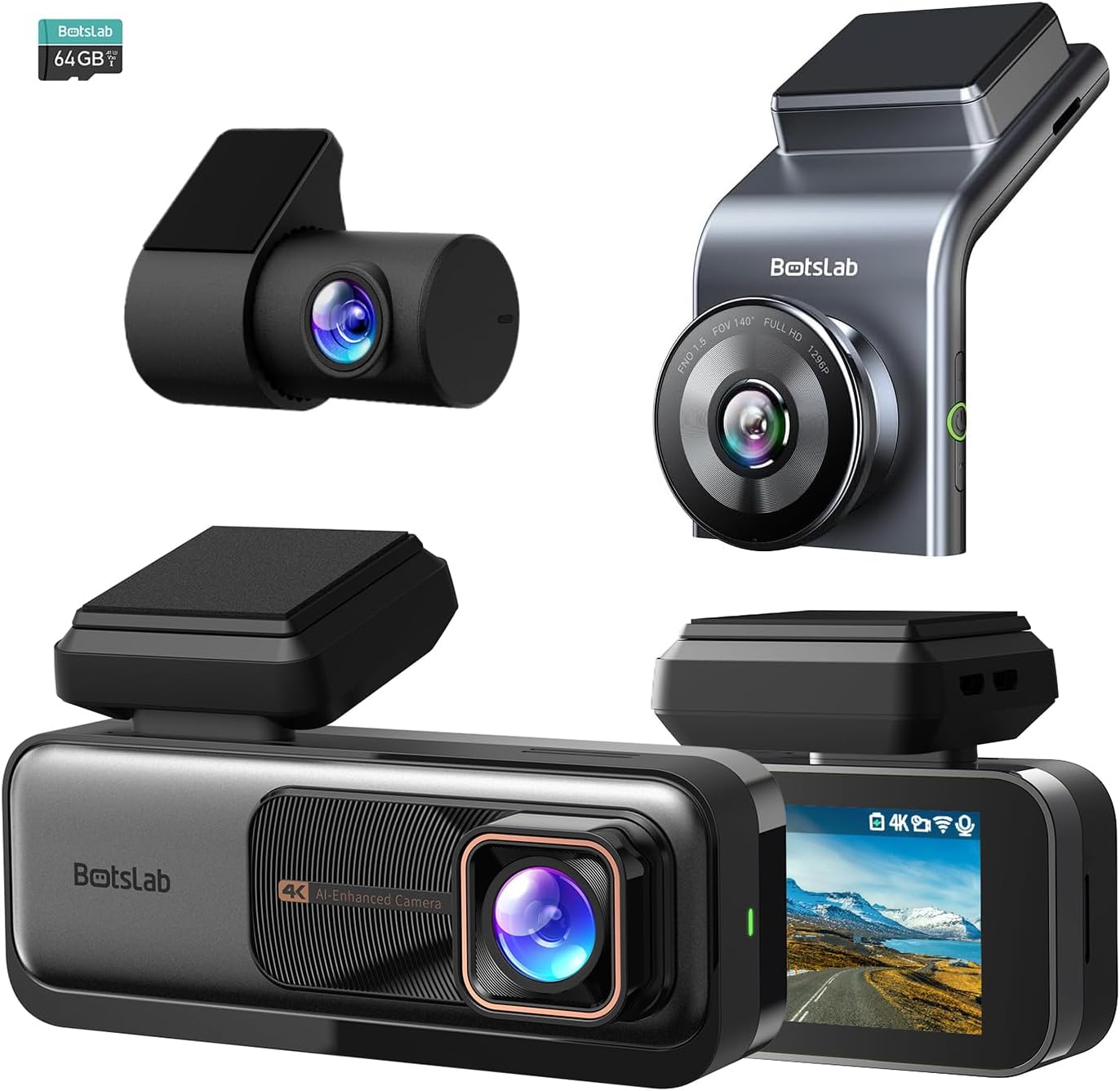
Slika 3.1: Gotovoview of the BOTSLAB G980H and G300H dash cam units.

Figure 3.2: Illustration of the Sony IMX 415 sensor and the 6-layer lens with F1.5 aperture for enhanced clarity.
4. Postavljanje i instalacija
Proper installation is crucial for optimal performance of your dash cam. Follow these steps carefully:
4.1 Priprema za instalaciju
- Odaberite lokaciju: Select a spot on your windshield that does not obstruct your view, obično iza leđaview ogledalo.
- Očistite vjetrobransko staklo: Ensure the mounting area is clean and dry for secure adhesion.
- Umetnite SD karticu: Insert a compatible microSD card (not included, unless specified) into the dash cam's card slot. Ensure the card is formatted before first use (refer to Section 6.1).
4.2 Montiranje kamere za automobil
- Attach the mounting bracket to the dash cam unit.
- Remove the protective film from the adhesive pad on the bracket.
- Firmly press the dash cam with the bracket onto the chosen windshield location for at least 30 seconds.
- For the G980H, install the rear camera on the rear windshield, ensuring a clear view.
4.3 Priključak za napajanje
- Spojite kabel za napajanje na ulazni priključak za napajanje kamere za automobil.
- Route the power cable along the edge of the windshield and dashboard to the vehicle's 12V power outlet (cigarette lighter socket) or fuse box.
- For 24/7 Parking Mode functionality, connect the included hardwire kit to your vehicle's fuse box according to the hardwire kit's specific instructions. This allows the dash cam to receive continuous power even when the vehicle is off.
- Connect the rear camera cable to the G980H main unit and route it to the rear camera.

Figure 4.1: Recommended installation position for a wide, unobstructed view (170°).
5. Uputstvo za upotrebu
5.1 Osnovni rad
- Uključivanje/isključivanje: The dash cam will automatically power on and begin recording when the vehicle's ignition is turned on. It will power off automatically when the ignition is turned off (unless hardwired for parking mode).
- Snimanje: Loop recording is enabled by default. Older files will be overwritten by new ones when the memory card is full.
- Snimanje u hitnim slučajevima (G-senzor): In the event of a collision or sudden braking, the built-in G-Sensor will automatically detect the event and lock the current video segment, preventing it from being overwritten.
5.2 Napredni sistemi pomoći vozaču (ADAS)
The dash cam features an AI NPU chip that provides real-time ADAS alerts to enhance driving safety:
- Upozorenje na sudar s pješacima: Alerts you to potential pedestrian collisions.
- Vehicle Movement Ahead: Obavještava vas kada se vozilo ispred vas počne kretati.
- Upozorenje o napuštanju trake: Alerts you if you unintentionally drift out of your lane.
- Headway Monitoring: Helps maintain a safe distance from the vehicle ahead.
- Upozorenja o umoru vozača: Provides alerts every 2 hours to remind you to take a break.

Figure 5.1: Visual representation of ADAS alerts and the AI NPU chip.

Slika 5.2: Prample of a timely alert for front vehicle departure.

Slika 5.3: Prample of pedestrian recognition with voice reminders.
5.3 Built-in GPS Functionality
The integrated GPS module records your driving data, including speed and location. This data can be viewed on Google Maps via a connected smartphone application, ensuring your travel data remains private and secure.

Figure 5.4: Visualization of GPS route recording and data display.
5.4 Režim parkiranja
When connected with the dedicated hardwire kit (ASIN: B0D3QK86TQ), the dash cam can continue to monitor your vehicle even when it is turned off. This mode provides protection against theft and vandalism by recording events while parked.
5.5 Night Vision and Clarity
Both dash cam models are equipped with advanced sensors and optics (like the Sony IMX 415 in G980H) to ensure clear video capture even in low-light conditions or at night, without relying on streetlights.

Slika 5.5: Prample of clear video capture in dark road conditions.

Figure 5.6: Comparison showing enhanced clarity with the G300H's 2.5K resolution.
6. Održavanje
6.1 Upravljanje SD karticom
- Formatiranje: It is recommended to format the microSD card regularly (e.g., once a month) to prevent data corruption and ensure optimal recording performance. This can usually be done through the dash cam's settings menu.
- Zamjena kartice: MicroSD cards have a limited lifespan. If you experience frequent recording errors or corrupted files, consider replacing the card.
6.2 Čišćenje uređaja
- Use a soft, dry cloth to clean the dash cam's lens and body.
- Do not use chemical cleaners or solvents, as they may damage the device.
7. Otkrivanje problema
Ako naiđete na probleme s kamerom za automobil, pogledajte sljedeće uobičajene probleme i rješenja:
| Problem | Mogući uzrok / rješenje |
|---|---|
| Kamera za automobil se ne uključuje. |
|
| Snimanje se zaustavlja ili files su oštećeni. |
|
| GPS signal je slab ili ga uopšte nema. |
|
| ADAS alerts are not functioning. |
|
8. Specifikacije
| Feature | Opis |
|---|---|
| Naziv modela | G980H (Dual), G300H (Front) |
| Brand | BOTSLAB |
| Rezolucija video snimanja | 4K (G980H Front), 1080P (G980H Rear), 2.5K (G300H Front) |
| Posebne karakteristike | Built-In GPS, ADAS, G-Sensor, 24/7 Parking Mode (with hardwire kit) |
| Tehnologija povezivanja | USB, Wireless (Wi-Fi for app connectivity) |
| Boja | Crna |
| Orijentacija | Front and Inside (G980H), Front (G300H) |
| Uključene komponente | Hardwire Kit |
| Proizvođač | BOTSLAB |
9. Garancija i podrška
For warranty information and technical support, please contact BOTSLAB customer service directly. Details can typically be found on the official BOTSLAB website or through the contact information provided with your purchase documentation.


