1. Uvod
This manual provides detailed instructions for the installation, operation, and maintenance of your Reobiux D20-1P 2K Outdoor Surveillance Camera. Please read this manual thoroughly before using the product to ensure proper functionality and safety.
2. Sadržaj paketa
Provjerite da li se u vašem paketu nalaze sve dolje navedene stavke. Ako neke stavke nedostaju ili su oštećene, obratite se korisničkoj podršci.
- 1x Reobiux D20-1P Solar PTZ Camera
- 1x Solar Collector
- 1x uputstvo za upotrebu
- 1x postolje za montažu
- 1x Power Supply (for initial charging)
- 1x Vrećica s vijcima (za montažu)
- 1x Type-C Charging Line
3. Proizvod je gotovview
The Reobiux D20-1P is a 2K outdoor surveillance camera designed for comprehensive home security. It features dual lenses, 360° Pan-Tilt-Zoom (PTZ) capabilities, and operates wirelessly via Wi-Fi. Key features include PIR motion detection, color night vision, two-way audio, and an IP66 weatherproof rating, powered by a solar panel and rechargeable battery.
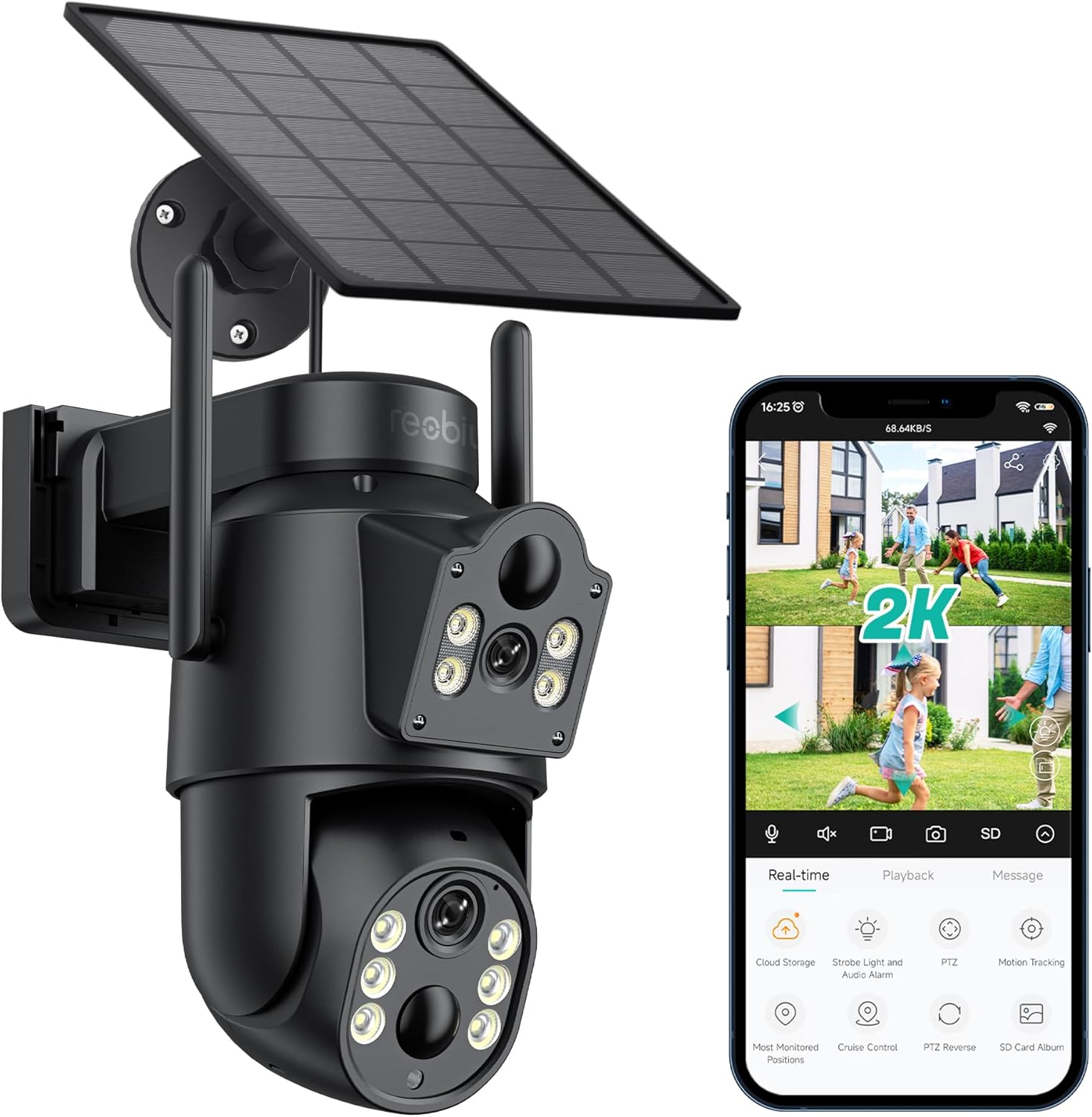
Slika 3.1: Reobiux D20-1P Solar PTZ Camera and its mobile application interface showing real-time monitoring, playback, and various control options.
Ključne karakteristike:
- 2K QHD High Resolution: Pruža jasan i detaljan video zapistage.
- Dizajn s dvostrukim sočivima: Combines a fixed lens with a rotating lens for comprehensive coverage.
- Funkcionalnost PTZ kamere od 360°: Allows remote control of pan, tilt, and zoom for flexible viewing angles.
- Solar Powered with Rechargeable Battery: Ensures continuous operation with minimal manual charging.
- PIR detekcija pokreta: Intelligently detects human movement to reduce false alarms.
- Noćni vid u boji: Offers full-color video even in low-light conditions, alongside infrared night vision.
- Dvosmjerni zvuk: Omogućava komunikaciju s posjetiocima ili odvraćanje uljeza.
- IP66 Otporan na vremenske uslove: Dizajniran da izdrži različite vanjske vremenske uvjete.
- Wireless Wi-Fi Connectivity: Easy setup and remote access via smartphone.
4. Vodič za postavljanje
4.1 Početno punjenje
Before first use, fully charge the camera's internal battery using the provided Type-C charging line and power supply. This ensures the camera has sufficient power for initial setup and operation, especially if solar charging conditions are not optimal immediately after installation.
4.2 Instalacija aplikacije i kreiranje računa
- Preuzmite iCSee app from your smartphone's app store (iOS App Store or Google Play Store).
- Instalirajte aplikaciju i otvorite je.
- Slijedite upute na ekranu da biste kreirali novi račun ili se prijavite ako ga već imate.
4.3 Camera Connection to Wi-Fi
- Provjerite je li vaša kamera uključena.
- In the iCSee app, tap the "+" icon to add a new device.
- Select the option for "Wi-Fi Camera" or "Add Device by AP Hotspot" (refer to app for exact wording).
- Follow the app's instructions to connect the camera to your 2.4GHz Wi-Fi network. You may need to scan a QR code displayed on your phone with the camera, or listen for a sound prompt.
- Nakon povezivanja, možete imenovati kameru i započeti praćenje.
4.4 Montiranje kamere
Choose a location that provides optimal surveillance coverage and receives direct sunlight for the solar panel. Ensure the camera is within range of your Wi-Fi network.
- Odaberite lokaciju: Identify a suitable wall or surface for mounting. Consider the camera's viewing angle (355° pan, 90° tilt) and the solar panel's exposure to sunlight.
- Označite tačke bušenja: Use the mounting base as a template to mark the screw holes on the wall.
- Izbušite rupe: Drill pilot holes at the marked positions. Insert wall anchors if necessary.
- Pričvrstite montažnu bazu: Secure the mounting base to the wall using the provided screws.
- Priloži kameru: Mount the camera onto the secured base.
- Podesite solarni panel: Position the solar panel to maximize sunlight exposure throughout the day.

Slika 4.1: Illustration of the camera mounted with its solar panel, highlighting the fixed and rotating lenses and the benefit of continuous solar power.
5. Uputstvo za upotrebu
5.1 Uživo View i Reprodukcija
Open the iCSee app and select your camera to access the live viewOdavde možete:
- Praćenje u realnom vremenu: View prijenos videa uživo.
- PTZ kontrola: Use the on-screen joystick to pan (355°) and tilt (90°) the camera.
- Digitalni zum: Pinch to zoom on the live feed.
- Reprodukcija: Pristup snimljen footage stored on the SD card or cloud storage.

Slika 5.1: Demonstrates the superior clarity of 2K QHD resolution compared to 1080P, providing more details for monitoring.
5.2 Detekcija pokreta i upozorenja
The camera utilizes PIR (Passive Infrared) intelligent detection to identify human movement, minimizing false alarms from pets or swaying branches.
- Omogući/onemogući: Activate or deactivate motion detection in the app settings.
- Podešavanje osjetljivosti: Adjust the PIR sensor's sensitivity to suit your environment.
- Obavještenja o alarmima: Receive instant push notifications on your smartphone when motion is detected.
- Zvučni i svjetlosni alarm: Configure the camera to trigger a strobe light and audible alarm upon detection.

Slika 5.2: The camera's PIR intelligent detection distinguishes human movement from other objects, reducing unnecessary alerts.

Slika 5.3: When motion is detected, the camera can send real-time push notifications and activate a sound and light alarm to deter intruders.
5.3 Režimi noćnog vida
The camera offers two night vision modes for clear visibility in the dark:
- Spotlight Full Color Night Vision: Utilizes built-in spotlights to provide full-color video in low-light conditions.
- Spotlight Infrared Night Vision: Uses infrared LEDs for black-and-white video in complete darkness, with a range of up to 30 meters.
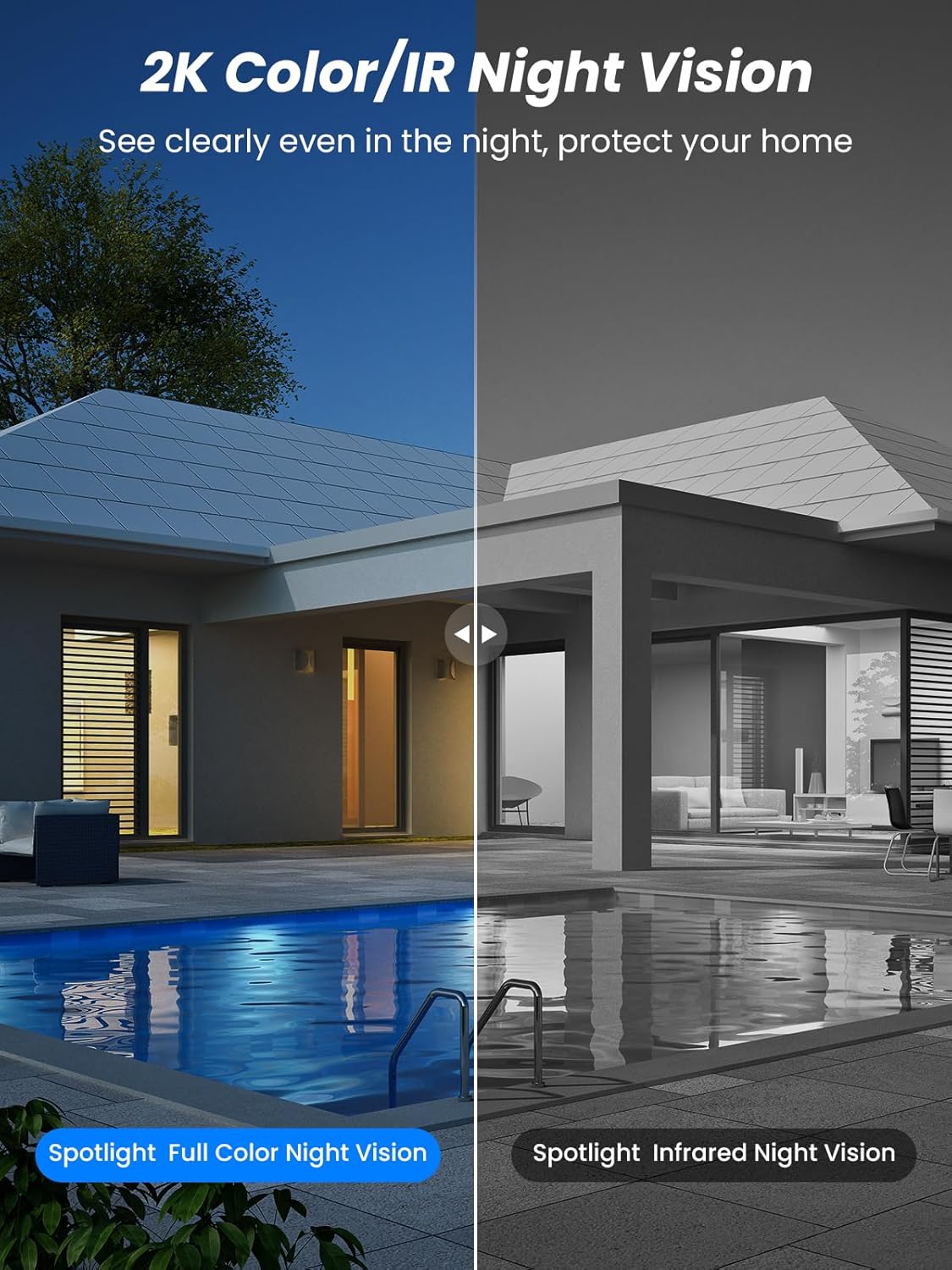
Slika 5.4: Illustrates the difference between full-color night vision, enabled by spotlights, and traditional infrared night vision.
5.4 Dvosmjerni audio
The integrated microphone and speaker allow for two-way communication.
- govori: Dodirnite ikonu mikrofona u aplikaciji da biste govorili preko zvučnika kamere.
- slušaj: Mikrofon kamere snima zvuk iz okoline.

Slika 5.5: The two-way audio function allows for direct communication through the camera, useful for interacting with visitors or delivery personnel.
6. Održavanje
- čišćenje: Povremeno čistite objektiv kamere i solarni panel mekom krpom.amp cloth to ensure optimal performance and clear image quality. Avoid abrasive cleaners.
- Zdravlje baterije: While solar-powered, extreme weather or prolonged periods of low sunlight may require manual charging. Monitor battery levels via the app.
- Ažuriranja firmvera: Check the iCSee app regularly for available firmware updates to ensure your camera has the latest features and security enhancements.
- Zaštita od vremenskih prilika: The camera is IP66 weatherproof, designed to withstand rain, snow, and sun. However, ensure all connections are secure to maintain water resistance.

Slika 6.1: The IP66 rating ensures the camera's durability and functionality in various outdoor weather conditions, including snow, rain, and direct sunlight.
7. Otkrivanje problema
- Kamera se ne povezuje na Wi-Fi:
- Ensure the camera is within range of your 2.4GHz Wi-Fi network. 5GHz networks are not supported.
- Provjerite je li vaša lozinka za Wi-Fi ispravna.
- Ponovo pokrenite ruter i kameru.
- If issues persist, try resetting the camera (refer to app or product for reset button location).
- Baterija se ne puni ili brzo prazni:
- Ensure the solar panel is clean and receives direct sunlight for several hours daily.
- Provjerite vezu između solarnog panela i kamere.
- If in a low-light environment, manually charge the camera using the Type-C cable.
- Česti događaji detekcije pokreta ili uživo view streaming can consume battery faster. Adjust settings if needed.
- False motion detection alarms:
- Adjust the PIR motion detection sensitivity in the iCSee app.
- Ensure the camera is not pointed at areas with constant movement (e.g., busy roads, swaying trees) if not intended for monitoring.
- Loš kvalitet slike:
- Očistite sočivo kamere.
- Osigurajte dovoljno osvjetljenja za optimalno snimanje slika, posebno noću.
- Provjerite jačinu Wi-Fi signala; slab signal može utjecati na kvalitetu video streaminga.
8. Specifikacije
| Feature | Detalj |
|---|---|
| Naziv modela | D20-1P |
| Rezolucija video snimanja | 2.5K |
| Efektivna video rezolucija | 2K QHD |
| Bežična komunikacijska tehnologija | Wi-Fi (2.4GHz) |
| Form Factor | Dome |
| Viewing Angle | 355 stepeni (pomjeranje), 90 stepeni (nagib) |
| Vrsta instalacije | Wall-Mounted |
| Noćni vid | 30 metara |
| Frame Rate | 25 fps |
| Materijal | Plastika |
| Voltage | 12 volti (DC) |
| Wattage | 5 vati |
| Izvor napajanja | Na baterije, solarni pogon |
| Baterije | 3 litijum-jonske baterije (uključene) |
| Connectivity Protocol | Wi-Fi |
| Tip kontrolera | iCSee App |
| Posebne karakteristike | Night Vision (Color/IR), PIR Motion Detection, Two-Way Audio, IP66 Weatherproof |
| Težina artikla | 1.06 kg |
| Dimenzije parcele | 21.7 x 19.5 x 13.8 cm |
9. Garancija i podrška
Reobiux offers a 1 godine garancije for this product. For any issues or inquiries, please do not hesitate to reach out to our customer service. We provide 20 hours of online service to assist you.
For support, please refer to the contact information provided with your purchase or within the iCSee application.


