Uvod
This manual provides essential instructions for the safe and efficient use of your Qubo Senior P-210nw 4G mobile phone. Please read this manual thoroughly before operating the device and keep it for future reference.
1. Podešavanje
Before using your Qubo Senior P-210nw 4G, follow these steps to prepare the device.
1.1 Sadržaj paketa
Provjerite da li vaš paket sadrži sljedeće stavke:
- Qubo Senior P-210nw 4G Mobile Phone
- Battery (1000 mAh Lithium-ion)
- Charger (USB connection)
- Uputstvo za upotrebu
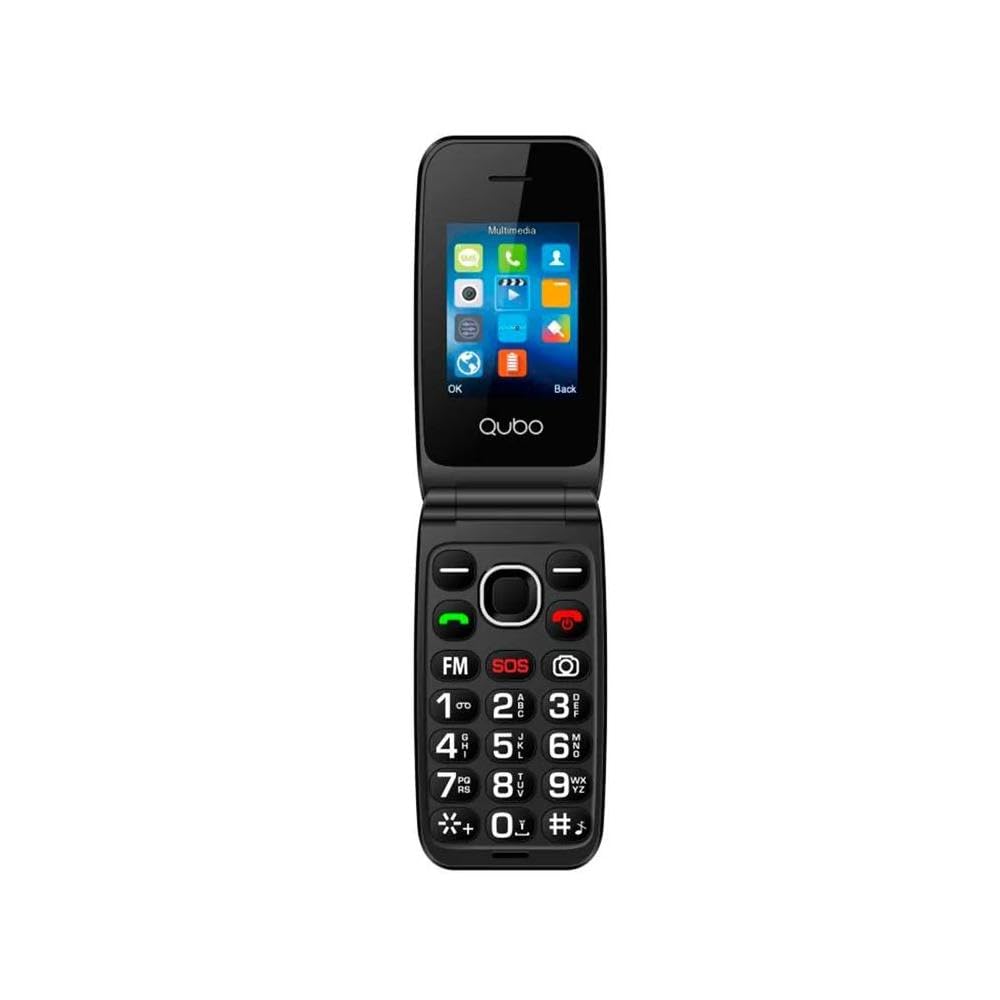
Image 1: Qubo Senior P-210nw 4G Mobile Phone. This image displays the front view of the Qubo Senior P-210nw 4G mobile phone, highlighting its compact design and physical keypad.
1.2 Instalacija SIM kartice i baterije
- Uklonite zadnji poklopac: Lagano otvorite zadnji poklopac telefona.
- Umetnite SIM karticu(e): Locate the SIM card slot(s). This phone supports dual SIM cards. Insert your SIM card(s) into the designated slot(s) with the gold contacts facing down.
- Insert microSD card (optional): If you wish to expand storage, insert a microSD card into its dedicated slot.
- Umetnite bateriju: Place the 1000 mAh Lithium-ion battery into the battery compartment, ensuring the contacts align correctly.
- Zamijenite zadnji poklopac: Securely attach the back cover until it clicks into place.
1.3 Punjenje baterije
Prije prve upotrebe, potpuno napunite bateriju telefona.
- Connect the USB charger cable to the phone's USB port.
- Uključite drugi kraj punjača u utičnicu.
- Indikator punjenja na telefonu će zasvijetliti. Nakon što se telefon potpuno napuni, indikator može promijeniti boju ili se ugasiti.
1.4 Uključivanje/isključivanje
- Za uključivanje: Pritisnite i držite dugme za napajanje/prekid poziva dok se ekran ne upali.
- Za isključivanje: Press and hold the Power/End Call button until the power-off options appear, then select "Power Off".
2. Uputstvo za upotrebu
This section details the basic functions and operations of your Qubo Senior P-210nw 4G phone.
2.1 Osnovna navigacija
- Use the navigation keys (up, down, left, right) to move through menus.
- Press the "OK" or "Select" button (usually in the center of the navigation keys) to confirm selections.
- Pritisnite dugme "Nazad" ili "Obriši" da biste se vratili na prethodni ekran ili izbrisali znakove.
2.2 Upućivanje i primanje poziva
- Pozivanje: Unesite broj telefona pomoću tastature i pritisnite zeleno dugme za poziv.
- Primanje poziva: Kada telefon zazvoni, pritisnite zeleno dugme za poziv da biste odgovorili.
- Završetak poziva: Pritisnite crveno dugme za prekid poziva.
2.3 Razmjena poruka
To send and receive SMS messages:
- Idite na meni "Poruke".
- Odaberite "Nova poruka" ili "Kreiraj SMS".
- Unesite broj primaoca ili odaberite iz kontakata.
- Unesite svoju poruku pomoću tastature.
- Pritisnite "Pošalji".
2.4 Funkcija kamere
Your phone is equipped with a 0.3 MP rear camera.
- Pristupite kameri iz glavnog menija.
- Kadrirajte subjekt na ekranu.
- Press the "OK" or "Capture" button to take a photo.
2.5 FM radio
Da biste koristili FM radio:
- Connect a wired headset (not included) to the audio jack, as it acts as an antenna.
- Navigate to the "FM Radio" application.
- Koristite navigacijske tipke za skeniranje stanica ili ručno podešavanje.
2.6 Bluetooth povezivost
To connect to other Bluetooth devices:
- Idite na "Postavke" > "Bluetooth".
- Uključite Bluetooth.
- Odaberite "Traži devices" or "Pair new device".
- Choose the desired device from the list and follow on-screen prompts to pair.
2.7 SOS dugme
The SOS button is a safety feature designed for emergencies.
- Postavljanje: In the phone's settings, configure up to five emergency contacts for the SOS function.
- Aktivacija: In an emergency, press and hold the dedicated SOS button (usually on the back or side of the phone).
- The phone will automatically send an emergency SMS message to the pre-set contacts and then dial them one by one until a connection is made.
3. Održavanje
Proper care ensures the longevity of your Qubo Senior P-210nw 4G.
- čišćenje: Koristite meku, suhu krpu za čišćenje ekrana i kućišta telefona. Izbjegavajte tekuća sredstva za čišćenje ili abrazivne materijale.
- Održavanje baterije:
- Ne izlažite bateriju ekstremnim temperaturama.
- Izbjegavajte često potpuno pražnjenje baterije.
- Ako se telefon neće koristiti duži period, napunite bateriju na oko 50% prije skladištenja.
- Skladištenje: Telefon čuvajte na hladnom i suhom mjestu, dalje od direktne sunčeve svjetlosti i vlage.
- Otpornost na vodu: Ovaj telefon nije vodootporan. Izbjegavajte izlaganje tekućinama.
4. Otkrivanje problema
Pogledajte ovaj odjeljak za rješenja uobičajenih problema.
| Problem | Mogući uzrok | Rješenje |
|---|---|---|
| Telefon se ne uključuje | Slaba baterija; Baterija nije pravilno umetnuta | Napunite bateriju; Ponovo pravilno umetnite bateriju. |
| Nema mrežnog signala | Out of network coverage; SIM card issue | Move to an area with better coverage; Check SIM card insertion; Contact your service provider. |
| Ne mogu upućivati/primati pozive | No network signal; SIM card not active; Incorrect settings | Check network signal; Ensure SIM card is active; Verify call settings. |
| Baterija se brzo prazni | Heavy usage; Old battery; Background processes | Reduce usage; Consider replacing battery if old; Close unnecessary applications. |
5. Specifikacije
Key technical specifications for the Qubo Senior P-210nw 4G mobile phone.
- Model: P-210NW 4G
- Brand: Qubo
- Boja: Crna
- Prikaz: 2.8" VGA screen, 240 x 320 pixels
- RAM: 4 MB
- Interna pohrana: 4 MB
- Proširiva pohrana: microSD (card not included)
- Povezivanje: 4G, Dual SIM, Bluetooth, USB
- kamera: Zadnja kamera od 0.3 MP
- baterija: 1000 mAh Litijum-jonski
- Posebne karakteristike: SOS Button, FM Radio, Audio Jack
- Operativni sistem: Standard (Feature Phone OS)
- CPU model: A-Series
- Brzina procesora: 3.4 GHz (Note: Value from specifications, typical for feature phones may vary)
Napomena: Specifikacije su podložne promjenama bez prethodne najave.
6. Garancija i podrška
6.1 Garancija proizvođača
Your Qubo Senior P-210nw 4G mobile phone comes with a 3 godine garancije na proizvodne greškeOva garancija pokriva nedostatke u materijalima i izradi pri normalnoj upotrebi. Ne pokriva štetu uzrokovanu nepravilnom upotrebom, nezgodama, neovlaštenim modifikacijama ili normalnim habanjem.
Molimo sačuvajte svoj dokaz o kupovini za zahtjeve u vezi s garancijom.
6.2 Korisnička podrška
For technical assistance, warranty claims, or further inquiries, please contact your retailer or the Qubo customer service department. Refer to the packaging or Qubo's official webstranica za kontakt informacije.