Uvod
Hvala vam što ste odabrali Crnuview AirBuds 4 Wireless Earbuds. This manual provides essential information for setting up, operating, and maintaining your earbuds. Please read it carefully to ensure optimal performance and longevity of your device.
Sadržaj paketa
Provjerite da li se sve stavke nalaze u vašem paketu:
- Crnaview AirBuds 4 slušalice (lijeve i desne)
- Futrola za punjenje
- Uputstvo za upotrebu
- Kabel za punjenje tipa C
- Two additional pairs of silicone ear tips (total of 3 sizes: S, M, L)

Product Overview
Crniview AirBuds 4 feature an ergonomic in-ear design for comfortable wear and stable fit. The charging case provides convenient storage and extends battery life.

Setup
1. Punjenje slušalica i kutijice
Before first use, fully charge the earbuds and charging case. Connect the provided Type-C charging cable to the charging port on the case and a USB power source.
- The charging case can provide up to 5 full charges for the earbuds.
- Potpuno punjenje kućišta traje otprilike 1.5 sat.

2. Bluetooth uparivanje
- Otvorite kutijicu za punjenje. Slušalice će automatski ući u način rada za uparivanje.
- Na vašem uređaju (pametnom telefonu, tabletu, računaru) omogućite Bluetooth.
- Traži available Bluetooth devices and select "AirBuds 4" from the list.
- Nakon povezivanja, čut ćete zvučni signal potvrde i slušalice su spremne za upotrebu.
The earbuds feature automatic re-connection to the last paired device when removed from the case.

Uputstvo za upotrebu
Nositi slušalice
Choose the silicone ear tips that provide the most comfortable and secure fit for your ears. Insert the earbuds gently into your ear canal and rotate slightly to ensure a snug seal for optimal sound quality and stability.

Dodirnite Kontrole
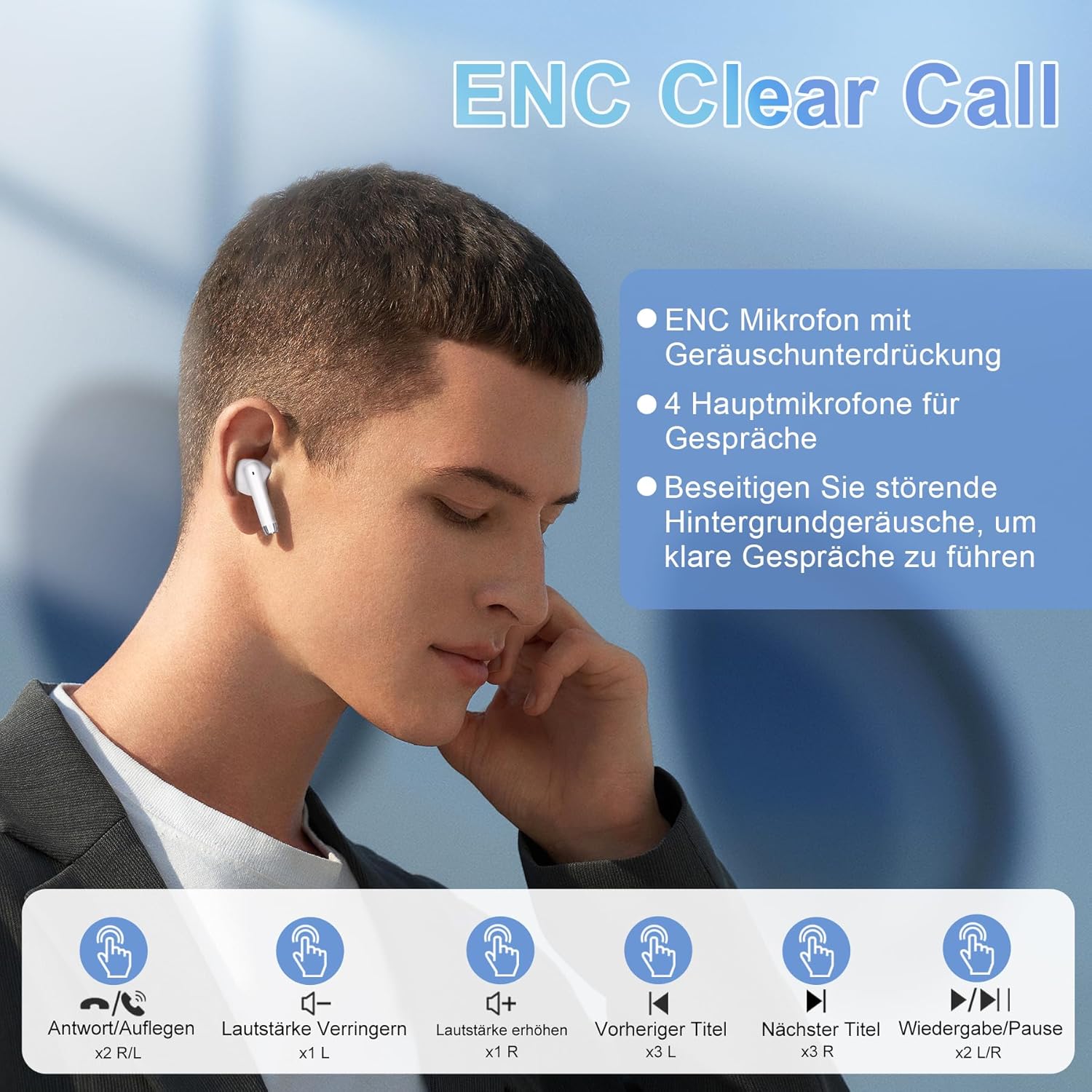
Crniview AirBuds 4 feature intuitive touch controls on each earbud. The functions are as follows:
| Akcija | Kontrola | Funkcija |
|---|---|---|
| Dvostruki dodir (L/R) | Earbud Touch Sensor | Reprodukcija/Pauziranje muzike, Odgovor/Završetak poziva |
| Trostruki dodir (L) | Left Earbud Touch Sensor | Previous Track |
| Trostruki dodir (R) | Right Earbud Touch Sensor | Next Track |
| Jedan dodir (L) | Left Earbud Touch Sensor | Utišavanje zvuka |
| Jedan dodir (R) | Right Earbud Touch Sensor | Volume Up |
| Dugi pritisak (L/R) | Earbud Touch Sensor | Aktivirajte glasovnog asistenta |
Karakteristike
Napredna Bluetooth 5.3 tehnologija
The AirBuds 4 utilize Bluetooth 5.3, offering a faster and more stable wireless connection. This technology ensures lower power consumption and reduced latency for a seamless audio experience.

Hi-Fi Stereo Sound & ENC Noise Reduction
Equipped with 13mm dynamic drivers and a three-layer composite diaphragm, the AirBuds 4 deliver high-resolution audio with strong bass and clear highs. Each earbud includes an Environmental Noise Cancellation (ENC) microphone to enhance voice clarity and reduce background noise during calls.

IPX7 vodootporna ocjena
The earbuds are IPX7 waterproof, making them resistant to sweat, rain, and splashes. This protection allows for use during workouts or in light rain conditions.
Produženo trajanje baterije
Enjoy up to 8 hours of music playback on a single charge. With the included charging case, the total listening time extends to approximately 36 hours.
Rješavanje problema
No Sound from Earbuds
- Provjerite jesu li slušalice napunjene.
- Check Bluetooth connection on your device. Re-pair if necessary.
- Adjust volume on both your device and via earbud touch controls.
Slušalice se ne uparuju
- Make sure both earbuds are in the charging case and have sufficient charge.
- Remove "AirBuds 4" from your device's Bluetooth list and attempt to pair again.
- Provjerite da nijedan drugi Bluetooth uređaj ne ometa vezu.
Problemi sa punjenjem
- Provjerite je li Type-C kabel sigurno spojen i na kućište i na izvor napajanja.
- Pokušajte s drugim kabelom za punjenje ili adapterom za napajanje.
- Očistite kontakte za punjenje na slušalicama i unutar kućišta.
Specifikacije
| Feature | Detalj |
|---|---|
| Naziv modela | AirPods 4 |
| Tehnologija povezivanja | Bežično (Bluetooth 5.3) |
| Postavljanje uha | In-Ear |
| Form Factor | In-Ear |
| Kontrola buke | Ukidanje buke iz okoliša (ENC) |
| Otpornost na vodu | IPX7 |
| Trajanje baterije (slušalice) | Do 8 sati |
| Ukupno vrijeme reprodukcije (s kutijom) | Do 36 sati |
| Port za punjenje | Tip-C |
| Težina | 100 grams (packaging dimensions) |
Održavanje
- čišćenje: Redovno čistite slušalice i kućište za punjenje mekom, suhom krpom. Izbjegavajte upotrebu jakih hemikalija ili abrazivnih materijala.
- Skladištenje: Kada se ne koriste, slušalice čuvajte u kutijici za punjenje kako biste ih zaštitili od prašine i oštećenja.
- Održavanje baterije: To prolong battery life, avoid fully discharging the earbuds or case frequently. Charge them regularly, even if not in constant use.
Garancija i podrška
Tvoja Crnaview AirBuds 4 are covered by a manufacturer's warranty. For detailed warranty information, please refer to the warranty card included in your package or visit the official Blackview website. For technical support or service inquiries, please contact Blackview korisničku podršku putem njihovih službenih kanala.
Molimo sačuvajte svoj dokaz o kupovini za zahtjeve u vezi s garancijom.


