1. Uvod
Hvala na kupoviniasing the Diyeeni Digital Alarm Clock Speaker. This device combines a digital alarm clock, FM radio, and speaker with Bluetooth 5.0 connectivity and memory card playback. Its portable design and 1600mAh battery make it suitable for various uses, including travel, reading, and sports. Please read this manual carefully to ensure proper use and optimal performance of your device.
2. Proizvod je gotovview
2.1 Ključne karakteristike
- Bluetooth 5.0 povezivanje: Enjoy wireless audio streaming from compatible devices.
- Dvostruki budilnik: Set two independent alarms for flexible scheduling.
- FM radio: Tune into your favorite FM stations (87.5MHz-108MHz).
- Reprodukcija memorijske kartice: Supports memory cards up to 32GB for direct music playback.
- Prijenosni dizajn: Compact and lightweight with a built-in 1600mAh battery for on-the-go use.
- Jasan LED ekran: Easy-to-read digital time display.
- Funkcija ogledala: The screen can also serve as a mirror.
- Zatamnjivanje ekrana: Adjust display brightness for comfort.
2.2 Komponente i kontrole proizvoda
Familiarize yourself with the various parts and controls of your Digital Alarm Clock Speaker.
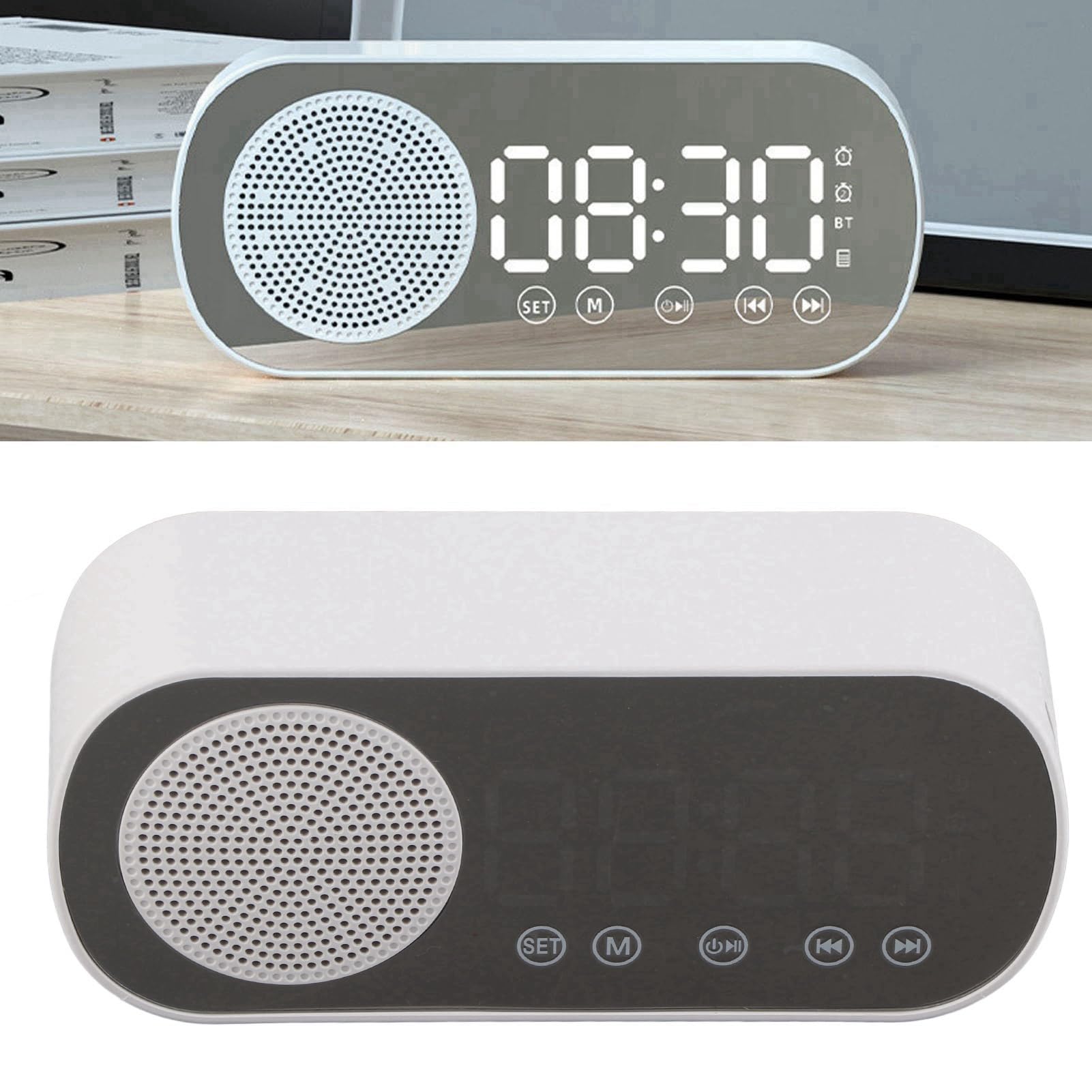
Slika 1: Prednja strana view of the Diyeeni Digital Alarm Clock Speaker.

Slika 2: Gotovoview of the Diyeeni Digital Alarm Clock Speaker highlighting its key functions.

Figure 3: Portability and mirror function of the device.
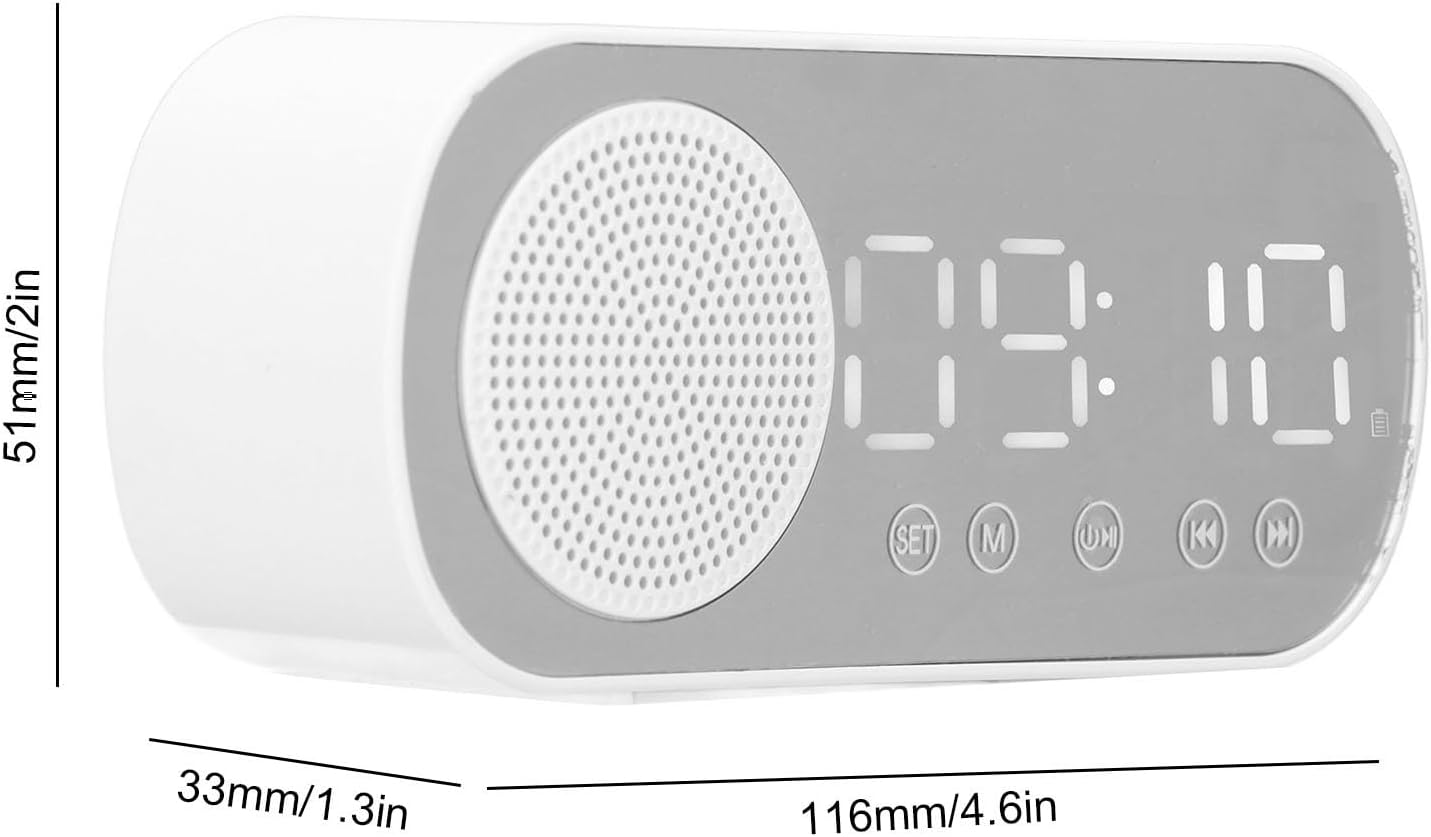
Slika 4: Dimenzije proizvoda za referencu.
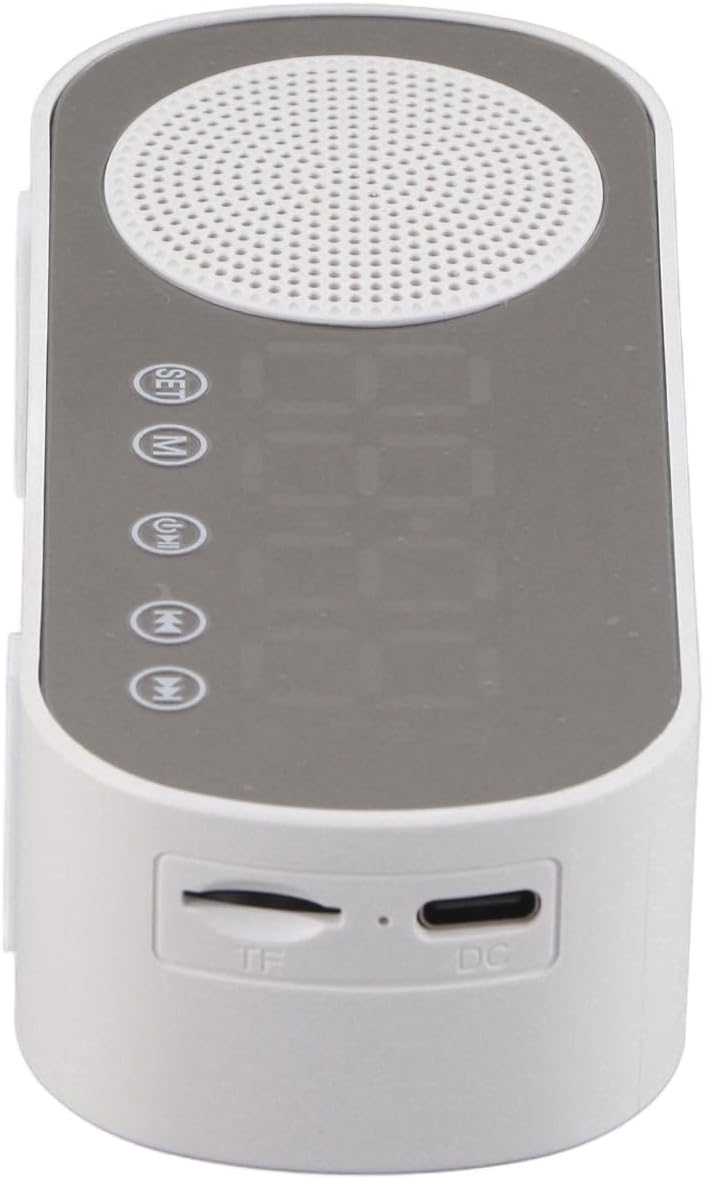
Slika 5: Vrh view showing the TF card slot and DC charging port.
3. Podešavanje
3.1 Početno punjenje
Before first use, fully charge the device. Connect the provided charging cable to the DC port on the device and the other end to a USB power adapter (not included). The charging indicator will show the charging status.
3.2 Uključivanje/isključivanje napajanja
- Da biste uključili, pritisnite i držite dugme za napajanje.
- Da biste isključili napajanje, ponovo pritisnite i držite dugme za napajanje.
3.3 Postavljanje vremena
- U režimu sata pritisnite SET dugme za ulazak u režim podešavanja vremena.
- Koristite +/- buttons (or similar navigation buttons) to adjust the hour.
- Pritisnite SET again to move to minute adjustment, then use +/- za postavljanje minuta.
- Pritisnite SET za potvrdu i izlaz iz podešavanja vremena.
4. Uputstvo za upotrebu
4.1 Odabir načina rada
Pritisnite M (Mode) button to cycle through available modes: Bluetooth, FM Radio, Memory Card Playback, and Clock/Alarm mode.
4.2 Bluetooth uparivanje
- Switch the device to Bluetooth mode. The display will show "BT" and an indicator will flash, indicating it's ready for pairing.
- Enable Bluetooth on your smartphone or other device and search for "Diyeeni Speaker" (or similar name).
- Select the device to pair. Once connected, a confirmation sound will play, and the "BT" indicator will stop flashing.
4.3 Rad FM radija
- Prebacite se u FM radio način rada.
- Pritisnite Pusti/Pauza dugme za automatsko skeniranje i spremanje dostupnih FM stanica.
- Koristite Prethodno/Sljedeće tipke za navigaciju kroz spremljene stanice.
- Podesite jačinu zvuka pomoću Volume dugme ili dugmad.
4.4 Memory Card Playback
- Insert a memory card (TF card, max 32GB) into the TF slot on the side of the device.
- The device will automatically switch to Memory Card Playback mode and begin playing audio files.
- Koristite Pusti/Pauza i Prethodno/Sljedeće dugmad za kontrolu reprodukcije.
4.5 Postavljanje alarma
- U režimu sata pritisnite i držite Alarm 1 or Alarm 2 dugme za ulazak u režim podešavanja alarma.
- Koristite +/- buttons to adjust the alarm hour, then press the alarm button again to set minutes.
- Continue pressing the alarm button to select alarm sound (e.g., FM radio, buzzer) and volume.
- Press the alarm button one last time to confirm and activate the alarm. An alarm icon will appear on the display.
- To turn off a sounding alarm, press any button. To disable an alarm, press the corresponding alarm button briefly until the alarm icon disappears.
4.6 Osvjetljenje ekrana (zatamnjenje)
Pritisnite Snooze/Dimmer button (or similar) repeatedly to cycle through different brightness levels for the LED display.
5. Održavanje
5.1 Čišćenje
- Obrišite uređaj mekom, suvom krpom.
- Ne koristite abrazivna sredstva za čišćenje, voskove ili rastvarače jer mogu oštetiti površinu.
5.2 Njega baterija
- Da biste produžili vijek trajanja baterije, izbjegavajte često potpuno pražnjenje baterije.
- Redovno punite uređaj, čak i ako ga ne koristite duži period.
6. Otkrivanje problema
| Problem | Mogući uzrok | Rješenje |
|---|---|---|
| Uređaj se ne uključuje. | Slaba baterija ili nema punjenja. | Pomoću kabla za punjenje priključite uređaj na izvor napajanja i ostavite ga da se napuni. |
| Nema zvuka iz zvučnika. | Jačina zvuka je preniska; uređaj nije povezan; pogrešan način rada. | Increase volume. Ensure Bluetooth is paired or memory card is inserted correctly. Check mode selection. |
| Bluetooth uparivanje nije uspjelo. | Device too far; Bluetooth not enabled on source; incorrect pairing procedure. | Ensure devices are within range. Enable Bluetooth on your source device. Re-enter pairing mode on the speaker. |
| Prijem FM radija je slab. | Slab signal; smetnje. | Reposition the device for better reception. Avoid placing near other electronic devices that may cause interference. |
| Alarm se ne oglašava. | Alarm nije postavljen ili je onemogućen; jačina zvuka je preniska. | Verify alarm settings and ensure the alarm icon is visible. Increase alarm volume. |
7. Specifikacije
- Brand: Dijeeni
- Broj modela: Diyeeniv5x3kuw2ne
- Materijal: ABS (akrilonitril butadien stiren)
- Boja: Bijelo
- Veličina proizvoda: Approx. 116 x 51 x 33mm / 4.6 x 2 x 1.3in
- baterija: Built-in Lithium Battery, 1600mAh Capacity
- Bluetooth verzija: 5.0
- Načini reprodukcije: Bluetooth, Memory Card (Maximum Support 32G)
- FM radio frekvencija: 87.5MHz-108MHz
- Karakteristike: Digital Clock, Dual Alarm Clock, FM Radio, Speaker, Mirror Function, Dimmable Display
- Težina artikla: 5.8 unce
8. Garancija i podrška
For warranty information and customer support, please refer to the documentation included with your purchase or contact the retailer/manufacturer directly. Keep your purchase receipt as proof of purchase for any warranty claims.