1. Uvod
This manual provides comprehensive instructions for the installation, operation, maintenance, and troubleshooting of the Axiom GMFIBER-SFP-500-AX 1000BASE-SX SFP Transceiver. Please read this manual thoroughly before using the product to ensure proper functionality and safety.
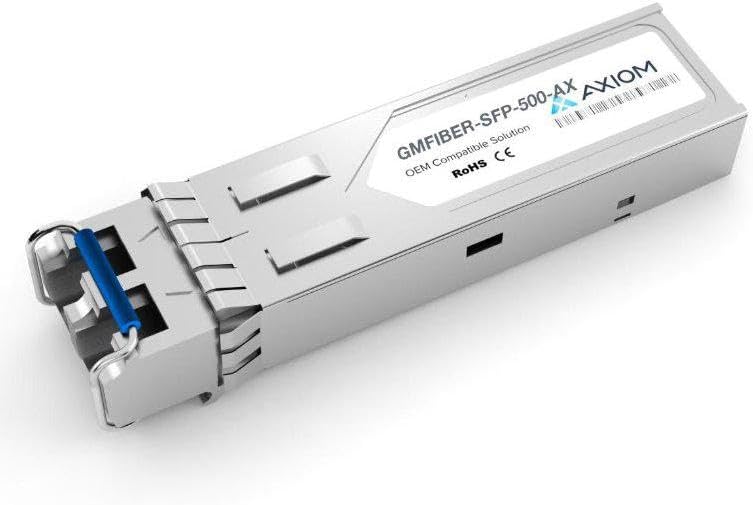
An image showing the Axiom GMFIBER-SFP-500-AX 1000BASE-SX SFP Transceiver. It is a compact, metallic module with a blue pull tab on one end, designed for network connectivity.
2. Proizvod je gotovview
The Axiom GMFIBER-SFP-500-AX is a high-performance Small Form-Factor Pluggable (SFP) transceiver module designed for 1000BASE-SX Gigabit Ethernet applications. It provides a reliable fiber optic link for data communication, compatible with SIXNET systems. This module is hot-pluggable, allowing for easy installation and replacement without interrupting network operations.
Ključne karakteristike:
- 1000BASE-SX compliant
- SFP (Small Form-Factor Pluggable) standard
- Designed for multi-mode fiber applications
- Hot-pluggable interface
- OEM Compatible Solution for SIXNET
- RoHS and CE compliant
3. Podešavanje
3.1 Sadržaj paketa
Before proceeding with installation, please verify that all items are present and in good condition:
- Axiom GMFIBER-SFP-500-AX 1000BASE-SX SFP Transceiver
- Ovo korisničko uputstvo (digitalno ili štampano)
3.2 Koraci instalacije
Follow these steps to properly install the SFP transceiver:
- Sigurnost na prvom mjestu: Ensure that the host device (e.g., network switch, router) is powered off or that the SFP port is disabled, if possible, to prevent accidental damage during installation.
- Orient the Transceiver: Hold the SFP transceiver with the blue pull tab facing upwards.
- Insert into Port: Gently slide the SFP transceiver into the designated SFP port on your compatible network device (e.g., SIXNET equipment) until it clicks into place. Do not force the module.
- Spojite optički kabel: Remove the dust cap from the SFP transceiver's optical port and from your fiber optic cable. Carefully insert the appropriate fiber optic cable (LC connector for 1000BASE-SX) into the transceiver's port. Ensure a secure connection.
- Power On/Enable Port: If you powered off the device, power it back on. If you disabled the port, re-enable it.
- Potvrdite vezu: Check the link/activity LEDs on the host device's SFP port. A solid green or blinking green light typically indicates a successful link and data activity. Refer to your host device's manual for specific LED indicators.
4. Uputstvo za upotrebu
Once installed, the Axiom GMFIBER-SFP-500-AX transceiver operates automatically as part of your network infrastructure. It facilitates the conversion of electrical signals to optical signals for transmission over fiber optic cables and vice-versa.
Provjera operacije:
- Status veze: Observe the link status indicator on your network device's SFP port. A steady light usually signifies a successful physical link.
- Activity Indicator: A blinking light typically indicates data transmission and reception.
- Mrežna povezanost: Confirm network connectivity and data flow between devices connected via the transceiver.
For detailed information on monitoring SFP module status, consult the documentation for your specific network switch or router.
5. Održavanje
The Axiom GMFIBER-SFP-500-AX SFP Transceiver is designed for reliable, long-term operation with minimal maintenance. However, proper care can extend its lifespan and ensure optimal performance.
Opšta njega:
- Održavajte čistoću: Always keep the optical ports of the transceiver and fiber optic cables clean and covered with dust caps when not in use. Dust and contaminants can significantly degrade optical performance.
- Pažljivo rukujte: Avoid touching the optical interfaces directly. Handle the transceiver by its metal casing.
- Skladištenje: Store the transceiver in a cool, dry, and dust-free environment when not installed. Use anti-static bags if available.
- Avoid Bending Fiber: Ensure that connected fiber optic cables are not bent beyond their minimum bend radius, as this can cause signal loss.
6. Otkrivanje problema
If you encounter issues with your Axiom GMFIBER-SFP-500-AX SFP Transceiver, refer to the following table for common problems and their solutions.
| Problem | Moguće rješenje |
|---|---|
| No Link Light on Host Device |
|
| Intermittent Connectivity |
|
| Slow Data Transfer / High Error Rate |
|
7. Specifikacije
The following table outlines the key technical specifications for the Axiom GMFIBER-SFP-500-AX SFP Transceiver:
| Feature | Detalj |
|---|---|
| Model | GMFIBER-SFP-500-AX |
| Vrsta proizvoda | SFP (Small Form-Factor Pluggable) Transceiver |
| Brzina prenosa podataka | 1.25 Gbps (gigabitni Ethernet) |
| Standard | 1000BASE-SX |
| Tip vlakna | Multimode Fiber (MMF) |
| Tip konektora | LC Duplex |
| Kompatibilnost | SIXNET (OEM Compatible Solution) |
| Proizvođač | Aksiom |
| ASIN | B0D83HG83R |
| Datum prve dostupnosti | 30. decembar 2022 |
8. Informacije o garanciji
Axiom products are manufactured to high-quality standards. This product is covered by the manufacturer's standard warranty. For specific warranty terms, conditions, and duration, please refer to the warranty documentation provided with your purchase or visit the official Axiom webSačuvajte dokaz o kupovini za slučaj reklamacije.
9. Podrška
If you require technical assistance or have questions regarding the Axiom GMFIBER-SFP-500-AX SFP Transceiver that are not addressed in this manual, please contact Axiom customer support or your authorized reseller. When contacting support, please have your product model number (GMFIBER-SFP-500-AX) and purchase information ready.
For the most up-to-date support resources, including FAQs and contact details, please visit the official Axiom website.


