Uvod
This instruction manual provides essential information for the setup, operation, and maintenance of your LOUTOC Replacement Remote Control, model URMT26CND002. This remote is designed as a universal replacement for various Philips Android and Google Smart TV models. Please read this manual thoroughly before use to ensure optimal performance and longevity of your device.
Setup
1. Instalacija baterije
The remote control requires two (2) AAA batteries (not included). Follow these steps to install them:
- Pronađite poklopac odeljka za baterije na poleđini daljinskog upravljača.
- Pomaknite poklopac prema dolje da biste otvorili pretinac.
- Umetnite dvije AAA baterije, pazeći da pozitivni (+) i negativni (-) terminali budu pravilno poravnati s oznakama unutar odjeljka.
- Vratite poklopac pretinca za baterije na mjesto dok ne klikne sigurno.
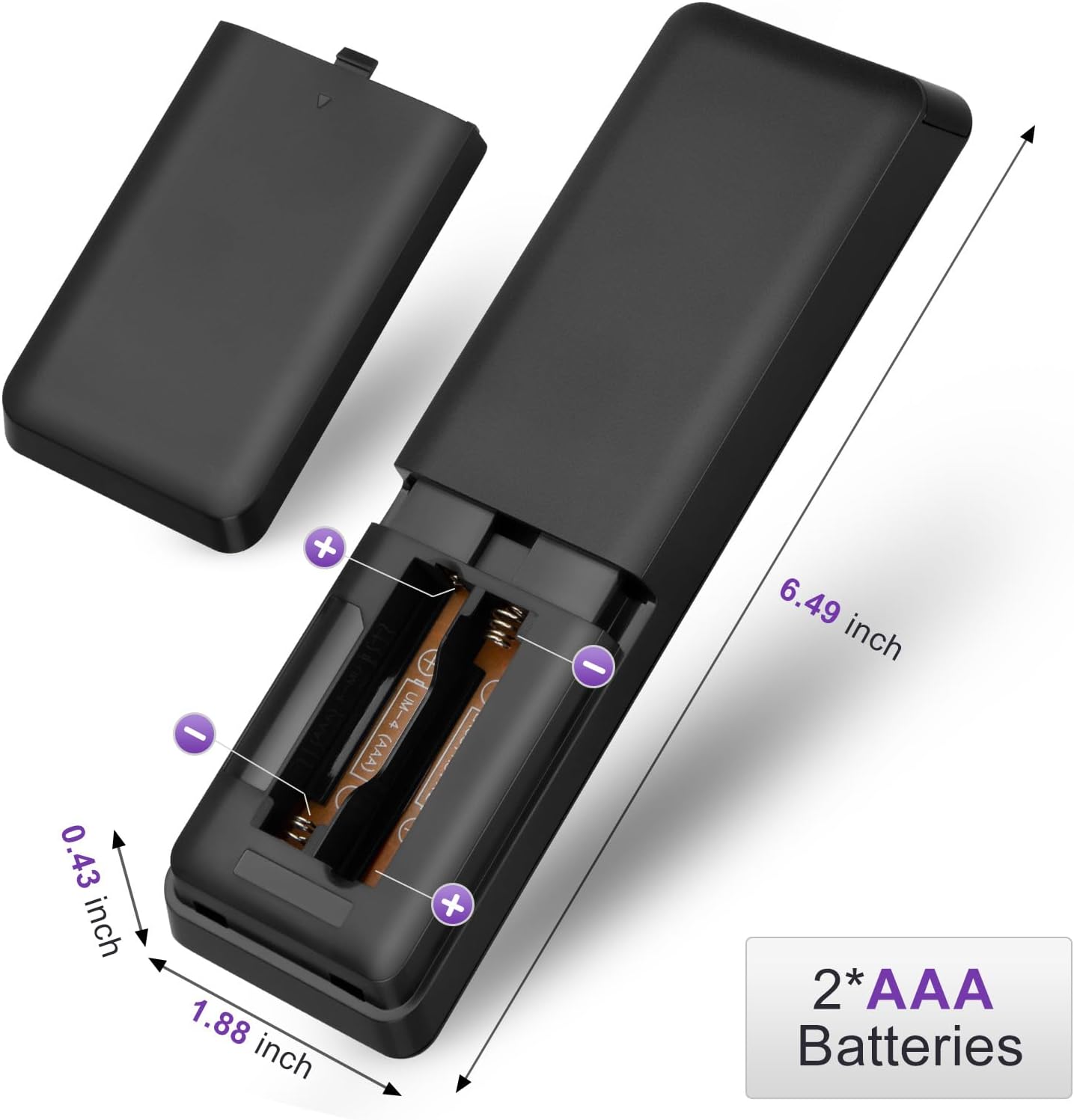
Figure 1: Battery installation for the LOUTOC remote control.
2. Početna upotreba
This LOUTOC remote control is pre-programmed and designed to work immediately with compatible Philips Smart TVs. No additional setup or pairing is required. Simply install the batteries, point the remote at your TV, and begin use.

Figure 2: Key features including no setup required and fast response time.
Uputstvo za upotrebu
The LOUTOC remote control features a standard layout for easy navigation and control of your Philips Smart TV. Below is a detailed description of each button's function.
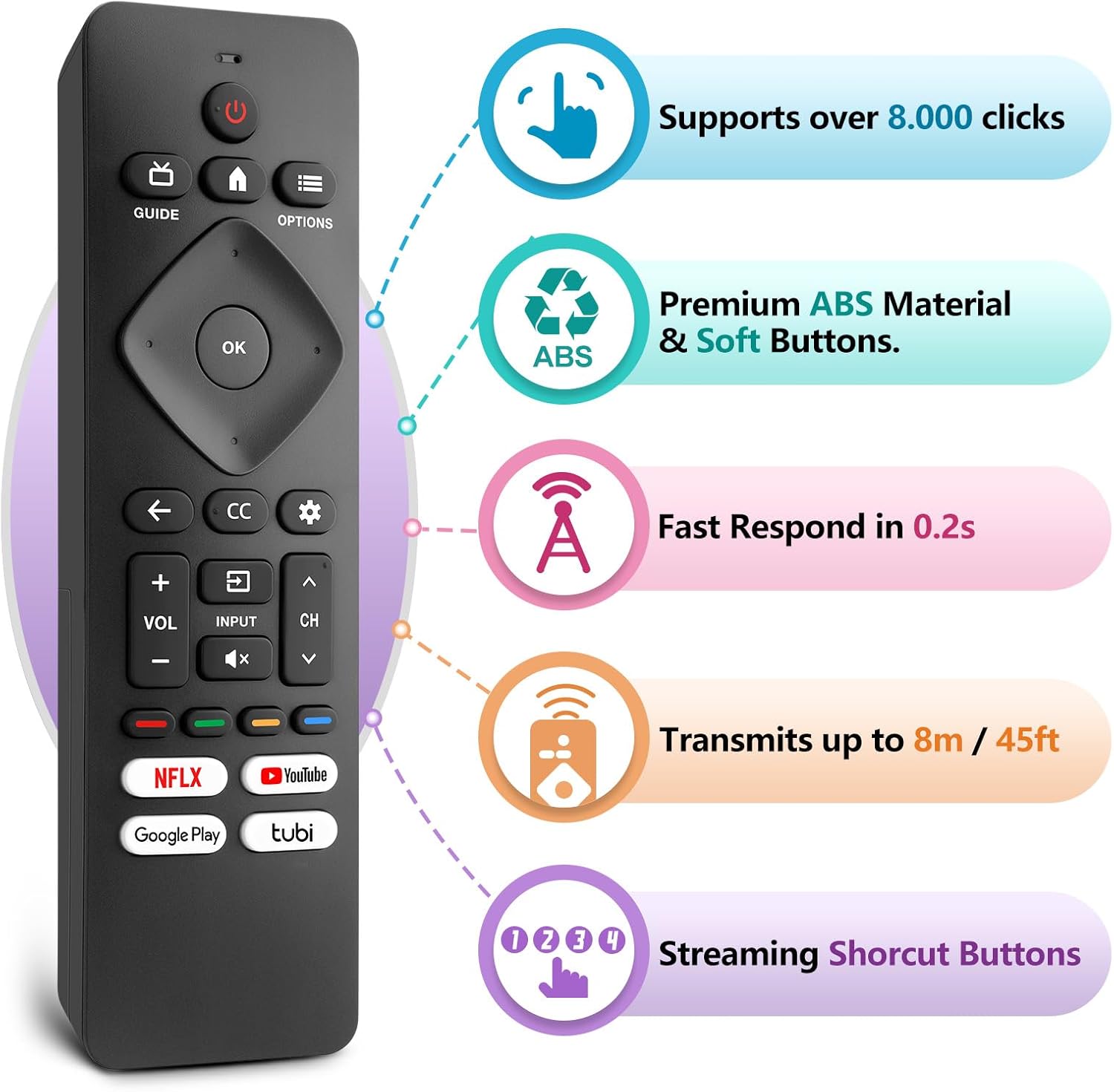
Figure 3: LOUTOC Remote Control Button Layout and Functions.
- POWER: Turns the TV on or off. Press for less than 1 second for Quick Start Standby. Hold for 1 second or more for Low Power Standby.
- VODIČ: Displays the TV program guide (availability may vary by service provider and region).
- HOME: Accesses your apps, Live TV, input devices, settings, and the Google Play Store.
- OPCIJE: Provides quick access to TV settings (settings vary depending on active screen).
- CURSOR (Up, Down, Left, Right) & OK: Moves to select an item and confirms selections on the menu.
- NAZAD: Povratak na prethodni ekran.
- CC (Titlovi): Selects closed caption settings.
- DASHBOARD: Accesses the Google TV dashboard for user settings, notifications, and kids mode.
- INPUT: Selects the input source for connected devices.
- MUTE: Toggles the sound on and off.
- VOL +/-: Podešava nivo jačine zvuka.
- CH +/-: Selects the next or previous channel.
- COLOR BUTTONS (Red, Green, Yellow, Blue): Works as direct access to user-specified net apps or functions.
Dugmad prečica
The remote includes dedicated shortcut buttons for popular streaming services:
- NETFLIX
- YouTube
- Google Play
- Tubi

Figure 4: Dedicated streaming service shortcut buttons.
Kompatibilnost
This LOUTOC remote control is compatible with a wide range of Philips Android and Google Smart TV models. It is designed to replace various original Philips remote controls.
Compatible Philips Google TV Models:
- 70PUL7553/F7, 75PUL7552/F7, 65PUL7552/F7, 55PUL7552/F7, 50PUL7552/F7
- 43PUL7672/F7, 43PUL7652/F7, 65PUL7672/F7, 55PUL7672/F7, 50PUL7672/F7
- Generally compatible with Philips Google TV 7000 and 7600 Series.
Compatible Philips Android TV Models:
- 65PFL5766/F7, 55PFL5766/F7, 50PFL5766/F7, 43PFL5766/F7, 50PFL5806/F7
- 75PFL5604/F7, 75PFL5604/F7A, 75PFL5604/F7E, 75PFL5704/F7A, 75PFL5704/F7
- 32PFL5505/F7, 65PFL5604/F7, 55PFL5604/F7, 50PFL5604/F7, 43PFL5604/F7
- 50PFL5604/F7A, 43PFL5766/F6, 50PFL5766/F6, 65PFL5766/F6, 55PFL5766/F6
- 55PFL5704/F7, 65PFL5704/F7, 50PFL5704/F7, 43PFL5704/F7, 65PFL5504/F7
- 65PFL5604/F7A, 55PFL5604/F7A, 55PFL5766/F7E
- Generally compatible with Philips Android TV 5000, 5500, 5700, 5704, and 5800 Series.

Figure 5: Compatibility with Philips Google TV and Android TV series.
Specifikacije
| Feature | Detalj |
|---|---|
| Broj modela | URMT26CND002 |
| Dimenzije | 6 x 1.2 x 0.8 inča (15.24 x 3.05 x 2.03 cm) |
| Težina artikla | 1.76 unce (50 grama) |
| Baterije su potrebne | 2 x AAA baterije (nisu uključene) |
| Udaljenost prijenosa | Approximately 6-8 meters (19-26 feet) |
| Vrijeme odgovora | U roku od 0.5 sekundi |
| Materijal | Premium ABS Material |
| Posebne karakteristike | Ergonomic, Lightweight, No Programming Required, Pre-Programmed, Universal |
Rješavanje problema
- Daljinski ne reaguje:
- Ensure batteries are inserted correctly with the correct polarity (+/-).
- Zamijenite stare baterije novim AAA baterijama.
- Check for any obstructions between the remote and the TV's infrared receiver.
- Ensure you are within the effective operating range (6-8 meters) of the TV.
- Određeni tasteri ne rade:
- Verify that the button is clean and not stuck.
- Some functions may be specific to certain TV models or require the TV to be in a particular mode (e.g., input selection).
- Nema glasovne kontrole:
- This remote control does not support voice control functionality.
Održavanje
To ensure the longevity and proper functioning of your remote control, follow these maintenance guidelines:
- čišćenje: Use a soft, dry cloth to clean the remote. Avoid using liquid cleaners or abrasive materials.
- Skladištenje: Daljinski upravljač čuvajte na hladnom i suhom mjestu, dalje od direktne sunčeve svjetlosti i ekstremnih temperatura.
- Održavanje baterije: Izvadite baterije ako daljinski upravljač nećete koristiti duži period kako biste spriječili curenje.
- Izbjegavajte kapi: Zaštitite daljinski upravljač od fizičkih udara, jer to može oštetiti unutrašnje komponente.
Garancija i podrška
LOUTOC offers a 60-day replacement policy for this product. If you encounter any issues or have questions regarding your order, please contact LOUTOC customer support directly. Our team aims to respond within 12 hours during the work week to assist you.
For further assistance, please refer to the contact information provided with your purchase or visit the official LOUTOC store on Amazon: LOUTOC Store