1. Uvod
This user manual provides detailed instructions for the Baseus 17-in-1 Docking Station (Model: B0D78WFLST). This versatile docking station is designed to expand the connectivity of your laptop or compatible device, offering multiple ports for display, data transfer, networking, and power delivery. Please read this manual thoroughly before using the product to ensure proper operation and to maximize its capabilities.
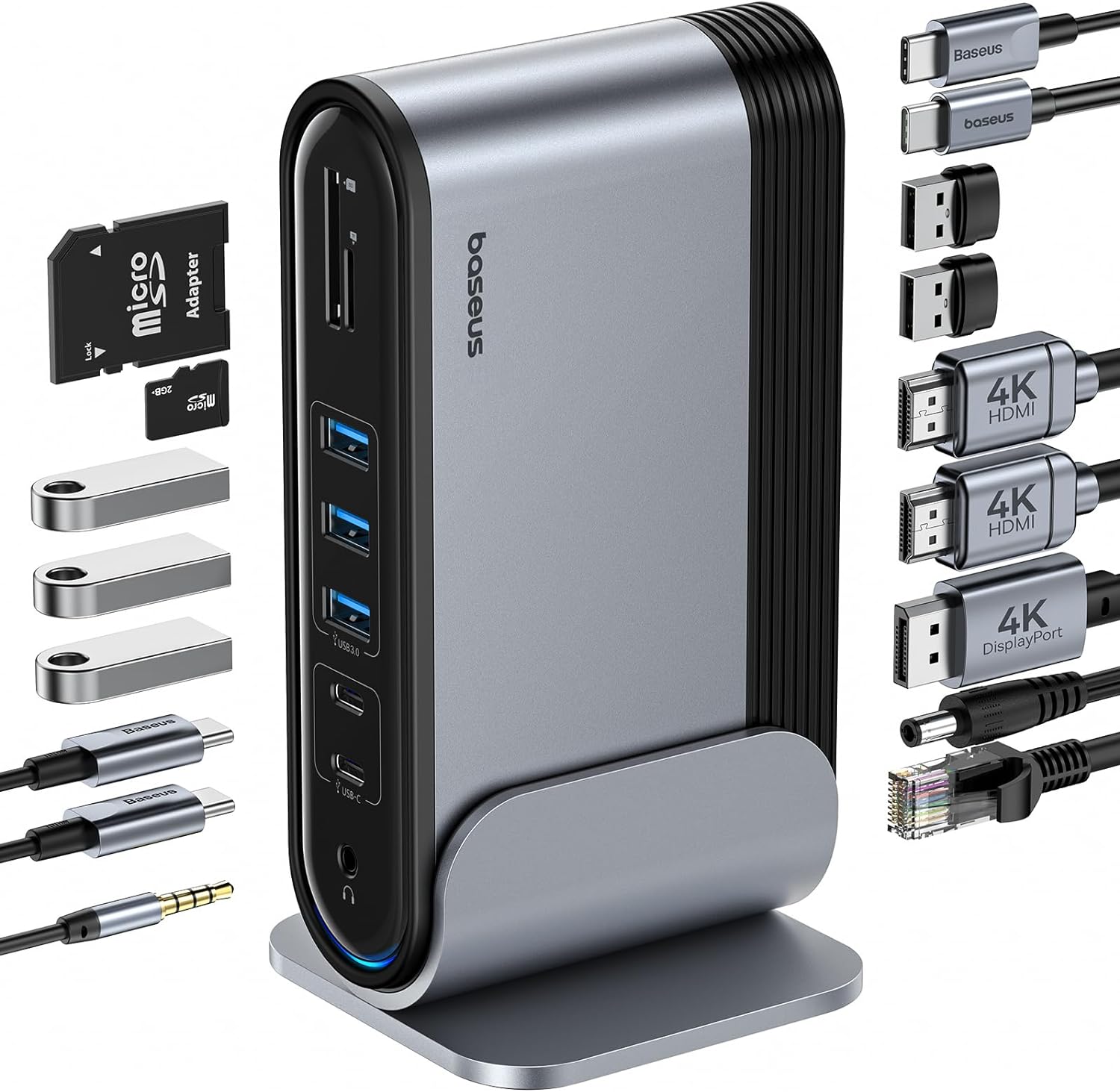
Slika 1: Baseus 17-u-1 priključna stanica i priloženi pribor.
2. Ključne karakteristike
The Baseus 17-in-1 Docking Station offers comprehensive connectivity solutions:
- 17-in-1 Port Expansion: Integrates a wide array of ports for diverse connectivity needs.
- Triple Monitor Support: Connect up to three external monitors for enhanced productivity.
- Displej visoke rezolucije: Supports 4K@60Hz resolution for single and dual displays, and 1080P@60Hz for triple displays on Windows systems.
- Brzi prijenos podataka: Features USB 3.0 ports with 5Gbps transfer speeds and USB 2.0 ports for peripherals.
- Isporuka snage 100W: Provides up to 85W power output to charge your laptop (100W input required).
- Gigabitni Ethernet: Ensures stable and high-speed wired network connection up to 1Gbps.
- Čitač SD/TF kartica: Convenient access to memory cards with speeds up to 104 MB/s.
- Audio povezivanje: Integrated 3.5mm audio jack for headphones or speakers.
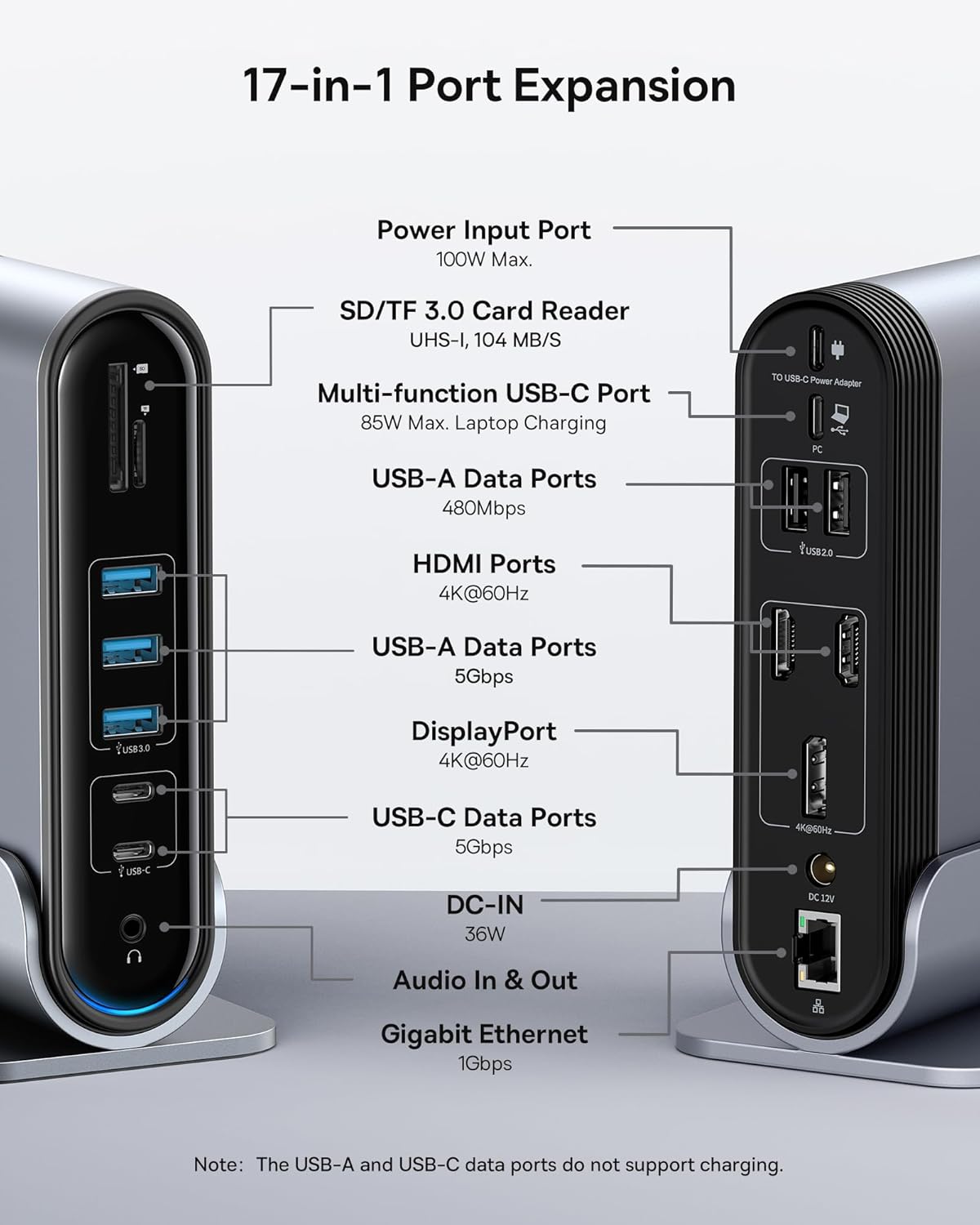
Figure 2: Detailed port layout and specifications of the docking station.
3. Sadržaj paketa
Molimo Vas da provjerite da li se u paketu nalaze svi artikli:
- Baseus UnionJoy priključna stanica sa 17 portova sa tri displeja
- Dock Stand
- Adapter za napajanje
- USB-C na USB-C kabl
- Američki adapter za utikač
- EU adapter za utikač
- Adapter za UK
- Uputstvo za upotrebu

Slika 3: Šta se nalazi u kutiji.
4. Upute za postavljanje
Slijedite ove korake za postavljanje vaše Baseus 17-u-1 priključne stanice:
- Priključite napajanje:
Connect the provided power adapter to the DC-IN port (36W) on the docking station. Use the appropriate regional adapter plug (US, EU, or UK) for your power outlet. For laptop charging, ensure a 100W PD charger (not included) is connected to the Power Input Port (100W Max.) on the docking station.

Figure 4: Power connection for the docking station and laptop charging.
- Poveži se s host uređajem:
Use the included USB-C to USB-C cable to connect the docking station's Multi-function USB-C Port (85W Max. Laptop Charging) to your laptop or compatible host device.
- Povežite monitore:
Connect your external monitors to the HDMI Ports (4K@60Hz) and/or DisplayPort (4K@60Hz) on the docking station using appropriate cables. Refer to the "Operating Instructions" section for display mode configurations.
- Povežite periferne uređaje:
Connect your USB devices (keyboard, mouse, external drives, etc.) to the available USB-A Data Ports (5Gbps or 480Mbps) and USB-C Data Ports (5Gbps). Insert SD or TF cards into the respective card reader slots.
- Poveži mrežu (opciono):
For a wired network connection, connect an Ethernet cable from your router/modem to the Gigabit Ethernet port (1Gbps) on the docking station.
- Povežite audio (opcionalno):
Connect headphones or speakers to the 3.5mm Audio In & Out jack.
5. Uputstvo za upotrebu
5.1 Načini prikaza
The docking station supports various display configurations depending on your operating system and the number of connected monitors.
Za Windows sisteme:
- Mirror Mode (A+A+A): Displays the same content on all connected monitors and the laptop screen. Supports 1080P@60Hz.
- Extend Mode (A+B+C): Extends your desktop across multiple monitors, allowing different content on each screen. Supports 1080P@60Hz for triple display.
Za macOS sisteme:
- Mirror Mode (A+A+A): Displays the same content on all connected monitors and the laptop screen. Supports 4K@60Hz.
- Extend Mode (A+B+B): Extends your desktop across external monitors, but macOS typically mirrors content across multiple external displays when using a single MST hub. Supports 4K@60Hz.
- Note: macOS does not support triple extended display (A+B+C) through a single MST hub.

Figure 5: Display mode configurations for Windows and macOS.

Figure 6: Detailed resolution capabilities for various display configurations and DP versions.
5.2 Prijenos podataka
Priključna stanica omogućava mogućnosti brzog prijenosa podataka:
- USB 3.0 (5 Gbps): Ideal for external hard drives, SSDs, and other high-bandwidth devices.
- USB 2.0 (480 Mbps): Suitable for keyboards, mice, printers, and other standard peripherals.
- Čitač SD/TF kartica: Quickly transfer photos and videos from memory cards.

Figure 7: Illustrating super-fast data transfer via the docking station.
5.3 Isporuka energije
The docking station supports Power Delivery (PD) to charge your laptop:
- Connect a 100W PD charger (not included) to the dedicated Power Input Port on the docking station.
- The docking station will then provide up to 85W of power to your connected laptop via the USB-C host connection.
Note: The USB-A and USB-C data ports on the front of the docking station do not support charging.
6. Održavanje i njega
To ensure the longevity and optimal performance of your docking station, follow these guidelines:
- Uređaj održavajte čistim brisanjem mekom, suhom krpom. Izbjegavajte upotrebu abrazivnih sredstava za čišćenje ili rastvarača.
- Do not expose the docking station to water, moisture, or extreme temperatures.
- Izbjegavajte ispuštanje ili izlaganje uređaja jakim udarima.
- Osigurajte odgovarajuću ventilaciju oko priključne stanice kako biste spriječili pregrijavanje.
- Disconnect all cables when the device is not in use for extended periods.
7. Otkrivanje problema
If you encounter issues with your Baseus 17-in-1 Docking Station, refer to the following common problems and solutions:
7.1 No Display Output / Flickering Screen
- Provjerite kablovske veze: Ensure all HDMI/DisplayPort cables are securely connected to both the docking station and the monitors.
- Verify Host Connection: Confirm the USB-C cable connecting the docking station to your laptop is firmly plugged in.
- Napajanje: Make sure the docking station is receiving adequate power from its power adapter.
- Postavke ekrana: Check your computer's display settings (e.g., Windows Display Settings, macOS System Preferences > Displays) to ensure the external monitors are detected and configured correctly (Extend, Mirror).
- Ažuriranja drajvera: Ensure your laptop's graphics drivers and USB-C drivers are up to date.
- Kompatibilnost rezolucije: Verify that the selected resolution and refresh rate are supported by your monitors and the docking station. Refer to the "Multiple Display Modes" table in Section 5.1.
- macOS Triple Display: Remember that macOS does not support triple extended display (A+B+C) through a single MST hub.
7.2 USB Devices Not Working
- Reconnect Device: Unplug and re-plug the USB device from the docking station.
- Pokušajte s drugim portom: Test the USB device in another USB port on the docking station or directly on your laptop to isolate the issue.
- Napajanje: Ensure the docking station has sufficient power, especially for power-hungry USB devices.
- Problemi sa vozačem: Check if the USB device requires specific drivers and ensure they are installed on your computer.
7.3 Laptop Not Charging
- 100W PD Charger: Confirm you are using a 100W Power Delivery charger connected to the dedicated Power Input Port on the docking station. The docking station itself does not generate power for your laptop.
- USB-C kabl: Ensure the USB-C cable connecting the docking station to your laptop supports power delivery.
- Kompatibilnost sa laptopom: Verify your laptop supports charging via its USB-C port.
7.4 Ethernet Connection Issues
- Provjera kablova: Provjerite je li Ethernet kabel sigurno spojen i na priključnu stanicu i na vaš ruter/modem.
- Mrežne postavke: Provjerite mrežne postavke računara kako biste bili sigurni da je Ethernet adapter omogućen i ispravno konfiguriran.
- Ruter/Modem: Verify your router/modem is functioning properly.
8. Specifikacije
| Feature | Specifikacija |
|---|---|
| Model | B0D78WFLST |
| Brand | Baseus |
| Ukupan broj portova | 17 |
| HDMI portovi | 2 (4K@60Hz) |
| DisplayPort | 1 (4K@60Hz) |
| USB-A portovi podataka | 7 (3x 5Gbps, 4x 480Mbps) |
| USB-C portovi podataka | 2 (5 Gbps) |
| Napajanje (ulaz) | 100W Max (via dedicated PD port) |
| Power Output (to Laptop) | 85W Max (via Multi-function USB-C Port) |
| Ethernet port | 1 (1Gbps Gigabit Ethernet) |
| Čitač kartica | SD/TF (UHS-I, 104 MB/s) |
| Audio Jack | 3.5 mm audio ulaz i izlaz |
| Kompatibilni uređaji | Dell, HP, Mac, Lenovo, Steam Deck, etc. |
| Dimenzije | 9.29 x 8.27 x 2.28 inča |
| Težina artikla | 1.9 funte |
9. Garancija i podrška
Za informacije o garanciji i tehničkoj podršci, molimo vas da se obratite službenom Baseusovom servisu. website or contact Baseus customer service directly. Keep your purchase receipt as proof of purchase for warranty claims.
Službenik Baseusa Webstranica: www.baseus.com
Za dodatnu pomoć, možete kontaktirati i prodavca putem platforme na kojoj ste kupili proizvod.


