1. Uvod
This manual provides detailed instructions for the installation, operation, and maintenance of your SANPTENT Single DIN Car Stereo. This unit features a 6.9-inch Full HD IPS touchscreen, wireless and wired Apple CarPlay and Android Auto compatibility, Bluetooth 5.0, Mirror Link functionality, GPS navigation support, FM radio, and a backup camera input. Please read this manual thoroughly before use to ensure proper operation and to maximize your experience.
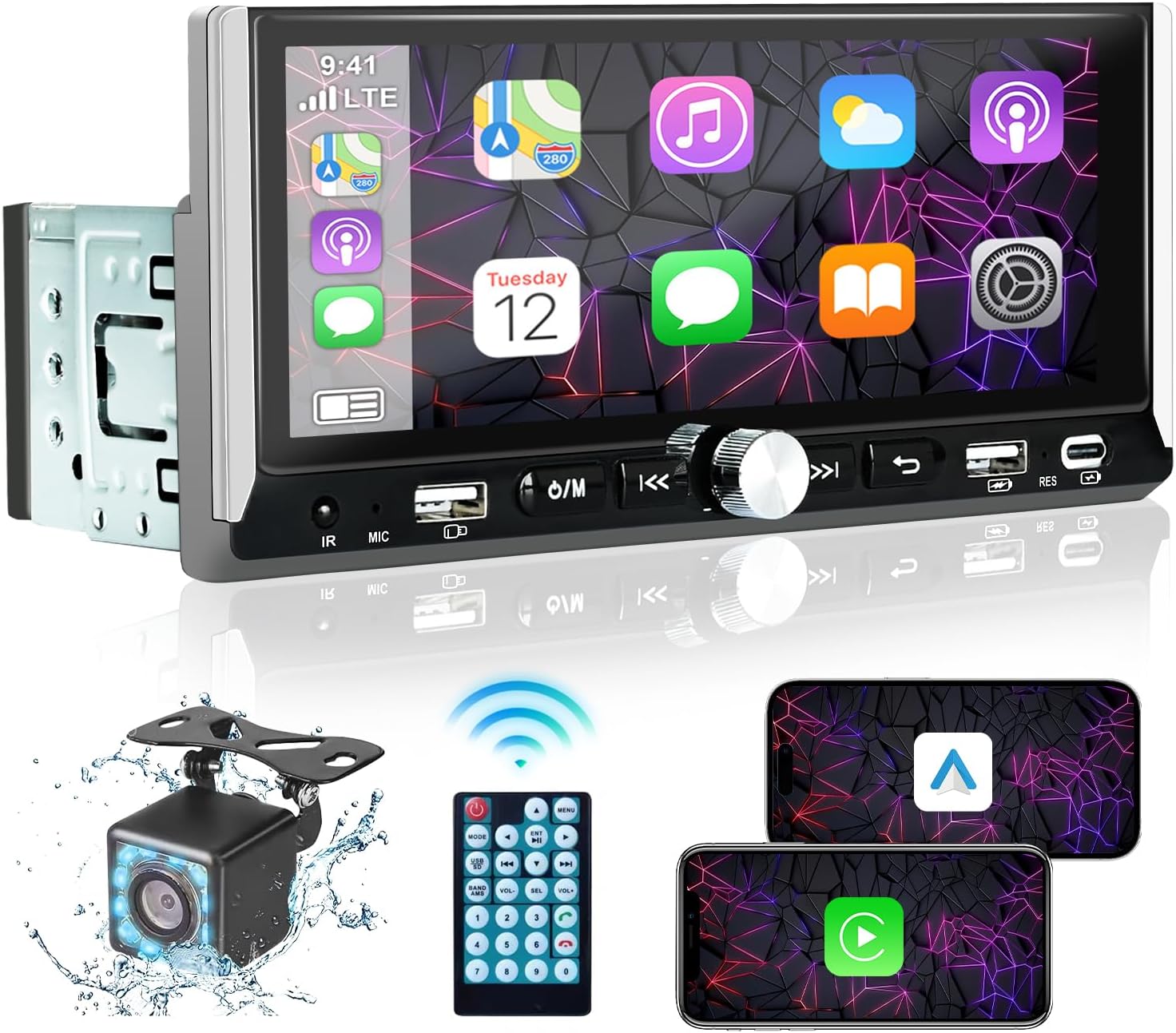
Image 1.1: SANPTENT Single DIN Car Stereo with included accessories.
2. Šta se nalazi u kutiji
- Single Din stereo
- Power Cable Horn Cable
- Daljinski upravljač
- Zadnja kamera
- Uputstvo za upotrebu
3. Postavljanje i instalacija
3.1. Sigurnosne mjere
- Prije ugradnje isključite negativni pol akumulatora vozila kako biste spriječili kratke spojeve.
- Ensure all wiring is correctly connected according to the provided wiring diagram to avoid damage to the unit or vehicle.
- Konsultujte se sa profesionalnim instalaterom ako niste sigurni u vezi bilo kojeg dijela procesa instalacije.
3.2. Ožičenje
Connect the power cable, horn cable, and other necessary wires to your vehicle's electrical system. The unit includes standard ISO connectors for ease of installation. Ensure the backup camera is connected to the dedicated 'RCAM' input for automatic display when reversing.
3.3. Montaža jedinice
Install the single DIN unit into your vehicle's dashboard opening. Secure it using the provided mounting hardware. Ensure the touchscreen is positioned for optimal visibility and accessibility without obstructing driving view.
4. Uputstvo za upotrebu
4.1. Uključivanje/isključivanje
Press the power button (usually marked with Ⓘ/M) to turn the unit on or off. The unit will automatically power on with the vehicle's ignition.
4.2. Bežični Apple CarPlay i Android Auto
To use wireless CarPlay or Android Auto, first ensure Bluetooth is enabled on your smartphone and the car stereo. Pair your phone with the car stereo via Bluetooth. Once paired, the system will prompt you to enable CarPlay or Android Auto. Follow the on-screen instructions to establish the connection.
4.3. Wired Apple CarPlay & Android Auto
Connect your iPhone or Android phone to the car stereo using a USB data cable. The system will automatically detect the connection and launch CarPlay or Android Auto. Follow any prompts on your phone to trust the device.

Slika 4.1: Gotovoview of wireless and wired connectivity options.
Video 4.1: Demonstration of Bluetooth pairing and CarPlay functionality.
4.4. Bluetooth 5.0
The unit supports Bluetooth 5.0 for high-speed data transfer and stable connections. To pair, navigate to the Bluetooth menu on the stereo and enable Bluetooth on your phone. Select the car stereo's device name (e.g., "CAR-BT-F104") from your phone's Bluetooth settings. Once connected, you can stream audio and make hands-free calls.

Image 4.2: Hands-free Bluetooth functionality for calls and music.
4.5. Funkcija ogledalne veze
Mirror Link allows you to display your smartphone's screen directly on the car stereo. Connect your smartphone via a USB data cable. The stereo will mirror your phone's content, enabling you to view apps, videos, and navigation directly on the larger screen. Note: Compatibility may vary with certain phone models (e.g., some Huawei and Samsung devices).
4.6. GPS navigacija
When connected via Apple CarPlay or Android Auto, you can use your preferred navigation applications (e.g., Apple Maps, Google Maps, Waze) directly on the car stereo's display. The large touchscreen provides a clear view of routes and directions.

Image 4.3: GPS navigation interface through CarPlay.
4.7. Upravljanje glasom
Utilize Siri or Google Assistant for hands-free control of various functions, including navigation, music playback, and calls. Activate voice control by saying the wake phrase (e.g., "Hey Siri" or "Hey Google") or by pressing the dedicated voice control button on the unit or steering wheel controls (if supported by your vehicle).
4.8. FM radio
Access the FM radio function to listen to local broadcasts. The unit features an automatic channel search and save function, allowing you to quickly find and store your favorite stations. Use the touchscreen or physical buttons to tune and switch between stations.
4.9. EQ postavke
Customize your audio experience using the built-in Equalizer (EQ) settings. Adjust various frequency bands to tailor the sound output to your preferences. Preset options like Jazz, Classic, Pop, Rock, and Flat are available, along with a custom setting.

Image 4.4: Customizable EQ settings for personalized audio.
4.10. Zadnji View Kamera
The included 12-LED HD backup camera provides a clear view of the area behind your vehicle. When the vehicle is shifted into reverse, the car stereo automatically displays the camera feed with parking assist lines. The camera is waterproof and offers a 170-degree wide-angle view.

Slika 4.5: Pozadi view camera display with parking assist lines.
5. Održavanje
5.1. Čišćenje ekrana
Koristite meku krpu koja ne ostavlja dlačice da nježno obrišete ekran osjetljiv na dodir. Za tvrdokorne mrlje, lagano obrišiteampOperite krpu vodom ili sredstvom za čišćenje ekrana. Izbjegavajte abrazivne materijale ili jake hemikalije.
5.2. Opća njega
- Izbjegavajte izlaganje uređaja ekstremnim temperaturama ili direktnoj sunčevoj svjetlosti tokom dužeg perioda.
- Ne pokušavajte sami rastavljati ili popravljati uređaj, jer će to poništiti garanciju.
- Uređaj držite čistim od prašine i prljavštine.
6. Otkrivanje problema
Ako imate problema sa stereo uređajem u automobilu, pogledajte sljedeće uobičajene korake za rješavanje problema:
- Nema napajanja: Check all power connections and the vehicle's fuse box. Ensure the unit is properly grounded.
- Nema zvuka: Verify speaker connections. Check volume levels on both the stereo and your connected device. Ensure the mute function is not active.
- Bluetooth/CarPlay/Android Auto Connectivity Issues: Ensure Bluetooth is enabled on both devices. Try forgetting the device on your phone and re-pairing. For wired connections, try a different USB cable.
- Ekran na dodir ne reaguje: Try restarting the unit. If the issue persists, a factory reset may be necessary (refer to the setup menu).
- Kamera za vožnju unazad se ne prikazuje: Check the camera's power and video connections. Ensure the reverse gear signal wire is correctly connected.
For persistent issues not resolved by these steps, please contact SANPTENT customer support.
7. Specifikacije
| Feature | Specifikacija |
|---|---|
| Dimenzije proizvoda | 3.4"D x 7.3"Š x 2"V (8.6 x 18.5 x 5.1 cm) |
| Težina artikla | 1.54 funte (0.7 kg) |
| Broj modela | 763932917487 |
| Tehnologija povezivanja | Bluetooth, Wi-Fi, USB, Type-C, Wireless, Wired, FM, Mirror Link |
| Tip kontrolera | Apple CarPlay & Android Auto, iOS Siri & Google Assistant, Remote Control, Push Button Knobs, Touchscreen |
| Posebne karakteristike | GPS Navigation, EQ Setting, Rear View Camera Input, Front Backup Camera, Touchscreen, Built-In Bluetooth, Voice Control, Mirror Link, Wired/Wireless Apple CarPlay/Android Auto |
| Kompatibilni uređaji | Apple iPhone, Android Phone, Smartphone, Amplifier, Tablet, Bluetooth Receiver Box Adapter |
| Tip konektora | USB, Type-C, Speaker & Power Jack, RCA, ANT, Wired/Wireless CarPlay/Android Auto |
| Način audio izlaza | Stereo |
8. Garancija i podrška
This SANPTENT product is covered by a manufacturer's warranty. Please refer to the warranty card included in your package for specific terms and conditions. For technical support, troubleshooting assistance, or warranty claims, please contact SANPTENT customer service through the retailer where the product was purchased or visit the official SANPTENT website.
