1. Proizvod je gotovview
The INNOVV N1 is a portable 5.5-inch smart screen designed for motorcycles, integrating Apple CarPlay, Android Auto, GPS navigation, and a dual dash cam system. It features front and rear 1080P@30FPS recording, 5.8G Wi-Fi connectivity, IP67 waterproofing, a full-screen touch interface, and parking monitoring. This manual provides comprehensive instructions for its setup, operation, and maintenance.

Image 1.1: The INNOVV N1 smart screen display unit and two compact dash cameras.
2. Sadržaj paketa
Provjerite da li se u vašem paketu nalaze sve dolje navedene stavke. Ako neke stavke nedostaju ili su oštećene, obratite se korisničkoj podršci.
- DVR and Display Unit (1 pc)
- 0.6 Meter Extended Cable (2 pcs)
- 2.5 Meter Extended Cable (1 pc)
- Power Supply Cable (1 pc)
- Accessory Kit (3 pcs)
- Uputstvo za upotrebu (1 kom)
- GPS Module (1 pc)
- Front Camera (1 pc)
- Rear Camera (1 pc)
- TPMS Sensors (2 pcs, if included in your model)
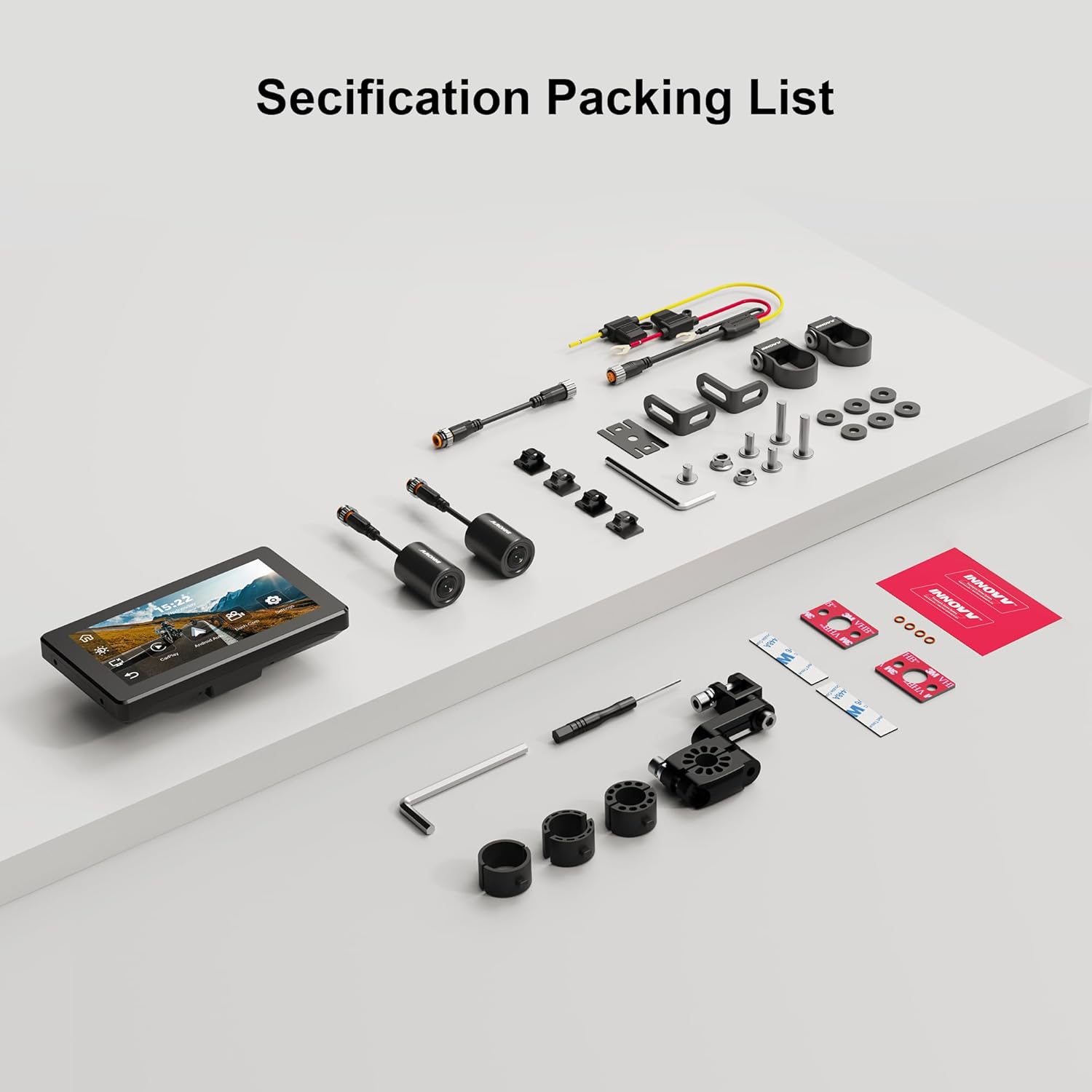
Image 2.1: A visual representation of the INNOVV N1 system components and accessories included in the package.
3. Vodič za instalaciju
Proper installation ensures optimal performance and safety. It is recommended to have this device installed by a qualified professional if you are unsure about any steps.
3.1 Montiranje jedinice za prikaz
- Select a suitable location on your motorcycle's handlebar that does not obstruct your view or control of the vehicle.
- Use the provided handlebar mount from the accessory kit to securely attach the display unit. Ensure it is firmly installed without shaking.
- Podesite viewugao za optimalnu vidljivost.

Image 3.1: The 5.5-inch display unit securely mounted on a motorcycle handlebar, showing its compact dimensions (150mm x 84.5mm).
3.2 Povezivanje kamera
- Identify the front and rear cameras. The cameras are designed for 1080P recording with a 125-degree wide-angle lens.
- Montirajte prednju kameru na mjesto koje omogućava jasan i nesmetan pogled view puta ispred nas.
- Montirajte zadnju kameru da biste snimili view iza tvog motocikla.
- Connect the camera cables to the corresponding ports on the main DVR unit. Use the extended cables as needed.

Slika 3.2: Krupni plan view of the dual 1080P cameras with 125-degree wide-angle lenses, designed for comprehensive coverage.
3.3 Priključak za napajanje
- Connect the power supply cable to the main DVR unit.
- Route the power cable safely to your motorcycle's power source, ensuring it does not interfere with moving parts or get pinched.
3.4 Instalacija GPS modula
- Connect the GPS module to the designated port on the main unit.
- Mount the GPS module in a location with a clear view neba za optimalan prijem signala.
3.5 TPMS Sensor Installation (If Applicable)
- If your package includes TPMS sensors, install them on your motorcycle's tire valves according to the instructions provided with the sensors.
- Ensure the sensors are securely fastened to prevent air leakage.
3.6 Instalacija završenaview Video
For a visual guide on the installation and features of the INNOVV N1, please refer to the video below:
Video 3.1: This video demonstrates the physical components, connections, and initial setup of the INNOVV N1 system, including the dash cameras, GPS module, and tire pressure sensors, along with a brief overview of its functions like CarPlay and Android Auto.
4. Uputstvo za upotrebu
Familiarize yourself with the device's functions to enhance your riding experience.
4.1 Uključivanje/isključivanje napajanja
- Uključeno: The device will automatically power on when your motorcycle's ignition is turned on.
- Iskljuciti: The device will automatically power off when your motorcycle's ignition is turned off.
4.2 Interfejs ekrana osetljivog na dodir
The 5.5-inch full-screen touch display allows for intuitive navigation. Tap icons to access different functions such as CarPlay, Android Auto, Dash Cam, and Settings.
4.3 Apple CarPlay i Android Auto
Connect your smartphone wirelessly via Bluetooth 4.2 and 5.8G Wi-Fi to access CarPlay or Android Auto features directly on the N1 display.
- Provjerite jesu li Bluetooth i Wi-Fi omogućeni na vašem pametnom telefonu.
- On the N1 display, select the CarPlay or Android Auto icon.
- Follow the on-screen prompts to pair your device. For CarPlay, your iPhone must be iOS 13 or above. For Android Auto, your Android phone must be Android 11 or above and support 5G Wi-Fi.
- Once connected, you can use navigation apps, make calls, send messages, and play music through the N1 display.

Image 4.1: The INNOVV N1 display showing the Apple CarPlay and Android Auto interfaces, demonstrating seamless smartphone integration.
4.4 Funkcionalnost kamere za automobil
The integrated dual dash cam records continuously in 1080P@30FPS from both front and rear cameras.
- Snimanje: Recording starts automatically when the device powers on.
- Snimanje u petlji: The system supports loop recording, overwriting the oldest footage when the storage card is full.
- Snimanje događaja: In case of sudden impact or vibration, the G-sensor will trigger event recording, locking the footage da spriječite prepisivanje.
- Reprodukcija: Access recorded videos through the Dash Cam menu on the display.
4.5 GPS navigacija
Utilize the GPS module for accurate location tracking and navigation through connected CarPlay or Android Auto applications.
- Provjerite je li GPS modul pravilno povezan i ima li jasan view neba.
- Open your preferred navigation app (e.g., Google Maps, Apple Maps) via CarPlay or Android Auto.
4.6 Parking Monitoring Mode
The N1 automatically monitors your motorcycle's status when parked. If vibrations are detected, it will record videos from the front and rear cameras, providing 24-hour parking surveillance.

Image 4.2: The INNOVV N1's parking monitoring feature, which activates 24-hour surveillance upon detecting vibrations while parked.
4.7 Sistem za nadzor pritiska u gumama (TPMS)
If equipped, the TPMS sensors provide real-time tire pressure and temperature readings directly on the N1 display, enhancing safety.
- The display will show current tire pressure and temperature for both front and rear tires.
- Set high and low pressure alarms in the settings to receive alerts for abnormal tire conditions.
5. Održavanje
Regular maintenance ensures the longevity and optimal performance of your INNOVV N1 system.
- čišćenje: Koristite meku, damp cloth to clean the display and camera lenses. Avoid abrasive cleaners or solvents.
- Ažuriranja firmvera: Periodično provjeravajte INNOVV website for firmware updates to ensure your device has the latest features and bug fixes. Follow the provided instructions carefully for any updates.
- Skladištenje: Kada se uređaj ne koristi duži period, čuvajte ga na hladnom i suhom mjestu, dalje od direktne sunčeve svjetlosti.
- SD kartica: Format the microSD card regularly (e.g., once a month) to maintain optimal recording performance and prevent data corruption.
6. Otkrivanje problema
If you encounter issues with your INNOVV N1, refer to the table below for common problems and solutions.
| Problem | Mogući uzrok | Rješenje |
|---|---|---|
| Uređaj se ne uključuje. | Nema napajanja; labava veza. | Check power cable connection to the motorcycle and the device. Ensure ignition is on. |
| Kamere ne snimaju niti prikazuju video. | Loose camera connection; faulty SD card; camera malfunction. | Check camera cable connections. Ensure SD card is inserted correctly and formatted. Try a different SD card. |
| CarPlay/Android Auto se ne povezuje. | Bluetooth/Wi-Fi isključen na telefonu; nepravilno uparivanje; operativni sistem telefona nije podržan. | Ensure phone's Bluetooth and Wi-Fi are on. Re-pair the device. Check phone OS version compatibility. |
| GPS signal je slab ili nije dostupan. | GPS module obstructed; faulty module. | Osigurajte da GPS modul ima čist view of the sky. Check connection. |
| TPMS not displaying readings. | Sensors not paired; low sensor battery; incorrect installation. | Ensure sensors are correctly installed and paired. Check sensor battery status. |
7. Specifikacije proizvoda
| Feature | Specifikacija |
|---|---|
| Veličina ekrana | 5.5 inča |
| Rezolucija | 1080p (Video Recording) |
| Operativni sistem | Android (for internal system, supports CarPlay/Android Auto) |
| Unos ljudskog interfejsa | Touchscreen |
| Display Type | LCD |
| Tip ekrana na dodir | Kapacitivni |
| Vrsta montaže | Handlebar Mount |
| Vrsta karte | Street (via connected smartphone apps) |
| Vrsta usluge vozila | Motocikl |
| Waterproof Rating | IP67 |
| Wi-Fi frekvencija | 5.8G |
8. Garancija i podrška
The INNOVV N1 comes with a 12-mjesečna garancija od datuma kupovine, pokrivajući proizvodne nedostatke. Molimo sačuvajte dokaz o kupovini za reklamacije u slučaju garancije.
For technical support, troubleshooting assistance, or warranty inquiries, please contact INNOVV customer service through their official webweb-mjesto ili prodavača gdje ste kupili proizvod.
Online resursi: Visit the official INNOVV website for FAQs, updated manuals, and firmware downloads.


