Uvod
Hvala na kupoviniasing the VGN V98Pro V2 Gaming Keyboard. This manual provides detailed instructions for setting up, operating, and maintaining your new keyboard. Please read this manual thoroughly before use to ensure optimal performance and longevity of your device.
Sadržaj paketa
- VGN V98Pro V2 Gaming Keyboard
- USB-C na USB-A kabel
- Izvlakač ključeva
- Uputstvo za upotrebu
Product Overview
The VGN V98Pro V2 is a high-performance gaming keyboard designed for durability and responsiveness. It features a compact layout with a dedicated number pad, customizable keycaps, and a robust build quality.
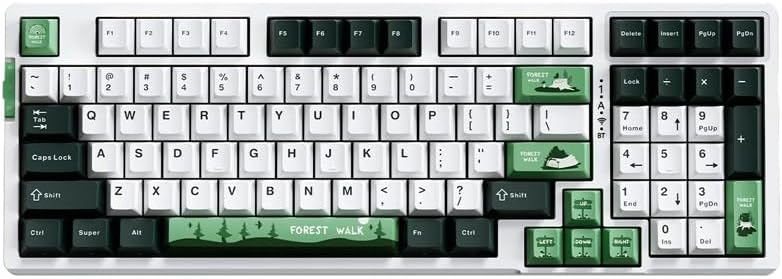
Slika 1: Odozgo view of the VGN V98Pro V2 Gaming Keyboard. This image displays the full keyboard layout, including the main alphanumeric keys, function row, navigation cluster, and numeric keypad. The keycaps feature a white, dark green, and light green color scheme, with specific keys like 'Forest Walk' and 'Forest' having unique designs.
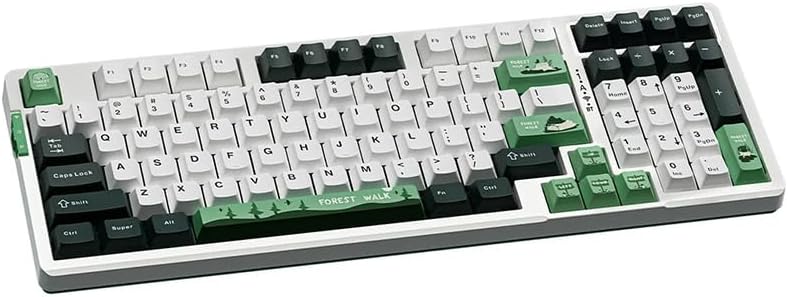
Slika 2: Ugao view of the VGN V98Pro V2 Gaming Keyboard. This perspective highlights the profile of the keycaps and the overall ergonomic design of the keyboard. The side view shows the slight incline of the keyboard base and the texture of the keycaps.
Setup
- Raspakujte tastaturu: Pažljivo izvadite tastaturu i svu dodatnu opremu iz ambalaže.
- Povežite USB kabl:
- Insert the USB-C end of the provided cable into the port on the back or side of the VGN V98Pro V2 keyboard.
- Insert the USB-A end of the cable into an available USB port on your computer or laptop.
- Prepoznavanje sistema: Your operating system should automatically detect and install the necessary drivers for the keyboard. This process may take a few moments. No additional software installation is typically required for basic functionality.
- Test funkcionalnost: Open a text editor or browser and type to ensure all keys are functioning correctly.
Uputstvo za upotrebu
Osnovna upotreba
The VGN V98Pro V2 functions as a standard QWERTY keyboard. Simply connect it to your computer, and it will be ready for use. The numeric keypad provides convenient data entry.
Kombinacije funkcijskih tipki (tipka Fn)
The keyboard features an Fn (Function) key, typically located near the left Ctrl or Alt key. This key, when pressed in combination with other keys, activates secondary functions. Common Fn key combinations include:
- Fn + F1-F12: Multimedia controls (e.g., volume up/down, play/pause, stop, next/previous track). Specific functions may vary.
- Fn + tipka Windows: Zaključava/otključava Windows tipku kako bi se spriječilo slučajno pritiskanje tokom igranja.
- Fn + tipke sa strelicama: May control backlight brightness or effects (if applicable).
- Fn + PrtSc/ScrLk/Pause: May offer additional system functions.
Refer to the keycap legends for specific Fn key functions on your V98Pro V2 keyboard.
Održavanje i njega
- čišćenje:
- Prije čišćenja isključite tastaturu iz računara.
- Koristite meku krpu koja ne ostavlja dlačiceampvodom ili blagim sredstvom za čišćenje obrišite tipke i kućište.
- Za prašinu i nečistoće između tipki koristite komprimirani zrak.
- Izbjegavajte upotrebu jakih hemikalija, abrazivnih sredstava ili rastvarača.
- Uklanjanje tipkovnice: Use the provided keycap puller to carefully remove keycaps for deeper cleaning or replacement. Gently pull straight up to avoid damaging the switch.
- Skladištenje: Tastaturu čuvajte na čistom i suhom mjestu, dalje od ekstremnih temperatura i direktne sunčeve svjetlosti.
- Izloženost tečnosti: Avoid spilling liquids on the keyboard. If a spill occurs, immediately disconnect it, turn it upside down to drain, and allow it to dry completely before reconnecting.
Rješavanje problema
- Tastatura ne reaguje:
- Provjerite da li je USB kabl sigurno povezan i sa tastaturom i sa računarom.
- Pokušajte povezati tastaturu s drugim USB priključkom na računaru.
- Testirajte tastaturu na drugom računaru kako biste isključili problem specifičan za sistem.
- Ponovo pokrenite računar.
- Određeni tasteri ne rade:
- Remove the keycap using the keycap puller and check for any debris obstructing the switch. Clean if necessary.
- Ako problem i dalje postoji, to može ukazivati na hardverski kvar.
- Input Lag or Delays:
- Provjerite da li su upravljački programi za USB uređaj vašeg računara ažurirani.
- Avoid connecting the keyboard through unpowered USB hubs. Connect directly to the computer.
Specifikacije
| Brand | VGN |
| Broj modela | V98PROV2BBICF |
| Tip tastature | Tastatura za igre |
| Kompatibilni uređaji | Laptop, PC |
| Povezivanje | Žični (USB-C) |
| Težina artikla | 1 kg |
| Shema boja | Blueberry Ice Cream - Forest (White, Dark Green, Light Green) |
Garancija i podrška
The VGN V98Pro V2 Gaming Keyboard comes with a standard manufacturer's warranty. Please refer to the warranty card included in your package for specific terms and conditions. For technical support, troubleshooting assistance, or warranty claims, please contact VGN customer service through their official webweb-mjesto ili prodavač od kojeg ste kupili proizvod.


