1. Uvod
Thank you for choosing the EIGHTREE Outdoor Wi-Fi Smart Plug ET71. This smart plug is designed for outdoor use, featuring IP44 waterproofing, energy monitoring, and compatibility with popular smart home platforms like Alexa, SmartThings, and Google Home. This manual provides detailed instructions for safe installation, operation, and maintenance of your device.
2. Važne informacije o sigurnosti
- Prije upotrebe pažljivo pročitajte sva uputstva.
- This device is rated IP44 for outdoor use, protecting against splashing water. Do not immerse in water.
- Ensure the power supply matches the device's specifications (230V, 16A, Max 3680W).
- Do not disassemble, repair, or modify the device. Contact support if issues arise.
- Čuvati van domašaja djece.
- Povežite se samo na Wi-Fi mrežu od 2.4 GHz. Wi-Fi od 5.0 GHz nije podržan.
Važna napomena: This smart plug may not include a ground pin, which could make it incompatible or unsafe for use in certain regions (e.g., France, Belgium) that require a specific type of grounded plug. Please verify compatibility with your local electrical outlets before use.
3. Proizvod je gotovview
The EIGHTREE ET71 Smart Plug is a compact device designed to make your outdoor appliances smart. It features a power button, an indicator light, and a weather-resistant casing.
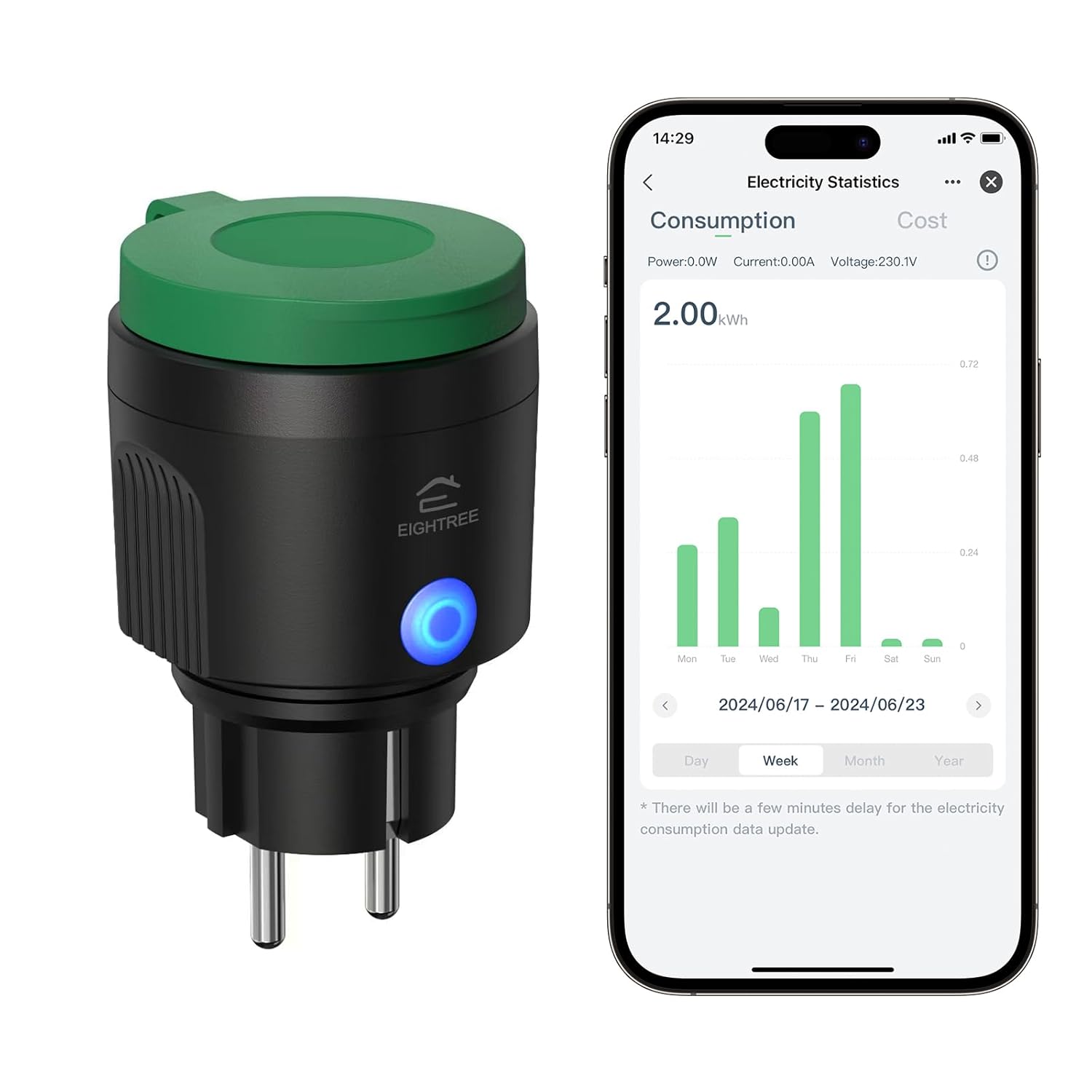
Slika 3.1: EIGHTREE ET71 Outdoor Wi-Fi Smart Plug shown alongside its mobile application interface displaying electricity consumption statistics. The plug is black with a green cap and a blue LED indicator.
Ključne karakteristike:
- IP44 vodootporan: Designed for outdoor use, resistant to splashing water.
- Monitoring energije: Track detailed power consumption of connected devices.
- upravljanje glasom: Compatible with Alexa, SmartThings, and Google Home for hands-free operation.
- daljinski upravljač: Manage your devices from anywhere using the mobile app.
- Tajmer i raspored: Set custom schedules for automatic on/off operations.
- Wi-Fi veza: Connects to your home Wi-Fi network (2.4 GHz only).

Slika 3.2: Visual representation of the EIGHTREE ET71 Smart Plug's versatile features, including App Control, Voice Control, Energy Monitoring, Group Control, Set Timers, WiFi Connection, and IP44 Waterproofing.
4. Specifikacije
| Parametar | Vrijednost |
|---|---|
| Broj modela | ET71 |
| Rated Voltage | 230 V |
| Nazivna struja | 16 A |
| Maksimalna snaga opterećenja | 3680 W |
| Materijal | PC + ABS plastika |
| Aplikacija | Aplikacija Smart Life |
| Podržani sistemi | Android i iOS |
| Wi-Fi frekvencijski opseg | 2.4 GHz only (5.0 GHz not supported) |
| IP Rating | IP44 (vodootporni) |
| Dimenzije (D x Š x V) | 5.7 x 6.5 x 10 cm |
| Težina | 130 grama |
| Način rada | UKLJUČENO ISKLJUČENO |
| Tip konektora | Plug-in |

Slika 4.1: The EIGHTREE ET71 Smart Plug installed in an outdoor socket, demonstrating its IP44 weatherproof design with water splashing on it, indicating reliable operation in various weather conditions.
5. Upute za postavljanje
5.1. Preuzmite aplikaciju Smart Life
- Scan the QR code (if provided on packaging) or search for "Smart Life" in the Apple App Store (for iOS) or Google Play Store (for Android).
- Preuzmite i instalirajte aplikaciju.
- Registrujte nalog ili se prijavite ako ga već imate.
5.2. Connect the Smart Plug to Wi-Fi
- Plug the EIGHTREE ET71 Smart Plug into an outdoor electrical outlet. Ensure the outlet is protected from direct heavy rain and is within Wi-Fi range.
- Otvorite aplikaciju Smart Life.
- Dodirnite ikonu "+" u gornjem desnom uglu da biste dodali uređaj.
- Odaberite "Električna utičnica" ili "Pametni utikač" s popisa uređaja.
- Follow the on-screen instructions to put the smart plug into pairing mode (usually by pressing and holding the power button on the plug until the indicator light blinks rapidly).
- Unesite naziv i lozinku za vašu Wi-Fi mrežu od 2.4 GHz. Note: 5.0 GHz Wi-Fi networks are not supported.
- Wait for the app to connect to the device. Once connected, you can rename the plug for easier control.
6. Uputstvo za upotrebu
6.1. Kontrola aplikacija
Once connected, you can control the smart plug directly from the Smart Life app:
- On/Off: Tap the power icon next to the device name to turn it on or off.
- Monitoring energije: Access the device details to view real-time power consumption (Power: W, Current: A, Voltage: V) and historical electricity statistics (kWh) by day, week, or month.
- Electricity Cost Setting: Within the app, you can input your local electricity price to estimate your energy costs. Use a decimal point (e.g., "0.25") for fractional values.

Slika 6.1: The Smart Life app interface showing the energy monitoring function of the EIGHTREE ET71 Smart Plug, displaying consumption data over time, useful for tracking household electricity usage.
6.2. Upravljanje glasom
The EIGHTREE ET71 Smart Plug is compatible with Amazon Alexa, Google Home, and SmartThings. To enable voice control:
- Link your Smart Life account to your preferred voice assistant app (Alexa, Google Home, or SmartThings).
- Discover devices in the voice assistant app.
- Nakon što ga otkrijete, možete koristiti glasovne naredbe kao što su:
- "Alexa, uključi [Naziv uređaja]."
- "Hej Google, isključi [Naziv uređaja]."
- "SmartThings, set [Device Name] to on."

Slika 6.2: A user interacting with a voice assistant (Alexa) to control the EIGHTREE ET71 Smart Plug, demonstrating hands-free operation and compatibility with major smart home platforms.
6.3. Daljinski upravljač
Control your outdoor devices from anywhere with an internet connection. Simply open the Smart Life app on your smartphone or tablet to manage the smart plug's status.

Slika 6.3: Two images depicting the remote control capability of the EIGHTREE ET71 Smart Plug. One shows a person using a smartphone outdoors, and the other shows a house with festive lights, implying remote management of outdoor lighting.
6.4. Funkcije tajmera i rasporeda
Automate your devices by setting timers and schedules:
- Tajmer: Set a countdown timer for the plug to turn on or off after a specified duration.
- Raspored: Create daily or weekly schedules for the plug to turn on or off at specific times. This can be used for garden lights, irrigation systems, or other outdoor appliances.
- Odbrojavanje: Similar to a timer, but often used for temporary operations.

Slika 6.4: The Smart Life app interface showing timer and scheduling options for the EIGHTREE ET71 Smart Plug, with examples like turning on a sprinkler at 5:00 PM and outdoor lights at 7:00 PM (sunrise turn on).
7. Održavanje
- čišćenje: Prije čišćenja isključite pametni utikač iz utičnice. Za brisanje površine koristite meku, suhu krpu. Ne koristite tekuća sredstva za čišćenje ili abrazivne materijale.
- Skladištenje: If not in use for an extended period, store the smart plug in a cool, dry place away from direct sunlight and extreme temperatures.
- inspekcija: Periodically check the plug and cable for any signs of damage. Do not use if damaged.
8. Otkrivanje problema
- Problem: Device cannot connect to Wi-Fi.
- Rješenje:
- Provjerite da vaša Wi-Fi mreža koristi frekvenciju od 2.4 GHz. Mreže od 5.0 GHz nisu podržane.
- Check if the Wi-Fi signal is strong enough at the plug's location.
- Make sure the plug is in pairing mode (indicator light blinking rapidly).
- Provjerite je li vaša lozinka za Wi-Fi ispravna.
- Restart your Wi-Fi router and try again.
- Problem: Voice control is not working.
- Rješenje:
- Ensure your Smart Life account is correctly linked to Alexa, Google Home, or SmartThings.
- Pokušajte ponovo otkriti uređaje u aplikaciji za glasovni asistent.
- Check the device name in the Smart Life app and use that exact name in your voice commands.
- Provjerite je li vaša internetska veza stabilna.
- Problem: Energy monitoring data is delayed or inaccurate.
- Rješenje:
- There might be a slight delay (a few minutes) for electricity consumption data to update in the app.
- Ensure the plug has a stable Wi-Fi connection.
- If the issue persists, try unplugging and replugging the smart plug.
- Problem: Plug is unresponsive.
- Rješenje:
- Check if the plug is receiving power.
- Unplug the device, wait 10 seconds, and plug it back in.
- If the issue continues, you may need to reset the device and re-pair it with the app.
9. Garancija i podrška
The EIGHTREE ET71 Smart Plug comes with a 24-mjesečna garancija, which begins upon delivery of the package. This warranty covers mechanical and electrical failures resulting from regular use.
If you encounter any problems or require additional assistance, please contact EIGHTREE customer support directly. Contact information can typically be found on the product packaging or the official EIGHTREE website.


