1. Uvod
This manual provides essential information for the safe and effective operation of your VICTOR 8145C Digital Bench Multimeter. The VICTOR 8145C is a high-precision, 4½-digit (22000 count) bench-type multimeter featuring True RMS measurement, auto-ranging capabilities, and a large LCD display with backlight. It is designed for accurate electrical measurements in both laboratory and mobile service environments, offering a wide range of functions including DC/AC voltage and current, resistance, capacitance, frequency, and temperature.
Please read this manual thoroughly before using the device to ensure proper handling, optimal performance, and safety.
2. Sigurnosne informacije
WARNING: To avoid electric shock or personal injury, please read and understand all safety information before using this multimeter.
- Uvijek se uvjerite da je multimetar u dobrom radnom stanju i bez oštećenja prije upotrebe.
- Ne primjenjivati voltage or current that exceeds the maximum specified limits for the selected range. The device is rated CAT III 600V.
- Use only the test leads provided or approved replacements. Ensure test leads are fully seated into the input jacks.
- Never use the multimeter if the test leads are damaged or if the meter itself appears damaged.
- Budite oprezni pri radu s volumomtagiznad 30V AC RMS, 42V peak ili 60V DC. Ovi volumenitagpredstavljaju opasnost od strujnog udara.
- Isključite napajanje strujnog kola i ispraznite sve visokonaponsketagkondenzatore prije izvođenja mjerenja otpora, kontinuiteta, diode ili kapacitivnosti.
- Ne koristite multimetar u okruženjima s eksplozivnim plinovima, parama ili prašinom.
- Always select the correct function and range before making a measurement.
- Tokom mjerenja držite prste iza štitnika za prste na mjernim sondama.
3. Sadržaj paketa
Carefully unpack the VICTOR 8145C Digital Bench Multimeter and check for the following items:
- VICTOR 8145C Digital Bench Multimeter
- Ispitni kablovi (crveni i crni)
- Kabl za napajanje
- USB komunikacijski kabel
- CD sa softverom za računar
- Uputstvo za upotrebu
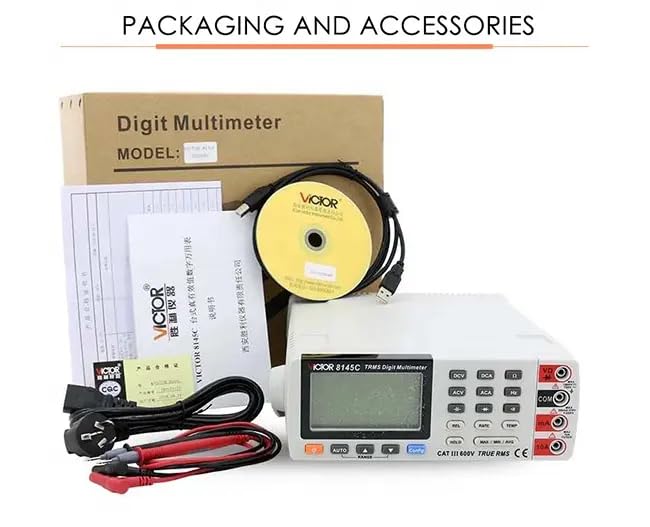
Figure 3.1: The image displays the product packaging and the accessories that come with the VICTOR 8145C, including the multimeter, test leads, power cord, USB cable, software CD, and user manual.
4. Proizvod je gotovview
4.1 Prednja ploča
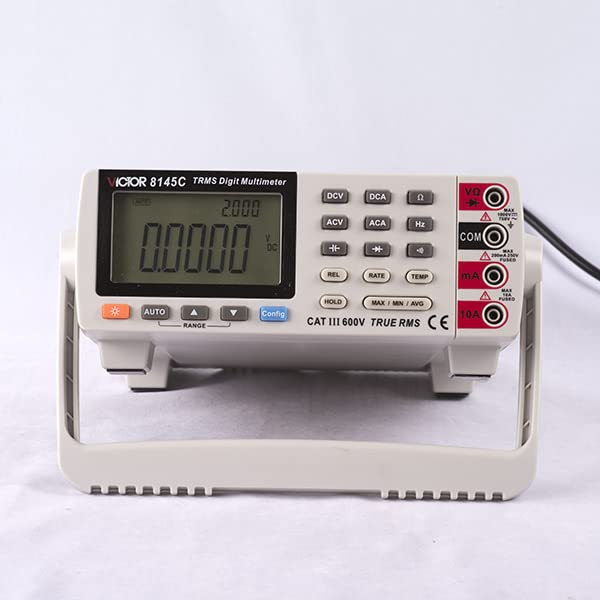
Figure 4.1: This image shows the front panel of the VICTOR 8145C Digital Bench Multimeter, highlighting its large LCD screen, function buttons, and input terminals.
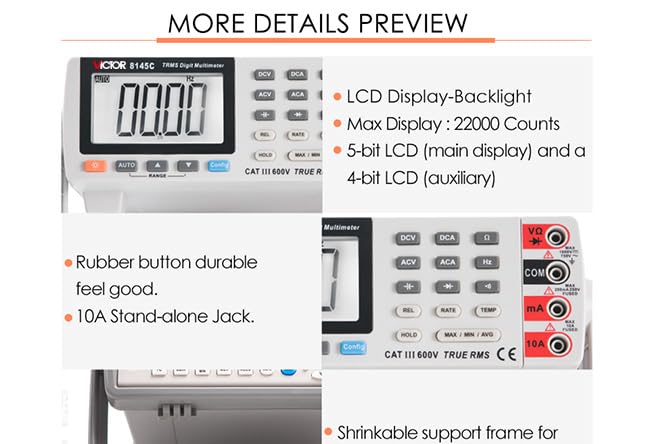
Slika 4.2: Krupni plan view highlighting the multimeter's LCD display with backlight, 22000 count capability, durable rubber buttons, and the 10A stand-alone input jack.
- LCD ekran: Large, backlit display with a maximum count of 22000. Features a 5-bit main display for primary readings and a 4-bit auxiliary display for secondary information.
- Funkcijska dugmad: Dedicated buttons for selecting measurement types (DCV, DCA, ACV, ACA, Hz, TEMP) and special functions (REL, RATE, HOLD, MAX/MIN/AVG, Config).
- AUTO/RANGE Buttons: For automatic or manual range selection.
- Ulazne utičnice:
- VΩ: Ulaz za voltage, mjerenja otpora, kapaciteta, frekvencije, diode i kontinuiteta.
- COM: Common (ground) input for all measurements.
- mA: Unos za miliamptrenutna mjerenja.
- 10A: Ulaz za mjerenja visoke struje (do 10A).
4.2 Zadnja ploča
The rear panel typically includes the main power switch, AC power input, and a USB port for PC connectivity.
4.3 Ključne karakteristike
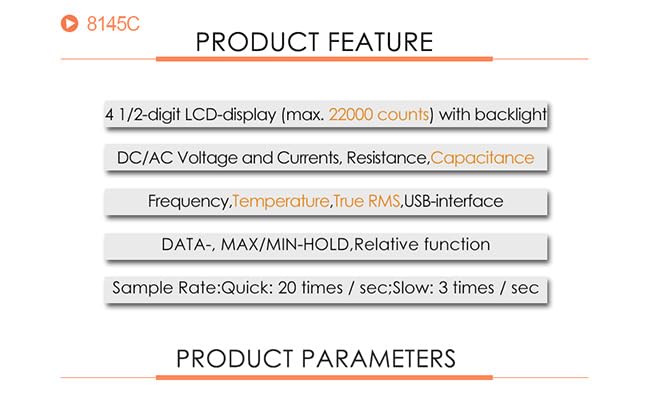
Figure 4.3: This graphic summarizes the main features of the VICTOR 8145C, including its 4 1/2-digit LCD, measurement capabilities (DC/AC Voltage, Current, Resistance, Capacitance, Frequency, Temperature, True RMS), USB interface, and data functions.
- 4½-digit LCD display (max. 22000 counts) with backlight.
- Mjere DC/AC Voltage and Currents, Resistance, Capacitance, Frequency, and Temperature.
- Mjerenje True RMS vrijednosti za precizna očitavanja nesinusoidnih talasnih oblika.
- USB interface for PC connectivity and data logging.
- DATA HOLD, MAX/MIN/AVG, and Relative function.
- Sample Rate: Quick (20 times/sec) and Slow (3 times/sec).
5. Specifikacije

Figure 5.1: A detailed table outlining the technical specifications of the VICTOR 8145C Digital Bench Multimeter, including measurement ranges, basic accuracy, display words, and special functions.
| Feature | Opis |
|---|---|
| Display | 22000 Counts, 4½-digit LCD with backlight |
| DC Voltage domet | 200mV / 2V / 20V / 200V / 1000V |
| DC Voltage Basic Accuracy | ± (0.05% + 4dgt) |
| AC Voltage domet | 200mV / 2V / 20V / 200V / 750V |
| AC Voltage Basic Accuracy | ± (0.5% + 40dgt) |
| Raspon istosmjerne struje | 0.2mA / 2mA / 20mA / 200mA / 10A |
| DC Current Basic Accuracy | ± (0.2% + 10dgt) |
| Raspon izmjenične struje | 0.2mA / 2mA / 20mA / 200mA / 10A |
| AC Current Basic Accuracy | ± (0.8% + 30dgt) |
| Opseg otpora | 200Ω / 2kΩ / 20kΩ / 200kΩ / 2MΩ / 20MΩ / 60MΩ |
| Resistance Basic Accuracy | ± (0.2% + 5dgt) |
| Capacitance Range | 10nF / 100nF / 1000nF / 10uF / 100uF / 1000uF |
| Capacitance Basic Accuracy | ± (5% + 5dgt) |
| Frekvencijski opseg | 10Hz ~ 10MHz |
| Frequency Basic Accuracy | ± (0.02% + 4dgt) |
| Termocouple Range | K indexing: -200.0°C ~ 1372.0°C |
| Thermocouple Basic Accuracy | ±(0.5%+5°C) |
| Brzina merenja | Quick: 20 times/sec; Slow: 2.5 times/sec |
| Automatic / Manual Range | Da |
| True RMS | Da |
| Bandwidth | 1kHz |
| Diodni test | Da |
| Continuity Beeper | Da |
| MAX / MIN / AVG | Da |
| Mjerenje relativne vrijednosti | Da |
| Zadržavanje podataka | Da |
| Reference Junction Compensation | Da |
| °C / °F Conversion | Da |
| Izvor napajanja | AC Power (1 LR41 battery included for internal functions) |
| Dimenzije proizvoda (D x Š x V) | 20 x 15 x 18 cm (7.87 x 5.91 x 7.09 inča) |
| Težina artikla | 1 kg (2.2 lbs) |
| Proizvođač | Xi'an Beicheng Electronics Co.Ltd (VICTOR and Ruoshui) |
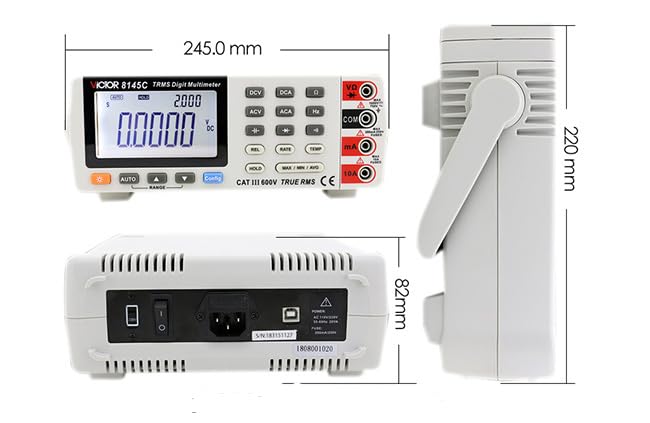
Figure 5.2: This diagram illustrates the physical dimensions of the VICTOR 8145C Digital Bench Multimeter, showing its length, width, and height in millimeters.
6. Podešavanje
6.1 Priključak za napajanje
- Ensure the multimeter's power switch (located on the rear panel) is in the OFF position.
- Connect the provided power cord to the AC power input on the rear panel of the multimeter.
- Uključite drugi kraj kabla za napajanje u odgovarajuću utičnicu naizmenične struje.
- Flip the power switch to the ON position to power on the device.
6.2 Spajanje mjernog kabela
Always connect the test leads to the appropriate input jacks based on the measurement you intend to perform.
- Za većinu mjerenja (volumentage, resistance, capacitance, frequency, diode, continuity): Insert the red test lead into the VΩ utičnicu i crni mjerni kabel u COM Jack.
- Za miliampere current measurements: Insert the red test lead into the mA utičnicu i crni mjerni kabel u COM Jack.
- For high current (up to 10A) measurements: Insert the red test lead into the 10A utičnicu i crni mjerni kabel u COM Jack.
6.3 USB priključak (opciono)
To connect the multimeter to a computer for data logging or control:
- Install the provided PC software from the CD onto your computer.
- Connect one end of the USB communication cable to the USB port on the rear panel of the multimeter.
- Povežite drugi kraj USB kabla na slobodan USB port na računaru.
- Follow the instructions in the PC software manual for establishing communication and using data logging features.
7. Uputstvo za upotrebu
7.1 Basic Measurement Steps
- Ensure the multimeter is powered on and test leads are correctly connected for the desired measurement type.
- Select the appropriate function by pressing the corresponding button (e.g., DCV for DC Voltagi).
- The multimeter will typically operate in auto-ranging mode. If manual ranging is desired, press the RANGE button to cycle through available ranges.
- Spojite ispitne sonde na strujno kolo ili komponentu koja se testira.
- Očitajte izmjerenu vrijednost na LCD ekranu.
- Nakon mjerenja, isključite mjerne sonde iz strujnog kola.
7.2 Specifične mjerne funkcije
- DC/AC Voltage (DCV/ACV): Pritisnite DCV or ACV button. Connect probes in parallel with the circuit.
- DC/AC Current (DCA/ACA): Pritisnite DCA or ACA button. Connect probes in series with the circuit. Ensure correct jack (mA or 10A) is used.
- Otpor (Ω): Pritisnite Ω button. Disconnect power from the circuit. Connect probes across the component.
- Kapacitet (F): Pritisnite F button. Disconnect power and discharge the capacitor before connecting probes.
- Frekvencija (Hz): Pritisnite Hz button. Connect probes to the signal source.
- Temperatura (TEMP): Pritisnite TEMP button. Connect a K-type thermocouple (not included) to the appropriate input terminals.
- Diodni test: Pritisnite Diode button. Connect probes across the diode. Forward bias will show a voltage drop, reverse bias will show OL.
- Test kontinuiteta: Pritisnite Kontinuitet button. Connect probes across the circuit. A beep indicates continuity (low resistance).
7.3 Posebne funkcije
- DRŽI: Pritisnite HOLD dugme za zamrzavanje trenutnog očitavanja na ekranu. Pritisnite ponovo za otpuštanje.
- MAKS/MIN/PROSJEK: Pritisnite MAX / MIN / AVG button to record the maximum, minimum, and average values over a period. Press repeatedly to cycle through MAX, MIN, AVG, and exit.
- REL (Relativno mjerenje): Pritisnite REL button to store the current reading as a reference value. Subsequent measurements will be displayed as the difference from this reference. Press again to exit.
- Konfiguracija: Used for advanced settings and configurations, refer to the detailed software manual for specific options.
8. Održavanje
8.1 Čišćenje
Za čišćenje multimetra, obrišite kućište sredstvom za čišćenje.amp cloth and a mild detergent. Do not use abrasives or solvents. Ensure the device is powered off and disconnected from all power sources before cleaning.
8.2 Battery Replacement (Internal)
The multimeter includes an LR41 battery, typically for internal memory or clock functions. If the display shows signs of memory loss or incorrect time (if applicable), this battery may need replacement. This procedure should ideally be performed by qualified personnel to avoid damaging internal components.
8.3 Zamjena osigurača
If the current measurement function fails, the internal fuse may need replacement. Refer to the detailed service manual or contact customer support for fuse specifications and replacement procedures. Always replace with a fuse of the identical type and rating.
8.4 Skladištenje
When not in use for extended periods, store the multimeter in a dry, dust-free environment, away from direct sunlight and extreme temperatures. Disconnect all test leads and the power cord.
9. Otkrivanje problema
| Problem | Mogući uzrok | Rješenje |
|---|---|---|
| Nema prikaza kada je uključen | No AC power; Power cord loose; Power switch off | Check AC power connection; Ensure power switch is ON. |
| Netačna očitavanja | Wrong function/range selected; Poor test lead connection; Damaged test leads | Select correct function/range; Reconnect test leads firmly; Inspect/replace test leads. |
| Mjerenje struje ne radi | Blown fuse; Incorrect jack used | Check/replace fuse (refer to service manual); Ensure red lead is in mA or 10A jack. |
| Continuity beeper not working | Circuit resistance too high; Beeper function not selected | Ensure circuit resistance is low; Select continuity function. |
| Greška u USB komunikaciji | Driver not installed; Loose USB cable; Software issue | Install USB drivers from CD; Reconnect USB cable; Consult software manual. |
10. Garancija i podrška
For warranty information, please refer to the documentation provided at the time of purchase or contact your retailer. The manufacturer of this product is Xi'an Beicheng Electronics Co.Ltd (VICTOR and Ruoshui).
If you encounter any issues not covered in this manual or require technical assistance, please contact the seller or authorized service center for support.


