1. Uvod
The ICUIXIAN HDR HDMI Matrix Switch 8x8 is a professional audio and video switcher designed for high-quality signal distribution. It features 8 HDMI inputs, 8 HDMI outputs, and 8 SPDIF & LR analog audio outputs, supporting advanced video and audio formats.
Ključne karakteristike:
- HDR10 HDMI Matrix 8x8 4K60Hz: Supports HDMI2.0 (HDCP2.3) with a maximum output resolution of 4K@60Hz 4:4:4, HDR10, and Dolby Vision.
- 4K@60Hz-4:4:4 Ultra HD Resolution: Features downward doubling function, allowing 4K video sources to display 4K content on 4K displays and 1080P content on 1080P displays simultaneously (up to two outputs).
- Fleksibilna kontrola: Offers multiple control options including two-way infrared (IR) control, RS232 command, TCP/IP network port control, and front panel key control.
- Broadcast-level Professional Matrix: 18Gbps bandwidth, HDMI2.0/HDCP2.2, HDR10, Web GUI, CEC, ARC, AOC, EDID management, and support for LPCM 7.1 Audio, Dolby Atmos, Dolby TrueHD, Dolby Digital Plus, DTS:X, and DTS-HD Master Audio pass-through.
- Web Control + EDID Presets: Cross-platform web control via computer, mobile phone, or tablet. Built-in scenario management allows setting up to 32 scenarios for quick recall and switching.
2. Sadržaj paketa
Please ensure all items are present and in good condition. If any items are missing or damaged, contact your vendor immediately.
- ICUIXIAN HDR HDMI Matrix Switch 8x8 Unit
- Adapter za napajanje
- IR daljinski upravljač
- Uputstvo za upotrebu
- Nosači za montažu (ako je primjenjivo)
3. Proizvod je gotovview
3.1 Prednja ploča

Slika 3.1: Prednja strana view of the ICUIXIAN HDR HDMI Matrix Switch 8x8 with its remote control.

Slika 3.2: Detaljno view of the front panel, showing input and output selection buttons, and control method indicators.
- INPUTS 1-8 Buttons: Bira HDMI ulazni izvor.
- OUTPUTS 1-8 Buttons: Selects the HDMI output destination.
- Dugme SVE: Assigns the selected input to all outputs.
- Dugme CLEAR: Clears all output assignments.
- Dugme ENTER: Potvrđuje odabire.
- PRESET/RECALL Buttons: Saves or recalls custom configurations.
- IC prijemnik: Za upravljanje daljinskim upravljačem.
- LED za napajanje: Označava status napajanja.
3.2 Zadnja ploča

Figure 3.3: Rear panel connections including HDMI inputs/outputs, audio outputs, and control ports.
- HDMI IN 1-8: HDMI ulazni portovi za izvorne uređaje.
- HDMI OUT 1-8: HDMI output ports for display devices.
- SPDIF & LR Audio Outputs: Coaxial and analog stereo audio outputs for each HDMI output.
- RS232 port: Za serijsko upravljanje putem računara ili upravljačkog sistema.
- TCP/IP (Ethernet) Port: For network control via Web GUI.
- IR EXT: External IR receiver port.
- DC 24V: Ulaz za napajanje.
4. Podešavanje i veze
Follow these steps to connect your ICUIXIAN HDR HDMI Matrix Switch 8x8:
- Iskljuciti: Ensure all devices, including the matrix switch, are powered off before making any connections.
- Povežite HDMI izvore: Connect your HDMI source devices (e.g., Blu-ray players, game consoles, PCs) to the HDMI IN 1-8 ports on the matrix switch using high-quality HDMI cables.
- Povežite HDMI ekrane: Connect your HDMI display devices (e.g., TVs, projectors) to the HDMI OUT 1-8 ports on the matrix switch.
- Audio priključci (opciono): If using external audio systems, connect the SPDIF or LR audio outputs from the matrix switch to your audio receiver or amplifier.
- Kontrolne veze (opciono):
- For RS232 control, connect a serial cable from your control system to the RS232 port.
- For network control, connect an Ethernet cable from your router/network to the TCP/IP port.
- For extended IR control, connect an external IR receiver to the IR EXT port.
- Uključeno: Connect the power adapter to the DC 24V port and then plug it into a power outlet. Power on all connected source and display devices.

Slika 4.1: Prample connection diagram showing various source devices connected to the matrix switch and then to multiple display devices.
5. Uputstvo za upotrebu
5.1 Basic Switching Operations (Front Panel)
To switch an input to an output:
- Pritisnite željeno INPUT button (1-8). The corresponding LED will light up.
- Pritisnite željeno IZLAZ button (1-8). The corresponding LED will light up.
- Pritisnite ENTER button to confirm the switch. The selected input will now be displayed on the chosen output.
To switch one input to all outputs:
- Pritisnite željeno INPUT dugme (1-8).
- Pritisnite SVE dugme.
- Pritisnite ENTER button to confirm. The selected input will now be displayed on all outputs.
To clear all output assignments:
- Pritisnite CLEAR dugme.
5.2 Metode kontrole
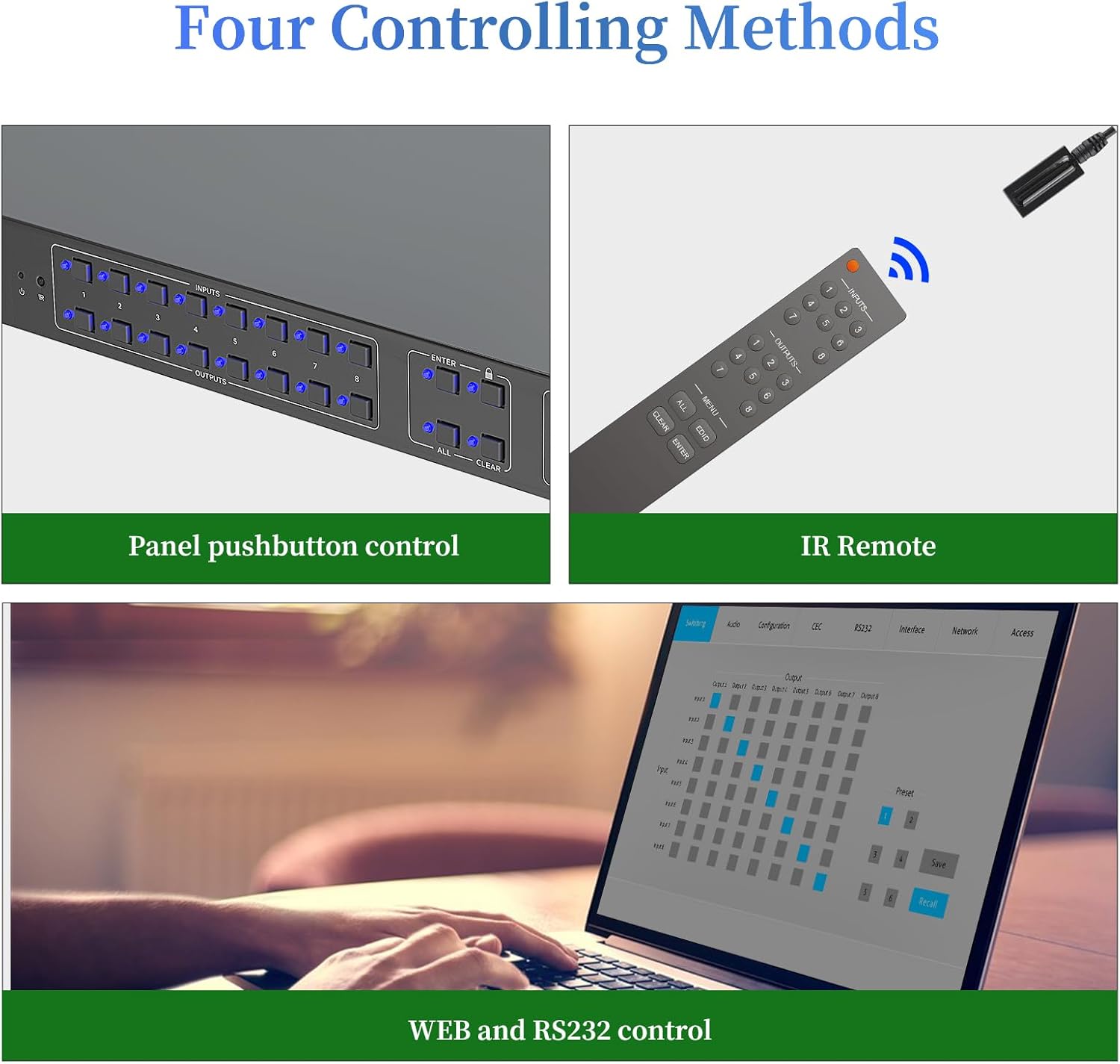
Slika 5.1: Gotovoview of the four available control methods for the matrix switch.
- Gumbi na prednjoj ploči: Direct control using the physical buttons on the device.
- IR daljinski upravljač: Use the included IR remote for convenient wireless control.
- RS232 kontrola: Integrate with professional control systems using RS232 commands. Refer to the detailed RS232 command set in the appendix (if available) or contact support.
- Web GUI Control (TCP/IP): Pristup web-based graphical user interface for control from a computer, tablet, or smartphone connected to the same network.
5.3 Web Kontrola upravljanja
The Web GUI allows for comprehensive control and configuration of the matrix switch, including video signal switching, preset scene saving and recalling, audio settings, EDID management, CEC control, and network settings.
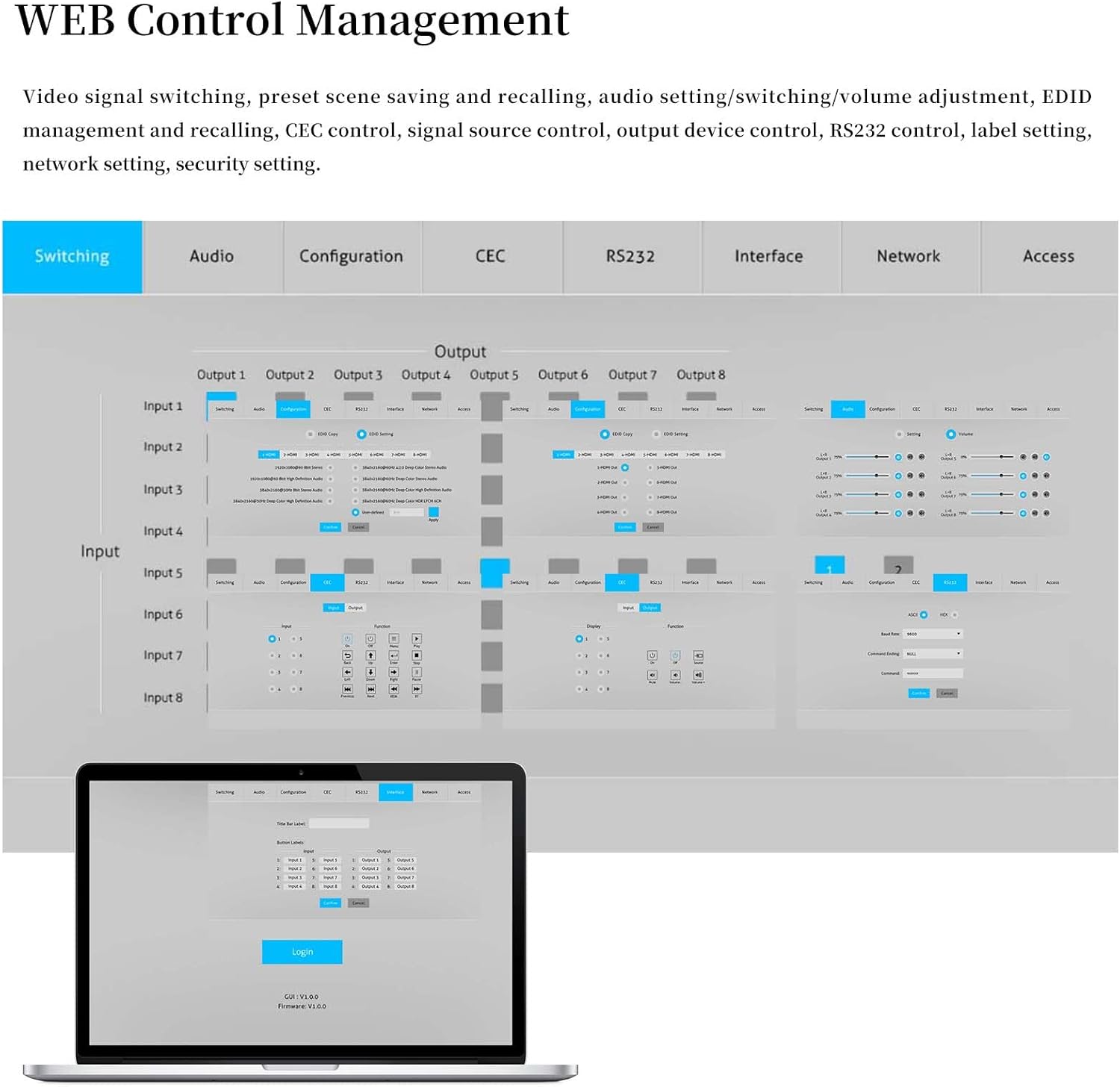
Slika 5.2: Web GUI interface showing input/output routing and various configuration tabs.
Za pristup Web GUI:
- Connect the matrix switch to your network via the TCP/IP port.
- Find the IP address of the device (usually displayed on a connected screen during boot or via network scanning tools).
- Otvori a web browser on a device connected to the same network and enter the IP address.
- Log in using the default credentials (refer to the device's label or contact support if unknown).
5.4 EDID Management and Presets
The matrix switch supports intelligent EDID management to ensure compatibility between source devices and displays. You can configure and save up to 32 custom scenarios (profiles) for quick recall.
To save a current configuration as a profile:
- Pritisnite MODE + [Profile Number] + ENTER.
To recall a saved scenario:
- Pritisnite SCENE + [Scenario Number] + ENTER.
Video 5.1: Demonstration of saving and recalling profiles using the front panel buttons. This video shows how to save current input/output configurations as profiles and recall them later.
Video 5.2: Further demonstration of profile saving and recalling, illustrating different input/output assignments.
5.5 Video Wall Functionality and Downscaling
The matrix switch supports various screen modes, including Matrix Mode, Matrix & Splitter Mode, and Splitter Mode, allowing flexible display configurations. It also supports 4K to 1080P downscaling, enabling simultaneous display of 4K content on 4K displays and 1080P content on 1080P displays.

Figure 5.3: Visual representation of different screen modes: Matrix (each display selects a standalone input), Matrix & Splitter (part of displays share the same input), and Splitter (all displays share the same input).

Figure 5.4: Demonstration of the 4K to 1080P downscaling capability, showing a 4K source displayed on both 4K and 1080P screens.
Video 5.3: Demonstration of the video wall functionality, showcasing various content displayed across multiple screens in different configurations.
6. Održavanje
- čišćenje: Za čišćenje uređaja koristite meku, suhu krpu. Izbjegavajte tekuća sredstva za čišćenje ili aerosole.
- ventilacija: Osigurajte odgovarajuću ventilaciju oko uređaja kako biste spriječili pregrijavanje. Ne blokirajte ventilacijske otvore.
- Upravljanje kablovima: Kablove držite organiziranima i bez uvrtanja ili prekomjernog savijanja kako biste spriječili degradaciju ili oštećenje signala.
- Ažuriranja firmvera: Provjerite proizvođača webperiodično provjeravajte stranicu radi ažuriranja firmvera kako biste osigurali optimalne performanse i pristup novim funkcijama.
7. Otkrivanje problema
| Problem | Mogući uzrok | Rješenje |
|---|---|---|
| Nema video izlaza na ekranu. |
|
|
| Loš kvalitet videa ili treperenje. |
|
|
| Daljinski upravljač ne radi. |
|
|
8. Specifikacije
| Feature | Detalj |
|---|---|
| Brand | ICUIXIAN |
| Model | HDR HDMI Matrix Switch 8x8 |
| Boja | crna |
| Tip konektora | HDMI |
| Kompatibilni uređaji | Laptop, televizija |
| Vrsta kabla | HDMI |
| Maksimalna rezolucija | 4K@60Hz 4:4:4 |
| Bandwidth | 18Gbps |
| HDMI verzija | HDMI 2.0 (HDCP2.3) |
| HDR podrška | HDR10, Dolby Vision |
| Audio podrška | LPCM 7.1, Dolby Atmos, Dolby TrueHD, Dolby Digital Plus, DTS:X, DTS-HD Master Audio |
| Kontrolne metode | Front Panel, IR Remote, RS232, TCP/IP (Web GUI) |
| EDID upravljanje | Intelligent EDID, 32 Scenario Presets |
9. Garancija i podrška
ICUIXIAN products come with a standard manufacturer's warranty. For specific warranty details, please refer to the warranty card included with your product or visit the official ICUIXIAN website. For technical support, troubleshooting assistance, or to inquire about replacement parts, please contact ICUIXIAN customer service through their official channels.
Možete razmotriti i kupovinuasing prošireni planovi zaštite za vaš uređaj:
- Dvogodišnji plan zaštite
- Potpuna zaštita: Jedan plan pokriva sve podobne prošle i buduće kupovine