Uvod
This manual provides detailed instructions for the installation, operation, and maintenance of your ARES WING GDT1004WLBK Single Monitor Wall Mount. This heavy-duty gas spring wall mount is designed to support 17-49 inch ultrawide screens, including 1000R curved monitors, with a weight capacity of up to 44 lbs. It offers full flexibility and adjustability to optimize your viewing experience and workspace.
Postavljanje i instalacija
Before beginning installation, ensure all components are present and undamaged. Refer to the included hardware list in your product packaging.
1. Check Monitor Compatibility
- VESA uzorak: Compatible with 75x75mm and 100x100mm VESA patterns.
- Veličina ekrana: Fits monitors from 17 inches to 49 inches.
- Kapacitet težine: Supports monitors weighing between 4.4 lbs and 44 lbs.
If your monitor does not have VESA holes, a VESA mount adapter (not included) must be purchased separately. Some monitors, like the Samsung G9, may come with a compatible VESA adapter.

This image illustrates the monitor arm's compatibility with VESA 75x75mm and 100x100mm patterns, its support for 17-49 inch flat and curved monitors, and a maximum weight capacity of 44 lbs.
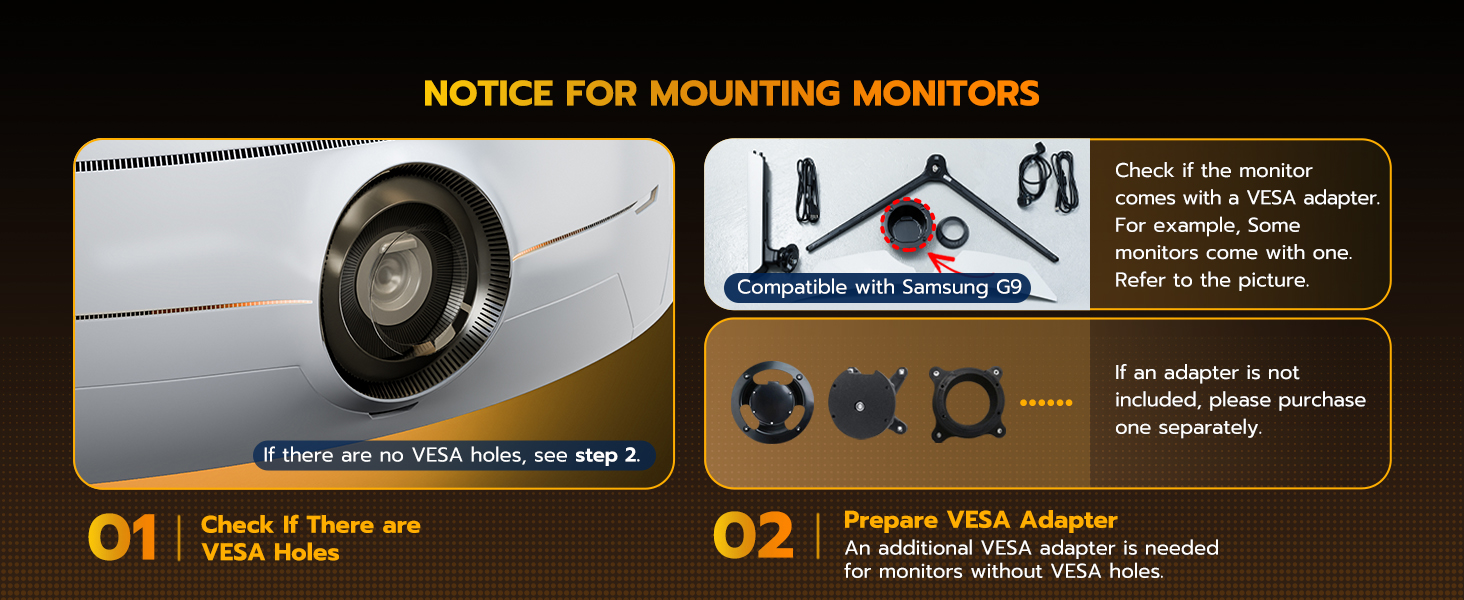
This diagram provides guidance on checking for existing VESA holes on your monitor and the necessity of a VESA adapter for monitors without them.
2. Choose a Suitable Wall Type
For maximum security and stability, the monitor arm must be attached to one of the following wall types:
- Stud Stud
- Solid Concrete Wall
- Zidni zid
NOTE: Do not use the provided anchors on drywall or wood alone. Always secure to a structural element.

This image demonstrates the appropriate wall types for installation: wood stud, brick, and solid concrete. It also includes a crucial warning against installing on drywall alone.
3. Sastavljanje i montaža
Follow the detailed instructions and diagrams provided in your product packaging for step-by-step assembly. Ensure all screws are tightened securely.
Quick-Release VESA Plate
The quick-release VESA plate simplifies attaching the monitor to the arm. Install the VESA plate to your monitor first, then slide it onto the arm's mounting head until it clicks into place.
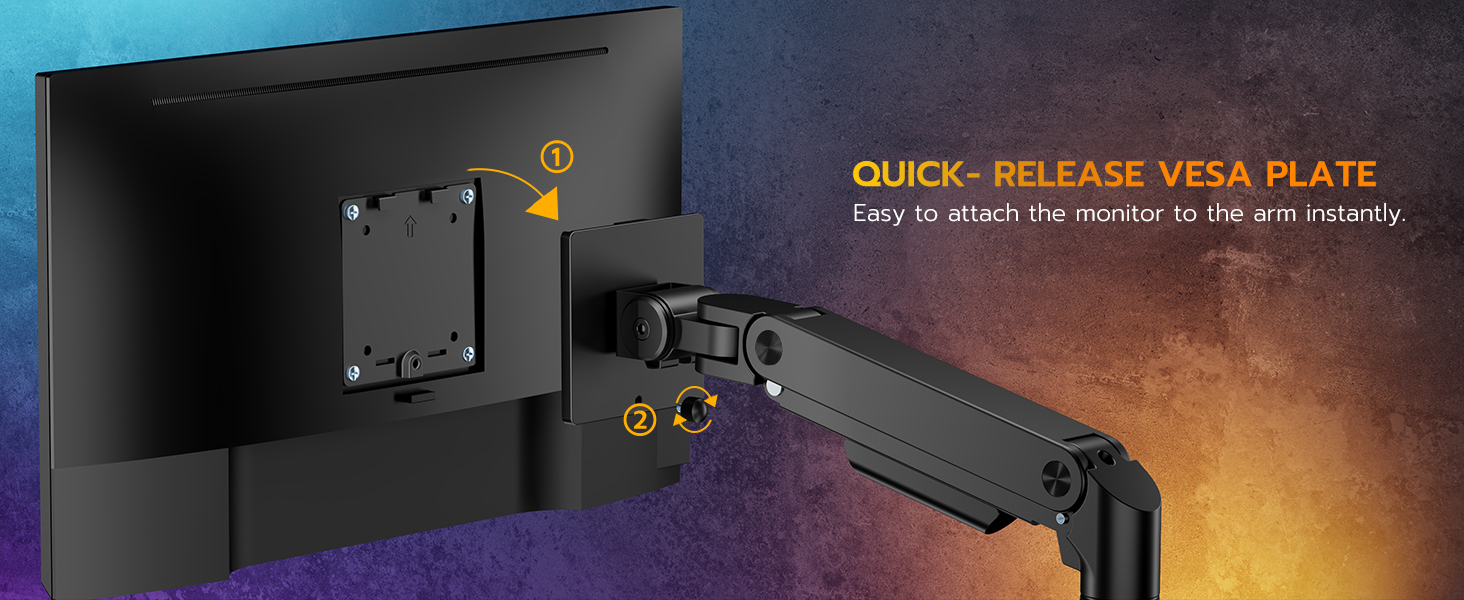
This diagram shows the two-step process for using the quick-release VESA plate to easily attach your monitor to the arm.
Upravljanje krakom monitora
The ARES WING monitor arm offers extensive adjustability to achieve an ergonomic viewing position.
1. Podešavanje napetosti plinske opruge
The internal gas spring allows for smooth height adjustment. Adjust the tension to match your monitor's weight for optimal balance.
- Okreni se u smjeru kazaljke na satu to increase tension (if the arm drops).
- Okreni se suprotno od kazaljke na satu to decrease tension (if the arm rises too easily).
Important: Before mounting the monitor, adjust the gas spring tension (points A & B on the arm) to the maximum setting. This provides initial stability for heavier monitors.
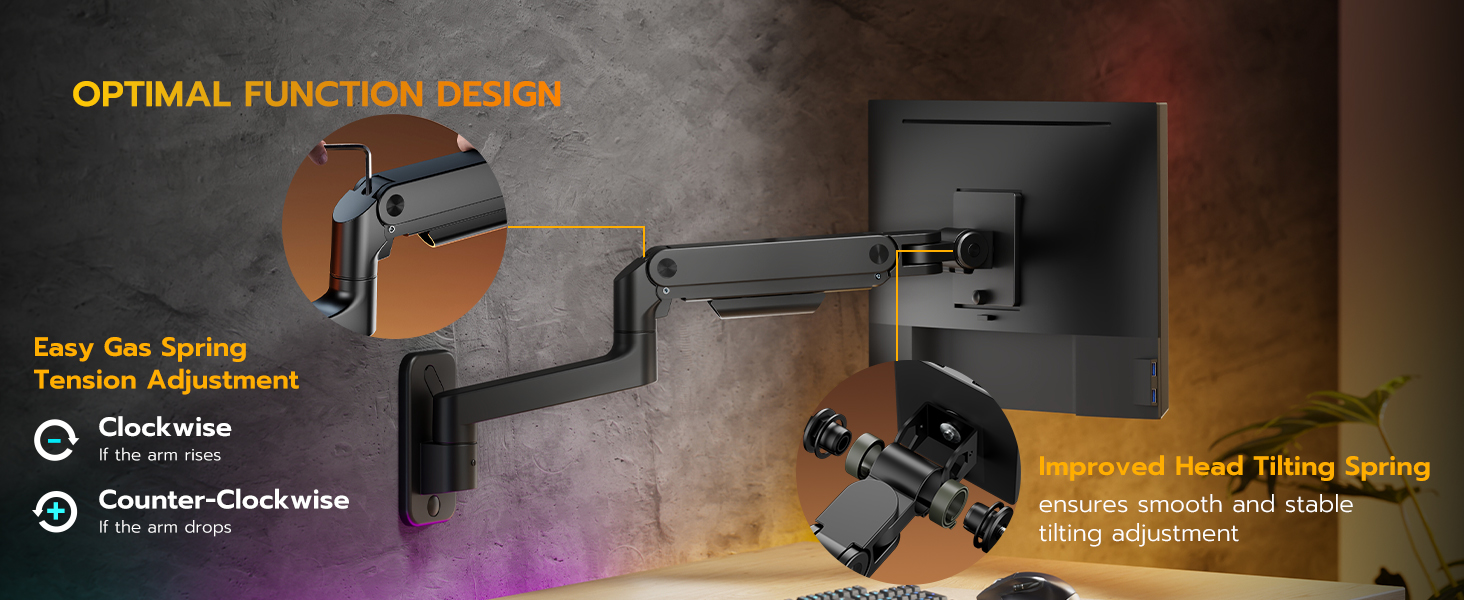
This image illustrates the gas spring tension adjustment points and the direction to turn for increasing ili dekretasing napetost.
2. Podešavanje položaja monitora
The arm provides the following movement capabilities:
- Nagib: +50° to -20° for optimal vertical viewing angles.
- Okretni: 180° for horizontal screen orientation.
- rotacija: 360° for switching between landscape and portrait modes.
- Podešavanje visine: 10-inch range.
- Ispruženje ruke: Retracts to 5 inches from the wall, extends up to 23.9 inches.

This image highlights the arm's range of motion, including its retraction, extension, height adjustment, and tilt capabilities.

This image illustrates how the arm allows for easy swiveling and 360-degree rotation of the monitor.
3. Upravljanje kablovima
Utilize the integrated cable management system to route and conceal cables along the arm, maintaining a clean and organized workspace.
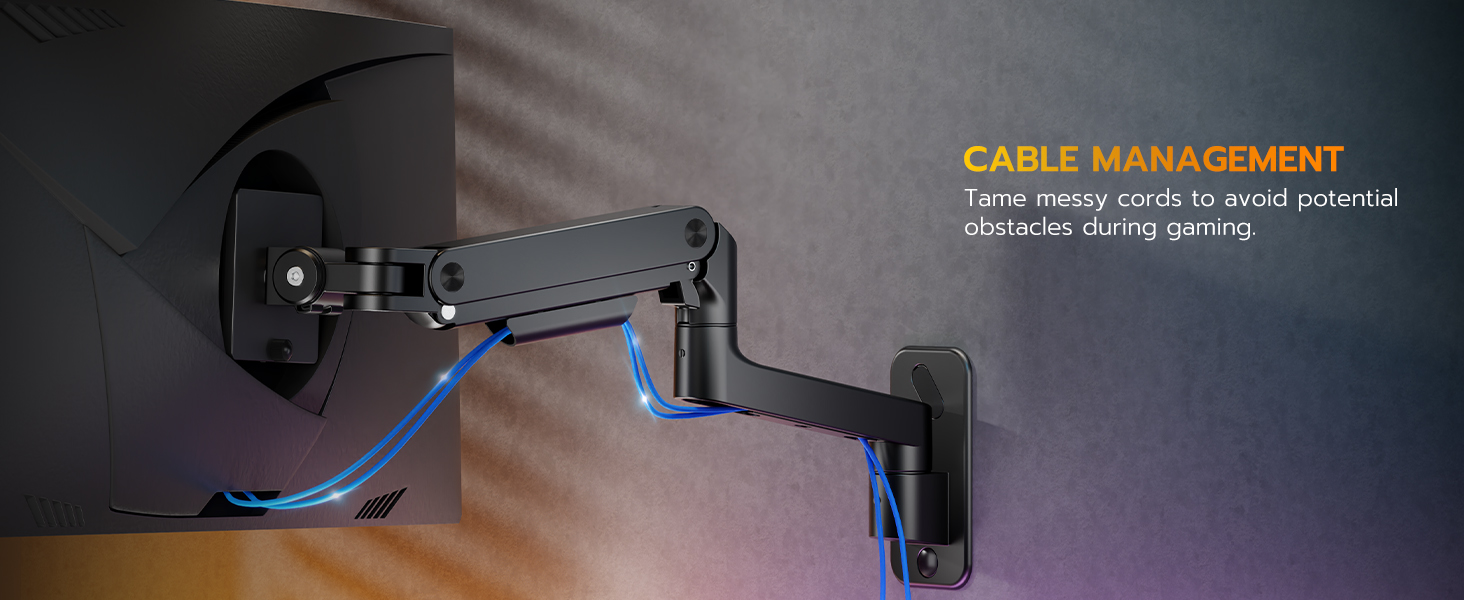
This image demonstrates the effective use of the built-in cable management system to keep cables tidy.
Održavanje
To ensure the longevity and optimal performance of your ARES WING monitor arm, follow these simple maintenance guidelines:
- čišćenje: Wipe the arm surfaces with a soft, dry cloth. Avoid abrasive cleaners or solvents.
- Periodične kontrole: Regularly inspect all mounting screws and connections to ensure they remain tight and secure.
- Podešavanje plinske opruge: Re-adjust the gas spring tension if your monitor's weight changes or if the arm no longer holds its position smoothly.
Rješavanje problema
Monitor Does Not Hold Position (Sags or Rises Too Easily)
This indicates incorrect gas spring tension for your monitor's weight.
- Rješenje: Adjust the gas spring tension using the provided Allen wrench. Turn clockwise if the arm sags, and counter-clockwise if it rises too easily. Make small adjustments and test the arm's movement.
Monitor Cannot Tilt Smoothly or Stays Fixed
The tilt mechanism may be too tight or too loose.
- Rješenje: If the monitor is not tiltable, locate the tilt screw on the VESA plate connection point and loosen it slightly until smooth tilting is achieved. If it tilts too freely, tighten the screw.
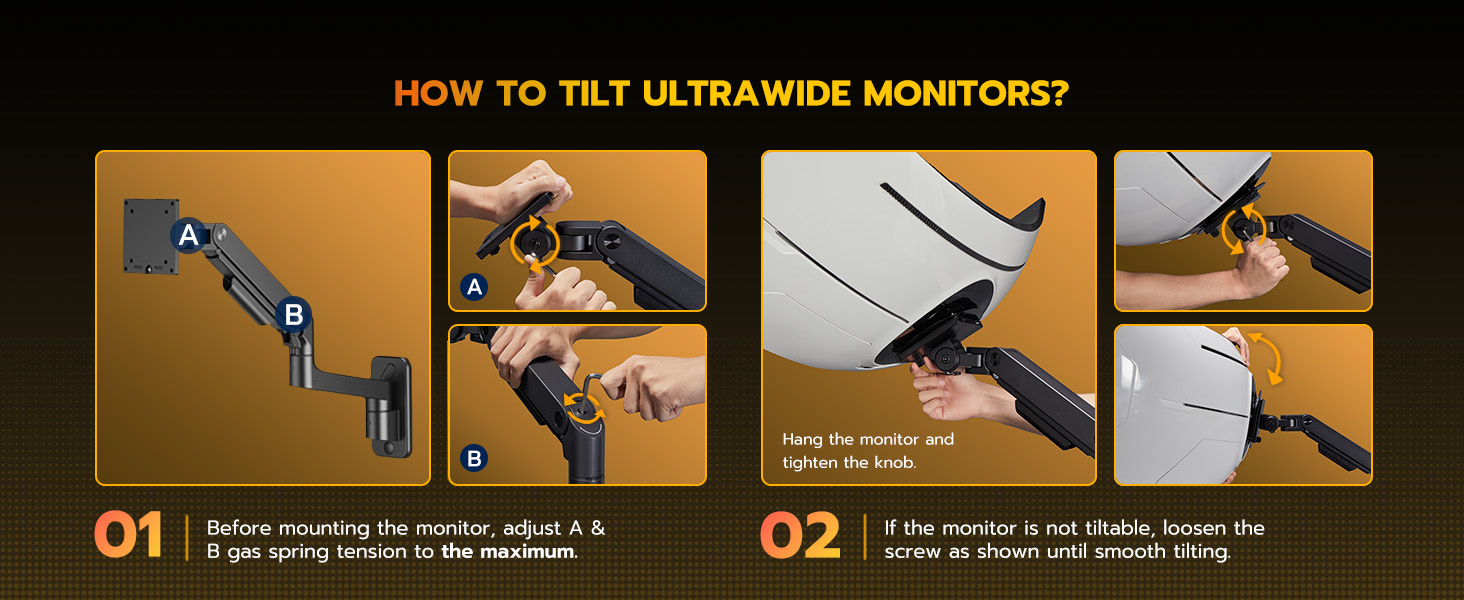
This diagram illustrates the steps for adjusting gas spring tension and loosening the tilt screw to ensure proper monitor movement.
Mount Feels Unstable on the Wall
This is often due to improper installation or unsuitable wall anchors.
- Rješenje: Ensure the mount is securely fastened to a wood stud, solid concrete, or brick wall. If the provided anchors failed during installation, replace them with higher-quality anchors suitable for your specific wall material. Never install on drywall alone.
- Rješenje: Verify all mounting screws are fully tightened.
Specifikacije
| Feature | Detalj |
|---|---|
| Broj modela | GDT1004WLBK |
| Brand | ARESOVO KRILO |
| Vrsta montaže | Zidni nosač |
| Materijal | Premium-grade Steel and Aluminum |
| Boja | Crna |
| Kompatibilna veličina ekrana | 17 - 49 inča |
| Težina Kapacitet | 4.4 - 44 kg |
| VESA kompatibilnost | 75x75mm, 100x100mm |
| Raspon nagiba | +50° do -20° |
| Okretni domet | 180° |
| Rotacija | 360° |
| Raspon podešavanja visine | 10 inča |
| Maksimalno istezanje ruke | 23.9 inča |
| Retraction Distance | 5 inča |
| Item Weight (Mount Only) | 8 funte |
Informacije o garanciji
For detailed warranty information, please refer to the documentation included with your product or visit the official ARES WING webstranica. Garantni uslovi obično pokrivaju nedostatke u proizvodnji i nedostatke materijala pri normalnoj upotrebi.
Korisnička podrška
If you encounter any issues or have questions regarding your ARES WING GDT1004WLBK Single Monitor Wall Mount that are not addressed in this manual, please contact ARES WING customer support through their official webweb-mjesto ili kontakt informacije navedene u pakovanju vašeg proizvoda.


