1. Uvod
The Ferguson Regent i351S is a versatile internet radio designed to provide a rich audio experience with multiple connectivity options. This manual offers detailed instructions for setting up, operating, and maintaining your device, ensuring you can fully utilize its features including Wi-Fi, DAB+, FM radio, Bluetooth, Spotify Connect, and dual alarms. Please read this manual thoroughly before first use and keep it for future reference.
2. Sigurnosne informacije
Da biste osigurali siguran rad i spriječili oštećenja, molimo vas da se pridržavate sljedećih sigurnosnih mjera opreza:
- Ne izlažite uređaj kiši, vlazi ili ekstremnim temperaturama.
- Avoid placing the unit near heat sources such as radiators, stoves, or other heat-producing appliances.
- Ne blokirajte ventilacijske otvore. Osigurajte dovoljno prostora oko uređaja za pravilan protok zraka.
- Koristite samo dodatke/pribor koje je naveo proizvođač.
- Isključite uređaj iz struje tokom oluja sa grmljavinom ili kada ga ne koristite duže vreme.
- Ne otvarajte casing. Za sve servisne radove obratite se kvalifikovanom servisnom osoblju.
- Držite uređaj dalje od jakih magnetnih polja.
3. Sadržaj paketa
Molimo Vas da provjerite sadržaj paketa prilikom raspakivanja. Ako bilo koji predmet nedostaje ili je oštećen, obratite se prodavaču.
- Ferguson Regent i351S Internet Radio
- Adapter za napajanje
- Daljinski upravljač
- Vodič za brzi početak
4. Proizvod je gotovview
Familiarize yourself with the main components and controls of your Ferguson Regent i351S.
4.1 Prednja ploča i ekran
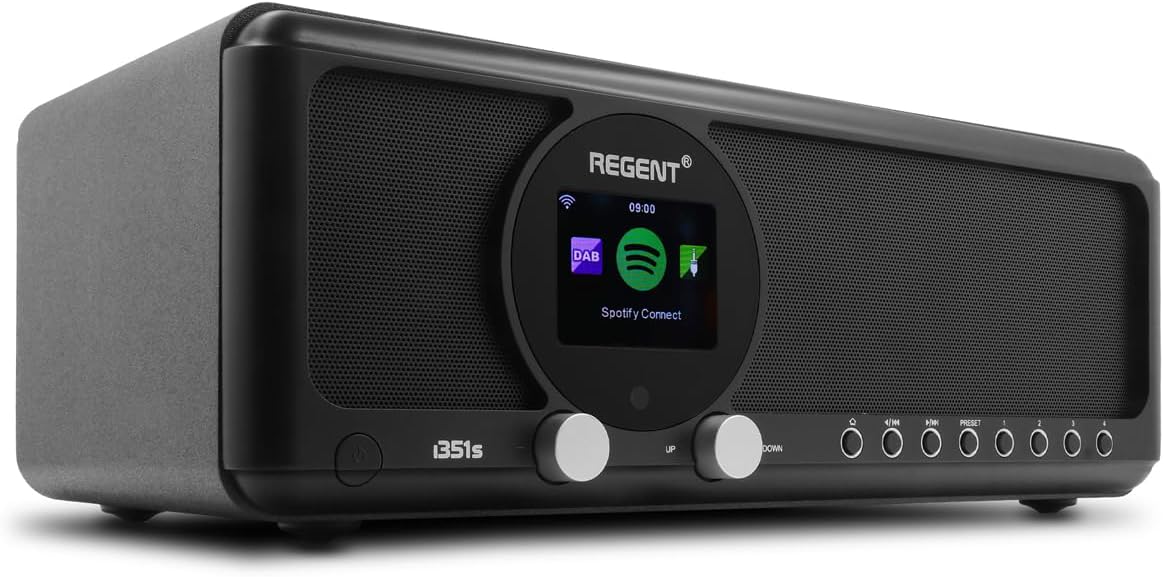
Slika: Front view of the Ferguson Regent i351S Internet Radio, showcasing the central color display, dual speakers, and control knobs/buttons.
The front panel features a prominent 2.4-inch TFT color display, two main control knobs (Up/Down), and several function buttons for navigation and mode selection. The stereo speakers are located on either side of the central display.
4.2 Zadnja ploča i priključci

Slika: Stražnja strana view of the Ferguson Regent i351S Internet Radio, showing the telescopic antenna, USB port, power input, and bass reflex port.
The rear panel includes the telescopic antenna for DAB+/FM reception, a USB port for media playback, an AUX-in port for external audio sources, a 3.5mm headphone output, and the power adapter input.
4.3 Daljinski upravljač

Image: The remote control unit for the Ferguson Regent i351S Internet Radio, featuring various buttons for power, volume, navigation, mode selection, and presets.
The included remote control allows convenient operation of all radio functions from a distance.
4.4 Dimenzije proizvoda

Image: Diagram showing the dimensions of the Ferguson Regent i351S Internet Radio: 33 cm (length), 17.30 cm (depth), and 11.50 cm (height).
The radio measures approximately 41 cm (length) x 17 cm (width) x 22 cm (height).
5. Vodič za postavljanje
Follow these steps for initial setup of your internet radio.
- Priključak za napajanje: Connect the supplied power adapter to the DC IN port on the rear of the radio and then plug it into a wall outlet.
- Početno uključivanje: Press the Power button on the front panel or remote control to turn on the radio.
- Odabir jezika: The display will prompt you to select your preferred language. Use the navigation knobs or remote to select and confirm.
- Postavljanje mreže (Wi-Fi):
- Radio će skenirati dostupne Wi-Fi mreže. Odaberite svoju mrežu s popisa.
- Enter your Wi-Fi password using the on-screen keyboard and navigation controls.
- Alternatively, if your router supports WPS, you can select the WPS option on the radio and activate WPS on your router for a quick connection.
- Nakon povezivanja, ikona Wi-Fi mreže će se pojaviti na ekranu.
- Vrijeme i datum: The radio will automatically synchronize the time and date via the internet connection.
6. Uputstvo za upotrebu
Learn how to use the various audio modes and features of your Ferguson Regent i351S.
6.1 Internet radio
Access a vast selection of online radio stations from around the world.
- U glavnom meniju odaberite "Internet Radio".
- Možete pretraživati stanice po lokaciji, žanru ili tražiti određene stanice.
- Odaberite stanicu za početak reprodukcije.
- To save a station as a preset, press and hold the "Preset" button until the save menu appears.
6.2 DAB+ radio
Enjoy high-quality digital audio broadcasting.
- Izvucite teleskopsku antenu do kraja.
- Select "DAB+" from the main menu. The radio will automatically scan for available DAB+ stations.
- Use the navigation controls to select a station from the list.
6.3 FM radio
Tune into traditional FM radio broadcasts with RDS information.
- Izvucite teleskopsku antenu do kraja.
- Select "FM" from the main menu.
- Use the tuning controls to manually scan or auto-scan for stations.
- RDS (Radio Data System) information, such as station name, will be displayed if available.
6.4 Bluetooth Connectivity (Two-Way BT Transmitter)
The Regent i351S features unique two-way Bluetooth 5.0 capabilities, allowing both transmission and reception of high-quality audio.
- Receiving Audio (Bluetooth Speaker Mode):
- Select "Bluetooth" from the main menu. The radio will enter pairing mode.
- On your smartphone or other Bluetooth device, search for "Regent i351S" and pair.
- Once connected, you can stream audio from your device to the radio.
- Transmitting Audio (Bluetooth Transmitter Mode):
- This mode allows the radio to send its audio output to Bluetooth headphones or speakers.
- Navigate to the Bluetooth settings on the radio and select "BT Transmitter" mode.
- Stavite Bluetooth slušalice/zvučnik u način rada za uparivanje.
- The radio will search for and connect to your Bluetooth audio device.
6.5 Spotify Connect
Stream your Spotify playlists directly through the Regent i351S without needing Bluetooth pairing.

Image: Close-up of the Ferguson Regent i351S display, showing the Spotify Connect logo and interface.
- Ensure your radio is connected to the same Wi-Fi network as your smartphone or tablet running the Spotify app.
- Otvorite aplikaciju Spotify na svom uređaju.
- Reproducirajte pjesmu i dodirnite ikonu "Dostupni uređaji" (obično ikona zvučnika ili računara).
- Select "Regent i351S" from the list of available devices.
- The radio will begin streaming directly from Spotify.
6.6 USB/AUX ulaz
Connect external audio sources or play media from a USB drive.
- USB reprodukcija: Insert a USB drive into the USB port on the rear panel. Select "USB" mode from the menu to browse and play audio files.
- AUX ulaz: Connect an external audio device (e.g., MP3 player) to the AUX IN port using a 3.5mm audio cable. Select "AUX In" mode to listen to audio from the connected device.
6.7 Dual Alarms
Set up two independent alarms with customizable sources and times.
- Access the "Alarm" settings from the main menu.
- Select Alarm 1 or Alarm 2 to configure.
- Set the alarm time, source (e.g., buzzer, FM, DAB+, Internet Radio), volume, and recurrence (daily, weekdays, weekends, once).
- Potvrdite postavke da biste aktivirali alarm.
6.8 Aplikacija za daljinsko upravljanje
Control your radio using a dedicated mobile application for smartphones.
- Download the official Ferguson remote control app from your device's app store (e.g., Google Play Store for Android).
- Ensure your smartphone and the radio are connected to the same Wi-Fi network.
- Open the app and follow the on-screen instructions to connect to your Regent i351S.
- The app provides full control over radio functions, including mode selection, station browsing, volume, and presets.
7. Održavanje
Proper care will ensure the longevity of your Ferguson Regent i351S.
- čišćenje: Za čišćenje vanjske strane radija koristite meku, suhu krpu. Ne koristite abrazivna sredstva za čišćenje, voskove ili rastvarače.
- antena: Pažljivo rukujte teleskopskom antenom kako biste izbjegli savijanje ili lomljenje.
- Skladištenje: Ako radio skladištite duži period, isključite ga iz električne utičnice i čuvajte ga na hladnom i suhom mjestu.
8. Otkrivanje problema
Pogledajte ovaj odjeljak za rješenja uobičajenih problema s kojima se možete susresti.
| Problem | Mogući uzrok | Rješenje |
|---|---|---|
| Nema struje | Adapter za napajanje nije priključen; utičnica je neispravna. | Ensure the power adapter is securely connected. Try a different power outlet. |
| Nema zvuka | Jačina zvuka je preniska; zvuk je isključen; odabran je pogrešan izvor zvuka. | Increase volume. Check if mute is active. Select the correct audio source (e.g., Internet Radio, DAB+). |
| Wi-Fi connection unstable or lost | Weak Wi-Fi signal; Incorrect password; Router issues. | Move the radio closer to the Wi-Fi router. Re-enter Wi-Fi password. Restart your Wi-Fi router. Ensure no interference from other devices. |
| Cannot find DAB+/FM stations | Antenna not extended; Poor signal area. | Fully extend the telescopic antenna. Try repositioning the radio for better reception. Perform a full scan for stations. |
| Bluetooth uparivanje nije uspjelo | Device not in pairing mode; Radio not in correct Bluetooth mode. | Ensure both the radio and your external device are in Bluetooth pairing mode. Check if the radio is set to BT Receiver or BT Transmitter mode as needed. |
| Daljinski upravljač ne radi | Dead batteries; Obstruction between remote and radio. | Replace batteries in the remote control. Ensure a clear line of sight to the radio's IR receiver. |
9. Specifikacije
| Brand | Ferguson |
| Broj modela | i351s |
| Boja | Crna |
| Tehnologija povezivanja | Pomoćni, Bluetooth, USB, Wi-Fi |
| Posebne karakteristike | Mobile app control, Built-In Clock, Weather alarm, Spotify Connect, DAB, DAB+ and FM tuner with RDS, Wi-Fi, Unique Two-Way Bluetooth IN/OUT Transmitter |
| Kompatibilni uređaji | Speaker, Smartphone, Earphone |
| Dimenzije proizvoda (D x Š x V) | 41 cm x 17 cm x 22 cm |
| Tehnologija podešavanja | Spotify Connect, Internet Radio, DAB, DAB+ and FM tuner with RDS |
| Izvor napajanja | AC adapter powered |
| Podržani radio opsezi | 2 benda |
| Uključene komponente | Vodič za brzi početak |
10. Informacije o garanciji
The Ferguson Regent i351S comes with a manufacturer's warranty. Please refer to the warranty card included in your package for specific terms and conditions.
- Dostupnost rezervnih dijelova: 2 godina
- Ažuriranja softvera zagarantovana do: Informacije nisu dostupne
Sačuvajte dokaz o kupovini za eventualne reklamacije u vezi s garancijom.
11. Podrška
For further assistance, technical support, or service inquiries, please contact Ferguson customer support through their official webweb-mjesto ili kontakt informacije navedene u dokumentaciji vašeg proizvoda.
Također možete posjetiti stranica proizvoda na Amazonu za dodatne resurse i često postavljana pitanja.


