1. Uvod
This manual provides comprehensive instructions for the setup, operation, and maintenance of your AUSDOM 98Pro Silent Mechanical Keyboard. Designed for versatility and quiet performance, this keyboard features tri-mode connectivity, pre-lubed silent tactile switches, and a gasket structure for an enhanced typing experience. Please read this manual thoroughly before using the product to ensure optimal performance and longevity.

The AUSDOM 98Pro Silent Mechanical Keyboard, featuring a green and white color scheme.
2. Sadržaj paketa
Molimo Vas da provjerite da li se u Vašem paketu nalaze sve dolje navedene stavke:
- Bežična mehanička tastatura x 1
- USB prijemnik x 1
- Type-C kabl za punjenje x 1
- Uputstvo za upotrebu x 1
- Mechanical Switch x 3
- Skidač prekidača x 1
3. Značajke proizvoda
The AUSDOM 98Pro keyboard is equipped with advanced features to enhance your productivity and gaming experience:
- Trostruka povezivost: Supports Bluetooth 5.0, 2.4GHz wireless, and wired USB-C connections. Connect up to five devices simultaneously and switch easily.
- Pre-lubed Silent Tactile Switches: AUSDOM's self-developed switches provide a clear press feeling with a quiet typing environment, ideal for office use.
- Gasket Structure Design: Features a precision locking cover with gaskets and internal sound-absorbing/shock-absorbing layers to reduce typing noise and resonance.
- 95% Compact Layout (97 Keys): Saves desk space while retaining essential number and arrow keys.
- Hot-swapable: Allows for easy replacement of 3-pin/5-pin switches and keycaps without soldering.
- Ergonomic & PBT Keycaps: Two-color PBT keycaps are sweat-proof, non-slippery, and colorfast. Two-stage feet allow for adjustable typing height.
- Single White Backlight: Offers 4 levels of brightness and 16 lighting effects.
- Prilagodljivi softver: Supports customizable gaming shortcuts and lighting effects (Windows system only, wired and 2.4G modes).
- Anti-Ghosting Key: Ensures no key conflicts with any key combination.
- Mac and Win Dual Layout: Easily switch layouts with FN+ key combination.

Gotovoview of the AUSDOM 98Pro Mechanical Keyboard's key features, including connectivity, gasket structure, white backlight, battery, PBT keycaps, hot-swappable design, mute keyboard function, and Mac/Win layout switch.
4. Podešavanje
4.1 Punjenje tastature
Before first use, fully charge the keyboard using the provided Type-C charging cable. Connect one end to the keyboard's USB-C port and the other to a compatible USB power source (e.g., computer USB port, wall adapter).

The independent USB-C port for charging and wired connection.
4.2 Povezivanje tastature
The AUSDOM 98Pro supports three connection modes: Bluetooth, 2.4GHz Wireless, and Wired USB-C.
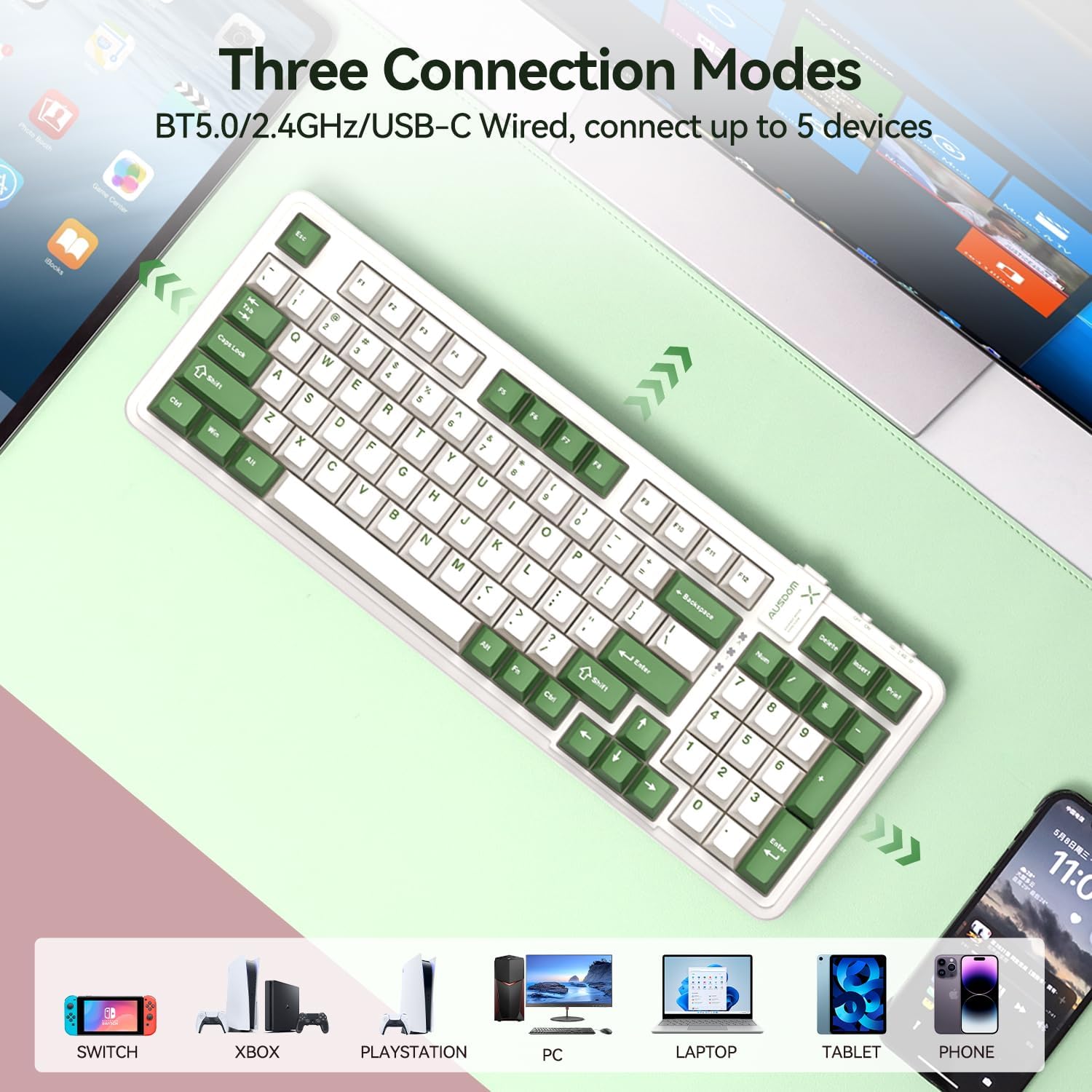
Visual representation of the three connection modes: Bluetooth 5.0, 2.4G wireless, and USB-C wired, showing compatibility with various devices like Switch, Xbox, PlayStation, PC, Laptop, Tablet, and Phone.
4.2.1 Bežična veza od 2.4 GHz
- Locate the USB receiver in the keyboard's storage slot.
- Uključite USB prijemnik u dostupan USB priključak na računaru ili uređaju.
- Switch the keyboard's mode selector to "2.4G" (usually located on the top edge of the keyboard).
- Tastatura bi se trebala automatski povezati. Ako ne, pritisnite FN + 4 da započnete uparivanje.
4.2.2 Bluetooth veza
Tastatura podržava do tri Bluetooth uređaja (BT1, BT2, BT3).
- Switch the keyboard's mode selector to "BT".
- Pritisnite i držite FN + 1 (za BT1), FN + 2 (za BT2), ili FN + 3 (za BT3) 3-5 sekundi dok indikatorska lampica ne počne brzo treptati, što označava način uparivanja.
- On your device (computer, tablet, phone), enable Bluetooth and search for "AUSDOM 98Pro".
- Odaberite tastaturu za uparivanje. Indikatorska lampica će prestati treptati nakon povezivanja.
- Za prebacivanje između uparenih Bluetooth uređaja, jednostavno pritisnite FN + 1, FN + 2, ili FN + 3.
4.2.3 Žičana USB-C veza
- Spojite priloženi Type-C kabel na USB-C priključak tastature.
- Povežite drugi kraj kabla na USB port na računaru.
- Switch the keyboard's mode selector to "Wired" or ensure it's in a wired mode if no specific switch is present (often automatically detected when cable is plugged in).
5. Uputstvo za upotrebu
5.1 Kontrola pozadinskog osvetljenja
The keyboard features a single white backlight with multiple effects.
- Promjena nivoa pozadinskog osvjetljenja: Pritisnite FN + ← or FN + → za podešavanje svjetline pozadinskog osvjetljenja (4 nivoa).
- Promjena efekata pozadinskog osvjetljenja: Pritisnite FN + ↑ or FN + ↓ to cycle through 16 different lighting effects.

Illustrates how to change backlight levels using FN + left/right arrow keys and backlight effects using FN + up/down arrow keys.
5.2 Prekidači koji se mogu mijenjati tokom rada
The AUSDOM 98Pro allows you to easily change mechanical switches without soldering.
- Use the provided switch puller to gently remove the desired keycap.
- Use the switch puller to carefully grip and pull out the switch from its socket.
- Align the pins of the new 3-pin or 5-pin switch with the holes in the PCB socket.
- Lagano pritisnite novi prekidač na mjesto dok ne klikne sigurno.
- Zamijenite poklopac tipke.
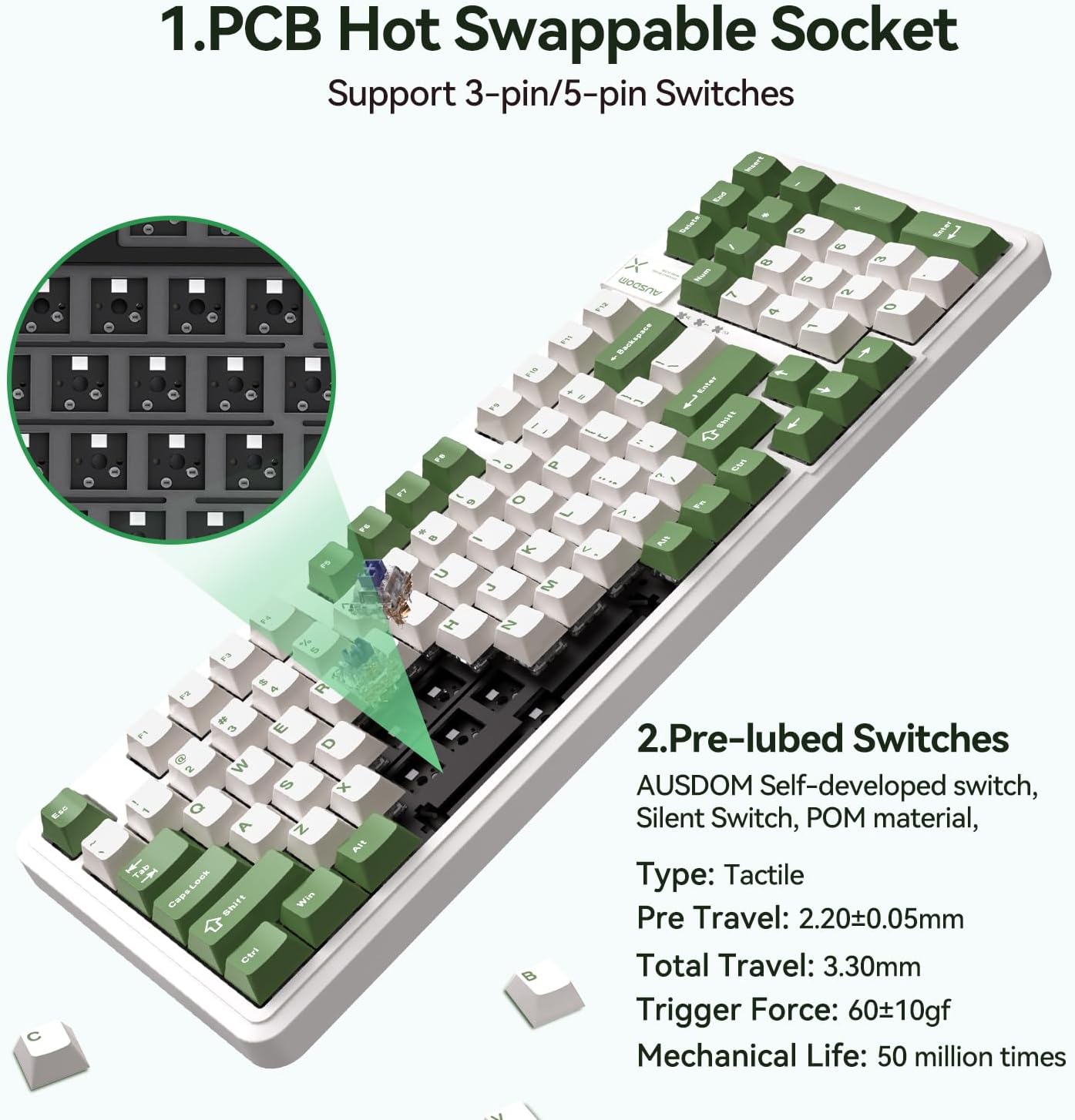
Detaljno view of the PCB hot-swappable socket supporting 3-pin/5-pin switches and the pre-lubed tactile switches with their specifications.
5.3 Prebacivanje rasporeda na Mac/Windows
To switch between Mac and Windows keyboard layouts, press FN + A for Windows layout or FN + S for Mac layout.
5.4 Custom Software (Windows Only)
For advanced customization of lighting effects and macro programming, download the official AUSDOM software. This software is compatible only with Windows operating systems and functions in wired and 2.4G modes.
- Customized light effects.
- All key support macro programmable.
- Customize the shortcut keys.
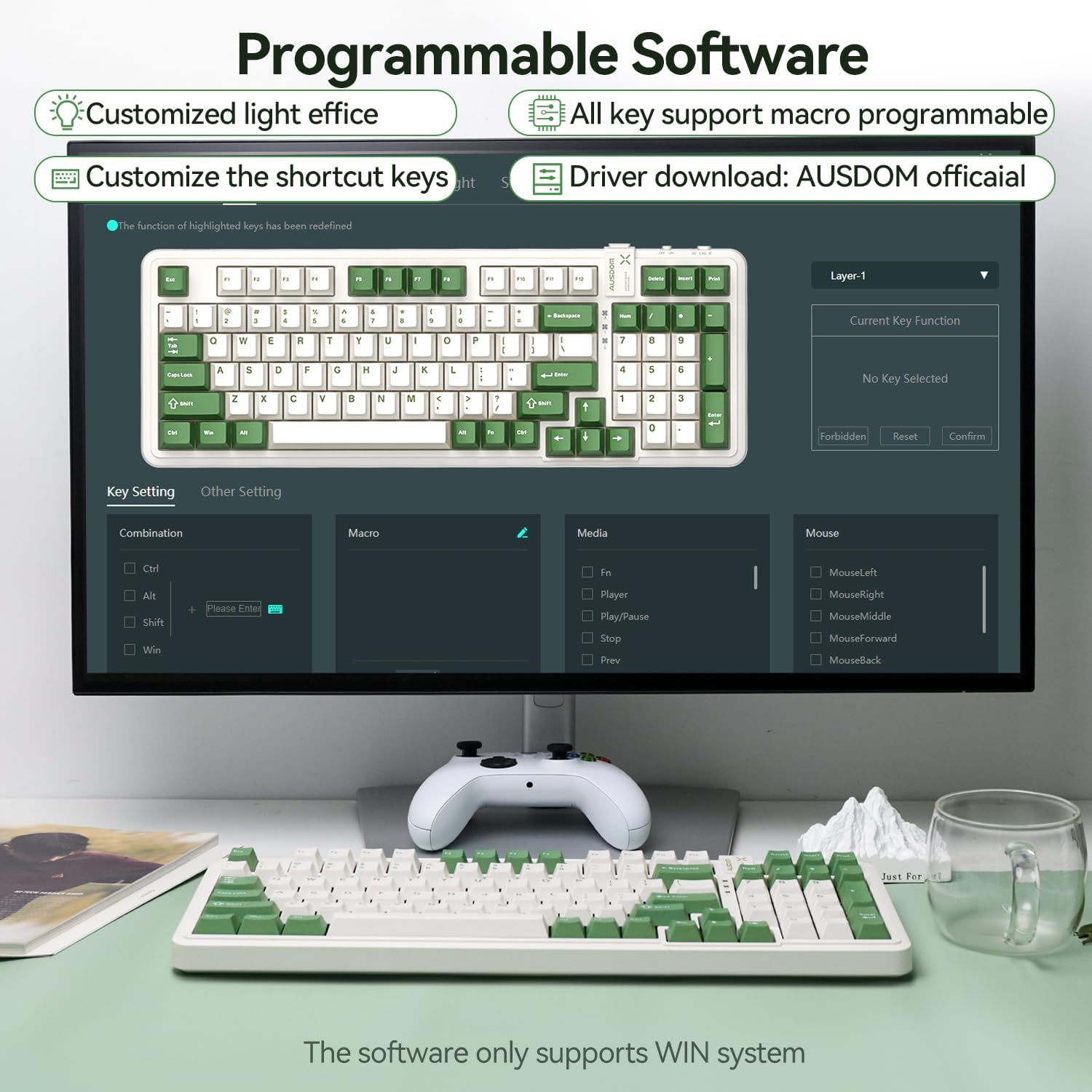
Screenshot of the programmable software interface, showing options for customized light effects, macro programming, and shortcut key customization. Note: Software supports Windows only.
6. Održavanje
- čišćenje: Koristite meku, suhu krpu za brisanje površine tastature. Za dublje čišćenje koristite bocu komprimiranog zraka za uklanjanje prašine i ostataka između tipki. Izbjegavajte upotrebu jakih hemikalija ili abrazivnih materijala.
- Skladištenje: Tastaturu čuvajte na hladnom i suhom mjestu, dalje od direktne sunčeve svjetlosti i ekstremnih temperatura.
- Održavanje baterije: To prolong battery life, avoid fully discharging the keyboard frequently. Charge it regularly, especially if not used for extended periods.
- Keycap and Switch Removal: Prilikom uklanjanja tipki ili prekidača, činite to pažljivo kako biste izbjegli oštećenje komponenti.
7. Otkrivanje problema
| Problem | Mogući uzrok | Rješenje |
|---|---|---|
| Tastatura ne reaguje (bežično) | Low battery; Incorrect connection mode; USB receiver not properly connected; Bluetooth not paired. | Charge the keyboard; Ensure the mode switch is set to 2.4G or BT; Re-insert the USB receiver; Re-pair Bluetooth (FN+1/2/3). |
| Tipke se ne registruju ili se tipkaju dvaput | Dust/debris under keycap/switch; Faulty switch. | Remove keycap and clean with compressed air; Replace the switch using the hot-swappable feature. |
| Pozadinsko osvjetljenje ne radi ili je prigušeno | Pozadinsko osvjetljenje isključeno; Osvjetljenje postavljeno prenisko; Baterija je prazna. | Press FN + ←/→ to adjust brightness; Charge the keyboard. |
| Softver ne prepoznaje tastaturu | Keyboard not in wired or 2.4G mode; Software compatibility issue. | Ensure keyboard is connected via wired USB-C or 2.4G wireless; Confirm your operating system is Windows. |
| Difficulty switching Mac/Win layout | Neispravna kombinacija tipki. | Pritisnite FN + A for Windows layout or FN + S for Mac layout. |
8. Specifikacije
| Feature | Detalj |
|---|---|
| Dimenzije proizvoda | 15.51 x 5.59 x 1.46 inča |
| Težina artikla | 2.9 funte |
| Proizvođač | AUSDOM |
| Broj modela stavke | AUSDOM 98Pro-Green&White-Silent |
| Baterije | Potrebna je 1 litijum-polimerska baterija (uključena) |
| Tehnologija povezivanja | 2.4G, Bluetooth, USB-C |
| Opis tastature | Mehanički |
| Preporučena upotreba | Business, Gaming, Office Everyday Use, Personal, Student |
| Posebne karakteristike | Backlit, Ergonomic, Hot-Swappable, Silent, Tri-mode Connect |
| Boja | Green & White-Silent |
| Broj ključeva | 97 |
| Pozadinsko osvetljenje tastature | Jedna boja (bijela) |
| Stil | Moderna |
9. Garancija i podrška
Za informacije o garanciji i tehničkoj podršci, molimo vas da se obratite službenom AUSDOM-u. webweb-mjesto ili direktno kontaktirajte njihovu korisničku službu. Sačuvajte račun kao dokaz o kupovini za bilo kakve reklamacije u vezi s garancijom.
Za dalju pomoć posjetite: AUSDOM Official Store on Amazon


