Uvod
This manual provides essential information for the setup, operation, maintenance, and troubleshooting of your Arcade1Up PAC-Man Deluxe Arcade Bundle. Please read this manual thoroughly before assembly and use to ensure proper function and safety.
Product Overview
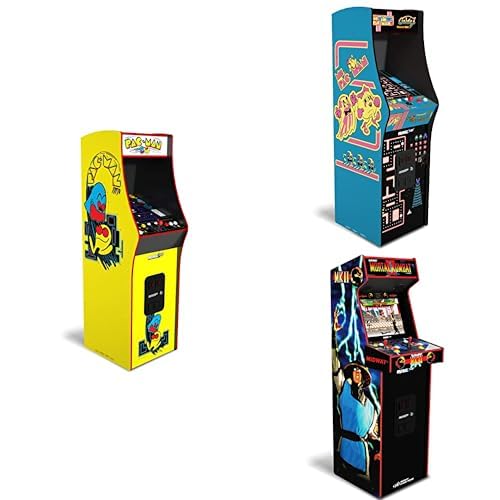
This image displays various Arcade1Up arcade cabinets, including the iconic yellow PAC-Man cabinet, a blue Ms. Pac-Man cabinet, and a dark Mortal Kombat II cabinet. Each cabinet features distinct artwork and controls, representing the classic arcade experience.
The Arcade1Up PAC-Man Deluxe Arcade Bundle brings the classic arcade experience into your home. This unit features the original PAC-Man game, along with other included titles, providing hours of entertainment. The cabinet is designed to replicate the look and feel of traditional arcade machines, complete with authentic controls and vibrant graphics.
Setup
Raspakivanje i pregled
Pažljivo izvadite sve komponente iz ambalaže. Pregledajte sve dijelove da li ima oštećenja. Ako su neki dijelovi oštećeni ili nedostaju, nemojte nastaviti sa sastavljanjem i kontaktirajte korisničku podršku.
Uputstva za sastavljanje
Assembly typically involves attaching the side panels, control deck, monitor, and marquee. Follow the step-by-step instructions provided in the separate assembly guide included with your product. Ensure all screws are tightened securely but do not overtighten.
- Identify all components using the parts list.
- Assemble the main cabinet structure.
- Install the monitor and connect its cables.
- Attach the control panel and connect its wiring harness.
- Secure the marquee and back panel.
- Povežite adapter za napajanje.
Plasman
Place the arcade cabinet on a flat, stable surface. Ensure there is adequate ventilation around the unit. Avoid placing the unit in direct sunlight or near heat sources. Keep away from moisture and extreme temperatures.
Uputstvo za upotrebu
Uključivanje/isključivanje
To power on the unit, connect the power adapter to a wall outlet and then to the arcade cabinet's power input. Locate the power switch, typically on the back or side of the unit, and flip it to the "ON" position. To power off, flip the switch to "OFF" and disconnect the power adapter from the wall outlet.
Odabir igre
Upon powering on, the unit will display a game selection menu. Use the joystick and buttons on the control panel to navigate through the available games. Press the "START" or "ENTER" button to select a game.
Igranje
Refer to the specific game's instructions for detailed gameplay mechanics. Generally, use the joystick for movement and the action buttons for in-game actions such as shooting, jumping, or interacting. The "PLAYER 1 START" and "PLAYER 2 START" buttons initiate a game for one or two players, respectively. The "COIN" button simulates inserting a coin to add credits.
Kontrola jačine zvuka
The volume control is usually located on the control panel or the back of the unit. Adjust the slider or knob to increase or decrease the audio level.
Održavanje
Čišćenje
Regularly clean the exterior of the cabinet with a soft, dry cloth. For stubborn marks, a slightly damp cloth with mild soap can be used, followed by drying. Do not use abrasive cleaners, solvents, or excessive moisture, as these can damage the finish and electronic components. Clean the screen with a screen-specific cleaner and a microfiber cloth.
Skladištenje
If storing the unit for an extended period, disconnect it from power and cover it to protect from dust. Store in a cool, dry place away from direct sunlight and extreme temperatures.
Component Care
Avoid excessive force on joysticks and buttons. While designed for durability, rough handling can lead to premature wear. Do not attempt to open the cabinet or modify internal components, as this will void the warranty and may cause damage or injury.
Rješavanje problema
| Problem | Mogući uzrok | Rješenje |
|---|---|---|
| Jedinica se ne uključuje. | Kabl za napajanje nije priključen; prekidač za napajanje isključen; neispravna utičnica. | Ensure power cable is securely connected to unit and outlet. Check power switch is "ON". Test outlet with another device. |
| No video display. | Monitor cable loose; monitor not powered. | Check monitor cable connections inside the cabinet. Ensure monitor is receiving power. |
| Nema zvuka. | Volume too low; speaker cable loose. | Increase volume using the control. Check speaker cable connections. |
| Kontrole ne reagiraju. | Control panel cable loose; joystick/button malfunction. | Verify control panel wiring harness is securely connected. If problem persists, contact support. |
| Igra se zamrzava ili ruši. | Softverski kvar; pregrijavanje. | Power cycle the unit (turn off, wait 10 seconds, turn on). Ensure adequate ventilation. |
If you encounter issues not listed here or if the suggested solutions do not resolve the problem, please contact Arcade1Up customer support.
Specifikacije
- Naziv proizvoda: Arcade1Up PAC-Man Deluxe Arcade Bundle
- Model: PAC-Man Deluxe Arcade
- Dimenzije (cca): Varies by specific model, refer to product packaging for exact measurements.
- Težina (približno): Varies by specific model.
- Ulazna snaga: AC 100-240V, 50/60Hz (Specific adapter output detailed on power supply).
- Prikaz: LCD Screen (Size varies by model).
- Games Included: PAC-Man and other bundled titles.
- ASIN: B0CY31NWJ2
- Datum prve dostupnosti: 14. marta 2024
Garancija i podrška
Arcade1Up products typically come with a limited manufacturer's warranty. Please refer to the warranty card included with your product for specific terms, conditions, and duration. Keep your proof of purchase for warranty claims.
Korisnička podrška
For technical assistance, missing parts, or warranty inquiries, please contact Arcade1Up customer support. Visit the official Arcade1Up webstranica za najnovije kontakt informacije, često postavljana pitanja i resurse za podršku.
Webstranica: www.arcade1up.com/support (Npramplink, provjerite službenu stranicu)


