Uvod
This manual provides essential information for the setup, operation, and maintenance of your Arducam USB 3.0 Camera Module B0497C. This high-speed 4K camera features an 8.3MP IMX678 sensor, designed for superior low-light performance and wide-angle capture on Windows and Linux systems.
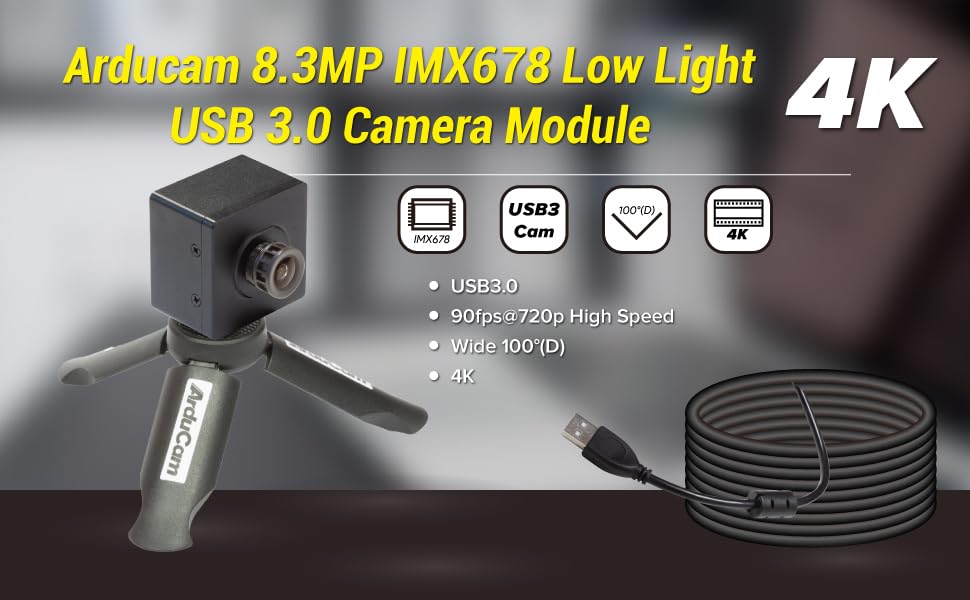
Image: Arducam 8.3MP IMX678 Low Light USB 3.0 Camera Module B0497C highlighting its 4K resolution, USB 3.0 connectivity, 90fps@720p high speed, and 100°(D) wide-angle lens.
Šta je u kutiji
Provjerite da li su sve komponente prisutne nakon raspakivanja:
- 1 x IMX678 USB3.0 Camera Module with Back Cover and Tripod Adapter
- 1 x 1m USB A na Type-C kabel

Image: Contents of the Arducam USB 3.0 Camera Module package, showing the camera module and the USB Type-C cable.
Uputstva za postavljanje
- Povežite USB kabl: Insert the USB Type-C end of the provided 1m cable into the camera module's Type-C port.
- Povežite se na računar: Plug the USB-A end of the cable into an available USB 3.0 port on your Windows or Linux computer. For optimal performance, use a USB 3.0 port.
- Instalacija drajvera (Plug and Play): The camera is designed for plug-and-play operation. No additional drivers are typically required for Windows and Linux operating systems. The system should automatically detect and install the necessary components.
- Montaža (opciono): The camera module includes a tripod adapter. You can attach it to a standard tripod or mounting bracket for stable positioning.

Image: Detail of the USB Type-C port on the Arducam camera module, indicating USB 3.0 connectivity.

Image: The Arducam camera module attached to a tripod, demonstrating a typical setup configuration. Note: Tripod is not included.
Uputstvo za upotrebu
Softverska kompatibilnost
The Arducam B0497C is compatible with standard webcam software on both Windows and Linux operating systems. It functions as a UVC (USB Video Class) device.
- Windows: Use built-in camera applications, OBS Studio, VLC Media Player, or other third-party software that supports UVC cameras.
- Linux: Utilize applications like Cheese, OBS Studio, VLC Media Player, or custom applications that interface with V4L2 (Video for Linux Two) devices.

Image: Visual representation of the camera module's compatibility with Windows and Linux operating systems.
Basic Operation
- Pokreni softver: Open your preferred camera application on your computer.
- Select Camera: If you have multiple cameras, select "Arducam USB Camera" or a similar identifier from the device list within your software.
- Prilagodite postavke: Most applications allow you to adjust resolution, frame rate, brightness, contrast, and other image parameters. The camera supports resolutions up to 3840x2160 (4K) and frame rates up to 90fps at 720p.
- Performanse pri slabom svjetlu: The IMX678 sensor provides enhanced low-light capabilities. For optimal results in dim environments, ensure your software settings are configured to utilize these features.

Image: A visual comparison demonstrating the superior low-light performance of the Arducam 4K IMX678 camera compared to a standard camera.

Slika: pramples illustrating the camera's effective performance in low-light conditions, such as indoor and outdoor night scenes.
Održavanje
- Čišćenje sočiva: Use a soft, lint-free cloth specifically designed for optical lenses to gently wipe the camera lens. Avoid abrasive materials or harsh chemicals.
- Cleaning the Module: For the camera body, use a dry, soft cloth to remove dust. Do not use liquid cleaners directly on the module.
- Skladištenje: When not in use, store the camera module in a clean, dry environment, away from extreme temperatures and direct sunlight.
- Rukovanje: Handle the camera module by its edges to avoid touching the lens or the circuit board components.
Rješavanje problema
- Camera not detected by computer:
- Provjerite je li USB kabel sigurno povezan i s kamerom i s računarom.
- Pokušajte s drugim USB priključkom na računaru, po mogućnosti USB 3.0 priključkom.
- Testirajte s drugim USB kablom ako je dostupan.
- Ponovo pokrenite računar.
- Check your operating system's device manager (Windows) or
lsusbcommand (Linux) to see if the device is listed.
- Poor image quality or excessive noise:
- Ensure adequate lighting in the environment. While the camera has low-light capabilities, extreme darkness will still affect image quality.
- Adjust camera settings within your software (e.g., exposure, gain, white balance).
- Provjerite je li objektiv čist i bez mrlja ili prašine.
- Check for available firmware updates from Arducam's official website, as updates can improve image processing.
- Low frame rate:
- Ensure the camera is connected to a USB 3.0 port. USB 2.0 ports will limit bandwidth and frame rate.
- Reduce the resolution or disable certain image enhancements in your software to decrease bandwidth requirements.
- Close other applications that might be consuming significant system resources.
Specifikacije
| Feature | Detalj |
|---|---|
| Naziv modela | B0497C |
| Senzor | IMX678 CMOS |
| Rezolucija | 8.3MP (3840x2160) |
| Frame Rate | 90fps@720p |
| Lens Type | M12 Lens, F1.65 Aperture |
| Polje of View (FoV) | 100 ° (D) |
| Povezivanje | USB 3.0 (Type-C konektor na kameri) |
| Posebne karakteristike | Low Light Performance, Onboard ISP (de-Bayer, gamma, BLC, AE, AWB, CCM, RGB2YUV) |
| Operativni sistemi | Windows, Linux (Plug and Play) |
| Težina artikla | 3.53 unce |
| Dimenzije paketa | 1.34 x 1.34 x 1.34 inča |
Garancija i podrška
Za informacije o garanciji i tehničkoj podršci, molimo vas da se obratite službenom Arducam servisu. webweb-mjesto ili direktno kontaktirajte njihovu korisničku službu. Sačuvajte račun za kupovinu u slučaju reklamacije.
Arducam Official Webstranica: www.arducam.com


