1. Uvod
This manual provides essential information for the safe and efficient operation of your Genmitsu 4040 Reno CNC Router Milling Machine and its accompanying Offline Control Module. The Genmitsu 4040 Reno is designed for precision woodworking and various crafting projects, offering a robust and user-friendly experience for both beginners and experienced DIY enthusiasts.
The machine features a modular setup, a durable aluminum construction, and a generous working area of 400 x 400 x 76mm. Its smart belt design ensures smooth and quiet operation with high accuracy, while the sturdy axis structure provides stability for precise cuts. The included offline control module allows for computer-free operation, simplifying your workflow.

Image 1.1: The Genmitsu 4040 Reno CNC Router Milling Machine with its Offline Control Module.
2. Sigurnosne informacije
Always prioritize safety when operating the CNC router. Failure to follow safety guidelines can result in injury or damage to the equipment.
- Pročitajte priručnik: Thoroughly read and understand this entire manual before operating the machine.
- Lična zaštitna oprema (PPE): Always wear safety glasses or goggles to protect your eyes from flying debris. Consider hearing protection and dust masks, especially during prolonged operation.
- Radna oblast: Ensure your work area is clean, well-lit, and free from obstructions. Keep children and unauthorized personnel away from the machine during operation.
- Osigurajte radni komad: Uvijek sigurno clamp your workpiece to the spoil board to prevent movement during milling.
- Hitno zaustavljanje: Upoznajte se s lokacijom i radom dugmeta za hitno zaustavljanje.
- Isključivanje struje: Disconnect power to the machine before performing any maintenance, adjustments, or when changing tools.
- Alati: Use only sharp, appropriate, and undamaged cutting tools for your material.
- ventilacija: Ensure adequate ventilation to remove dust and fumes generated during operation.
3. Proizvod je gotovview
3.1 Ključne karakteristike
- Modular Setup & Robust Construction: Easy assembly with a tough, all-aluminum build.
- Generous Working Area: 400 x 400 x 76mm workspace suitable for various projects.
- Smart Belt Design: Ensures smooth, quiet, and precise operation with an accuracy of ±0.1mm on the XY axis.
- Sturdy Axis Structure: Double Y-axis and solid XZ frame provide enhanced stability and minimize movement for consistent results.
- 4-Axis Mode Compatibility: Supports optional 4th axis rotary kit for expanded creative control.
- Offline Control Module: Enables computer-free operation with spindle control, Z-axis tool setting, emergency stop, and an operating knob.
3.2 Komponente
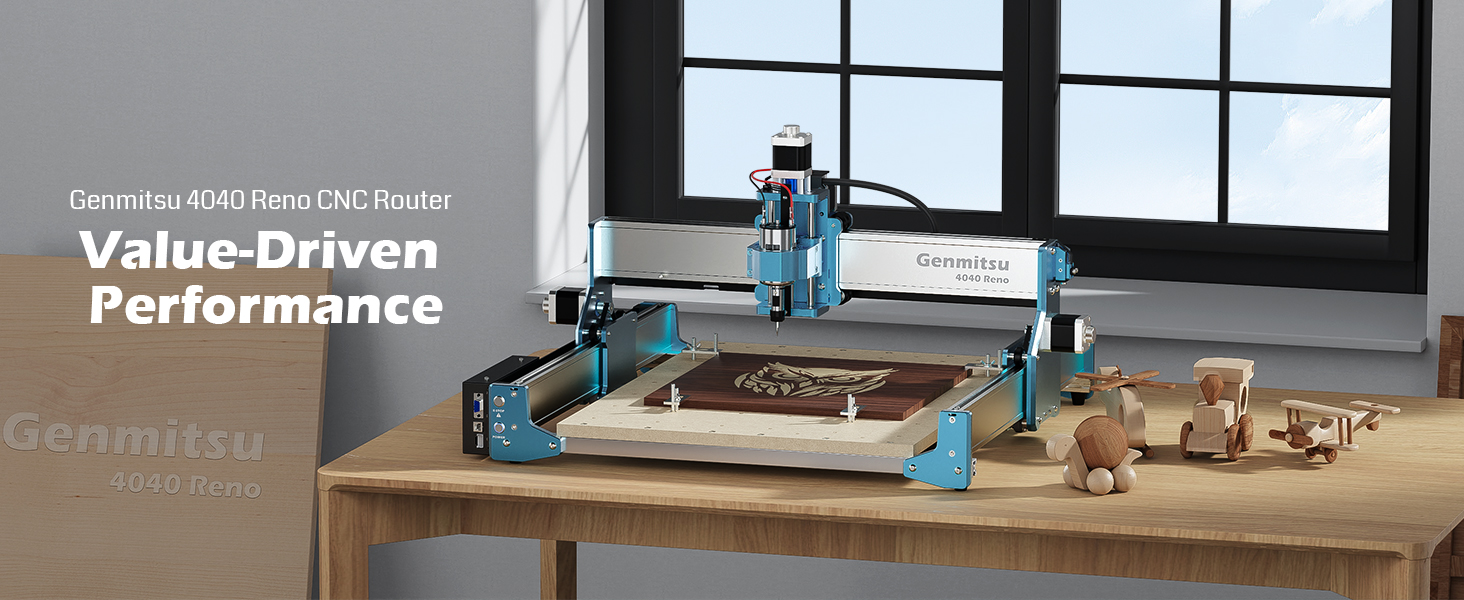
Image 3.1: The Genmitsu 4040 Reno CNC Router, highlighting its performance and design.

Image 3.2: Modular assembly and all-aluminum construction of the Genmitsu 4040 Reno.

Image 3.3: Illustration of the large 400 x 400 x 76mm working area.

Image 3.4: Detail of the new patented belt design for easy adjustment and smooth operation.

Image 3.5: The Genmitsu 4040 Reno is compatible with an optional 4th axis module for advanced projects.
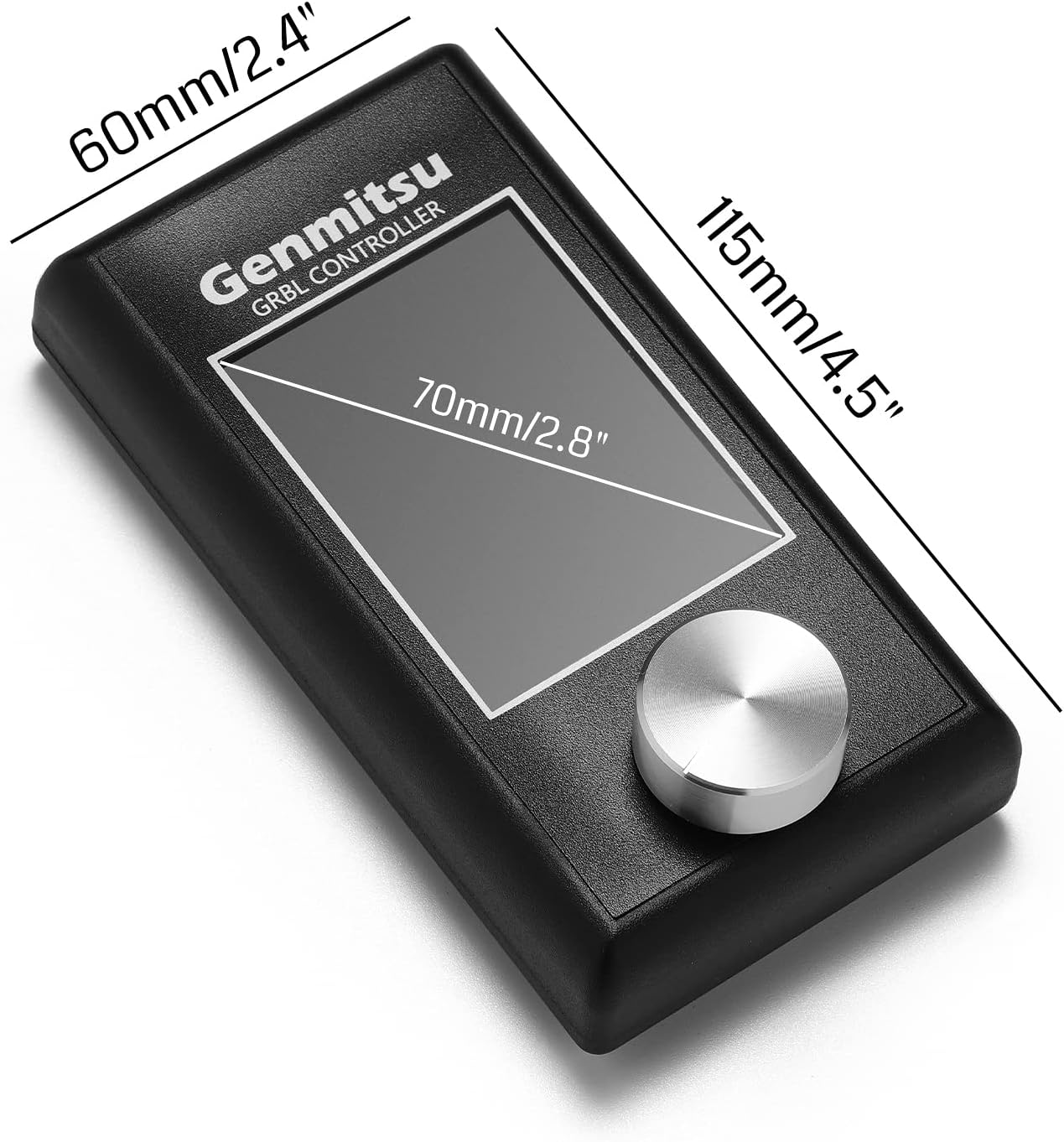
Image 3.6: Dimensions of the Genmitsu GRBL Offline Controller.

Slika 3.7: Pozadi view of the Offline Controller showing the SD card slot and controller plug-in port.
4. Podešavanje
4.1 Montaža
The Genmitsu 4040 Reno features a modular design for straightforward assembly. Follow the detailed assembly instructions provided in the separate assembly guide or video tutorial. Ensure all components are securely fastened and connections are correctly made before proceeding.
- Raspakujte sve komponente i provjerite ih u odnosu na listu za pakovanje.
- Assemble the frame components, ensuring all bolts are tightened.
- Install the gantry and spindle assembly.
- Connect all motor and limit switch cables.
- Mount the spoil board.
4.2 Initial Power-Up and Calibration
After assembly, connect the power supply. Perform initial calibration steps as outlined in the quick start guide to ensure proper axis movement and homing. This typically involves:
- Connecting the offline control module.
- Initiating the homing sequence for X, Y, and Z axes.
- Verifying smooth movement of all axes.
5. Uputstvo za upotrebu
5.1 Using the Offline Control Module
The offline control module allows you to operate the CNC machine without a computer connection. It features a display, an operating knob, and buttons for various functions.

Image 5.1: A user interacting with the Offline Control Module.
- Navigacija: Use the operating knob to scroll through menus and adjust values. Press the knob to select.
- File Učitavanje: Insert an SD card with your G-code files into the module. Navigate to the 'Prepare' or 'File' menu to select and load your desired project.
- Kontrola vretena: Toggle the spindle on/off directly from the module interface.
- Z-Axis Tool Setting: Utilize the Z-axis tool setting function for accurate tool length calibration.
- džogiranje: Manually move the X, Y, and Z axes using the dedicated jogging controls on the module.
- Start/Pause/Stop: Control the execution of your G-code program.
5.2 Preparing a Project
- Dizajn: Create your design using CAD/CAM software.
- Generate G-code: Use your CAM software to generate G-code compatible with GRBL.
- Transfer File: Sačuvajte G-kod file na SD karticu.
- Osigurajte radni komad: Čvrsto clamp your material to the spoil board.
- Alat za instaliranje: Insert the appropriate cutting tool into the spindle collet and tighten securely.
- Set Origin: Use the offline controller to set the X, Y, and Z origin points for your project.
5.3 Pokretanje posla
Once your project is prepared and the origin is set:
- Select the G-code file from the offline controller.
- Initiate the job. Monitor the machine closely during operation.
- Be ready to press the emergency stop button if any issues arise.
5.4 4-Axis Operation (Optional)
If you have the optional 4th axis rotary kit, refer to its specific manual for installation and operation instructions. The offline control module supports switching to 4-axis mode for enhanced control over rotational carving projects.
6. Održavanje
Regular maintenance ensures the longevity and optimal performance of your Genmitsu 4040 Reno CNC Router.
- čišćenje: After each use, clean the machine thoroughly to remove dust, chips, and debris. Use a vacuum cleaner or compressed air. Avoid using liquids directly on electronic components.
- podmazivanje: Periodically lubricate the lead screws and linear rails with appropriate grease or oil to ensure smooth movement.
- Zategnutost pojasa: Check the tension of the drive belts regularly. Adjust if they are too loose or too tight, referring to the assembly guide for proper tensioning.
- Inspekcija alata: Inspect cutting tools before each use for sharpness and damage. Replace dull or damaged tools immediately.
- Električni priključci: Povremeno provjeravajte sve električne spojeve na čvrstoću i znakove habanja.
7. Otkrivanje problema
Ovaj odjeljak se bavi uobičajenim problemima na koje možete naići. Za složenije probleme obratite se korisničkoj podršci.
| Problem | Mogući uzrok | Rješenje |
|---|---|---|
| Mašina se ne uključuje. | Power cable disconnected, power switch off, faulty power supply. | Check power connections, ensure switch is on, test power outlet. |
| Axes not moving correctly. | Loose motor cables, incorrect homing, belt slippage, limit switch triggered. | Check motor connections, re-home machine, inspect belt tension, check limit switches. |
| Poor cut quality / Inaccurate cuts. | Dull tool, loose workpiece, incorrect feed/speed settings, machine vibration. | Replace tool, re-secure workpiece, adjust CAM settings, check machine for loose components. |
| Offline controller not responding. | Loose connection to main board, faulty SD card, firmware issue. | Ensure secure connection, try a different SD card, consult support for firmware. |
8. Specifikacije
| Feature | Detalj |
|---|---|
| Broj modela | 4040 Reno |
| Materijal | Aluminijum |
| Izvor napajanja | Corded Electric |
| Working Area (XYZ) | 400 x 400 x 76 mm |
| Preciznost XY ose | ±0.1mm |
| Offline Control Module | Uključeno |
| 4th Axis Compatibility | Yes (optional kit required) |
9. Garancija i podrška
For warranty information and technical support, please refer to the documentation included with your product or visit the official Genmitsu websajtu. Više informacija i kontakt podatke možete pronaći i na Genmitsu Store on Amazon.


