Uvod
This manual provides comprehensive instructions for the installation, operation, and maintenance of your Srutueo 24-72V E-Bike LCD-S966 Colorful Display Control Panel. This display is designed to enhance your electric bicycle experience by providing clear data and convenient control. It features an NFC function for enhanced usability.
Please read this manual thoroughly before installation and use to ensure proper function and safety. This display requires a No. 2 protocol controller for proper operation.
Specifikacije
| Feature | Detalj |
|---|---|
| Model | LCD-S966 |
| Voltage Kompatibilnost | 24V-72V |
| Display Type | LCD u boji |
| Povezivanje | NFC Function, SM Plug |
| Materijal | Plastika |
| Dimenzije (približno) | 100mm x 61.5mm |
| Težina (približno) | 108 grama |
| Radna temperatura | -20°C do 60°C |
| Vrsta montaže | Handlebar Mount |
| Human Interface | Dugmad |
| Required Controller | No. 2 Protocol Controller |

Image: Detailed dimensions of the display (100mm x 61.5mm) and a table summarizing core specifications like voltage, operating temperature, and connection type.
Sadržaj paketa
Paket uključuje sljedeće artikle:
- 1 x Srutueo LCD-S966 Electric Bicycle Display
- 1 x SM Plug Cable (integrated or attached)
- 1 x Control Button Panel

Image: The main LCD-S966 display unit, showing the SM plug cable connector and the separate control button panel.
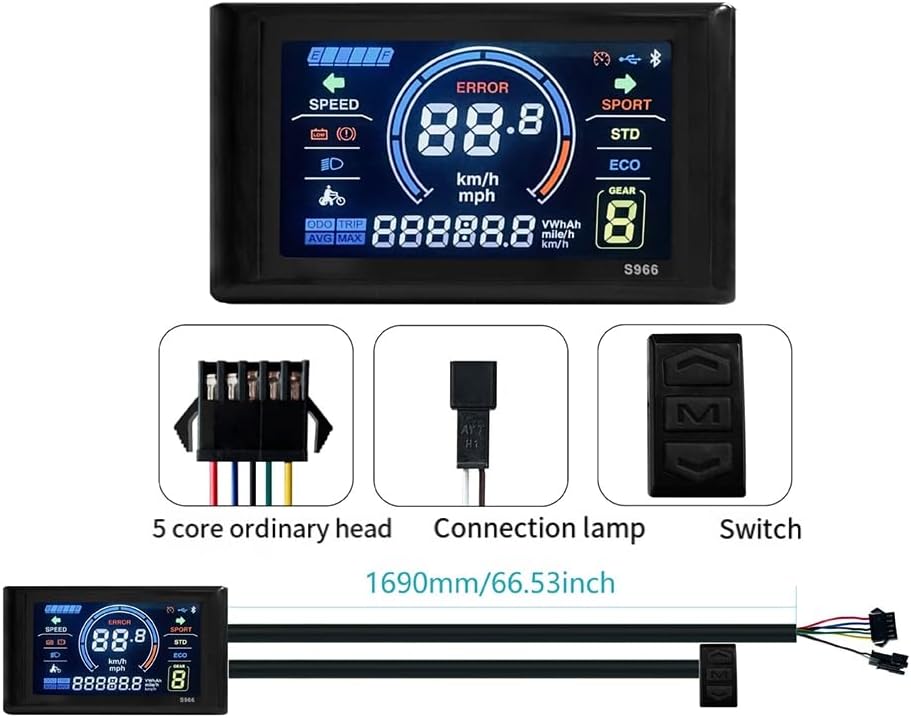
Image: The LCD-S966 display, its SM plug cable, and the control button panel, illustrating the approximate cable length of 1690mm (66.53 inches).
Postavljanje i instalacija
Before installation, ensure your e-bike uses a No. 2 protocol controller. This display is not compatible with other controller protocols.
1. Montiranje ekrana
- Identify a suitable location on your e-bike's handlebar for the display. Ensure it does not obstruct braking or shifting mechanisms.
- Loosen the mounting screws on the display bracket.
- Place the display bracket around the handlebar and tighten the screws securely. Ensure the display is firmly fixed and oriented for optimal viewing.

Image: The LCD-S966 display unit securely mounted on the handlebar of an electric bicycle, showing its position relative to other controls.
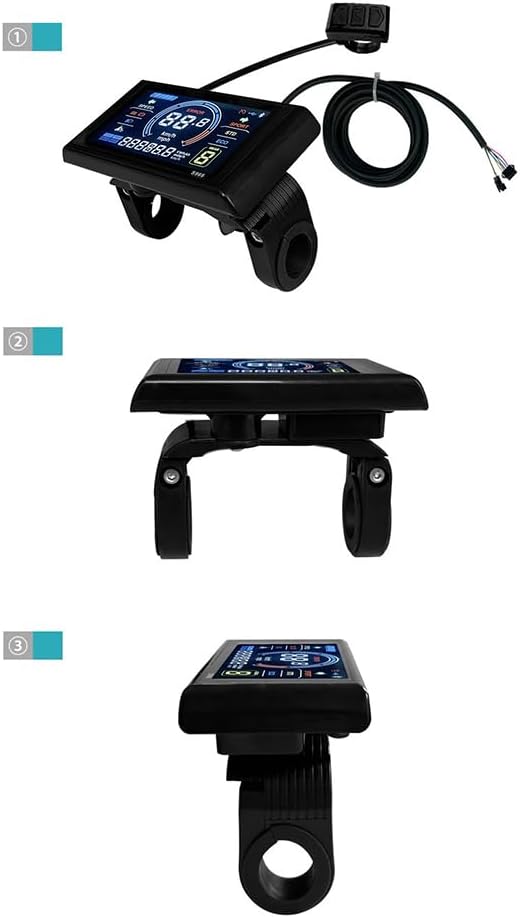
Image: A sequence of three illustrations demonstrating the mounting process: 1) The display unit with its cable, 2) A view of the display from below showing the handlebar clamp, and 3) A side view of the display mounted on the handlebar.
2. Ožičenje
Connect the SM plug cable from the display to the corresponding port on your e-bike's controller. Ensure the connection is secure and the plug is fully inserted.
Connect the separate control button panel to its designated port on the display or controller, as per your e-bike's wiring diagram.
Slika: Detaljna view of the SM plug cable, showing its multi-pin configuration, which connects the display to the e-bike's controller.
Operacija
Uključivanje/isključivanje
To power on the display, press and hold the power button on the control panel. To power off, press and hold the power button again.
Prikaz informacija
The colorful LCD screen provides various real-time data:
- brzina: Trenutna brzina vožnje (km/h ili mph).
- Kilometraža: Odometer (ODO) and Trip distance.
- Nivo baterije: Indikacija preostalog napunjenosti baterije.
- Kodovi grešaka: Displays error messages if issues are detected.
- Assist Level/Gear: Current pedal assist level or gear.
- Izlazna snaga: Real-time power consumption (VWh/h or similar).
- Indikator farova: Shows if headlights are on.
Image: The LCD-S966 display screen, highlighting the various data points such as speed, mileage, battery level, error indicators, and assist level.
NFC funkcija
The display is equipped with an NFC (Near Field Communication) function. This feature can be used for specific functionalities such as locking/unlocking the e-bike or accessing certain settings, depending on your e-bike's controller and system configuration.
To use the NFC function, gently tap your NFC card or compatible device against the designated NFC area on the display. The display will provide visual feedback upon successful interaction.

Image: The LCD-S966 display with an NFC card positioned near its surface, demonstrating the NFC function.

Image: A hand holding an NFC card, demonstrating the proximity required for the NFC function to interact with the LCD-S966 display.
Održavanje
To ensure the longevity and optimal performance of your LCD-S966 display, follow these maintenance guidelines:
- čišćenje: Obrišite ekran i kućište mekom,amp krpu. Izbjegavajte upotrebu abrazivnih sredstava za čišćenje, rastvarača ili jakih hemikalija, jer mogu oštetiti ekran iliasing.
- zaštita: While the display is designed to be durable, avoid exposing it to extreme temperatures, direct sunlight for prolonged periods, or heavy impacts.
- Veze: Povremeno provjeravajte sve kablovske spojeve kako biste se uvjerili da su sigurni i da nemaju korozije ili oštećenja.
- Izloženost vodi: The display has a waterproof joint, but avoid submerging it in water or exposing it to high-pressure water jets.
Rješavanje problema
If you encounter issues with your LCD-S966 display, refer to the following common problems and solutions:
| Problem | Mogući uzrok | Rješenje |
|---|---|---|
| Displej se ne uključuje. | No power from battery; loose connection; incompatible controller. | Check e-bike battery charge. Ensure all cables are securely connected. Verify your controller is a No. 2 protocol type. |
| Display shows "ERROR" or incorrect data. | Sensor malfunction; communication error with controller; incompatible controller. | Check sensor connections. Restart the e-bike system. Confirm controller compatibility. |
| NFC function not responding. | Incorrect NFC card placement; NFC feature not enabled/configured on controller. | Ensure the NFC card is placed directly over the NFC area. Consult your e-bike's controller manual for NFC configuration. |
If the problem persists after attempting these solutions, please contact Srutueo customer support or a qualified e-bike technician.
Garancija i podrška
Specific warranty information for the Srutueo LCD-S966 Colorful Display Control Panel is not provided within this manual. Please refer to the product packaging, your purchase receipt, or the official Srutueo webstranicu za detaljne uslove i odredbe garancije.
For technical support, troubleshooting assistance beyond what is covered in this manual, or warranty claims, please contact Srutueo customer service through the contact information provided at the point of purchase or on the manufacturer's official channels.


