Uvod
This manual provides comprehensive instructions for the ASWEE P4 Smart Watch, a versatile fitness tracker with call capabilities, a 1.85" TFT display, and various health monitoring features. Please read this manual thoroughly before using your device.
Šta je u kutiji
- ASWEE P4 Smart Watch
- Kabel za punjenje
- Uputstvo za upotrebu
Product Overview
The ASWEE P4 Smart Watch features a rectangular 1.85-inch TFT-LCD display with a 240x280 resolution. It includes a physical button on the side for navigation and interaction. The watch is designed for comfortable wear and easy access to its functions.
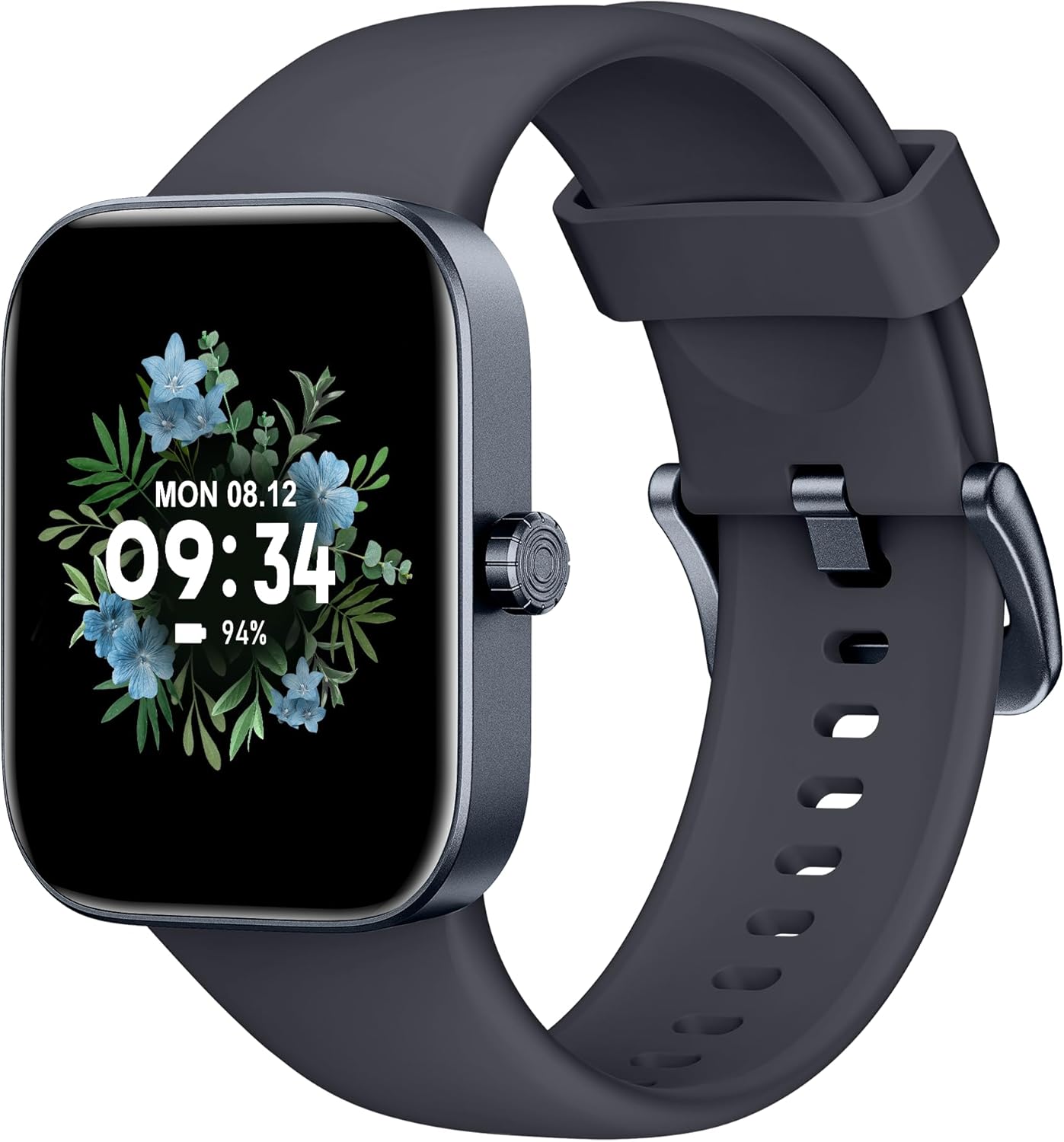
Front view of the ASWEE P4 Smart Watch, displaying time and date with a floral background.
Setup
Punjenje uređaja
The ASWEE P4 Smart Watch comes with a magnetic charging cable. Align the magnetic end of the cable with the charging contacts on the back of the watch. The watch will indicate when it is charging. A full charge typically takes approximately 2 hours and provides up to 7 days of active use or 15 days on standby.

Illustration showing the magnetic charging cable connected to the back of the ASWEE P4 Smart Watch, highlighting battery life indicators.
Instalacija aplikacije i uparivanje
To utilize all features of your ASWEE P4 Smart Watch, you need to download and install the "FitPro" application on your smartphone. Scan the QR code provided in the watch's packaging or search for "FitPro" in your device's app store.
Uparivanje sa iPhone-om
Follow these steps to pair your watch with an iPhone:
- Provjerite je li Bluetooth omogućen na vašem iPhoneu.
- Open the "FitPro" app.
- Navigate to "Setting" and then "Bind device".
- Select your watch (e.g., KM13Pro) from the scan results.
- Confirm the pairing request by clicking "Pair" and then "Allow" for notifications.
- Go to your iPhone's Bluetooth settings and connect to "KM13Pro Audio" for call functionality.
Video tutorial demonstrating how to bind the ASWEE P4 Smart Watch to an iPhone and how to unbind it.
Pairing with Android Phone
Follow these steps to pair your watch with an Android phone:
- Ensure Bluetooth is enabled on your Android phone.
- Open the "FitPro" app.
- Navigate to "Set" and then "Bind device".
- Select your watch (e.g., KM13Pro) from the scan results.
- Confirm the pairing request by clicking "Pair".
Video tutorial demonstrating how to bind the ASWEE P4 Smart Watch to an Android phone and how to unbind it.
Uputstvo za upotrebu
Osnovna navigacija
The watch features a touch-sensitive screen for navigation. Swipe left/right or up/down to access different functions and menus. The side button typically serves as a home or back button.
Call and Text Functionality
With its built-in speaker and microphone, the ASWEE P4 allows you to answer/dial calls directly from your wrist when connected via Bluetooth. You can also receive SMS text and SNS messages (Facebook, Twitter, WhatsApp, etc.) with vibration alerts.

Image showing the ASWEE P4 Smart Watch on a wrist, with notification icons for various messaging apps, indicating Bluetooth 5.0 connectivity for calls and texts.
Praćenje zdravlja
The watch provides comprehensive health monitoring:
- Otkucaji srca: 24-hour tracking with a high-precision PPG sensor. Stores 7 days of resting heart rate data.
- kiseonik u krvi: Measures SpO2 levels using a reflective-light based sensor.
- Praćenje spavanja: Tracks sleep quality through Awake, Light, and Deep sleep stages, helping to improve sleep duration and quality.
- Praćenje stresa: Provides insights into stress levels.

Image illustrating the ASWEE P4 Smart Watch's 24-hour data tracking capabilities, including heart rate, stress level, and blood oxygen monitoring.

Image depicting the ASWEE P4 Smart Watch's sleep health assistant feature, showing sleep duration and patterns.
Načini vježbanja
The ASWEE P4 supports multiple workout modes, including running, bike riding, basketball, and tennis. It accurately monitors data points like heart rate, time, and calories burned to enhance workout efficiency.

Prikaz slikeasing the ASWEE P4 Smart Watch's various sports modes, including running, bike riding, basketball, and jumping jack, with activity data like steps, distance, and calories.
Prilagodba
Choose from over 100 stylish watch faces or create your own using photos from your phone gallery.
Održavanje
Čišćenje
Redovno čistite sat i remen mekom krpomamp tkanina. Izbjegavajte korištenje jakih kemikalija ili abrazivnih materijala.
Skladištenje
Čuvajte sat na hladnom i suhom mjestu kada ga ne koristite.
Rješavanje problema
Sat se ne uključuje
- Provjerite je li sat potpuno napunjen. Spojite ga na kabel za punjenje i izvor napajanja najmanje 30 minuta.
Problemi uparivanja
- Provjerite je li Bluetooth omogućen na vašem telefonu i je li sat u dometu.
- Ponovo pokrenite i telefon i sat.
- If previously paired, try "forgetting" the device in your phone's Bluetooth settings and re-pairing through the FitPro app.
- Ensure the FitPro app has necessary permissions (Bluetooth, location).
Netačni zdravstveni podaci
- Pazite da sat čvrsto prianja na vašem zapešću, ne previše stegnut ili previše labav.
- Očistite senzor na poleđini sata.
- Faktori okoline i individualna fiziologija mogu uticati na očitanja.
Obavještenja se ne prikazuju
- Check app permissions for FitPro to ensure it can access notifications.
- Verify that notification push settings are enabled within the FitPro app for desired applications.
- Provjerite je li sat povezan s vašim telefonom putem Bluetootha.
Specifikacije
| Feature | Detalj |
|---|---|
| Naziv modela | P4 |
| Brand | ASWEE |
| Veličina ekrana | 1.85 inča |
| Display Technology | TFT-LCD |
| Rezolucija | 240 x 280 PPI |
| Operativni sistem | Wear OS |
| Povezivanje | Bluetooth 5.3 |
| Otpornost na vodu | IP68, 5 ATM |
| Trajanje baterije (tipična upotreba) | Do 7 dana |
| Vrijeme pripravnosti | Do 15 dana |
| Vrijeme punjenja | Pribl. 2 sati |
| Posebne karakteristike | Fitness Tracker, Sleep Monitor, Reminders, Multimedia control, Answer/Dial Call, Heart Rate Monitor, Blood Oxygen Monitor, Stress Monitor |
| Težina artikla | 2.89 unce |
Napomena: Specifikacije su podložne promjenama bez prethodne najave.
Garancija i podrška
For warranty information and technical support, please refer to the official ASWEE webweb-mjesto ili kontaktirajte njihovu korisničku službu. Sačuvajte račun kao dokaz o kupovini.


