1. Proizvod je gotovview
The Movo HMT-2 is a versatile tabletop tripod microphone stand designed to provide stable support for microphones. It is specifically compatible with the Movo WMX-HM and Rode Interview Go handheld wireless mic adapters. Its compact and adjustable design makes it suitable for various recording environments, from home studios to on-location events, catering to the needs of podcasters, vloggers, and content creators.
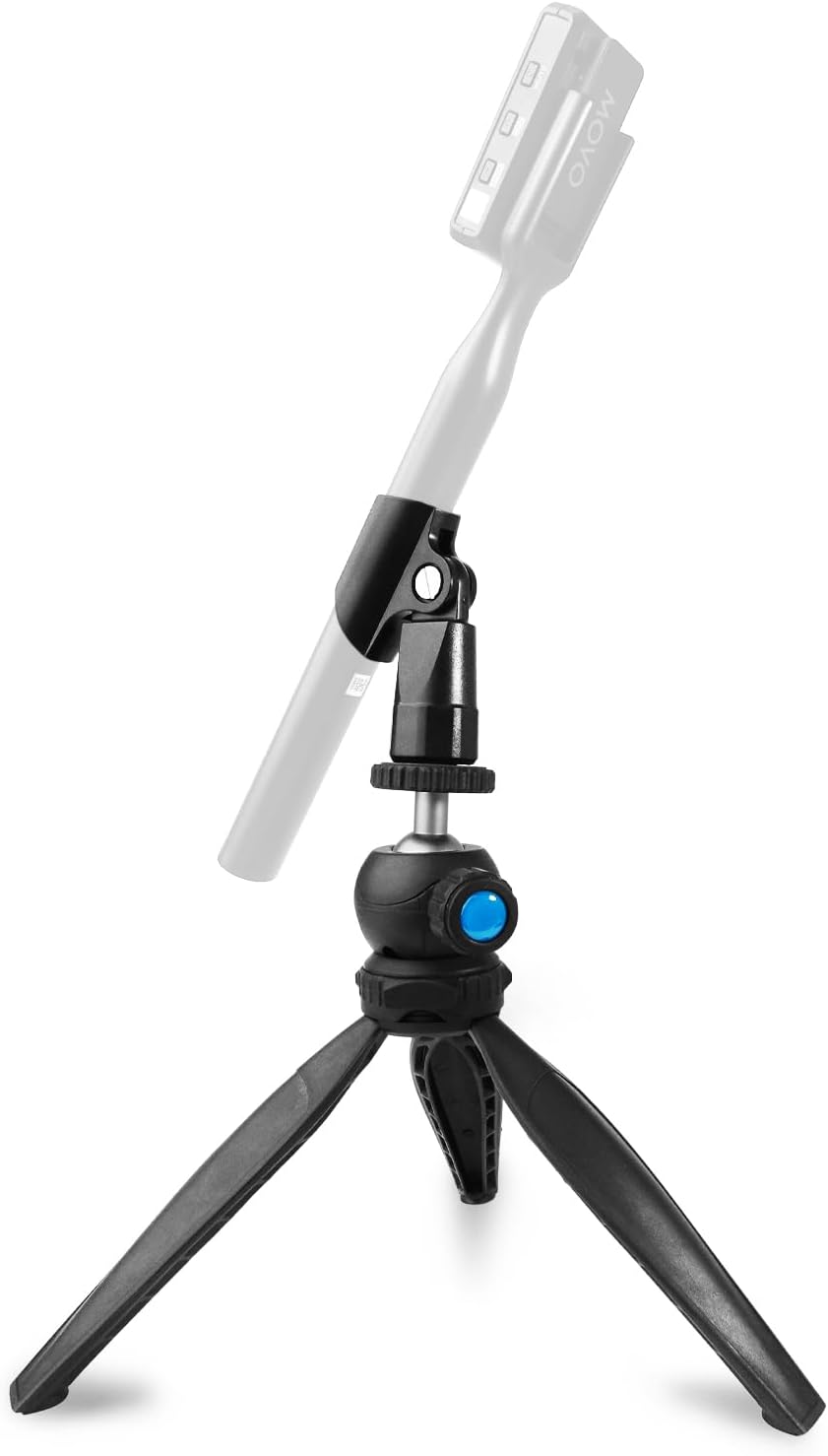
Image Description: A black Movo HMT-2 tabletop tripod microphone stand with a microphone attached, demonstrating its adjustable ball head and stable tripod base.
2. Sadržaj paketa
The Movo HMT-2 package includes the following components:
- Movo HMT-2 Tabletop Tripod Base
- Microphone Holder (compatible with Movo WMX-HM and Rode Interview idi)

Image Description: An illustration showing the Movo HMT-2 tripod stand with a microphone attached, highlighting that the HMT-2 tripod/desk stand is included.
3. Upute za postavljanje
Follow these steps to set up your Movo HMT-2 microphone stand:
- Rasklopite noge tronošca: Gently pull the three legs outwards until they are fully extended and locked into position. The legs can be partially or fully extended for maximum stability on various surfaces.
- Attach the Microphone Holder: The stand features a 1/4-inch screw at the top of the ball head. If a protective rubber cover is present, remove it. Screw the microphone holder onto this 1/4-inch thread. Ensure it is securely tightened to prevent wobbling.
- Mount Your Microphone: Carefully insert your compatible microphone (e.g., Movo WMX-HM, Rode Interview Go) into the attached microphone holder. Verify that the microphone is seated firmly and is stable.

Image Description: A split image demonstrating the collapsible nature of the tripod for portability and the adjustable legs for increased support and stability.
4. Rukovanje postoljem
The Movo HMT-2 features an adjustable ball head for precise microphone positioning:
- Locate the Adjustment Knob: Identify the blue knob located on the side of the ball head mechanism.
- Loosen for Adjustment: Turn the blue knob counter-clockwise to loosen the ball head. This action will allow you to freely adjust the angle and orientation of the microphone.
- Postavite mikrofon: Angle your microphone to the desired position for optimal sound capture. Consider the sound source and environment for best results.
- Osigurajte poziciju: Once the microphone is in the desired position, turn the blue knob clockwise to tighten the ball head. Ensure it is firm to prevent any unwanted movement during recording or use.

Image Description: An image illustrating the adjustable ball head of the Movo HMT-2, showing how the microphone can be angled to capture sound effectively.
5. Održavanje
To ensure the longevity and optimal performance of your Movo HMT-2 stand, follow these maintenance guidelines:
- čišćenje: Keep the stand clean by regularly wiping it with a soft, dry cloth.
- Izbjegavajte oštre hemikalije: Do not use harsh chemicals, solvents, or abrasive cleaners, as these can damage the material and finish of the stand.
- Skladištenje: Store the stand in a dry, cool place away from direct sunlight and extreme temperatures when not in use.
- Provjerite veze: Periodically inspect all screws and connections, especially the microphone holder and ball head knob, to ensure they remain secure.
6. Otkrivanje problema
If you encounter any issues with your Movo HMT-2 stand, refer to the following common troubleshooting tips:
- Microphone is unstable or wobbles:
- Ensure the tripod legs are fully extended and locked into their stable positions.
- Verify that the blue ball head knob is securely tightened after adjusting the microphone angle.
- Confirm that the microphone holder is properly screwed onto the 1/4-inch thread at the top of the ball head. - Difficulty adjusting microphone angle:
- Ensure the blue ball head knob is sufficiently loosened by turning it counter-clockwise. If the knob is excessively loose, it may detach; re-attach and tighten carefully.
- Check for any obstructions preventing smooth movement of the ball head. - Stand slides on the surface:
- Always place the stand on a flat, stable, and non-slippery surface.
- While the tripod feet are designed to provide grip, extreme angles or uneven surfaces may reduce overall stability.
7. Specifikacije
| Feature | Detalj |
|---|---|
| Broj modela | HMT-2 |
| Težina artikla | 7.8 unci (0.22 kilograma) |
| Dimenzije paketa | 8.07 x 3.43 x 1.85 inča |
| Materijal tijela | Akrilonitril Butadien Stiren (ABS) Plastika |
| Tip konektora | 3/8-inch threaded mount (with 1/4-inch adapter for ball head) |
| Stil | Tabletop |
| Base Type | Stativ |
8. Garancija i podrška
The Movo HMT-2 Tabletop Tripod Microphone Stand is backed by a 1-godišnja garancija, osiguravajući bezbrižnost u pogledu njegovog kvaliteta i performansi.
For technical assistance, troubleshooting guidance, or to initiate a warranty claim, please contact Movo's dedicated US-Based support team. They are available to help with any product-related inquiries.
For additional information, product registration, or to access further resources, please visit the official Movo website or refer to the documentation provided with your purchase.


