1. Uvod
The Pronomic DX-50 USB MKII is a professional 4-channel DJ mixer designed for a wide range of applications, including discos, parties, restaurants, and presentations. Its user-friendly design ensures that both experienced and less experienced users can fully utilize its features. This manual provides detailed instructions for setting up, operating, and maintaining your mixer.
Key features include a recording function, integrated Bluetooth interface, USB player with transport controls, and multiple input channels.
2. Važna sigurnosna uputstva
- Pročitajte uputstva: Prije upotrebe proizvoda pročitajte sva sigurnosna uputstva i uputstva za upotrebu.
- Upute za čuvanje: Sačuvajte sigurnosne i upute za uporabu za buduću upotrebu.
- Obratite pažnju na upozorenja: Pridržavajte se svih upozorenja na proizvodu iu uputama za upotrebu.
- Slijedite uputstva: Slijedite sva uputstva za rad i upotrebu.
- Voda i vlaga: Do not use this apparatus near water (e.g., bathtub, washbowl, kitchen sink, laundry tub, wet basement, or swimming pool).
- ventilacija: Ne blokirajte ventilacijske otvore. Instalirajte u skladu s uputama proizvođača.
- toplina: Ne postavljajte u blizini izvora toplote kao što su radijatori, grejni registri, peći ili drugi uređaji (uključujući ampLifiers) koji proizvode toplotu.
- Izvori napajanja: Use only power sources specified by the manufacturer.
- Zaštita kabela za napajanje: Zaštitite kabl za napajanje od gaženja ili priklještenja, posebno na utikačima, utičnicama i na mjestu gdje izlaze iz uređaja.
- čišćenje: Čistite samo suhom krpom.
- servisiranje: Ne pokušavajte sami da servisirate ovaj proizvod jer otvaranje ili uklanjanje poklopaca može da vas izloži opasnom voltage ili druge opasnosti. Sav servis prepustite kvalifikovanom serviseru.
3. Sadržaj paketa
Please check that all items listed below are included in your package. If any items are missing or damaged, contact your dealer immediately.
- Pronomic DX-50 USB MKII DJ Mixer
- Power Adapter (AC 12V)
- USB Stick (32 GB, if included in your specific bundle)
- Korisnički priručnik (ovaj dokument)
4. Proizvod je gotovview
Familiarize yourself with the various controls and connections on your DX-50 USB MKII mixer.
4.1 Kontrole na prednjoj ploči
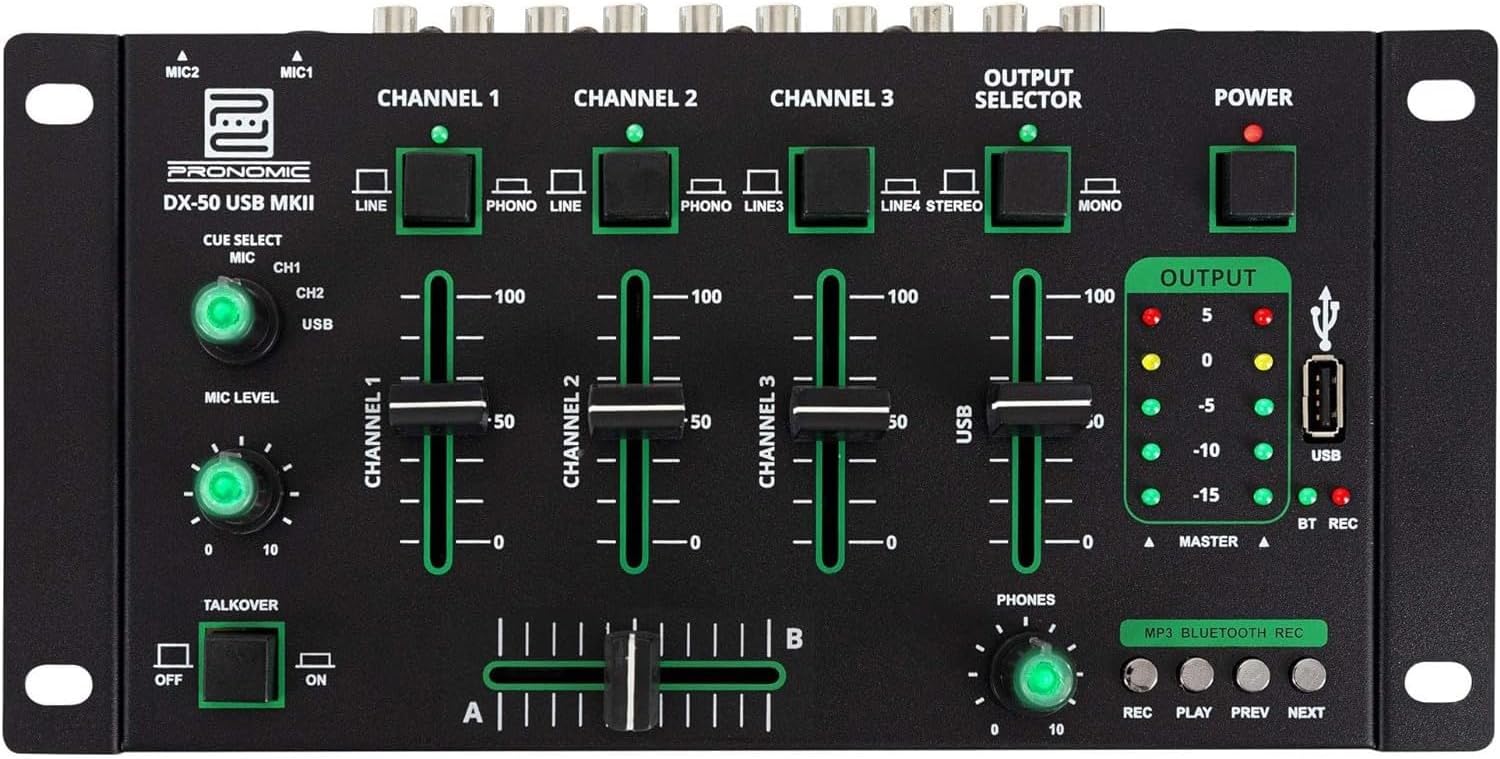
- MIC 1/2 Inputs: Povežite mikrofone.
- Channel 1-4 Input Selectors: Switch between LINE, PHONO, or USB/Bluetooth inputs for each channel.
- Faderi kanala: Adjust the volume level for each channel.
- CUE Select Buttons: Route specific channels to the headphone output for monitoring.
- MIC Level Knob: Adjust the volume of the microphone inputs.
- Talkover Switch: Activates the talkover function, which automatically lowers music volume when speaking into the microphone.
- Selektor izlaza: Choose between Stereo or Mono master output.
- Prekidač: Turns the mixer on/off.
- Mjerači izlaznog nivoa: LED indicators showing the master output level.
- USB port: Connect a USB drive for MP3 playback and recording.
- MP3/Bluetooth/REC Player Controls: Buttons for Play/Pause, Previous, Next, and Record functions for the integrated player.
- Potenciometar za nivo slušalica: Podešava jačinu zvuka izlaza za slušalice.
- Crossfader (A/B): Blends between channels assigned to A and B.
4.2 Priključci stražnje ploče

- AC 12V Power Input: Ovdje priključite priloženi adapter za napajanje.
- Izlaz za telefone: 6.3 mm priključak za povezivanje slušalica.
- MASTER OUT L/R (RCA): Connect to your main ampLifier ili aktivni zvučnici.
- Channel 1 & 2 Inputs (RCA Line/Phono): Connect turntables (Phono) or other line-level devices (CD players, media players). Use the front panel selector to switch.
- Channel 3 & 4 Inputs (RCA Line): Connect line-level devices.
- MIC 1 & 2 Inputs (6.3mm Jack): Povežite mikrofone.
5. Podešavanje
Follow these steps to set up your Pronomic DX-50 USB MKII mixer:
- Priključak za napajanje: Ensure the mixer's power switch is in the OFF position. Connect the supplied AC 12V power adapter to the "AC 12V" input on the rear panel of the mixer. Plug the adapter into a suitable power outlet.
- Master Output Connection: Connect the "MASTER OUT L/R" RCA outputs on the rear panel to the inputs of your ampLifier ili aktivni zvučnici.
- Povezivanje ulaznog uređaja:
- Gramofoni: Connect turntables to the "CHANNEL 1" or "CHANNEL 2" RCA inputs. Set the corresponding input selector on the front panel to "PHONO".
- CD Players/Line Devices: Connect CD players, media players, or other line-level devices to "CHANNEL 1", "CHANNEL 2", "CHANNEL 3", or "CHANNEL 4" RCA inputs. Set the corresponding input selector on the front panel to "LINE".
- mikrofoni: Connect microphones to the "MIC 1" or "MIC 2" 6.3mm jack inputs on the rear panel.
- Veza za slušalice: Connect your headphones to the "PHONES" 6.3mm jack on the rear panel.
- USB Drive (Optional): If using a USB drive for playback or recording, insert it into the "USB" port on the front panel.
- Uključeno: Once all connections are made, switch the mixer's power switch to the ON position. The power indicator LED will illuminate.
6. Uputstvo za upotrebu
6.1 Osnovno miješanje
- Odaberite unos: For each channel, use the input selector switch (LINE/PHONO/USB/BT) to choose the desired audio source.
- Adjust Channel Volume: Use the vertical faders for each channel to adjust its individual volume level.
- Glavni izlaz: Monitor the "OUTPUT" LED meters and adjust the master volume knob (if present, otherwise rely on channel faders and amplifier volume) to achieve a suitable overall output level without clipping.
- Crossfader: Use the crossfader to smoothly transition between channels assigned to A and B. Channels 1 and 2 are typically assigned to the crossfader.
6.2 Korištenje mikrofona
- Connect your microphone to one of the MIC inputs on the rear panel.
- Adjust the "MIC LEVEL" knob on the front panel to control the microphone's volume.
- Talkover Function: Activate the "TALKOVER" switch to automatically reduce the volume of the music when you speak into the microphone. This is useful for announcements.
6.3 Reprodukcija i snimanje putem USB-a
- USB reprodukcija: Umetnite USB disk koji sadrži MP3 files into the "USB" port. Select "USB" as the input source for the dedicated USB channel. Use the "PLAY/PAUSE", "PREV", and "NEXT" buttons to control playback.
- USB snimanje: Press the "REC" button to start recording the master output to the connected USB drive. Press "REC" again to stop recording. Ensure your USB drive has sufficient free space and is formatted correctly (FAT32 is commonly supported).
6.4 Bluetooth povezivost
- Aktivirajte Bluetooth: Select "BT" as the input source for the dedicated Bluetooth channel. The mixer will enter pairing mode.
- Uparite uređaj: On your Bluetooth-enabled device (smartphone, tablet, etc.), search for available Bluetooth devices. Select "Pronomic DX-50 USB MKII" (or similar name) from the list to pair.
- Pusti audio: Once paired, you can play audio from your device through the mixer. Control playback from your device or using the mixer's transport controls (if supported by your device).
6.5 Monitoring with Headphones
- Connect headphones to the "PHONES" output.
- Use the "CUE SELECT" buttons to choose which channels you want to monitor in your headphones without affecting the main output.
- Adjust the "PHONES" level knob to set your desired headphone volume.
7. Održavanje
- čišćenje: Disconnect the power before cleaning. Use a soft, dry cloth to wipe the surface of the mixer. Do not use liquid cleaners, aerosols, or solvents.
- Skladištenje: Mikser čuvajte na hladnom i suhom mjestu, dalje od direktne sunčeve svjetlosti i ekstremnih temperatura.
- Fader and Knob Care: Avoid excessive force when operating faders and knobs. Periodically check for dust or debris accumulation around moving parts.
- Upravljanje kablovima: Ensure cables are not kinked or strained, which can lead to damage.
8. Otkrivanje problema
| Problem | Mogući uzrok | Rješenje |
|---|---|---|
| Nema struje | Power adapter not connected; Power switch off; Faulty power outlet. | Check power adapter connection; Ensure power switch is ON; Try a different power outlet. |
| No sound from main output | Master volume too low; Amplifier/speakers off or disconnected; Incorrect input selection; Channel faders down. | Increase master volume; Check amplifier/speaker connections and power; Verify correct input selected for channels; Raise channel faders. |
| Nema zvuka iz slušalica | Headphone volume too low; Headphones not connected; No CUE selected. | Increase PHONES level; Connect headphones properly; Press CUE button for desired channel. |
| Bluetooth se ne uparuje | Mixer not in pairing mode; Device too far; Interference. | Ensure BT input is selected; Bring device closer; Restart mixer and device. |
| USB reprodukcija ne radi | USB disk nije pravilno umetnut; Neispravno file format; USB drive not formatted correctly. | Re-insert USB drive; Ensure files are MP3; Format USB drive to FAT32. |
9. Specifikacije
| Model | Pronomic DX-50 USB MKII |
| Broj kanala | 4 |
| Tehnologija povezivanja | Bluetooth, USB |
| Audio ulaz | RCA (line/phono), 6.3mm microphone, Bluetooth, USB |
| Tip izlaznog konektora | RCA (Master Out), 6.3mm (Phones) |
| Izvor napajanja | Električni kabel (AC 12V adapter) |
| Dimensions (without corner brackets and controls) | 222 x 129 x 28 mm (širina x dubina x visina) |
| Total Dimensions (with corner brackets and controls) | 267 x 136 x 51 mm (širina x dubina x visina) |
| Težina | 790 g |
10. Garancija i podrška
Za informacije o garanciji i tehničku podršku, molimo pogledajte dokumentaciju koja je priložena uz kupovinu ili se obratite prodavaču. Sačuvajte dokaz o kupovini za bilo kakve reklamacije u vezi s garancijom.
For further assistance, you may also visit the official Pronomic webstranice ili kontaktirajte njihov odjel za korisničku podršku.


